

🚧 This is an alpha version of the project, a proof of concept. Looking for collaborators !
Bring autodoc capabilities to your Notion workspace with Docution


Description •
Install •
Usage •
FAQ •
Contribute •
Roadmap
Documentation
Description
Writing documentation in Notion is an attractive alternative to other solutions :
- ✨ Neat interface, rich text editing
- 👥 Easy to share and collaborate, while keeping it private
- 🚀 Already hosted !
But Notion lacks features that makes the power of other solutions, like auto-documentation ! This is the role of docution : a python package and command line that updates your Notion pages with clean formatted documentation.
Install
Simply run :
pip install docution
Usage
In your Notion page, create a text block like follow :
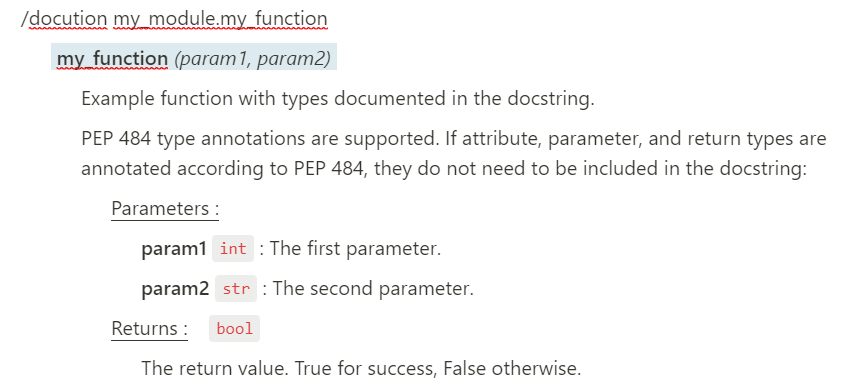
/docution my_module.my_function
After creating your integration and giving it access to your page, just run :
docution --auth_token <secret> --page_id <id>
And here you go ! Your Notion page is updated with your documentation :
You can check the docution usage with :
docution --help
Please also check the documentation for a full example with all the details !
FAQ
Why is it in alpha ?
Currently, the official Notion API is in beta, which means it can change anytime.
Also, this project needs additional features that are not implemented in the Notion API yet to be fully functional. So for now, this is just a proof of concept.
Checkout the current limitations for more details.
How does it work ?
When you use the docution command line, the following happens :
- Retrieve all the blocks used in the Notion page with the given ID
- Detect the blocks that are a docution command (
/docution a.b.c) - Import the docstring of the object
a.b.c - Correctly format the docstring as Notion blocks
- Write these blocks in your Notion page
Contribute
Clone the repository locally, create your branch, push your changes and open a PR !
Check if code is well-formated :
pip install flake8

flake8 . --count --max-complexity=10 --max-line-length=127 --statistics
Roadmap
-
Add missing functionality to be similar to sphinx (document public methods of class, etc...)
-
Add option to specify path of module
-
Add option for private members, only specific member, etc...
-
Should we add the module name (when documenting module) ? Add option for that ?
-
Should we add only the name of the thing, or the whole path ? Add option for that ?
-
Add option for dryrun
-
Change parser to
pardoc? To handle other type of section, likeExample. -
Optimize API call to NOT do recursive calling (for now, no choice)
-
Handle markdown ?
-
Handle RST ?
1 maintainer

Metadata
1 maintainer
Release files for docution 0.0.2
For a detailed explanation of source distributions (sdists) and built distributions (wheels), please see the package formats documentation.
Source distribution (sdist)
| File | Size | Uploaded | Provenance | |
|---|---|---|---|---|
| docution-0.0.2.tar.gz | 21.5 kB | Without provenance | Details |
Built distribution (wheel)
| File | Interpreter | ABI | Platform | Reset |
|---|---|---|---|---|
| docution-0.0.2-py3-none-any.whl | Python 3 | none | any | Details |
Total release size: 43.4 kB
Release files / docution-0.0.2.tar.gz
| Download URL | docution-0.0.2.tar.gz |
|---|---|
| Size | 21.5 kB |
| Tags | Source |
|
SHA-256 checksum How to use checksums |
ac60a92c57cf2c7438c5c3d66ac7a08a6d821ab1ac1e14eff1aabde7f775f1e2
|
|
BLAKE2b-256 checksum How to use checksums |
fa9703926c6237fd013234927ccf07fce5af02d5c17af723fe1b654c95063add
|
| Upload date | |
|
Uploaded using Trusted Publishing? What is trusted publishing? |
No |
| Uploaded via |
twine/3.2.0 pkginfo/1.5.0.1 requests/2.25.1 setuptools/41.2.0 requests-toolbelt/0.9.1 tqdm/4.47.0 CPython/3.8.0
|
Release files / docution-0.0.2-py3-none-any.whl
| Download URL | docution-0.0.2-py3-none-any.whl |
|---|---|
| Size | 21.9 kB |
| Tags | Python 3 |
|
SHA-256 checksum How to use checksums |
bff4396b6791cc33ef8ff9c183d8b7209d108d927549d53a78c098e4dabc62df
|
|
BLAKE2b-256 checksum How to use checksums |
89ecb3e44e1ec4e42cdb11cc061f0d4768bec4a95a658731532b9a129aad8ffa
|
| Upload date | |
|
Uploaded using Trusted Publishing? What is trusted publishing? |
No |
| Uploaded via |
twine/3.2.0 pkginfo/1.5.0.1 requests/2.25.1 setuptools/41.2.0 requests-toolbelt/0.9.1 tqdm/4.47.0 CPython/3.8.0
|
Security for docution 0.0.2
Provenance
Provenance describes where a file came from. On PyPI, provenance is shared via attestations, which provide a verifiable record of the build or publishing details. View details, limitations and caveats.
No provenance found
None of the files in this release were uploaded with provenance metadata.
A note on package security
PyPI is a repository for distributing packages, not a service for auditing them. While third-party security researchers and our staff do their best to detect and remove malicious packages, PyPI cannot guarantee the quality, security or suitability of any given package.
To learn more about protecting yourself from malicious actors, visit our package security documentation.













