
doge





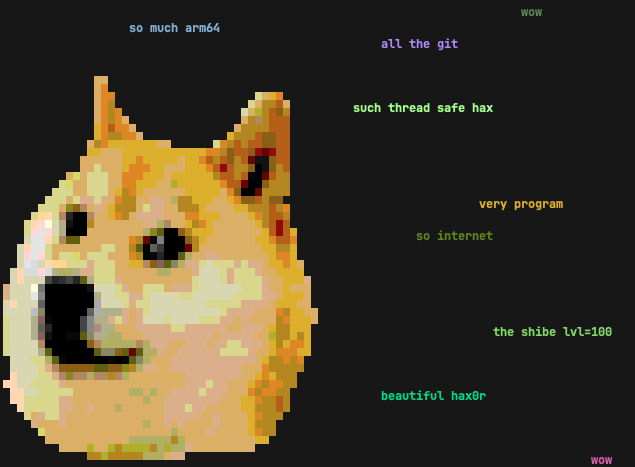
doge is a simple motd script based on the slightly stupid but very funny doge meme. It prints random grammatically incorrect statements that are sometimes based on things from your computer.
If you have uv or pipx (you should!), you can try out doge without installing
it permanently.
Just type uvx doge or pipx run doge in your terminal to see if you enjoy it. 🐶
If you do, uv tool install doge or pipx install doge to keep it around! 👍
Features
- Randomly placed and colored random strings, complete with broken english.
- Awesome Shibe 😎 in the terminal.
- Fetching of system data, such as hostname, running processes, current user
and
$EDITOR. - If you have 🌈 lolcat, you can do this gem:
while true; do doge | lolcat -a -d 100 -s 100 -p 1; done(thx hom3chuk) - stdin support:
ls /usr/bin | dogewill doge-print some of the executables found in /usr/bin. wow. There are also multiple command line switches that control filtering and statistical frequency of words. Seedoge -h, wow.- To use all dictionary words that start or end with "dog", try:
egrep '(^dog|dog$)' /usr/share/dict/words | fgrep -v "'s" | doge
- To use all dictionary words that start or end with "dog", try:
Notes
You need a terminal that supports 256 colors running on a system that supports unicode.
The terminal Shibe was created with hax0r Gimp skills and img2xterm.
Installation
There are several options for installing and running a Python CLI application such as doge.
Python-Based Install (Recommended)
The best way is to install doge directly from PyPI with either uv or pipx:
uv tool install doge-- this is the recommended method, but you need uv installed and configured.- uv is usually the best way to install and run Python-based applications from PyPI, so if you don't yet have it, you should! 👍
- To install newer versions, run
uv tool upgrade dogeoruv tool upgrade --all.
- The other option is to use pipx:
pipx install doge
Alternatively, you could also:
- Make a self-contained Python zipapp with pex or shiv, and put it
in your
$PATH, for example:shiv doge -c doge -o ~/bin/dogepex doge -c doge -o ~/bin/doge
- Install with pip, see Brett Cannon's
quick-and-dirty guide on how to install packages for Python
for more information. TLDR; basically use your preferred Python and run:
python3 -m pip install doge
Then, just add a call to doge at the bottom of your shell rc file.
If you don't want to install doge with the options above for whatever reason,
there is a proper pyproject.toml included, so inside a virtual
environment, python -m pip install -e . should work just fine.
Package Managers And Linux Distributions
Your package manager or Linux distribution might carry a downstream doge package.
If you choose this option, and experience any installation problems, then please report them to your downstream package maintainer.
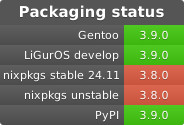
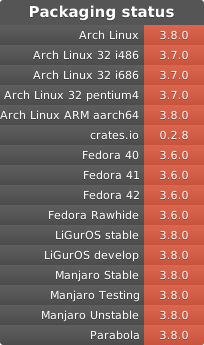
Please note that it might take some time for downstream packages to catch up with PyPI. The recommended installation with uv or pipx will always give you the latest version.
1 maintainer

Metadata
1 maintainer
Release files for doge 3.9.1
For a detailed explanation of source distributions (sdists) and built distributions (wheels), please see the package formats documentation.
Source distribution (sdist)
| File | Size | Uploaded | Provenance | Actions |
|---|---|---|---|---|
| doge-3.9.1.tar.gz | 91.1 kB | Without provenance | Details for doge-3.9.1.tar.gz |
Built distribution (wheel)
| File | Interpreter | ABI | Platform | Actions Reset |
|---|---|---|---|---|
| doge-3.9.1-py3-none-any.whl | Python 3 | none | any | Details for doge-3.9.1-py3-none-any.whl |
Total release size: 125.6 kB
Release files / doge-3.9.1.tar.gz
| Download URL | doge-3.9.1.tar.gz |
|---|---|
| Size | 91.1 kB |
| Tags | Source |
|
SHA-256 checksum How to use checksums |
7436f07d6c933fd76a562740c8d9539146400232b29de020a17e43173c831571
|
|
BLAKE2b-256 checksum How to use checksums |
bc660d1a606b8723d3d33eaf529568c91d6d7a9989a9ddda79af76bee51a3036
|
| Upload date | |
|
Uploaded using Trusted Publishing? What is trusted publishing? |
No |
| Uploaded via |
uv/0.9.26 {"installer":{"name":"uv","version":"0.9.26","subcommand":["publish"]},"python":null,"implementation":{"name":null,"version":null},"distro":null,"system":{"name":null,"release":null},"cpu":null,"openssl_version":null,"setuptools_version":null,"rustc_version":null,"ci":null}
|
Release files / doge-3.9.1-py3-none-any.whl
| Download URL | doge-3.9.1-py3-none-any.whl |
|---|---|
| Size | 34.5 kB |
| Tags | Python 3 |
|
SHA-256 checksum How to use checksums |
c076689ae994fdc0ccf2c21e64245591a525999a3a627e765afec431c176cab5
|
|
BLAKE2b-256 checksum How to use checksums |
c6247370a40d3f3517e91b0eaee91ef8220638e34aae94051a7b0c45d3a7e6af
|
| Upload date | |
|
Uploaded using Trusted Publishing? What is trusted publishing? |
No |
| Uploaded via |
uv/0.9.26 {"installer":{"name":"uv","version":"0.9.26","subcommand":["publish"]},"python":null,"implementation":{"name":null,"version":null},"distro":null,"system":{"name":null,"release":null},"cpu":null,"openssl_version":null,"setuptools_version":null,"rustc_version":null,"ci":null}
|
Security for doge 3.9.1
Provenance
Provenance describes where a file came from. On PyPI, provenance is shared via attestations, which provide a verifiable record of the build or publishing details. View details, limitations and caveats.
No provenance found
None of the files in this release were uploaded with provenance metadata.
A note on package security
PyPI is a repository for distributing packages, not a service for auditing them. While third-party security researchers and our staff do their best to detect and remove malicious packages, PyPI cannot guarantee the quality, security or suitability of any given package.
To learn more about protecting yourself from malicious actors, visit our package security documentation.














