
Read here for full documentation
Dolon
The name Dolon comes from a spy in Homer’s Iliad.
dolon is a library that interfaces with the mnemic service to trace real time data; requires Python 3.6 or later and talks to the mnemic service that must be running in an accessible host.
dolon’s recommended way to install it is to use pip:
pip install dolonMnemic
Mnemic refers to the ability to retain memory.
mnemic is the backend that dolon talks to and also exposes the related front end as a web page. The easiest way to install it is using docker.
docker run --name mnemic-db -e POSTGRES_PASSWORD=postgres123 -p 15432:5432 -d jpazarzis/mnemic-db
docker run --name mnemic-back-end --add-host host.docker.internal:host-gateway -p 12013:12013/udp  -e POSTGRES_CONN_STR='postgresql://postgres:postgres123@172.17.0.1:15432/mnemic' -e BACK_END_PORT='12013'  -d jpazarzis/mnemic-backend
docker run --name mnemic-front-end -e POSTGRES_CONN_STR='postgresql://postgres:postgres123@172.17.0.1:15432/mnemic'  -e FRONT_END_PORT='12111' -p 12111:12111  -d jpazarzis/mnemic-front-end
High level View
The following picture shows the components that are involved in mnemic:
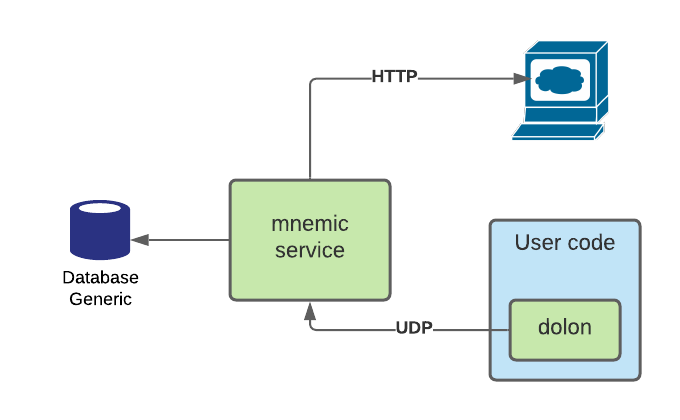
The backend consists of a service that runs as a docker container. It receives messages from the application to profile and stores then in the database. It also exposes a UI client making the profiling data discoverable and visible by a browser session.
Quick Example
"""Mnemic hello_word program."""

import asyncio
import random

import tracemalloc

tracemalloc.start()

import dolon.trace_client as tc


async def tracer():
    """Plain vanilla tracer."""
    tracer_name = "hello-world"
    host = "localhost"
    port = 12013
    frequency = 1
    await tc.start_tracer(
        tracer_name,
        frequency,
        host,
        port,
        tc.mem_allocation,
        tc.active_tasks,
        tc.cpu_percent
    )


async def time_and_memory_consuming_func():
    """Allocates some memory for some time!"""
    _ = [i for i in range(10000)]
    await asyncio.sleep(random.uniform(0.1, 3))


async def main():
    """The main function to profile."""
    while 1:
        asyncio.ensure_future(time_and_memory_consuming_func())
        await asyncio.sleep(0.4)


if __name__ == '__main__':
    loop = asyncio.get_event_loop()
    asyncio.ensure_future(tracer())
    loop.run_until_complete(main())
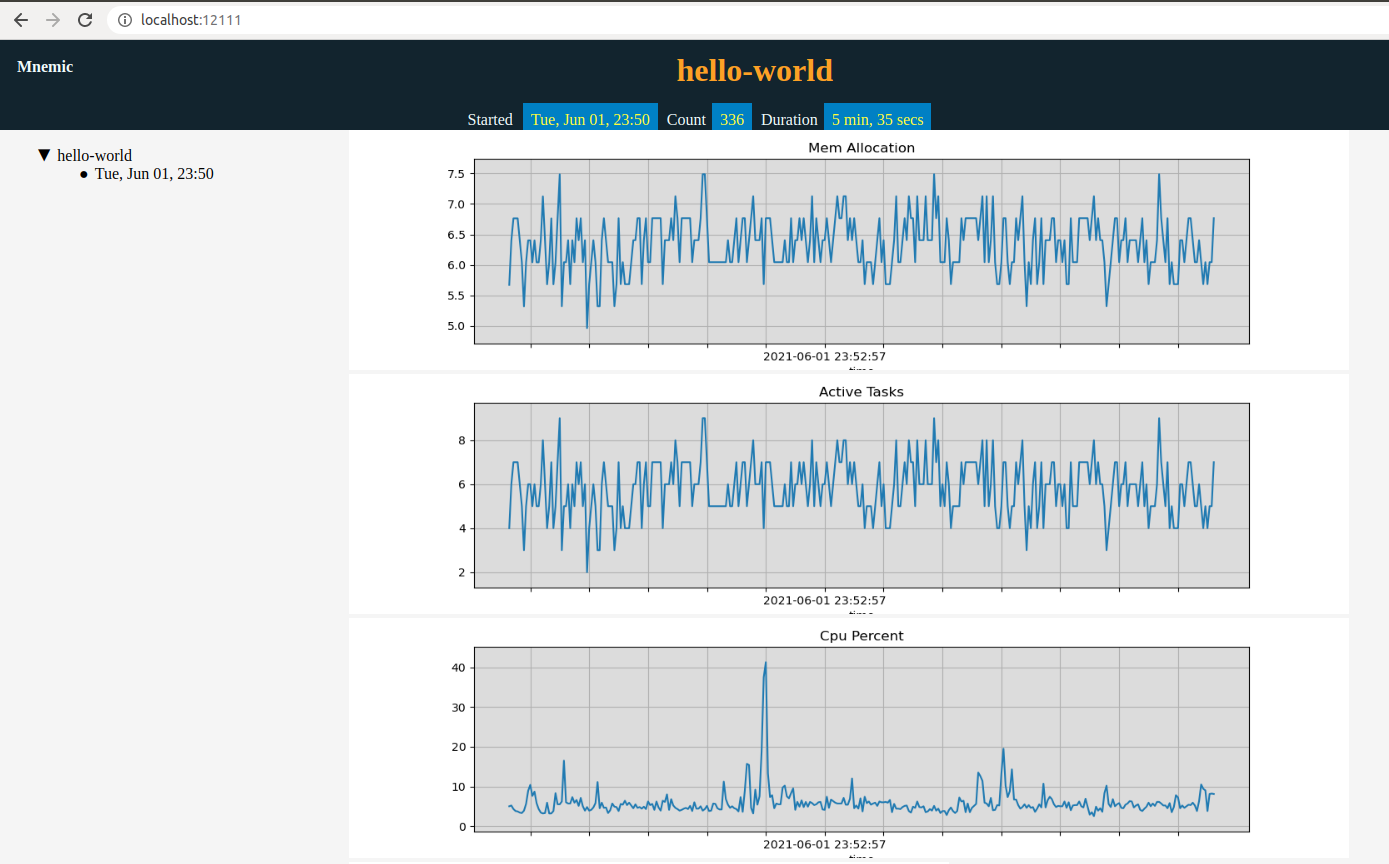
After running the above program for several minutes the screen that we will see when accessing the UI from the browser using localhost:12111 will be similar to the following:
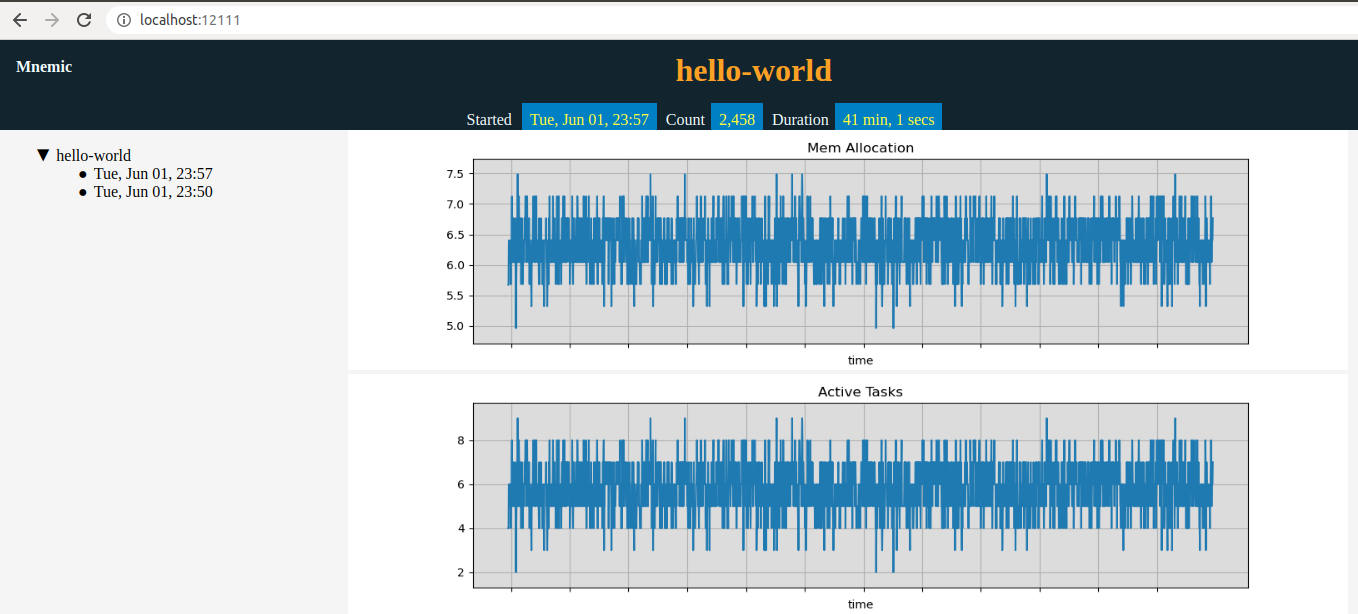
If we stop and restart the program then as we can see in the following picture we will see another key in the tree control under the same trace run name (hello-world in our example) which will acculate the new tracing info:
1 maintainer

Release files for dolon 0.2.0
For a detailed explanation of source distributions (sdists) and built distributions (wheels), please see the package formats documentation.
Source distribution (sdist)
| File | Size | Uploaded | |
|---|---|---|---|
| dolon-0.2.0.tar.gz | 18.6 kB | Details |
Built distribution (wheel)
| File | Interpreter | ABI | Platform | Reset |
|---|---|---|---|---|
| dolon-0.2.0-py3-none-any.whl | Python 3 | none | any | Details |
Total release size: 36.4 kB
Release files / dolon-0.2.0.tar.gz
| Download URL | dolon-0.2.0.tar.gz |
|---|---|
| Size | 18.6 kB |
| Tags | Source |
|
SHA-256 checksum How to use checksums |
32ac18a16db8f8ede22541659212c6e735dff3ecdf35dce468a8dd68967fe5a1
|
|
BLAKE2b-256 checksum How to use checksums |
42e40d4b9b991f38eb60c2971f4cd94c8e5d105eb8d2cf715367c0b7f8a08252
|
| Upload date | |
|
Uploaded using Trusted Publishing? What is trusted publishing? |
No |
| Uploaded via |
twine/3.4.1 importlib_metadata/4.0.1 pkginfo/1.7.0 requests/2.22.0 requests-toolbelt/0.9.1 tqdm/4.60.0 CPython/3.8.5
|
Release files / dolon-0.2.0-py3-none-any.whl
| Download URL | dolon-0.2.0-py3-none-any.whl |
|---|---|
| Size | 17.8 kB |
| Tags | Python 3 |
|
SHA-256 checksum How to use checksums |
6a6d4ac951cd3f086d21e5608f8be12544ac62a281c5e2835c95e61eb0d5062f
|
|
BLAKE2b-256 checksum How to use checksums |
9109cd1239a089a43a8ecd91194634ad1e447c08c787ae27ef0fc675c393f4d8
|
| Upload date | |
|
Uploaded using Trusted Publishing? What is trusted publishing? |
No |
| Uploaded via |
twine/3.4.1 importlib_metadata/4.0.1 pkginfo/1.7.0 requests/2.22.0 requests-toolbelt/0.9.1 tqdm/4.60.0 CPython/3.8.5
|














