
dotstow (DEPRICATED)
Manage dotfiles with stow
Please ★ this repo if you found it useful ★ ★ ★
DEPRICATED
The pypi dotstow module is deprecated.
Please use the one found on npm. https://npmjs.org/package/dotstow
You can install it by running the following command.
npm install -g dotstow
The new and improved dotstow module on npm supports the following features.
Group dotfiles into units (stow packages)
Automatically symlink (stow) files
Backup dotfiles with git
Keep track of simultaneous dotfile configurations for multiple environments
Supports shell autocompletion
If you were using the python version of dotstow, you should upgrade to this version to get the benefits of multiple environments. If you switch you will have to move your stash plugins into an environment folder (global is recommended).
You can do that by running the following commands.
mkdir ~/tmp_global
mv ~/.dotfiles/* ~/tmp_global
mv ~/tmp_global mkdir ~/.dotfiles/global
Features
Group dotfiles into units (stow packages)
Automatically symlink (stow) files
Backup dotfiles with git
Screenshots
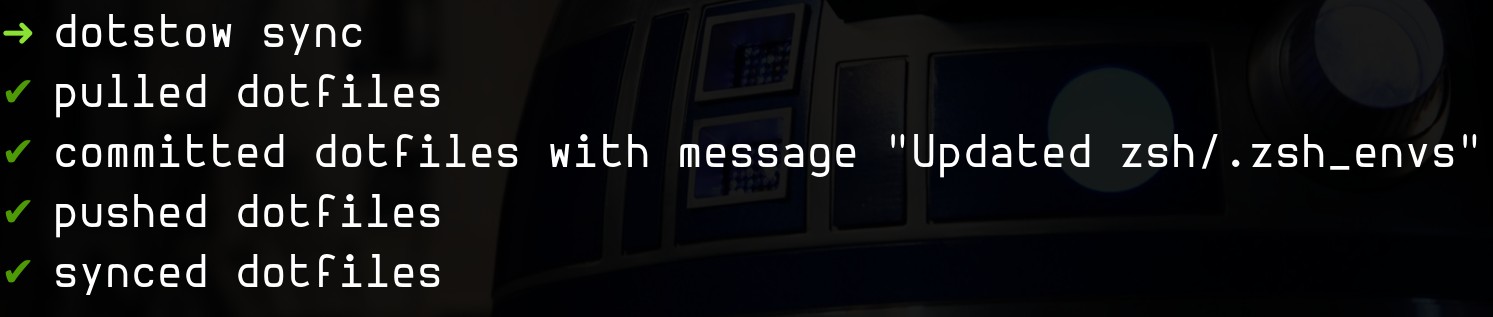
Screenshot 1
Installation
pip3 install dotstowDependencies
Usage
Note that unlike many dotfile syncing tools, this is powered by GNU Stow. This means your dotfiles must be stored inside stow packages (subfolders) instead of the root of your repo. This prevents cluttering your home directory with unwanted files, like your README.md. It also enables you to only install dotfiles you want on that computer.
The idea behind dotstow is twofold: 1. You don’t need to maintain a shell script that symlinks all of your dotfiles to the correct places in your $HOME directory upon a new dotfile install 2. Individual directories in you .dotfiles become packages that can be installed independently using dotstow [package]
For example:
When setting up your dotfiles on a new computer 1. Run dotstow sync, give it your dotfiles github repo link, and watch as it’s cloned into ~/.dotfiles. 2. Rundotstow zsh emacs vim ... etc for each of the stow packages you’d like to install (aka symlink to $HOME). 3. When you update a file in a package, you only need to dotstow sync to update your linked github repo with the changes. If you add new files to your stow package you will need to restow the package. For example, when adding .zshrc to .dotfiles/zsh/, you will need to dotstow zsh to restow the package and then dotstow sync to update your linked github repo with the changes.
Setup
Create a remote dotfiles repo. You can create one at GitHub.
Run the following command
dotstow syncCreating a stow package
mkdir ~/.dotfiles/my-stow-packageAdding dotfiles to stow package
mv ~/.some-dotfile ~/.dotfiles/my-stow-packageSymlink stow package
Note that this will fail if conflicting files exist in the home directory.
dotstow my-stow-packageSyncing dotfiles
dotstow syncExample
The following example demonstrates syncing your .zshrc file with dotstow
mkdir ~/.dotstow/zsh       # creates a new stow package called 'zsh'
mv ~/.zshrc ~/.dotstow/zsh # adds dotfiles to the 'zsh' stow package
dotstow zsh                # symlinks the 'zsh' stow package
dotstow sync               # syncs your dotfiles
Support
Submit an issue
Contributing
Review the guidelines for contributing
License
Jam Risser © 2018
Changelog
Review the changelog
Credits
Jam Risser - Author
Support on Liberapay
A ridiculous amount of coffee ☕ ☕ ☕ was consumed in the process of building this project.
Add some fuel if you’d like to keep me going!
1 maintainer

Metadata
1 maintainer
Release files for dotstow 0.1.5
For a detailed explanation of source distributions (sdists) and built distributions (wheels), please see the package formats documentation.
Source distribution (sdist)
| File | Size | Uploaded | Provenance | |
|---|---|---|---|---|
| dotstow-0.1.5.tar.gz | 6.4 kB | Without provenance | Details |
Built distribution (wheel)
| File | Interpreter | ABI | Platform | Reset |
|---|---|---|---|---|
| dotstow-0.1.5-py2.py3-none-any.whl | Python 2, Python 3 | none | any | Details |
Total release size: 15.3 kB
Release files / dotstow-0.1.5.tar.gz
| Download URL | dotstow-0.1.5.tar.gz |
|---|---|
| Size | 6.4 kB |
| Tags | Source |
|
SHA-256 checksum How to use checksums |
ef6e6a15995d6b97845185b2f823b912616a9845d24b14e5c21ce00bbac495ab
|
|
BLAKE2b-256 checksum How to use checksums |
a1d0d7b9b812262764942ae96bf824648d9a877c9e55444bd4892db7f24d496f
|
| Upload date | |
|
Uploaded using Trusted Publishing? What is trusted publishing? |
No |
| Uploaded via |
twine/3.1.1 pkginfo/1.5.0.1 requests/2.22.0 setuptools/40.6.2 requests-toolbelt/0.9.1 tqdm/4.39.0 CPython/3.6.9
|
Release files / dotstow-0.1.5-py2.py3-none-any.whl
| Download URL | dotstow-0.1.5-py2.py3-none-any.whl |
|---|---|
| Size | 9.0 kB |
| Tags | Python 2 Python 3 |
|
SHA-256 checksum How to use checksums |
2c3323bd2ecac11da6d9582a85af7809f587199d78aac4705cdae206ff7cc6dc
|
|
BLAKE2b-256 checksum How to use checksums |
a529da59264298eef6403a7a84a865e182755ac763854a6b0521265b6854f748
|
| Upload date | |
|
Uploaded using Trusted Publishing? What is trusted publishing? |
No |
| Uploaded via |
twine/3.1.1 pkginfo/1.5.0.1 requests/2.22.0 setuptools/40.6.2 requests-toolbelt/0.9.1 tqdm/4.39.0 CPython/3.6.9
|
Security for dotstow 0.1.5
Provenance
Provenance describes where a file came from. On PyPI, provenance is shared via attestations, which provide a verifiable record of the build or publishing details. View details, limitations and caveats.
No provenance found
None of the files in this release were uploaded with provenance metadata.
A note on package security
PyPI is a repository for distributing packages, not a service for auditing them. While third-party security researchers and our staff do their best to detect and remove malicious packages, PyPI cannot guarantee the quality, security or suitability of any given package.
To learn more about protecting yourself from malicious actors, visit our package security documentation.














