
This release is a pre-release and may not be stable for production use.

DrCELL - Dimensional reduction Cluster Exploration and Labeling Library
Installation Instructions:
- Download and install conda.
- Download DrCELL
- create conda environment based on the environment.yml file
- open shell or CMD
cd /path/to/DrCELLconda env create -f environment.yml --name DrCELL
Run DrCELL:
- start DrCELL
cd /path/to/DrCELLconda activate DrCELL
- open CELL in extra window
python -m drcell.scripts.startApplication "/path/to/data"
- alternatively open CELL in browser
Install and run DrCELL with pip (experimental):
- install python on your system
- install DrCELL via pip:
pip install drcell
- open CELL in extra window
drcell-app "/path/to/data"
- alternatively open CELL in browser
drcell-server "/path/to/data" --port 5000
How to use:
- Import your data in the DrCELL format (take a look at the Getting Started Notebook)
- After starting the application (the first launch might take some time), you see the GUI
General Tab
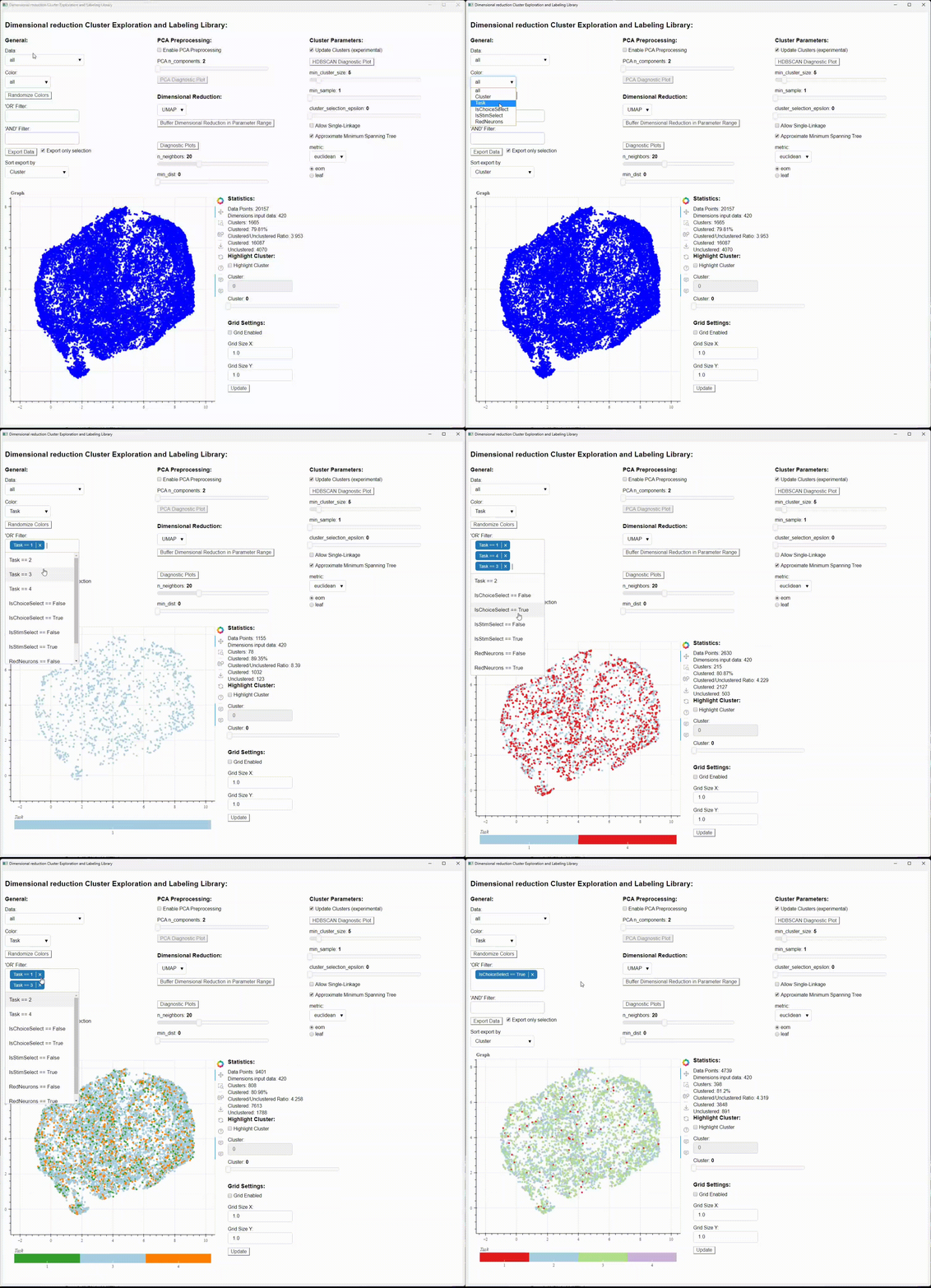
- You can select the different datasets you added in the "Data" Selection.
- With the "Color" Selection, you can select the column of your data, you want to be highlighted with color. The selectable Options can be customized with the "data_variables" in main.py
- "OR" Filter: Filters all the selected Values, by connecting them with a logical "OR". For example all red OR blue Objects. The selectable Options can be customized with the "data_variables" in main.py, and will show up with all unique values of that data column in the selection.
- "AND" Filter: Filters all the selected Values, by connecting them with a logical "AND". For example all Objects, that are red AND blue. The selectable Options can be customized with the "data_variables" in main.py, and will show up with all unique values of that data column in the selection.
- "Export Data" Button exports the current view as .npy and .mat file in the output folder. If "Export only selection" is enabled, only the data points currently on display will get exported (so for example all filtered data points won't be included). The export file can be sorted by any sortable column.
Hyperparameter Optimization

PCA Preprocessing Tab
- The data can be Preprocessed via PCA. The reduction of PCA ("n_components") can be adjusted here.
- If you select "None" as Dimensionality Reduction, the PCA is restricted to 2-Dimensions.
Dimensional Reduction Parameters Tab
-
Here you can change the Dimensional Reduction Method, as well as their parameters
-
By default, these dimensional reduction methods are available:
- None (uses PCA as Dimensional Reduction Method)
- UMAP
- t-SNE
- PHATE
- CEBRA (in development)
Cluster Parameters
- "Update Cluster" Checkbox: When unchecking the box, the current clustering will be kept and not changed, when changing the parameters (does not include change of dataset). (in development)
- Selection of other Cluster Algorithms (potential future feature)
- HDBSCAN used as clustering algorithm
- unclustered data points get assigned to -1
Cluster Selection Tab
- Lets you isolate a single cluster visually. Selected via entry of an integer or the slider (currently not functional)
Toolbar

- located on the right side of the plot
- General Tools
- Pan
- Box Zoom
- Wheel Zoom
- Save Plot
- Reset Plot Position
- Help
- Hover Tools
- Data point hover tool
- displays information of data point, when hovered over
- the information shown, can be customized with the "display_hover_variables" variable in main.py
- customized plot, based on data of data point (in development)
- Grid hover tool
- displays information about the quadrant and the data points in it, when hovered over it.
- customized plot, based on data of data points in quadrant (in development)
- Data point hover tool
Grid Settings
- With this option you can enable a grid, separating your data points in quadrants, that can be hovered over with the hover tool and displays you additional information
Statistics
- Some basic stats about the current selection
1 maintainer

Metadata
1 maintainer
Release files for drcell 0.0.1rc2
For a detailed explanation of source distributions (sdists) and built distributions (wheels), please see the package formats documentation.
Source distribution (sdist)
| File | Size | Uploaded | Provenance | Actions |
|---|---|---|---|---|
| drcell-0.0.1rc2.tar.gz | 33.3 kB | Without provenance | Details for drcell-0.0.1rc2.tar.gz |
Built distribution (wheel)
| File | Interpreter | ABI | Platform | Actions Reset |
|---|---|---|---|---|
| drcell-0.0.1rc2-py3-none-any.whl | Python 3 | none | any | Details for drcell-0.0.1rc2-py3-none-any.whl |
Total release size: 70.9 kB
Release files / drcell-0.0.1rc2.tar.gz
| Download URL | drcell-0.0.1rc2.tar.gz |
|---|---|
| Size | 33.3 kB |
| Tags | Source |
|
SHA-256 checksum How to use checksums |
e70c680f6e0d609b84f2b218ecfe9e5b7b6e0b34bc488c18e87afa2e3ab0c1ad
|
|
BLAKE2b-256 checksum How to use checksums |
8d9c21ddc6a16e96d83256cb8a4dfb80060eebc3ae2fdc739ca1ede6d757b294
|
| Upload date | |
|
Uploaded using Trusted Publishing? What is trusted publishing? |
Yes |
| Uploaded via |
twine/5.1.1 CPython/3.12.7
|
Release files / drcell-0.0.1rc2-py3-none-any.whl
| Download URL | drcell-0.0.1rc2-py3-none-any.whl |
|---|---|
| Size | 37.6 kB |
| Tags | Python 3 |
|
SHA-256 checksum How to use checksums |
9e8b7e8871a45c16ae5565aa592590c5a4773c23b257b933f0c02a07de8be53c
|
|
BLAKE2b-256 checksum How to use checksums |
2bf3e0b301fbb76bda1c2fa1113072dede89a448c7b9338496457860acddd7e5
|
| Upload date | |
|
Uploaded using Trusted Publishing? What is trusted publishing? |
Yes |
| Uploaded via |
twine/5.1.1 CPython/3.12.7
|
Security for drcell 0.0.1rc2
Provenance
Provenance describes where a file came from. On PyPI, provenance is shared via attestations, which provide a verifiable record of the build or publishing details. View details, limitations and caveats.
No provenance found
None of the files in this release were uploaded with provenance metadata.
A note on package security
PyPI is a repository for distributing packages, not a service for auditing them. While third-party security researchers and our staff do their best to detect and remove malicious packages, PyPI cannot guarantee the quality, security or suitability of any given package.
To learn more about protecting yourself from malicious actors, visit our package security documentation.













