
Extend websocket schema decorator for Django Channels
| Project | Status | |
|---|---|---|
| CI/CD |  |
|
| Quality |  |
|
| Package |    |
|
| Meta |    |
Provides extend_ws_schema decorator to documentation Cunsumer methods from channels just like it does drf-spectacular
Install
-
Install package
pip install drf-spectacular-websocket
-
Create sidecar static
python manage.py collectstatic
-
Add app name to
INSTALLED_APPSdrf_spectacular_websocketmust be higher thandrf_spectacularINSTALLED_APPS = [ 'drf_spectacular_websocket', 'drf_spectacular', 'drf_spectacular_sidecar', ]
Configure settings
ASGI_APPLICATION = 'path.to.your.application'

# (Optional) this is default settings are automatically set by the drf_spectacular_websocket.
# You can override them in your application if necessary.
SPECTACULAR_SETTINGS = {
    'DEFAULT_GENERATOR_CLASS': 'drf_spectacular_websocket.schemas.WsSchemaGenerator',
    'SWAGGER_UI_DIST': 'SIDECAR',
    'SWAGGER_UI_FAVICON_HREF': 'SIDECAR',
    'REDOC_DIST': 'SIDECAR',
    'SWAGGER_UI_SETTINGS': {
        'connectSocket': True,  # Automatically establish a WS connection when opening swagger
        'socketMaxMessages': 8,  # Max number of messages displayed in the log window in swagger
        'socketMessagesInitialOpened': False,  # Automatically open the log window when opening swagger
    },
}
drf_spectacular_websocket automatically finds websocket urls and related consumer using
ASGI_APPLICATIONsetting.
About decorator
extend_ws_schema decorator accepts one new type parameter relative to drf_spectacular extend_schema.
- possible values:
send- Type of interaction, [request -> response]receive- Type of interaction, [response without request]
Usage example
from channels.generic.websocket import AsyncJsonWebsocketConsumer
from rest_framework.serializers import Serializer, CharField
from drf_spectacular_websocket.decorators import extend_ws_schema


class SomeMethodInputSerializer(Serializer):
    some_field = CharField()


class SomeMethodOutputSerializer(Serializer):
    some_field = CharField()


class SendMessageOutputSerializer(Serializer):
    some_field = CharField()


class SomeConsumer(AsyncJsonWebsocketConsumer):

    async def receive_json(self, content, **kwargs):
        some_value = content.get('some_key')
        if some_value:
            await self.some_method(some_value)

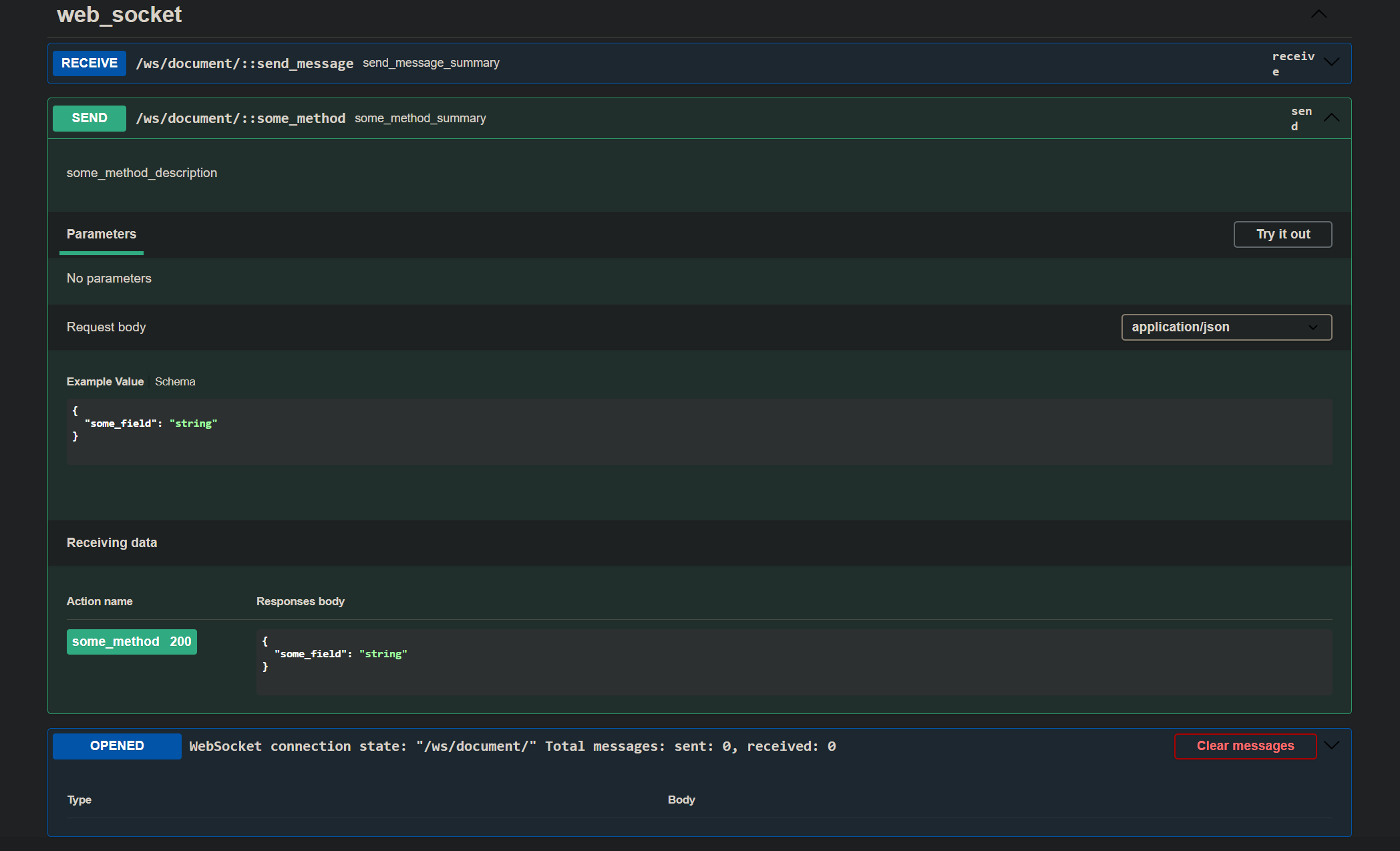
    @extend_ws_schema(
        type='send',
        summary='some_method_summary',
        description='some_method_description',
        request=SomeMethodInputSerializer,
        responses=SomeMethodOutputSerializer,
    )
    async def some_method(self, some_value):
        input_serializer = SomeMethodInputSerializer(data=some_value)
        input_serializer.is_valid(raise_exception=True)

        return_value = await some_business_logic(input_serializer.validated_data)

        output_serializer = SomeMethodOutputSerializer(data=return_value)
        output_serializer.is_valid(raise_exception=True)

        await self.send_json(output_serializer.validated_data)

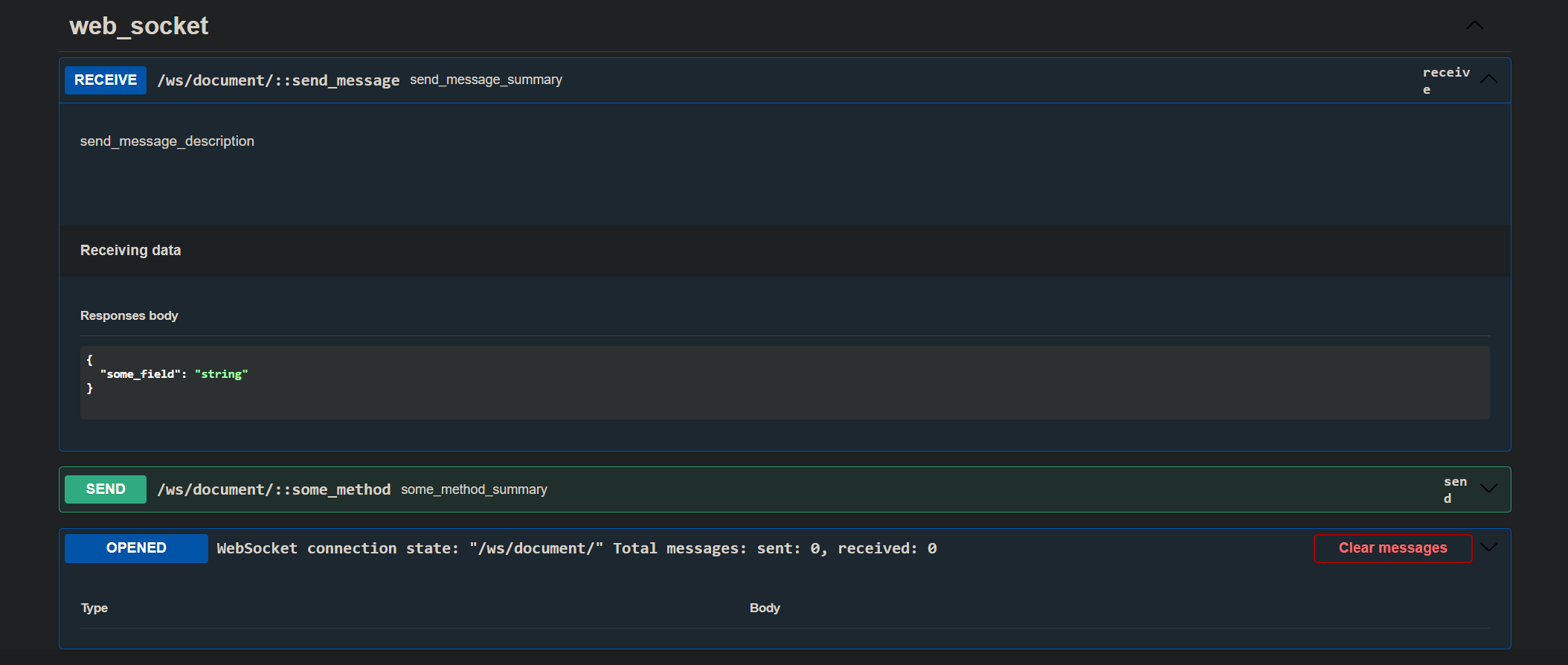
    @extend_ws_schema(
        type='receive',
        summary='send_message_summary',
        description='send_message_description',
        request=None,
        responses=SendMessageOutputSerializer,
    )
    async def send_message(self, message):
        await self.send_json(message)
Contributing
We would love you to contribute to drf-spectacular-websocket, pull requests are very welcome! Please see CONTRIBUTING.md for more information.
Swagger Examples
Send
Receive
1 maintainer

Download files
Download the file for your platform. If you're not sure which to choose, learn more about installing packages.
Source Distribution
Built Distribution
Filter files by name, interpreter, ABI, and platform.
If you're not sure about the file name format, learn more about wheel file names.
Copy a direct link to the current filters
File details
Details for the file drf_spectacular_websocket-1.3.1.tar.gz.
File metadata
- Download URL: drf_spectacular_websocket-1.3.1.tar.gz
- Upload date:
- Size: 164.3 kB
- Tags: Source
- Uploaded using Trusted Publishing? Yes
- Uploaded via:
twine/5.1.1 CPython/3.12.7
File hashes
| Algorithm | Hash digest | |
|---|---|---|
| SHA256 |
9203df1e5e9e2ca51a9f61104b2fc3f84346783333e4d8782c825a91ed60246c
|
|
| MD5 |
f8f160e4ad2fb47769fd7499768682c4
|
|
| BLAKE2b-256 |
4e57104b48aa0bc3d28bbce19774c9bfe4ff5c0cd92a584931c3b200cd78970b
|
Provenance
The following attestation bundles were made for drf_spectacular_websocket-1.3.1.tar.gz:
Publisher:
publish-to-pypi.yml on Friskes/drf-spectacular-websocket
-
Statement:
-
Statement type:
https://in-toto.io/Statement/v1 -
Predicate type:
https://docs.pypi.org/attestations/publish/v1 -
Subject name:
drf_spectacular_websocket-1.3.1.tar.gz -
Subject digest:
9203df1e5e9e2ca51a9f61104b2fc3f84346783333e4d8782c825a91ed60246c - Sigstore transparency entry: 152597115
- Sigstore integration time:
-
Permalink:
Friskes/drf-spectacular-websocket@4e4a5e23f200ae1a00c16b5deb87d11053b95951 -
Branch / Tag:
refs/tags/v1.3.1 - Owner: https://github.com/Friskes
-
Access:
public
-
Token Issuer:
https://token.actions.githubusercontent.com -
Runner Environment:
github-hosted -
Publication workflow:
publish-to-pypi.yml@4e4a5e23f200ae1a00c16b5deb87d11053b95951 -
Trigger Event:
push
-
Statement type:
File details
Details for the file drf_spectacular_websocket-1.3.1-py3-none-any.whl.
File metadata
- Download URL: drf_spectacular_websocket-1.3.1-py3-none-any.whl
- Upload date:
- Size: 16.8 kB
- Tags: Python 3
- Uploaded using Trusted Publishing? Yes
- Uploaded via:
twine/5.1.1 CPython/3.12.7
File hashes
| Algorithm | Hash digest | |
|---|---|---|
| SHA256 |
aeda4bf9c25a4d3888f1ebccadc9dc8da7f25c5c2884f08bead5a3e8e467f280
|
|
| MD5 |
1606844f716b2b494f2205de4843cb44
|
|
| BLAKE2b-256 |
ddbed8a805df17735aeeef06c04a86cf570c78dc758c8ac54a1b4ae6a9c8a894
|
Provenance
The following attestation bundles were made for drf_spectacular_websocket-1.3.1-py3-none-any.whl:
Publisher:
publish-to-pypi.yml on Friskes/drf-spectacular-websocket
-
Statement:
-
Statement type:
https://in-toto.io/Statement/v1 -
Predicate type:
https://docs.pypi.org/attestations/publish/v1 -
Subject name:
drf_spectacular_websocket-1.3.1-py3-none-any.whl -
Subject digest:
aeda4bf9c25a4d3888f1ebccadc9dc8da7f25c5c2884f08bead5a3e8e467f280 - Sigstore transparency entry: 152597116
- Sigstore integration time:
-
Permalink:
Friskes/drf-spectacular-websocket@4e4a5e23f200ae1a00c16b5deb87d11053b95951 -
Branch / Tag:
refs/tags/v1.3.1 - Owner: https://github.com/Friskes
-
Access:
public
-
Token Issuer:
https://token.actions.githubusercontent.com -
Runner Environment:
github-hosted -
Publication workflow:
publish-to-pypi.yml@4e4a5e23f200ae1a00c16b5deb87d11053b95951 -
Trigger Event:
push
-
Statement type:














