
SSE(Server-Sent Events) for DjangoRestFramework
Installation
python3 -m pip install drf-sse
Usage
1. Edit your setting.py:
INSTALL_APPS += [
    'rest_framework',
    'corsheaders',
    'drf_sse',
]

MIDDLEWARE.insert(0, 'corsheaders.middleware.CorsMiddleware')
CORS_ALLOW_ALL_ORIGINS = True

# SSE configuration
# SSE_RESPONSE_MODE = 'add'  # [optional, default: "chunk"]
SSE_ENCODE_BASE64 = True     # [optional, default: False]
2. Use in your views:
import time

from drf_sse import SSEMixin, SSEResponse
from rest_framework.views import APIView

class MyView(SSEMixin, APIView):
    def get(self, request, format=None):

        def iter_data():
            iter_data = 'This is a server-sent events response'.split()
            for part in iter_data:
                yield part
                time.sleep(1)

        return SSEResponse(iter_data())
        # return SSEResponse(iter_data(), mode='chunk', encode=False)  # will overwrite settings
3. Test from the frontend:
SSE_ENCODE_BASE64 = False
<body>
    <p id="result"></p>
</body>
<script>
    const eventSource = new EventSource('http://127.0.0.1:8000/sse/')
    eventSource.onmessage = (event) => {
        console.log(event)
        document.getElementById('result').innerHTML += event.data + ' '
    }
    eventSource.onopen = () => {
        console.log('sse opened.')
    }
    eventSource.addEventListener('end', () => {
        eventSource.close()
        console.log('sse closed.')
    })
</script>
Preview

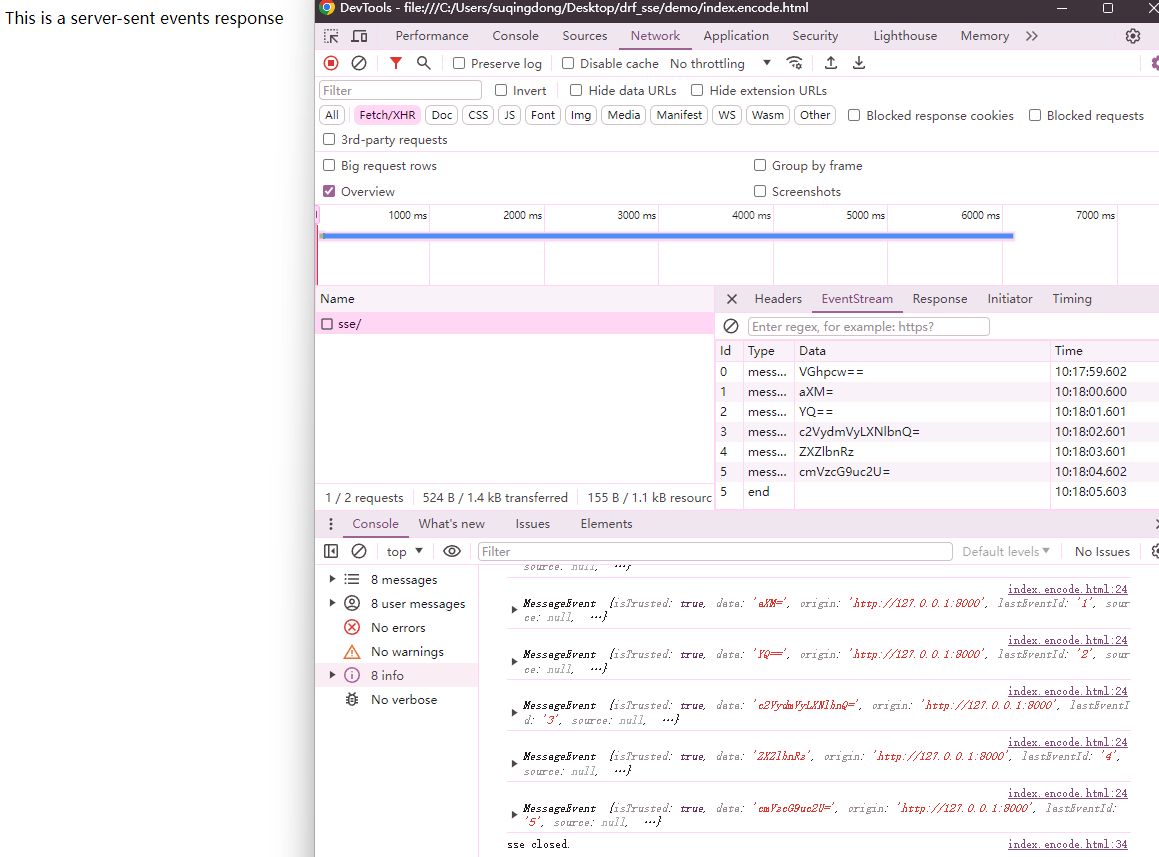
SSE_ENCODE_BASE64 = True
<body>
    <p id="result"></p>
</body>
<script>
    const base64DecodeAndUtf8Decode = (encodedStr) => {
        const textDecoder = new TextDecoder();
        const bytes = Uint8Array.from(atob(encodedStr), c => c.charCodeAt(0));
        return textDecoder.decode(bytes);
    }

    const eventSource = new EventSource('http://127.0.0.1:8000/sse/')
    eventSource.onmessage = (event) => {
        console.log(event)
        document.getElementById('result').innerHTML += base64DecodeAndUtf8Decode(event.data) + ' '
    }
    eventSource.onopen = () => {
        console.log('sse opened.')
    }
    eventSource.addEventListener('end', () => {
        eventSource.close()
        console.log('sse closed.')
    })
</script>
Preview
1 maintainer

Metadata
1 maintainer
Release files for drf-sse 1.0.1
For a detailed explanation of source distributions (sdists) and built distributions (wheels), please see the package formats documentation.
Source distribution (sdist)
| File | Size | Uploaded | |
|---|---|---|---|
| drf-sse-1.0.1.tar.gz | 3.9 kB | Details |
Built distribution (wheel)
| File | Interpreter | ABI | Platform | Reset |
|---|---|---|---|---|
| drf_sse-1.0.1-py3-none-any.whl | Python 3 | none | any | Details |
Total release size: 8.3 kB
Release files / drf-sse-1.0.1.tar.gz
| Download URL | drf-sse-1.0.1.tar.gz |
|---|---|
| Size | 3.9 kB |
| Tags | Source |
|
SHA-256 checksum How to use checksums |
3fe3179754d50956cd548269f55d12391fe1368f8a91ddf54475e36c096ccecc
|
|
BLAKE2b-256 checksum How to use checksums |
a00279ca1f8f7924afc9ca005f47f5bb4c15600953cb4dec846549365e36d366
|
| Upload date | |
|
Uploaded using Trusted Publishing? What is trusted publishing? |
No |
| Uploaded via |
twine/4.0.2 CPython/3.8.8
|
Release files / drf_sse-1.0.1-py3-none-any.whl
| Download URL | drf_sse-1.0.1-py3-none-any.whl |
|---|---|
| Size | 4.5 kB |
| Tags | Python 3 |
|
SHA-256 checksum How to use checksums |
e0020a4a167795384b8c611367f7de2d6eecc368c51f9948b464d90671babff3
|
|
BLAKE2b-256 checksum How to use checksums |
2428dfed04a56eba595b9b573d630d3766159a5580f53cf67b21eaac8ae99fee
|
| Upload date | |
|
Uploaded using Trusted Publishing? What is trusted publishing? |
No |
| Uploaded via |
twine/4.0.2 CPython/3.8.8
|














