


drgn (pronounced “dragon”) is a debugger with an emphasis on programmability. drgn exposes the types and variables in a program for easy, expressive scripting in Python. For example, you can debug the Linux kernel:
>>> from drgn.helpers.linux import list_for_each_entry
>>> for mod in list_for_each_entry('struct module',
...                                prog['modules'].address_of_(),
...                                'list'):
...    if mod.refcnt.counter > 10:
...        print(mod.name)
...
(char [56])"snd"
(char [56])"evdev"
(char [56])"i915"
Although other debuggers like GDB have scripting support, drgn aims to make scripting as natural as possible so that debugging feels like coding. This makes it well-suited for introspecting the complex, inter-connected state in large programs.
Additionally, drgn is designed as a library that can be used to build debugging and introspection tools; see the official tools.
drgn was developed at Meta for debugging the Linux kernel (as an alternative to the crash utility), but it can also debug userspace programs written in C. C++ support is in progress.
Documentation can be found at drgn.readthedocs.io.
Installation
Package Manager
drgn can be installed using the package manager on some Linux distributions.
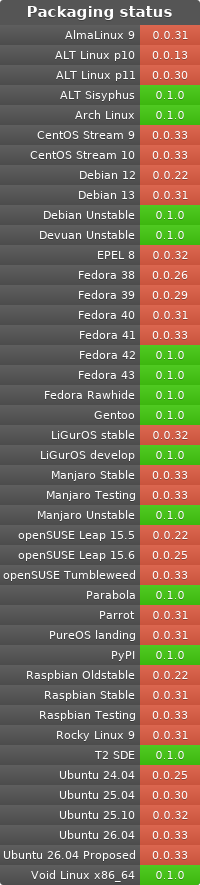
Fedora >= 32
$ sudo dnf install drgnRHEL/CentOS >= 8
Enable EPEL. Then:
$ sudo dnf install drgnArch Linux
Debian >= 12 (Bookworm)
$ sudo apt install python3-drgnopenSUSE
$ sudo zypper install python3-drgnUbuntu
Enable the michel-slm/kernel-utils PPA. Then:
$ sudo apt install python3-drgn
pip
If your Linux distribution doesn’t package the latest release of drgn, you can install it with pip.
First, install pip. Then, run:
$ sudo pip3 install drgnThis will install a binary wheel by default. If you get a build error, then pip wasn’t able to use the binary wheel. Install the dependencies listed below and try again.
Note that RHEL/CentOS 6, Debian Stretch, Ubuntu Trusty, and Ubuntu Xenial (and older) ship Python versions which are too old. Python 3.6 or newer must be installed.
From Source
To get the development version of drgn, you will need to build it from source. First, install dependencies:
Fedora
$ sudo dnf install autoconf automake elfutils-devel gcc git libkdumpfile-devel libtool make pkgconf python3 python3-devel python3-pip python3-setuptoolsRHEL/CentOS
$ sudo dnf install autoconf automake elfutils-devel gcc git libtool make pkgconf python3 python3-devel python3-pip python3-setuptoolsOptionally, install libkdumpfile-devel from EPEL on RHEL/CentOS >= 8 or install libkdumpfile from source if you want support for the makedumpfile format.
Replace dnf with yum for RHEL/CentOS < 8.
Debian/Ubuntu
$ sudo apt-get install autoconf automake gcc git liblzma-dev libelf-dev libdw-dev libtool make pkgconf python3 python3-dev python3-pip python3-setuptools zlib1g-devOptionally, install libkdumpfile from source if you want support for the makedumpfile format.
Arch Linux
$ sudo pacman -S --needed autoconf automake gcc git libelf libtool make pkgconf python python-pip python-setuptoolsOptionally, install libkdumpfile from the AUR or from source if you want support for the makedumpfile format.
openSUSE
$ sudo zypper install autoconf automake gcc git libdw-devel libelf-devel libkdumpfile-devel libtool make pkgconf python3 python3-devel python3-pip python3-setuptools
Then, run:
$ git clone https://github.com/osandov/drgn.git
$ cd drgn
$ python3 setup.py build
$ sudo python3 setup.py install
See the installation documentation for more options.
Quick Start
drgn debugs the running kernel by default; run sudo drgn. To debug a running program, run sudo drgn -p $PID. To debug a core dump (either a kernel vmcore or a userspace core dump), run drgn -c $PATH. Make sure to install debugging symbols for whatever you are debugging.
Then, you can access variables in the program with prog['name'] and access structure members with .:
$ sudo drgn
>>> prog['init_task'].comm
(char [16])"swapper/0"
You can use various predefined helpers:
>>> len(list(bpf_prog_for_each()))
11
>>> task = find_task(115)
>>> cmdline(task)
[b'findmnt', b'-p']
You can get stack traces with stack_trace() and access parameters or local variables with trace['name']:
>>> trace = stack_trace(task)
>>> trace[5]
#5 at 0xffffffff8a5a32d0 (do_sys_poll+0x400/0x578) in do_poll at ./fs/select.c:961:8 (inlined)
>>> poll_list = trace[5]['list']
>>> file = fget(task, poll_list.entries[0].fd)
>>> d_path(file.f_path.address_of_())
b'/proc/115/mountinfo'
See the user guide for more details and features.
License
Copyright (c) Meta Platforms, Inc. and affiliates.
drgn is licensed under the LGPLv2.1 or later.
1 maintainer

Metadata
1 maintainer
Release files for drgn 0.0.26
For a detailed explanation of source distributions (sdists) and built distributions (wheels), please see the package formats documentation.
Source distribution (sdist)
| File | Size | Uploaded | Provenance | Actions |
|---|---|---|---|---|
| drgn-0.0.26.tar.gz | 1.1 MB | Without provenance | Details for drgn-0.0.26.tar.gz |
Built distributions (wheels)
Total release size: 32.9 MB
Release files / drgn-0.0.26.tar.gz
| Download URL | drgn-0.0.26.tar.gz |
|---|---|
| Size | 1.1 MB |
| Tags | Source |
|
SHA-256 checksum How to use checksums |
a7ccbf72acea32dda8b431e9a5817d1c410e734a471d261eedd59a20c4727929
|
|
BLAKE2b-256 checksum How to use checksums |
19882f9b369c7ee9a23af6a404826c5919f1a085d8306f7aaeac548a8511a40a
|
| Upload date | |
|
Uploaded using Trusted Publishing? What is trusted publishing? |
No |
| Uploaded via |
twine/4.0.1 CPython/3.12.2
|
Release files / drgn-0.0.26-cp312-cp312-manylinux_2_17_x86_64.manylinux2014_x86_64.whl
| Download URL | drgn-0.0.26-cp312-cp312-manylinux_2_17_x86_64.manylinux2014_x86_64.whl |
|---|---|
| Size | 4.6 MB |
| Tags | CPython 3.12 Linux glibc 2.17+ x86-64 |
|
SHA-256 checksum How to use checksums |
8cd1c5e9b26c396f2ded6e44cc92a5599ae008124e7b809a3442f6e747e95f83
|
|
BLAKE2b-256 checksum How to use checksums |
19e5284f446aedafe89e2baa2dc2ec99ef1358caa78c1dbf6537442089f25f7b
|
| Upload date | |
|
Uploaded using Trusted Publishing? What is trusted publishing? |
No |
| Uploaded via |
twine/4.0.1 CPython/3.12.2
|
Release files / drgn-0.0.26-cp311-cp311-manylinux_2_17_x86_64.manylinux2014_x86_64.whl
| Download URL | drgn-0.0.26-cp311-cp311-manylinux_2_17_x86_64.manylinux2014_x86_64.whl |
|---|---|
| Size | 4.6 MB |
| Tags | CPython 3.11 Linux glibc 2.17+ x86-64 |
|
SHA-256 checksum How to use checksums |
39ae66a8ed443343140e0236e34c34e198134ac7ad63306453e3f3fb8433e84f
|
|
BLAKE2b-256 checksum How to use checksums |
4964bf3f13a05925f44162bbdb38ba3bbb6ae571a8a238b40958786277eb67fc
|
| Upload date | |
|
Uploaded using Trusted Publishing? What is trusted publishing? |
No |
| Uploaded via |
twine/4.0.1 CPython/3.12.2
|
Release files / drgn-0.0.26-cp310-cp310-manylinux_2_17_x86_64.manylinux2014_x86_64.whl
| Download URL | drgn-0.0.26-cp310-cp310-manylinux_2_17_x86_64.manylinux2014_x86_64.whl |
|---|---|
| Size | 4.5 MB |
| Tags | CPython 3.10 Linux glibc 2.17+ x86-64 |
|
SHA-256 checksum How to use checksums |
addb59c51cefb816cb97eed0bef7a05a9fdd2adba0117b889c7d881217661979
|
|
BLAKE2b-256 checksum How to use checksums |
1ac96180517231a8cc132b7476c6df27e69651ee9feb0bc329faa812a15cee95
|
| Upload date | |
|
Uploaded using Trusted Publishing? What is trusted publishing? |
No |
| Uploaded via |
twine/4.0.1 CPython/3.12.2
|
Release files / drgn-0.0.26-cp39-cp39-manylinux_2_17_x86_64.manylinux2014_x86_64.whl
| Download URL | drgn-0.0.26-cp39-cp39-manylinux_2_17_x86_64.manylinux2014_x86_64.whl |
|---|---|
| Size | 4.5 MB |
| Tags | CPython 3.9 Linux glibc 2.17+ x86-64 |
|
SHA-256 checksum How to use checksums |
79e23a2c5042224e1f8aa7a55cc90120b10bdc8bd21dd4f56e37bbee38734fb9
|
|
BLAKE2b-256 checksum How to use checksums |
65c6fcc559ad9c33a7016e80b03994da5992e6a9a96ee533d0cba475fcb51e3e
|
| Upload date | |
|
Uploaded using Trusted Publishing? What is trusted publishing? |
No |
| Uploaded via |
twine/4.0.1 CPython/3.12.2
|
Release files / drgn-0.0.26-cp38-cp38-manylinux_2_17_x86_64.manylinux2014_x86_64.whl
| Download URL | drgn-0.0.26-cp38-cp38-manylinux_2_17_x86_64.manylinux2014_x86_64.whl |
|---|---|
| Size | 4.5 MB |
| Tags | CPython 3.8 Linux glibc 2.17+ x86-64 |
|
SHA-256 checksum How to use checksums |
6da3091eb3e82e3171ad8ac998a64dd29d67b2256959c9a7a702634f3f888d70
|
|
BLAKE2b-256 checksum How to use checksums |
b002752836fe6b7d6f40d31c1b74ee8e8bf2a239c74019f70b91778181f9574e
|
| Upload date | |
|
Uploaded using Trusted Publishing? What is trusted publishing? |
No |
| Uploaded via |
twine/4.0.1 CPython/3.12.2
|
Release files / drgn-0.0.26-cp37-cp37m-manylinux_2_17_x86_64.manylinux2014_x86_64.whl
| Download URL | drgn-0.0.26-cp37-cp37m-manylinux_2_17_x86_64.manylinux2014_x86_64.whl |
|---|---|
| Size | 4.5 MB |
| Tags | CPython 3.7 CPython 3.7 pymalloc Linux glibc 2.17+ x86-64 |
|
SHA-256 checksum How to use checksums |
fa4e02b7cd0503ecae9f8d30133347e90e811cf65be908937fbbf5266939d6c0
|
|
BLAKE2b-256 checksum How to use checksums |
7d00f822a1d5fc6b00b8676dda179c4b91e1d3b7441b30721eaac0567542c841
|
| Upload date | |
|
Uploaded using Trusted Publishing? What is trusted publishing? |
No |
| Uploaded via |
twine/4.0.1 CPython/3.12.2
|
Release files / drgn-0.0.26-cp36-cp36m-manylinux_2_17_x86_64.manylinux2014_x86_64.whl
| Download URL | drgn-0.0.26-cp36-cp36m-manylinux_2_17_x86_64.manylinux2014_x86_64.whl |
|---|---|
| Size | 4.5 MB |
| Tags | CPython 3.6 CPython 3.6 pymalloc Linux glibc 2.17+ x86-64 |
|
SHA-256 checksum How to use checksums |
76da91b79b0d65f53651bdbfafe080b709b7d4e67d25123371e86cbb7bd27db4
|
|
BLAKE2b-256 checksum How to use checksums |
cca075722446eaddaa4ca9d36d840a5b9048045b2c8b2739a0729524f82e360e
|
| Upload date | |
|
Uploaded using Trusted Publishing? What is trusted publishing? |
No |
| Uploaded via |
twine/4.0.1 CPython/3.12.2
|
Security for drgn 0.0.26
Provenance
Provenance describes where a file came from. On PyPI, provenance is shared via attestations, which provide a verifiable record of the build or publishing details. View details, limitations and caveats.
No provenance found
None of the files in this release were uploaded with provenance metadata.
A note on package security
PyPI is a repository for distributing packages, not a service for auditing them. While third-party security researchers and our staff do their best to detect and remove malicious packages, PyPI cannot guarantee the quality, security or suitability of any given package.
To learn more about protecting yourself from malicious actors, visit our package security documentation.














