
DSPFTW
Starting points and helper functions for learning digital signal processing.
Setup
If you haven't already, install Python 3.5 or greater, and the dspftw package.
python3 -m pip install dspftw --user
Intro
Decomposition
Superposition: The foundation of DSP
Sinusoids
Prefer to use the complex exponential form instead of real, as it's a more natural fit for fourier analysis and synthesis.
The following functions represent a complex sinusoid. They are equivalent, and take the same parameters:
- A = Amplitude (y axis is amplitude).
- f = Frequency (cycles per second) in Hertz. It is multiplied by 2π to get radians per second.
- t = Time in seconds. These functions work in the time domain (x axis is time).
- ϕ = Phase offset at t=0, in radians.
z(t) = A*exp(j*(2π*f*t+ϕ))

z(t) = A*cos(2π*f*t+ϕ)+j*A*sin(2π*f*t+ϕ)
We can define this in Python with the following.
import numpy as np

# Here we use the name "complex_sinusoid" instead of just "z".
def complex_sinusoid(A, f, t, phi): return A * np.exp(1j*(2*np.pi*f*t+phi))
In fact, this is defined in the dspftw package, so let's import that.
import dspftw
We can create our own sinusoid by defining everything except t.
def my_sinusoid(t): return dspftw.complex_sinusoid(A=5, f=5, t=t, phi=0)
We can get the signal at a bunch of times thanks to numpy arrays. We use numpy.linspace to generate the evenly spaced times.
import numpy as np
times = np.linspace(0, 1, num=25)  # 25 evenly spaced values between 0 and 1
my_signal = my_sinusoid(times)  # returns an array of complex values representing the signal
Now plot it out with dspftw.plot_complex(), which uses matplotlib.
import matplotlib.pyplot as plt
dspftw.plot_complex(my_signal)
plt.show()
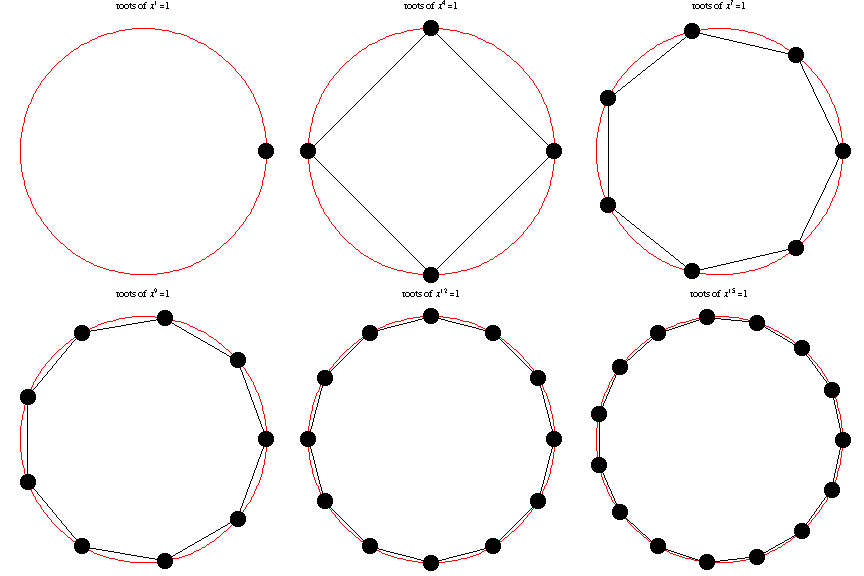
Roots of Unity
Delta Function
Conjugate
Convolution
Correlation
Kronecker Product
Sample Signals
Loading Signals
Complex 8 bit
import numpy as np
signal = np.fromfile('filename', dtype='b')  # load the whole file
signal = np.fromfile('filename', dtype='b', count=1024)  # only load the first 1024 bytes of the file
signal = np.fromfile('filename', dtype='b', offset=1024)  # skip the first 1024 bytes of the file
signal = np.fromfile('filename', dtype='b', offset=1024, count=1024)  # skip 1024, then load 1024
This just loads the values as an array of real numbers, but we want it as complex. We have to interpret every other value as the imaginary component.
signal = signal[0::2] + signal[1::2]*1j
Complex 32 bit float, little-endian (x86)
signal = np.fromfile('filename', dtype='<f')
count and offset work as above, but note that offset is in bytes, so you must multiple by 4 since there are 4 bytes in 32 bits.
Complex 32 bit float, big-endian
signal = np.fromfile('filename', dtype='>f')
count and offset work as above, but note that offset is in bytes, so you must multiple by 4 since there are 4 bytes in 32 bits.
1 maintainer

Metadata
1 maintainer
Release files for dspftw 2024.272.181
For a detailed explanation of source distributions (sdists) and built distributions (wheels), please see the package formats documentation.
Source distribution (sdist)
| File | Size | Uploaded | Provenance | |
|---|---|---|---|---|
| dspftw-2024.272.181.tar.gz | 16.3 kB | Without provenance | Details |
Built distribution (wheel)
| File | Interpreter | ABI | Platform | Reset |
|---|---|---|---|---|
| dspftw-2024.272.181-py3-none-any.whl | Python 3 | none | any | Details |
Total release size: 40.2 kB
Release files / dspftw-2024.272.181.tar.gz
| Download URL | dspftw-2024.272.181.tar.gz |
|---|---|
| Size | 16.3 kB |
| Tags | Source |
|
SHA-256 checksum How to use checksums |
d076974e103c4efb137b25d5dd94aa80ba815b9aff676ce792da17c896d8c76d
|
|
BLAKE2b-256 checksum How to use checksums |
e3bda3b6b727cf6b120e5d82445205d48469fec5c02303dd5457f121d384d2d9
|
| Upload date | |
|
Uploaded using Trusted Publishing? What is trusted publishing? |
Yes |
| Uploaded via |
twine/5.1.1 CPython/3.12.6
|
Release files / dspftw-2024.272.181-py3-none-any.whl
| Download URL | dspftw-2024.272.181-py3-none-any.whl |
|---|---|
| Size | 23.9 kB |
| Tags | Python 3 |
|
SHA-256 checksum How to use checksums |
5ade6be55a1cf7017e0db19fbe20cf2e6a0ca8490de8fab70d1735bf1b79dd4a
|
|
BLAKE2b-256 checksum How to use checksums |
d02c78e740bb6a0cf3792481353cabd180737f0c90b497c1d1014b9567a0e7eb
|
| Upload date | |
|
Uploaded using Trusted Publishing? What is trusted publishing? |
Yes |
| Uploaded via |
twine/5.1.1 CPython/3.12.6
|
Security for dspftw 2024.272.181
Provenance
Provenance describes where a file came from. On PyPI, provenance is shared via attestations, which provide a verifiable record of the build or publishing details. View details, limitations and caveats.
No provenance found
None of the files in this release were uploaded with provenance metadata.
A note on package security
PyPI is a repository for distributing packages, not a service for auditing them. While third-party security researchers and our staff do their best to detect and remove malicious packages, PyPI cannot guarantee the quality, security or suitability of any given package.














