
dumb_menu

simple_term_menu don't support windows, so I made dumb_menu.
dumb_menu is not as powerful as simple_term_menu , but this a GOOD OLD MENU .
dumb_menu is a light weight command line menu that supports Windows, MacOS, and Linux.
Installation
pip install dumb-menu
https://pypi.org/project/dumb-menu/
https://github.com/cornradio/dumb_menu (I want stars ⭐ uwu)
Usage
example:
import dumb_menu

options = ["[1]Option 1", "[2]Option 2", "[3]Option 3","[q]quit"]

index = dumb_menu.get_menu_choice(options)

print(f"You selected option {index + 1}: {options[index]}")
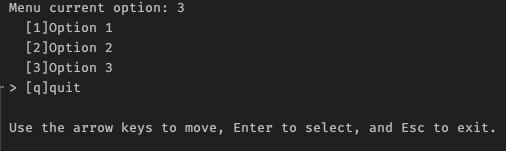
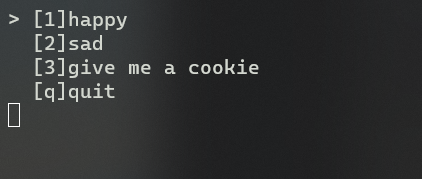
another example:
import os

import dumb_menu


def loopmenu():

    options = ["[1]happy",

            "[2]sad",

            "[3]give me a cookie",

            "[q]quit"]

    index = dumb_menu.get_menu_choice(options,isclean = True)

    # clear screen, cls for windows, clear for linux

    os.system('cls')

    # Python 3.10+ only,old version could use if-else

    match index:

        case 0:

            print(":)")

        case 1:

            print(":(")

        case 2:

            print("🍪ヾ(•ω•`)o")

        case 3:

            exit()

    input('Press ENTER to continue...')


if __name__ == "__main__":

    while True:

        loopmenu()
Get help
Get help ➡️ Github issue
Update log
1.0.8 add "return key string" option , add demo.py As a straightforward example
dumb_menu.get_menu_choice(options,give_key_str = True)
1.0.7 fix "flickering on mac zsh"
1.0.6 forget write log in 1.0.5
1.0.5 fix bug in 1.0.4
1.0.4 support "clean mode"
1.0.3 show selected index also when using hotkey
1.0.2 first useable version
1.0.1 fix bug
1.0.0 first release
how to upload a new version (for me)
en: https://packaging.python.org/tutorials/packaging-projects/
zh: https://python-packaging-zh.readthedocs.io/zh_CN/latest/minimal.html#id2
make sure have twine installed first
-
change
setup.py -
testing
python3 setup.py develop -
python3 setup.py sdist -
twine upload dist/*
test code :
python3


import dumb_menu

dumb_menu.demo()
1 maintainer

Metadata
1 maintainer
Release files for dumb-menu 1.0.8
For a detailed explanation of source distributions (sdists) and built distributions (wheels), please see the package formats documentation.
Source distribution (sdist)
| File | Size | Uploaded | |
|---|---|---|---|
| dumb_menu-1.0.8.tar.gz | 4.2 kB | Details |














