
A lightweight and easy bounding box manipulation library with Pascal VOC, COCO, and YOLO format conversions.

Project description
Easy Bbox



Easy Bbox is a Python package designed to simplify bounding box operations. It provides a comprehensive set of tools for manipulating bounding boxes in various coordinate formats, including Pascal VOC, COCO, YOLO and Albumentations. The package supports transformations, geometric operations, and conversions, making it a versatile tool for computer vision tasks.
Features
- Multiple Coordinate Formats: Supports Pascal VOC, COCO, YOLO and Albumentation formats.
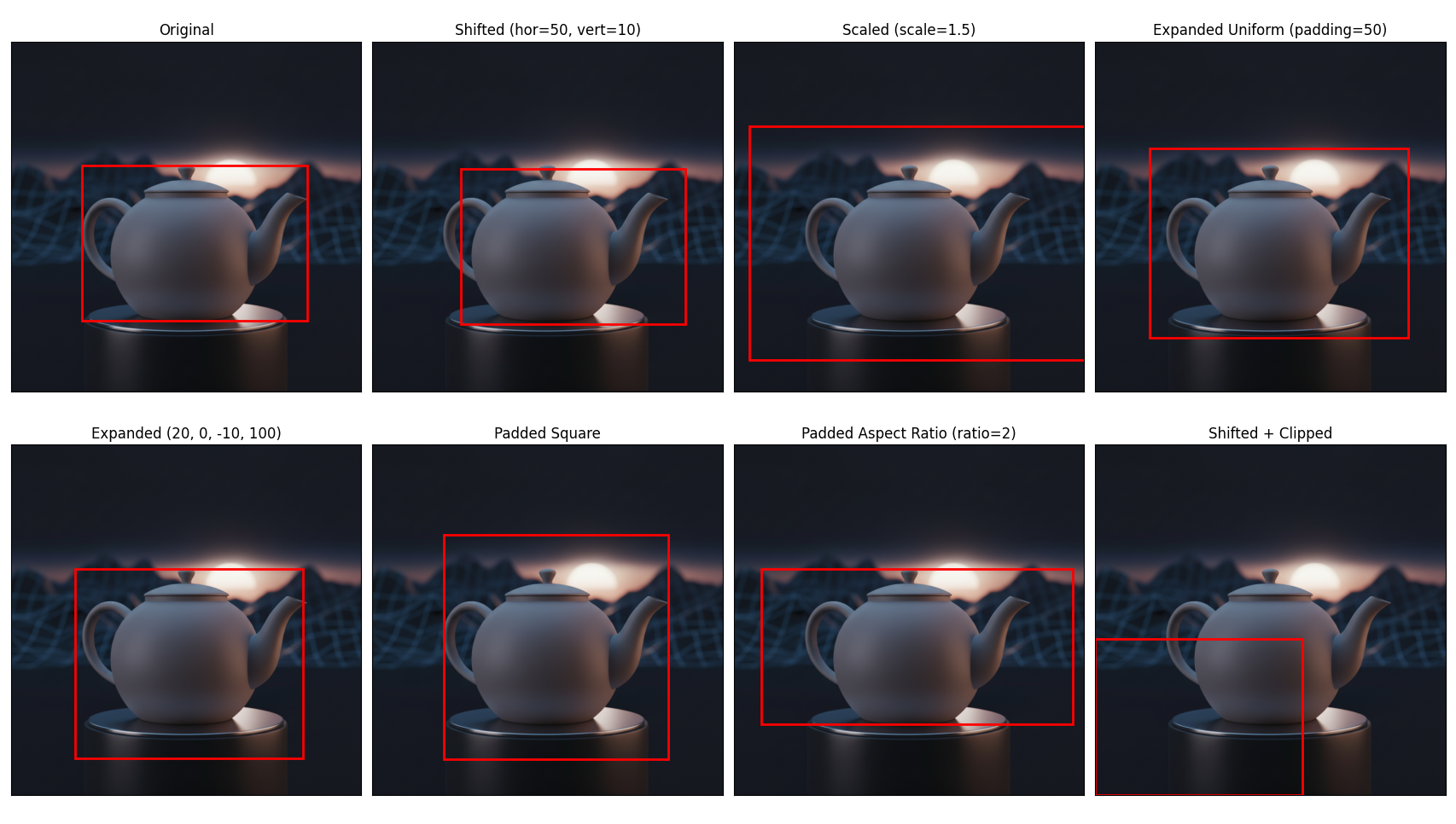
- Transformations: Shift, scale, expand, and pad bounding boxes.
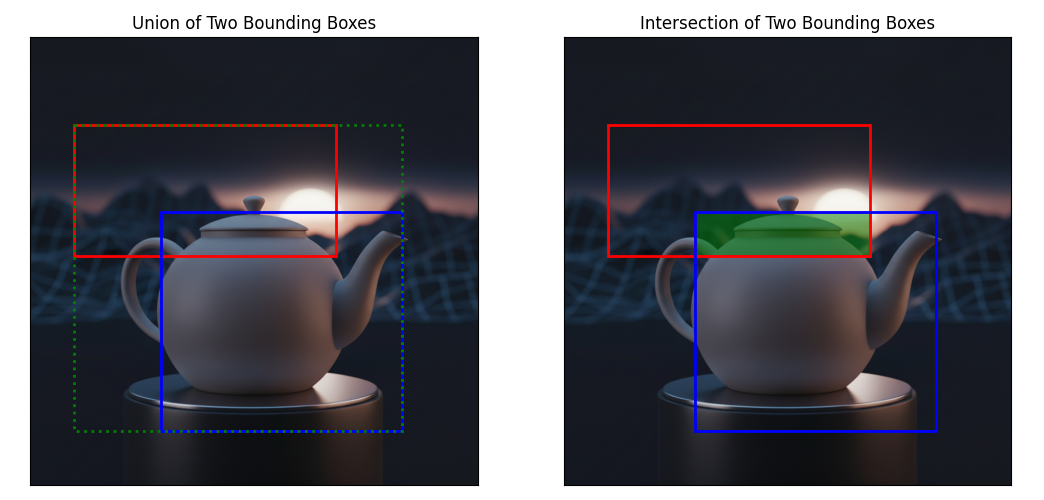
- Geometric Operations: Calculate intersections, unions, and IoU (Intersection over Union).
- Conversions: Convert between different coordinate formats.
- Utility Functions: Includes Non-Maximum Suppression (NMS) for filtering overlapping bounding boxes.
Installation
Easy Bbox is published as a python package and can be pip installed.
pip install easy-bbox
Usage
Creating a Bounding Box
You can create a bounding box using the Bbox class. The bounding box is stored in Pascal VOC format, which is top-left, bottom-right with a top-left origin (PIL coordinate system), but can be instantiated from different formats.
from easy_bbox import Bbox

# All of the following Bbox are equal

# Create a bounding box using top-left and bottom-right coordinates
bbox = Bbox(left=10, top=20, right=30, bottom=40)

# Instantiate from a sequence in Pascal VOC format
bbox = Bbox.from_pascal_voc([10, 20, 30, 40])
bbox = Bbox.from_tlbr([10, 20, 30, 40])
bbox = Bbox.from_xyxy([10, 20, 30, 40])
bbox = Bbox.from_list([10, 20, 30, 40])

# Create a bounding box using top-left and width-height coordinates (COCO format)
bbox = Bbox.from_tlwh((10, 20, 20, 20))
bbox = Bbox.from_coco((10, 20, 20, 20))

# Create a bounding box using center and width-height coordinates
bbox = Bbox.from_cwh((20, 30, 20, 20))
Transformations
Easy Bbox provides several methods for transforming bounding boxes:
Conversions
Easy Bbox provides methods for converting between different coordinate formats:
# Convert to Top-Left, Bottom-Right format
tlbr = bbox.to_tlbr() # Same as `.to_pascal_voc()`, `.to_xyxy()`, `.to_list()`

# Convert to Top-Left, Width-Height format
tlwh = bbox.to_tlwh()   # Same as `.to_coco()`

# Convert to Center, Width-Height format
cwh = bbox.to_cwh()

# Convert to normalized Top-Left, Bottom-Right format
norm_tlbr = bbox.to_norm_tlbr(img_w=100, img_h=100) # Same as `.to_albu(...)`

# Convert to normalized Top-Left, Width-Height format
norm_tlwh = bbox.to_norm_tlwh(img_w=100, img_h=100)

# Convert to normalized Center, Width-Height format
norm_cwh = bbox.to_norm_cwh(img_w=100, img_h=100) # Same as `.to_yolo(...)`

# Convert to polygon format
polygon = bbox.to_polygon()
Utility
Easy Bbox includes utility functions for common tasks:
from easy_bbox import nms

# Get the minimal englobing bbox
union = bbox1.union(bbox2) # same as bbox1 | bbox2

# Get the intersection
inter = bbox1.intersection(bbox2) # same as bbox1 & bbox2

# Calculate the IoU of two bboxes
iou = bbox1.iou(bbox2)

# Check if two bboxes are overlapping
overlap = bbox1.overlaps(bbox2)

# Check if a bbox contains a point
is_inside = bbox1.contains_point((5, 10))

# Calculate the distance from a point to a bbox
dist = bbox1.distance_to_point((5, 10))

# Perform Non-Maximum Suppression
selected_bboxes = nms(bboxes, scores, iou_threshold=0.5)
Development
Contribution are welcome! Please feel free to submit a Pull Request. Here are the steps to contribute to the project:
Prerequisites
- Python 3.9+
Installation
# 1. Clone the repo
git clone https://github.com/Alex-experiments/easy-bbox.git
cd easy-bbox

# 2. Set-up the venv
uv venv
uv pip install -e .[dev]
Testing
Run tests using pytest:
pytest
Code Quality
This project uses pre-commit hooks for code quality:
pre-commit install
This will set up the git hook scripts. Now pre-commit will run automatically on git commit.
Documentation
Documentation is build automatically when the main branch is updated. You can generate it locally documentation using Sphinx:
cd docs
make html
But you might need to install these packages beforehand:
pip install sphinx sphinx_rtd_theme sphinx-autodoc-typehints
License
This project is licensed under the MIT License - see the LICENSE file for details.


Download files
Download the file for your platform. If you're not sure which to choose, learn more about installing packages.
Source Distribution
Built Distribution
Filter files by name, interpreter, ABI, and platform.
If you're not sure about the file name format, learn more about wheel file names.
Copy a direct link to the current filters
File details
Details for the file easy_bbox-1.0.0.tar.gz.
File metadata
- Download URL: easy_bbox-1.0.0.tar.gz
- Upload date:
- Size: 14.6 kB
- Tags: Source
- Uploaded using Trusted Publishing? No
- Uploaded via: twine/6.2.0 CPython/3.12.11
File hashes
| Algorithm | Hash digest | |
|---|---|---|
| SHA256 |
80db60e55082852addf9e1a0c6b4babd46c8f19df35c163a9feb05ba32468a5f
|
|
| MD5 |
f9e5d615960b025ca3f98818c5ef69c3
|
|
| BLAKE2b-256 |
6415bfcc40c689683202c0fea8354d6e79771bfa9a620cb0e912a5fd1a210faa
|
File details
Details for the file easy_bbox-1.0.0-py3-none-any.whl.
File metadata
- Download URL: easy_bbox-1.0.0-py3-none-any.whl
- Upload date:
- Size: 9.9 kB
- Tags: Python 3
- Uploaded using Trusted Publishing? No
- Uploaded via: twine/6.2.0 CPython/3.12.11
File hashes
| Algorithm | Hash digest | |
|---|---|---|
| SHA256 |
1a6a8ee01757e2a277fec365137f018be37d9ae9c97e00430b835a35cbb721df
|
|
| MD5 |
24c9126f55ad4506cf4767da545ac442
|
|
| BLAKE2b-256 |
de1fe1f44c27ddcb3b136b1dcb3f0e048119ef3ed3aa5971c1f2f052005525ea
|






