
[ ]
]
Elastic Search Query Generator
what is Elastic Search Query Generator ?
-
While i was working with Elastic Search i found it very difficult to write complex queries as most of query are deep Nested
-
Thats the reason i decided to make a helper class that can generate complex Elastic Search query in Seconds
-
Library can be used to generate complex aggregation Query , Geo location Query (AND | OR | NOT ) any set of combination is possible
-
in addition to all mentioned above you can also generate auto complete query in matter of seconds
-
please see examples below on how to use this module.
-
if you have any questions or suggestion please drop me an email at shahsoumil519@gmail.com
-
Learn More : https://www.youtube.com/watch?v=C-JKcMM6IXE&t=2548s
documentation :
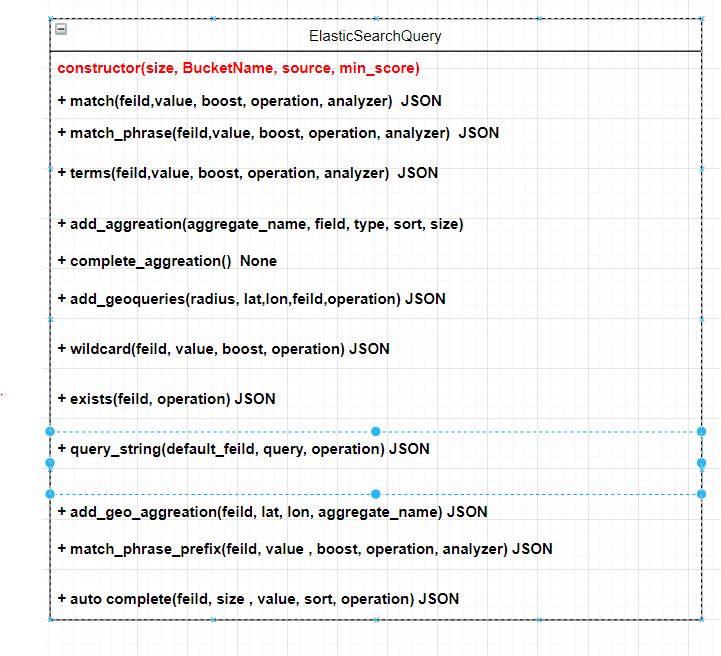
- UML Diagram
-
Constructor:
- Size: How Many Documents should the Query Return
- BucketName: is optional pass a name for Aggregation
- Source: Basically what fields you want to return takes a List Argument source= [“f1”, “f2”, …..]
- Min_score: used for filtering large documents average threshold is set to 0.5
-
Field:
- This is column or field you would like to search
-
Boost:
- If you want to Boost certain field pass a integer value
-
Operation
- There are four main operation you can pass * Should ( OR Operation) * Must (AND operation) * Filter (FILTER Result ) * Must_not (NOT Operation )
-
Analyzer:
- you can specify various analyzer such as stop etc
Installation
pip install elasticsearchquerygenerator
Usage
from elasticsearchquerygenerator.elasticsearchquerygenerator import ElasticSearchQuery
import json

def main():
    helper = ElasticSearchQuery(size=100, BucketName="MyBuckets")

    # match phrase
    query=helper.match_phrase(field="myfeild", value="myvalue", operation='must')

    # terms
    query=helper.terms(field="myfeild", value="myvalue", operation='must')

    # Feild Exists
    query = helper.exists(field='comp feild', operation="must")

    #Match
    query=helper.match(field="MMMMM", value="myvalue", operation='must')

    # Geo Queires
    query = helper.add_geoqueries(radius="100", lat="22", lon="33")

    # Aggreation
    helper.add_aggreation(aggregate_name="FirstName", field="field1",type='terms',sort='desc', size=3)
    helper.add_aggreation(aggregate_name="SecondName", field="field2",type='terms',sort='desc', size=3)
    helper.add_aggreation(aggregate_name="ThirdName", field="field3",type='terms',sort='desc', size=3)
    query = helper.complete_aggreation()
    query = helper.query_string(default_field="DEFAULT",query="X OR  Y",operation='must')

    query = helper.add_geo_aggreation(field="AAAA", lat="22", lon="43",aggregate_name="my_distance")

    print(json.dumps(query, indent=3))


if __name__ == "__main__":
    main()
{
   "_source": [],
   "size": 100,
   "min_score": 0.5,
   "query": {
      "bool": {
         "must": [
            {
               "match_phrase": {
                  "myfeild": {
                     "query": "myvalue"
                  }
               }
            },
            {
               "match_phrase": {
                  "myfeild": {
                     "query": "myvalue"
                  }
               }
            },
            {
               "term": {
                  "myfeild": "myvalue"
               }
            },
            {
               "exists": {
                  "field": "comp feild"
               }
            },
            {
               "match": {
                  "MMMMM": {
                     "query": "myvalue"
                  }
               }
            },
            {
               "match": {
                  "MMMMM": {
                     "query": "myvalue"
                  }
               }
            },
            {
               "query_string": {
                  "default_field": "DEFAULT",
                  "query": "X OR  Y"
               }
            }
         ],
         "filter": [
            {
               "geo_distance": {
                  "distance": "100mi",
                  "null": {
                     "lat": "22",
                     "lon": "33"
                  }
               }
            }
         ],
         "should": [],
         "must_not": []
      }
   },
   "aggs": {
      "FirstName": {
         "terms": {
            "field": "field1",
            "order": {
               "_count": "desc"
            },
            "size": 3
         }
      },
      "SecondName": {
         "terms": {
            "field": "field2",
            "order": {
               "_count": "desc"
            },
            "size": 3
         }
      },
      "ThirdName": {
         "terms": {
            "field": "field3",
            "order": {
               "_count": "desc"
            },
            "size": 3
         }
      },
      "my_distance": {
         "geo_distance": {
            "field": "AAAA",
            "origin": "22,43",
            "unit": "mi",
            "ranges": [
               {
                  "to": 0
               },
               {
                  "from": 0,
                  "to": 25
               },
               {
                  "from": 25,
                  "to": 50
               },
               {
                  "from": 50,
                  "to": 75
               },
               {
                  "from": 75,
                  "to": 100
               },
               {
                  "from": 100
               }
            ]
         }
      }
   }
}
Example 2
from elasticsearchquerygenerator.elasticsearchquerygenerator import ElasticSearchQuery
import json

def autocomplete():
    helper = ElasticSearchQuery(size=0, BucketName="MyBuckets")
    query  = helper.autocomplete_1(field="title",value="n", size=25,sort='desc')
    print(json.dumps(query, indent=3))


if __name__ == "__main__":
    main(autocomplete
{
   "_source": [],
   "size": 0,
   "min_score": 0.5,
   "query": {
      "bool": {
         "must": [
            {
               "match_phrase_prefix": {
                  "title": {
                     "query": "n"
                  }
               }
            }
         ],
         "filter": [],
         "should": [],
         "must_not": []
      }
   },
   "aggs": {
      "auto_complete": {
         "terms": {
            "field": "title",
            "order": {
               "_count": "desc"
            },
            "size": 25
         }
      }
   }
}
i would be adding more examples and making it better and better
Authors
Soumil Nitin Shah
Contributor
** sasirajpuvvada **
- Excellent experience of building scalable and high-performance Software Applications combining distinctive skill sets in Internet of Things (IoT), Machine Learning and Full Stack Web Development in Python.
Bachelor in Electronic Engineering | Masters in Electrical Engineering | Master in Computer Engineering |
- Website : https://soumilshah.herokuapp.com
- Github: https://github.com/soumilshah1995
- Linkedin: https://www.linkedin.com/in/shah-soumil/
- Blog: https://soumilshah1995.blogspot.com/
- Youtube : https://www.youtube.com/channel/UC_eOodxvwS_H7x2uLQa-svw?view_as=subscriber
- Facebook Page : https://www.facebook.com/soumilshah1995/
- Email : shahsoumil519@gmail.com

License
This project is licensed under the MIT License - see the LICENSE.md file for details
1 maintainer

Metadata
1 maintainer
Release files for elasticsearchquerygenerator 5.0.0
For a detailed explanation of source distributions (sdists) and built distributions (wheels), please see the package formats documentation.
Built distribution (wheel)
| File | Interpreter | ABI | Platform | Reset |
|---|---|---|---|---|
| elasticsearchquerygenerator-5.0.0-py3-none-any.whl | Python 3 | none | any | Details |
Release files / elasticsearchquerygenerator-5.0.0-py3-none-any.whl
| Download URL | elasticsearchquerygenerator-5.0.0-py3-none-any.whl |
|---|---|
| Size | 18.7 kB |
| Tags | Python 3 |
|
SHA-256 checksum How to use checksums |
d9ef26a288089373e2e3ac7230f182d04f356375b04819c1720d28c7d02955dc
|
|
BLAKE2b-256 checksum How to use checksums |
f03ee1fc9d43db2b426e6f96a97db78ee375b4c9212ab1b9ca941609aa0b6a2c
|
| Upload date | |
|
Uploaded using Trusted Publishing? What is trusted publishing? |
No |
| Uploaded via |
twine/3.2.0 pkginfo/1.5.0.1 requests/2.22.0 setuptools/49.6.0 requests-toolbelt/0.9.1 tqdm/4.46.1 CPython/3.8.3
|
Security for elasticsearchquerygenerator 5.0.0
Provenance
Provenance describes where a file came from. On PyPI, provenance is shared via attestations, which provide a verifiable record of the build or publishing details. View details, limitations and caveats.
No provenance found
None of the files in this release were uploaded with provenance metadata.
A note on package security
PyPI is a repository for distributing packages, not a service for auditing them. While third-party security researchers and our staff do their best to detect and remove malicious packages, PyPI cannot guarantee the quality, security or suitability of any given package.
To learn more about protecting yourself from malicious actors, visit our package security documentation.














