
ELFChatBot
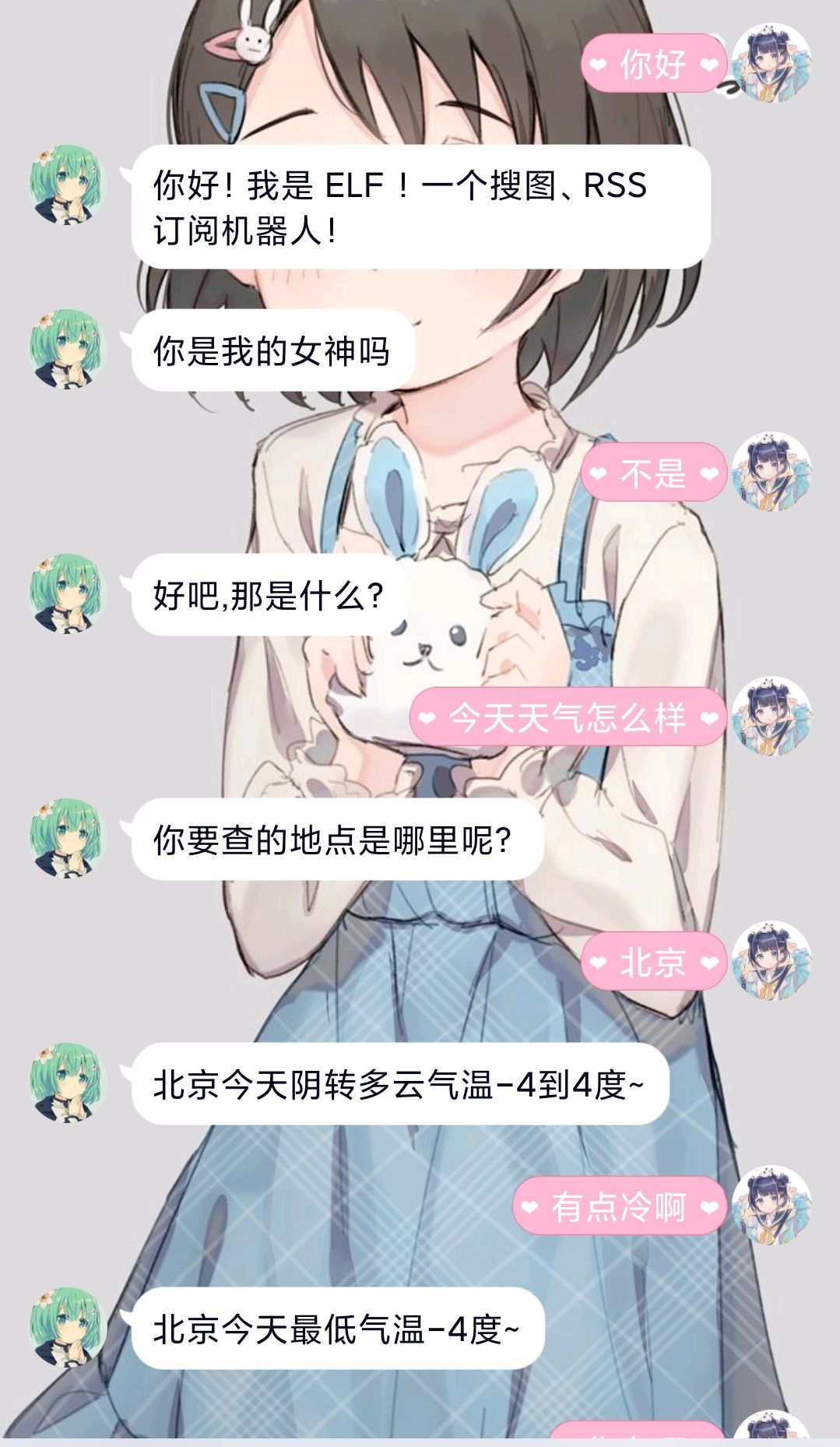
这是一个闲聊机器人,基于 Nonebot2
接入了腾讯和百度的闲聊 api,百度的api支持连续对话
可以实现群聊、私聊,同时随机回复群聊消息。
效果图:
娱乐功能
- 随机回复群友消息
- 伪造转发合并消息(fake、fakes触发,具体使用看代码)
申请密钥
-
腾讯开放平台(推荐作为备用也申请一个)
前往 https://ai.qq.com/console/capability/detail/8 注册并创建应用,并在能力库接入 智能闲聊,得到
app_id以及app_key -
百度大脑平台(推荐使用!)
https://ai.baidu.com/unit/home 注册并创建机器人,设置好机器人技能(至少包含闲聊),得到机器人id(S开头)、
api_key、secret_key注意:默认优先使用百度
部署
注意:Python 3.7+
一 、配置 QQ 协议端
目前支持的协议有:
QQ 协议端举例:
- go-cqhttp (基于 MiraiGo )
- cqhttp-mirai-embedded
- Mirai + cqhttp-mirai
- Mirai + Mirai Native + CQHTTP
- OICQ-http-api (基于 OICQ)
这里以 go-cqhttp为例
-
下载 go-cqhttp 对应平台的 release 文件,点此前往
-
运行 exe 文件或者使用
./go-cqhttp启动 -
生成默认配置文件并修改默认配置
{
 "uin": 你的QQ号,
 "password": "你的密码",
 "encrypt_password": false,
 "password_encrypted": "",
 "enable_db": true,
 "access_token": "",
 "relogin": {
   "enabled": true,
   "relogin_delay": 3,
   "max_relogin_times": 0
 },
 "_rate_limit": {
   "enabled": false,
   "frequency": 0,
   "bucket_size": 0
 },
 "ignore_invalid_cqcode": false,
 "force_fragmented": true,
 "heartbeat_interval": 0,
 "http_config": {
   "enabled": true,
   "host": "0.0.0.0",
   "port": 5700,
   "timeout": 0,
   "post_urls": {}
 },
 "ws_config": {
   "enabled": true,
   "host": "0.0.0.0",
   "port": 6700
 },
 "ws_reverse_servers": [
   {
     "enabled": true,
     "reverse_url": "ws://127.0.0.1:8080/cqhttp/ws",
     "reverse_api_url": "",
     "reverse_event_url": "",
     "reverse_reconnect_interval": 3000
   }
 ],
 "post_message_format": "string",
 "use_sso_address": false,
 "debug": false,
 "log_level": "",
 "web_ui": {
   "enabled": true,
   "host": "0.0.0.0",
   "web_ui_port": 9999,
   "web_input": false
 }
}
其中
ws://127.0.0.1:8080/cqhttp/ws中的127.0.0.1和8080应分别对应 nonebot 配置的 HOST 和 PORT其中以下配置项务必按照下方样式修改!
"ws_reverse_servers": [
    {
      "enabled": true,
      "reverse_url": "ws://127.0.0.1:8080/cqhttp/ws",
      "reverse_api_url": "",
      "reverse_event_url": "",
      "reverse_reconnect_interval": 3000
    }
  ],
- 再次运行 exe 文件或者使用
./go-cqhttp启动
- 再次运行 exe 文件或者使用
二、部署聊天插件
第一次部署
-
下载代码到本地
-
运行
pip install -r requirements.txt -
请按照 注释 修改配置文件 (文件
.env.prod) -
运行
nb run -
收到机器人发送的启动成功消息
从 Nonebot1 到 NoneBot2
-
卸载 nonebot1
pip uninstall nonebot
-
运行
pip install -r requirements.txt -
参照
第一次部署
已经部署过其它 Nonebot2 机器人
- 下载 项目文件夹
src/plugins/ELFChatBot复制 到你部署好了的机器人plugins目录 - 下载
requirements.txt文件,并运行pip install -r requirements.txt - 同
第一次部署一样,修改配置文件 - 运行
nb run
1 maintainer

Metadata
1 maintainer
Release files for elfchatbot 0.0.1
For a detailed explanation of source distributions (sdists) and built distributions (wheels), please see the package formats documentation.
Source distribution (sdist)
| File | Size | Uploaded | Provenance | Actions |
|---|---|---|---|---|
| elfchatbot-0.0.1.tar.gz | 13.7 kB | Without provenance | Details for elfchatbot-0.0.1.tar.gz |
Built distribution (wheel)
| File | Interpreter | ABI | Platform | Actions Reset |
|---|---|---|---|---|
| elfchatbot-0.0.1-py3-none-any.whl | Python 3 | none | any | Details for elfchatbot-0.0.1-py3-none-any.whl |
Total release size: 44.2 kB
Release files / elfchatbot-0.0.1.tar.gz
| Download URL | elfchatbot-0.0.1.tar.gz |
|---|---|
| Size | 13.7 kB |
| Tags | Source |
|
SHA-256 checksum How to use checksums |
7b3edac7cc4999f731daf52a264ed1295b1ecf8ab59d49c6be5f2be093bd7e8a
|
|
BLAKE2b-256 checksum How to use checksums |
28dccb0bc5ade5e09c28b4180650939ac624bb63add1783b825ad21641429b4e
|
| Upload date | |
|
Uploaded using Trusted Publishing? What is trusted publishing? |
No |
| Uploaded via |
twine/3.4.0 importlib_metadata/3.7.3 packaging/20.9 pkginfo/1.7.0 requests/2.25.1 requests-toolbelt/0.9.1 tqdm/4.59.0 CPython/3.9.2
|
Release files / elfchatbot-0.0.1-py3-none-any.whl
| Download URL | elfchatbot-0.0.1-py3-none-any.whl |
|---|---|
| Size | 30.6 kB |
| Tags | Python 3 |
|
SHA-256 checksum How to use checksums |
f583f4b5592b8eed1862455e75dfebea9c87a4a41108557d1fbf6fde12fd4704
|
|
BLAKE2b-256 checksum How to use checksums |
8b0bdfd99256fbf065a4987406c3bf3450601ced105cbcf22e7295f94d1dfc35
|
| Upload date | |
|
Uploaded using Trusted Publishing? What is trusted publishing? |
No |
| Uploaded via |
twine/3.4.0 importlib_metadata/3.7.3 packaging/20.9 pkginfo/1.7.0 requests/2.25.1 requests-toolbelt/0.9.1 tqdm/4.59.0 CPython/3.9.2
|
Security for elfchatbot 0.0.1
Provenance
Provenance describes where a file came from. On PyPI, provenance is shared via attestations, which provide a verifiable record of the build or publishing details. View details, limitations and caveats.
No provenance found
None of the files in this release were uploaded with provenance metadata.
A note on package security
PyPI is a repository for distributing packages, not a service for auditing them. While third-party security researchers and our staff do their best to detect and remove malicious packages, PyPI cannot guarantee the quality, security or suitability of any given package.
To learn more about protecting yourself from malicious actors, visit our package security documentation.













