


- empiricalutilities is an empirical package for manipulating DataFrames,
especially those with datetime indexes, and other common data science functions with an emphasis on improving visualization of results.
Installation
Latest PyPI stable release
pip install empiricalutilitiesLatest development release on GitHub




Pull and install in the current directory:
pip install -e git+https://github.com/jason-r-becker/empiricalutilities.git@master#egg=empiricalutilitiesimport empiricalutilities as eu
eu.latex_print(np.arange(1, 10))
...Usage
empiricalutilities is very versatile and can be used in a number of ways. Some examples of visualizing data in DataFrames and exporting to LaTeX are provided below.
import numpy as np
import pandas as pd
import matplotlib.pyplot as plt
import empiricalutilities as eu
Data Visulization
After generating a random DataFrame, color_table() can be used to observe relative values compared across rows or columns. Take a dataset that may be football players’ scores on different, unnamed drills:
np.random.seed(8675309)
cols = ['QB #1001', 'RB #9458', 'WR #7694', 'QB #5463', 'WR #7584', 'QB #7428']
table = pd.DataFrame(np.random.randn(5, 6), columns=cols)

color_table(table, axis=0)
plt.show()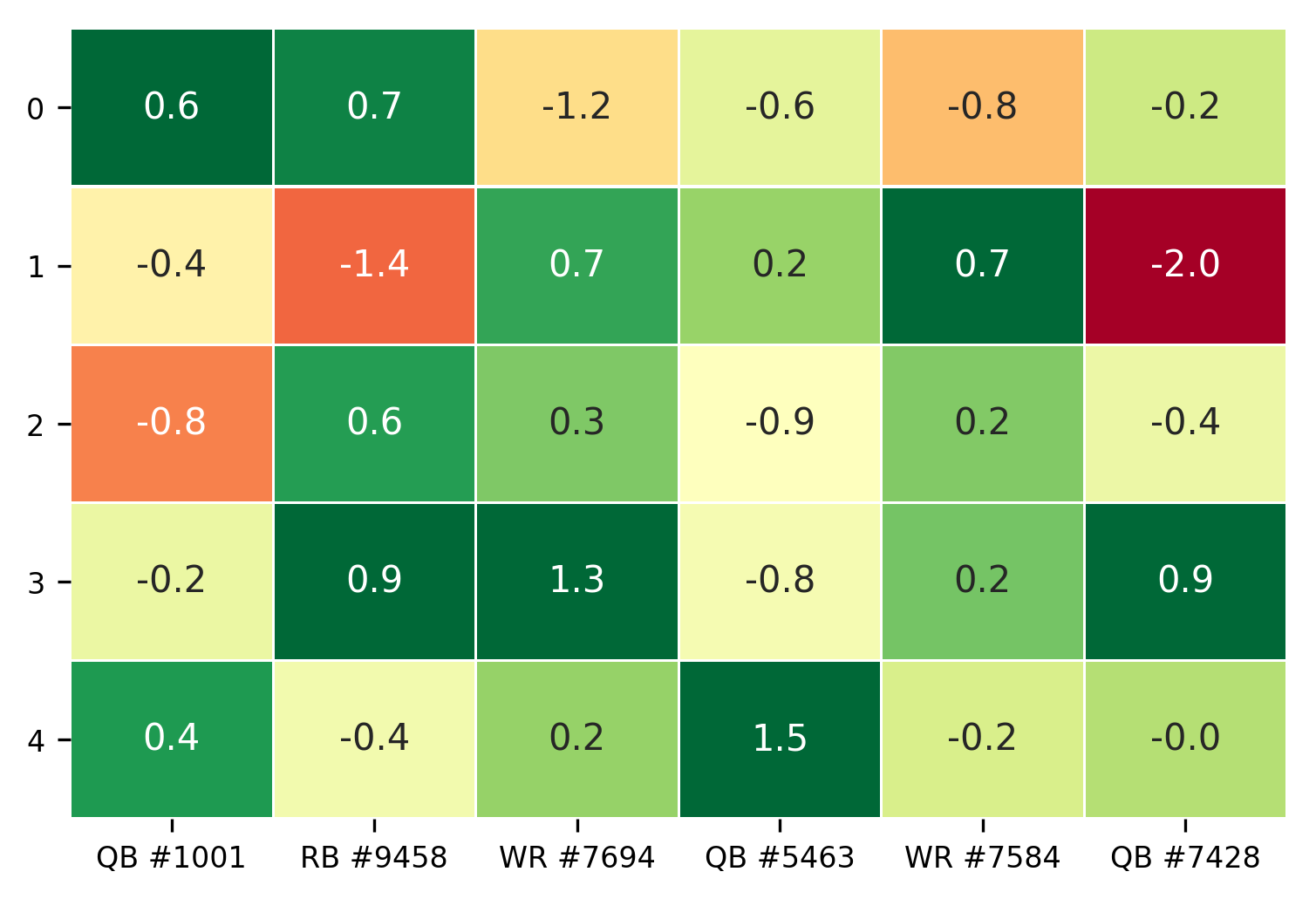
Simple Export to LaTeX
The table of values can be easily exported to LaTeX using latex_print()
eu.latex_print(table)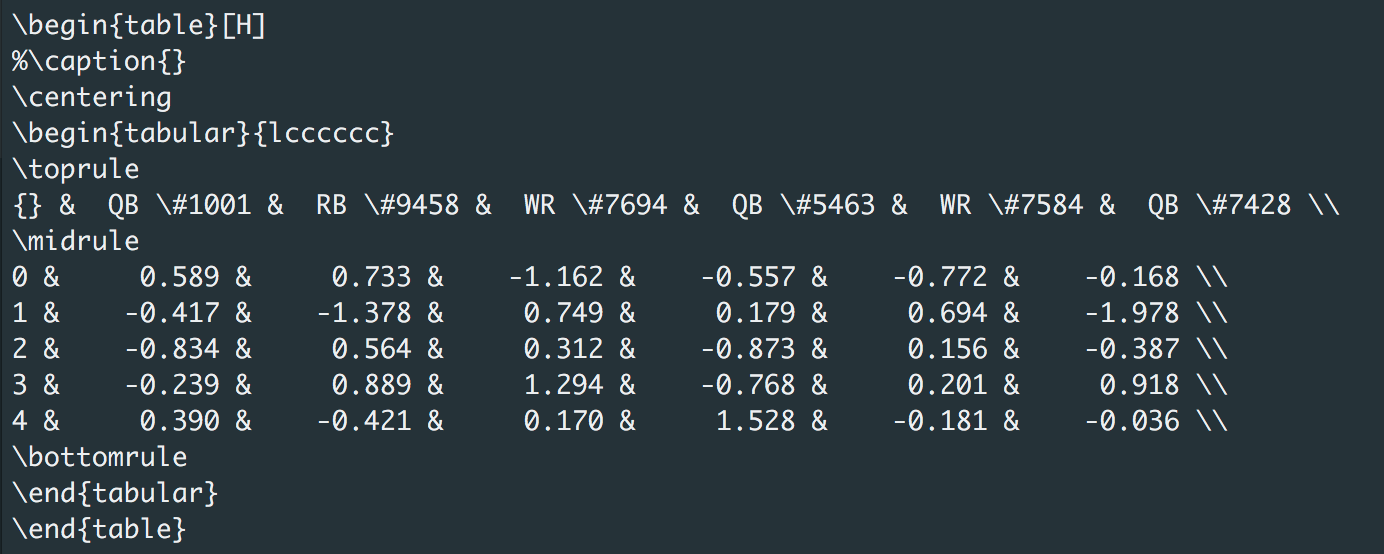
Which can be copied and pasted into LaTeX:
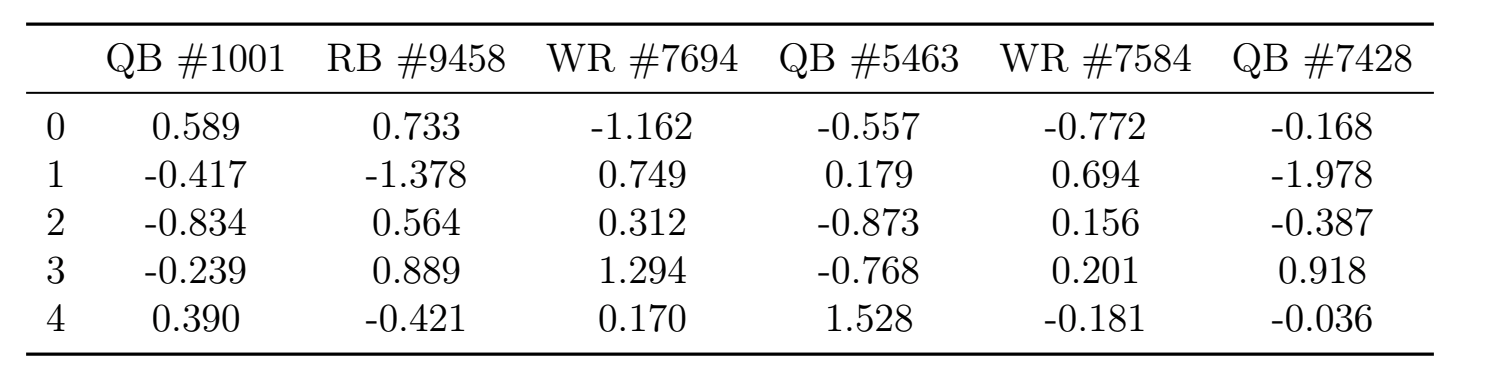
Table with Standard Errors
Now, lets assume the players have run the drills multiple times so we have average scores and standard errors. We can combine the average values with their respective errors with just one line using combine_errors_table(). Further, we can print the results to the screen such that they are easy to interpret using prettyPrint():
errors = pd.DataFrame(np.random.randn(5, 6), columns=cols) / 10
error_table = combine_errors_table(table, errors, prec=3)
eu.prettyPrint(error_table)
Advanced Export to LaTeX
To export this table, we must first create the table with an additional argument latex_format=True which lets combine_errors_table() know it needs to print with LaTeX formatting.
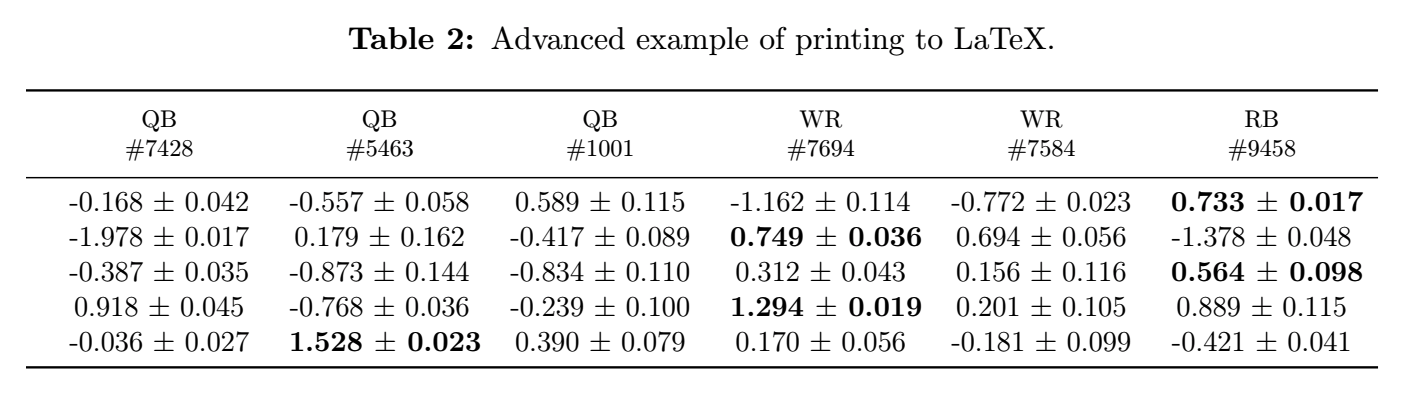
error_table = combine_errors_table(table, errors, prec=3, latex_format=True)We can also explore some of the advanced options available in latex_print(). First, the table header can be split into two rows, which is accomplished with the multi_row_header=True argument. When True, latex_print() expects a DataFrame with column headers containing a '*' to mark the start of each new row. We will use list comprehension to create a new column header list where spaces are replaced with ' * ', resulting in the top header row being player position and bottom being player number.
multi_cols = [col.replace(' ', ' * ') for col in cols]
error_table.columns = multi_cols
Next, we can sort the header. Let’s assume we want to group by position, and are most interested in quarterbacks (QB), especially those with high numbers. custom_sort() can be used to create our own sorting rules. By setting the sorting alphabet to 'QWR9876543210', we empasize position first, QB->WR->RB, and number second in decreasing order from 9.
sort_alphabet = 'QWR9876543210'
sorted_cols = eu.custom_sort(multi_cols, sort_alphabet)
Additionally, we can add some expressive ability to the table by bolding the score of the top performer for each drill. find_max_locs() identifies the location of each row-wise maximum in the DataFrame. We must be careful to sort the original table identically to the table with standard errors when the order of header columns is altered.
table.columns = multi_cols
max_locs = eu.find_max_locs(table[sorted_cols])
Finally, adding a caption can be accomplished with the caption argument, and the uninformative index can be removed with hide_index=True. For wide tables, adding adjust=True automatically sizes the table to the proper width of your LaTeX environment, adjusting the text size as needed.
eu.latex_print(error_table[sorted_cols],
               caption='Advanced example of printing to LaTeX.',
               adjust=True,
               multi_row_header=True,
               hide_index=True,
               bold_locs=max_locs,
               )
Contributions


All source code is hosted on GitHub. Contributions are welcome.
LICENSE
Open Source (OSI approved):
1 maintainer

Metadata
1 maintainer
Release files for empiricalutilities 0.1.12
For a detailed explanation of source distributions (sdists) and built distributions (wheels), please see the package formats documentation.
Source distribution (sdist)
| File | Size | Uploaded | |
|---|---|---|---|
| empiricalutilities-0.1.12.tar.gz | 21.0 kB | Details |
Release files / empiricalutilities-0.1.12.tar.gz
| Download URL | empiricalutilities-0.1.12.tar.gz |
|---|---|
| Size | 21.0 kB |
| Tags | Source |
|
SHA-256 checksum How to use checksums |
af214d09fa92211cd152760ccde8d06934db305a4a4747edb306189101763872
|
|
BLAKE2b-256 checksum How to use checksums |
4ee4a27d21743e64222f9f40888afff2c4891c515061d0ae6dc6f9900dd95ac0
|
| Upload date | |
|
Uploaded using Trusted Publishing? What is trusted publishing? |
No |
| Uploaded via |
twine/1.11.0 pkginfo/1.4.2 requests/2.19.1 setuptools/40.0.0 requests-toolbelt/0.8.0 tqdm/4.25.0 CPython/3.7.0
|














