
# enaml-native-maps
GoogleMaps for enaml-native
[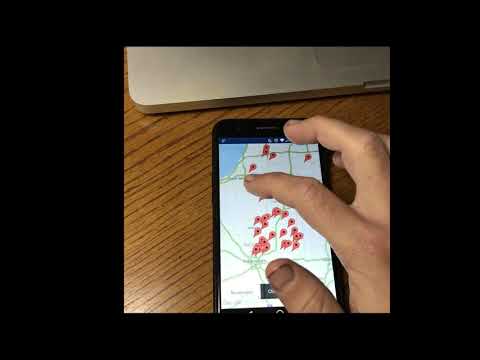](https://youtu.be/qH1EByO8pwM)
### Features
This package contains the following widgets:
- `MapView` with traffic, layers, buildings, and camera control
- `MapMarker` with customizable info windows
- `MapPolygon`, `MapPolyline`, and `MapCirlce`
You may want to also use the [`LocationManager`](https://github.com/codelv/enaml-native/blob/master/src/enamlnative/android/android_location.py) from `enamlnative.android.api` for GPS updates. See
### Installing
1. Install `enaml-native-maps` using the [enaml-native-cli](https://github.com/codelv/enaml-native-cli) (or pip)
```bash
#: Using the enaml-native cli
enaml-native install enaml-native-maps
#: or via pip and link it
pip install enaml-native-maps
enaml-native link enaml-native-maps
```
2. Next, add `enaml-native-maps: ""` to your app's `package.json`
3. Then update the manifest in `android/app/src/main/AndroidManifext.xml` to include:
```bash
<!-- If using google maps these two are required.
You must also define the API key in gradle.properties-->
<meta-data
android:name="com.google.android.gms.version"
android:value="@integer/google_play_services_version" />
<meta-data
android:name="com.google.android.geo.API_KEY"
android:value="@string/google_maps_key" />
```
> Note: Make sure it is __within the `<application>` tags__!
4. Now in `android/app/build.gradle` add the `resValue` lines below under the `buildTypes`
to tell gradle to pull your key from the `gradle.properties`
```groovy
buildTypes {
debug {
// Add this line
resValue "string", "google_maps_key",
(project.findProperty("GOOGLE_MAPS_API_KEY") ?: "")
}
release {
minifyEnabled false
proguardFiles getDefaultProguardFile('proguard-android.txt'), 'proguard-rules.pro'
// And add this line
resValue "string", "google_maps_key",
(project.findProperty("GOOGLE_MAPS_API_KEY") ?: "")
}
}
```
5. Finally add your `GOOGLE_API_MAPS_KEY=yourapikey` in `android/app/gradle.properties`.
See [android's maps docs](https://developers.google.com/maps/documentation/android-api/map-with-marker) for help
and to get an API key.
### Usage
See the examples folder.
GoogleMaps for enaml-native
[](https://youtu.be/qH1EByO8pwM)
### Features
This package contains the following widgets:
- `MapView` with traffic, layers, buildings, and camera control
- `MapMarker` with customizable info windows
- `MapPolygon`, `MapPolyline`, and `MapCirlce`
You may want to also use the [`LocationManager`](https://github.com/codelv/enaml-native/blob/master/src/enamlnative/android/android_location.py) from `enamlnative.android.api` for GPS updates. See
### Installing
1. Install `enaml-native-maps` using the [enaml-native-cli](https://github.com/codelv/enaml-native-cli) (or pip)
```bash
#: Using the enaml-native cli
enaml-native install enaml-native-maps
#: or via pip and link it
pip install enaml-native-maps
enaml-native link enaml-native-maps
```
2. Next, add `enaml-native-maps: ""` to your app's `package.json`
3. Then update the manifest in `android/app/src/main/AndroidManifext.xml` to include:
```bash
<!-- If using google maps these two are required.
You must also define the API key in gradle.properties-->
<meta-data
android:name="com.google.android.gms.version"
android:value="@integer/google_play_services_version" />
<meta-data
android:name="com.google.android.geo.API_KEY"
android:value="@string/google_maps_key" />
```
> Note: Make sure it is __within the `<application>` tags__!
4. Now in `android/app/build.gradle` add the `resValue` lines below under the `buildTypes`
to tell gradle to pull your key from the `gradle.properties`
```groovy
buildTypes {
debug {
// Add this line
resValue "string", "google_maps_key",
(project.findProperty("GOOGLE_MAPS_API_KEY") ?: "")
}
release {
minifyEnabled false
proguardFiles getDefaultProguardFile('proguard-android.txt'), 'proguard-rules.pro'
// And add this line
resValue "string", "google_maps_key",
(project.findProperty("GOOGLE_MAPS_API_KEY") ?: "")
}
}
```
5. Finally add your `GOOGLE_API_MAPS_KEY=yourapikey` in `android/app/gradle.properties`.
See [android's maps docs](https://developers.google.com/maps/documentation/android-api/map-with-marker) for help
and to get an API key.
### Usage
See the examples folder.
1 maintainer

Metadata
1 maintainer
Release files for enaml-native-maps 1.2
For a detailed explanation of source distributions (sdists) and built distributions (wheels), please see the package formats documentation.
Built distribution (wheel)
| File | Interpreter | ABI | Platform | Reset |
|---|---|---|---|---|
| enaml_native_maps-1.2-py2-none-any.whl | Python 2 | none | any | Details |
Release files / enaml_native_maps-1.2-py2-none-any.whl
| Download URL | enaml_native_maps-1.2-py2-none-any.whl |
|---|---|
| Size | 76.3 kB |
| Tags | Python 2 |
|
SHA-256 checksum How to use checksums |
a6536005254f4ae75f8fb5d6986dfb7994714c6c7cec4c296a981f9dad6ade7b
|
|
BLAKE2b-256 checksum How to use checksums |
cd85de7e8775403bf6bae0ea43ec769e4686f8ea484f390705afa262e325ed68
|
| Upload date | |
|
Uploaded using Trusted Publishing? What is trusted publishing? |
No |














