
Python libraries for Waveshare e-paper series
Python libraries for Waveshare e-paper series
About
This repo was created to provide a convenient way to install e-paper library for Raspberry Pi. The original code is provided by Waveshare GitHub.
Raspberry Pi GPIO Pin map
+-----+-----+---------+------+---+---Pi 3---+---+------+---------+-----+-----+
| BCM | wPi |   Name  | Mode | V | Physical | V | Mode | Name    | wPi | BCM |
+-----+-----+---------+------+---+----++----+---+------+---------+-----+-----+
|     |     |    3.3v |      |   |  1 || 2  |   |      | 5v      |     |     |
|   2 |   8 |   SDA.1 |   IN | 1 |  3 || 4  |   |      | 5v      |     |     |
|   3 |   9 |   SCL.1 |   IN | 1 |  5 || 6  |   |      | 0v      |     |     |
|   4 |   7 | GPIO. 7 |   IN | 1 |  7 || 8  | 1 | ALT5 | TxD     | 15  | 14  |
|     |     |      0v |      |   |  9 || 10 | 1 | ALT5 | RxD     | 16  | 15  |
|  17 |   0 | GPIO. 0 |   IN | 0 | 11 || 12 | 0 | IN   | GPIO. 1 | 1   | 18  |
|  27 |   2 | GPIO. 2 |   IN | 0 | 13 || 14 |   |      | 0v      |     |     |
|  22 |   3 | GPIO. 3 |   IN | 0 | 15 || 16 | 0 | IN   | GPIO. 4 | 4   | 23  |
|     |     |    3.3v |      |   | 17 || 18 | 0 | IN   | GPIO. 5 | 5   | 24  |
|  10 |  12 |    MOSI | ALT0 | 0 | 19 || 20 |   |      | 0v      |     |     |
|   9 |  13 |    MISO | ALT0 | 0 | 21 || 22 | 0 | IN   | GPIO. 6 | 6   | 25  |
|  11 |  14 |    SCLK | ALT0 | 0 | 23 || 24 | 1 | OUT  | CE0     | 10  | 8   |
|     |     |      0v |      |   | 25 || 26 | 1 | OUT  | CE1     | 11  | 7   |
|   0 |  30 |   SDA.0 |   IN | 1 | 27 || 28 | 1 | IN   | SCL.0   | 31  | 1   |
|   5 |  21 | GPIO.21 |   IN | 1 | 29 || 30 |   |      | 0v      |     |     |
|   6 |  22 | GPIO.22 |   IN | 1 | 31 || 32 | 0 | IN   | GPIO.26 | 26  | 12  |
|  13 |  23 | GPIO.23 |   IN | 0 | 33 || 34 |   |      | 0v      |     |     |
|  19 |  24 | GPIO.24 |  OUT | 1 | 35 || 36 | 1 | OUT  | GPIO.27 | 27  | 16  |
|  26 |  25 | GPIO.25 |   IN | 0 | 37 || 38 | 0 | IN   | GPIO.28 | 28  | 20  |
|     |     |      0v |      |   | 39 || 40 | 0 | IN   | GPIO.29 | 29  | 21  |
+-----+-----+---------+------+---+----++----+---+------+---------+-----+-----+
| BCM | wPi |   Name  | Mode | V | Physical | V | Mode | Name    | wPi | BCM |
+-----+-----+---------+------+---+---Pi 3---+---+------+---------+-----+-----+
Hardware connection (OLED => Raspberry Pi)
- VCC -> 3.3
- GND -> GND
- DIN -> MOSI
- CLK -> SCLK
- CS -> 24 (Physical, BCM: CE0, 8)
- D/C -> 22 (Physical, BCM: 25)
- RES -> 11 (Physical, BCM: 17)
- BUSY -> 18 (Physical, BCM: 24)
How to use
- install libraries required libraries and demos via
pip install epd-library
- run the demo with:
- 1.54inch e-paper
epd1in54
- 1.54inch e-paper b
epd1in54b
- 1.54inch e-paper c
epd1in54c
- 2.13inch e-paper
epd2in13
- 2.13inch e-paper b
epd2in13b
- 2.7inch e-paper
epd2in7
- 2.7inch e-paper b
epd2in7b
- 2.9inch e-paper
epd2in9
- 2.9inch e-paper b
epd2in9b
- 4.2inch e-paper
epd4in2
- 4.2inch e-paper b
epd4in2b
- 7.5inch e-paper
epd7in5
- 7.5inch e-paper b
epd7in5b
Supported models
Standard Raspberry Pi header on module, allowed to be attached onto Pi directly, compatible with Raspberry Pi 40PIN GPIO extension header
- GDEP015OC1 - e-paper library for Raspberry Pi - epd1in54
- GDEW0154Z04 - e-paper library for Raspberry Pi - epd1in54b
- 1.54inch e-Paper Module (C) - epd1in54c
- GDEM0213E26LT - 2.13" e-paper library for Raspberry Pi - epd2in13
- GDEW0213Z16 - 2.13" e-paper display (B) library for Raspberry Pi - epd2in13b
- GDEW027W3 - 2.7" e-paper library for Raspberry Pi - epd2in7
- GDEW027C44 - 2.7" e-paper display (B) library for Raspberry Pi - epd2in7b
- GDEH029A1 - 2.9" e-paper display library for Raspberry Pi - epd2in9
- GDEW029Z10 - 2.9" e-paper display (B) library for Raspberry Pi - epd2in9b
- GDEW042T2 - 4.2" e-paper display library for Raspberry Pi - epd4in2
- GDEW042Z15 - 4.2" e-paper display (B) library for Raspberry Pi - epd4in2b
- GDEW075T8 - 7.5" e-paper display library for Raspberry Pi - epd7in5
- GDEW075Z09 - 7.5" e-paper display (B) library for Raspberry Pi - epd7in5b
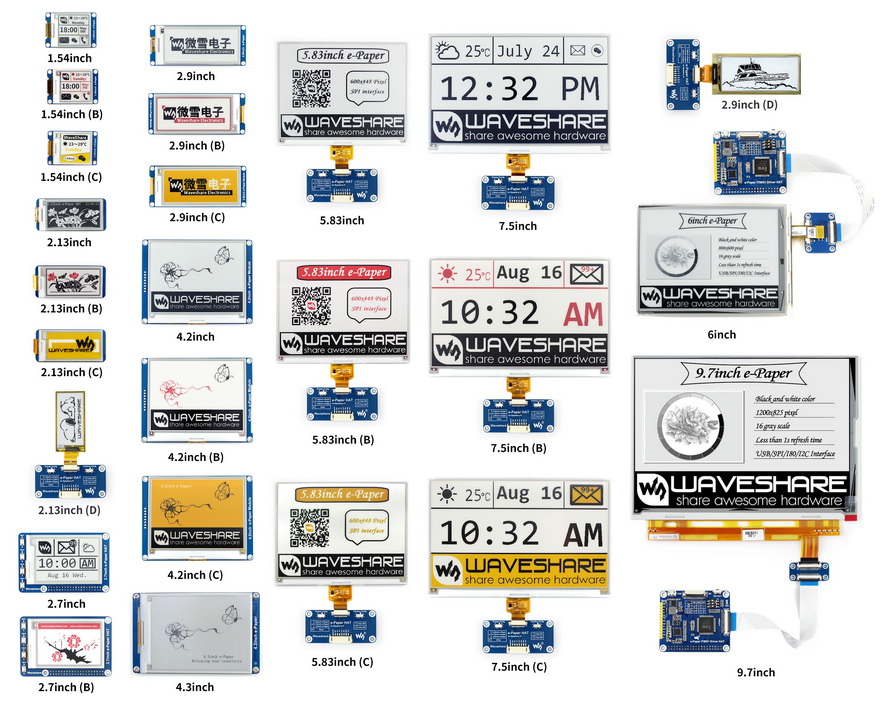
Interfaces
| Name | Description |
|---|---|
| VCC | 3.3V |
| GND | GND |
| DIN | SPI MOSI |
| CLK | SPI SCK |
| CS | SPI chip select (Low active) |
| DC | Data/Command control pin (High for data, and low for command) |
| RST | External reset pin (Low for reset) |
| BUSY | Busy state output pin (Low for busy) |
1 maintainer

Metadata
1 maintainer
Release files for epd-library 0.2.3
For a detailed explanation of source distributions (sdists) and built distributions (wheels), please see the package formats documentation.
Source distribution (sdist)
| File | Size | Uploaded | Provenance | |
|---|---|---|---|---|
| epd-library-0.2.3.tar.gz | 32.6 kB | Without provenance | Details |
Built distribution (wheel)
| File | Interpreter | ABI | Platform | Reset |
|---|---|---|---|---|
| epd_library-0.2.3-py3-none-any.whl | Python 3 | none | any | Details |
Total release size: 129.0 kB
Release files / epd-library-0.2.3.tar.gz
| Download URL | epd-library-0.2.3.tar.gz |
|---|---|
| Size | 32.6 kB |
| Tags | Source |
|
SHA-256 checksum How to use checksums |
cf3c6437c2231576e9cb92b5724e72eb7bbeb505c8d682f60c3acab250472bda
|
|
BLAKE2b-256 checksum How to use checksums |
a07641512d9d14704b8d175b8ecccde23c0df626d9e0612e58841fad22749376
|
| Upload date | |
|
Uploaded using Trusted Publishing? What is trusted publishing? |
No |
| Uploaded via |
twine/1.15.0 pkginfo/1.5.0.1 requests/2.22.0 setuptools/42.0.2 requests-toolbelt/0.9.1 tqdm/4.41.0 CPython/3.5.3
|
Release files / epd_library-0.2.3-py3-none-any.whl
| Download URL | epd_library-0.2.3-py3-none-any.whl |
|---|---|
| Size | 96.3 kB |
| Tags | Python 3 |
|
SHA-256 checksum How to use checksums |
17139033168911459b80e855bc9bbe918b359f122c1c4021e4e65680d2c1e3f0
|
|
BLAKE2b-256 checksum How to use checksums |
7c6972025decffd5fa0d9cbe213611350ba3d3aebf54d8f8cbdae85b7420b177
|
| Upload date | |
|
Uploaded using Trusted Publishing? What is trusted publishing? |
No |
| Uploaded via |
twine/1.15.0 pkginfo/1.5.0.1 requests/2.22.0 setuptools/42.0.2 requests-toolbelt/0.9.1 tqdm/4.41.0 CPython/3.5.3
|
Security for epd-library 0.2.3
Provenance
Provenance describes where a file came from. On PyPI, provenance is shared via attestations, which provide a verifiable record of the build or publishing details. View details, limitations and caveats.
No provenance found
None of the files in this release were uploaded with provenance metadata.
A note on package security
PyPI is a repository for distributing packages, not a service for auditing them. While third-party security researchers and our staff do their best to detect and remove malicious packages, PyPI cannot guarantee the quality, security or suitability of any given package.
To learn more about protecting yourself from malicious actors, visit our package security documentation.














