
epevermodbus
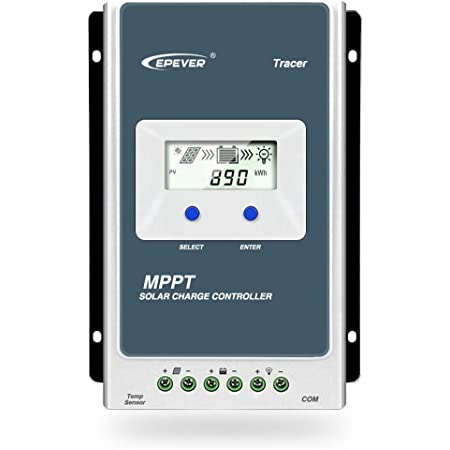
This package is intended to help you communicate with an EPever charge controller. It has been tested with an EPever Tracer AN but should work with other EPever devices.
Features
- Read real time data
- Read battery parameters
- Write battery parameters this feature is a work in progress
- Automatic retries
Connecting to the charge controller
I have only tested this package on Linux / Raspberry Pi but I see no reason why it should not work on other devices.
For the cable you have two options
- Official EPever cable
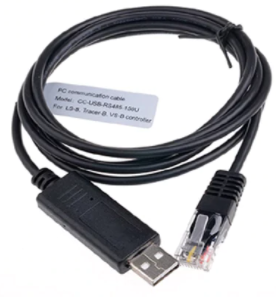
When using the offical cable on Linux your device will show up something like /dev/ttyXRUSB0. You will need to use a custom driver to use this cable on Linux rather than the bundled cdc-acm driver. It can be difficult to get this driver working properly on Linux and Raspberry Pi.
On Windows you can use the driver provided by EPever and the cable should work fine so long as you check the rs485 checkbox in device manager.
- Your own custom cable
You can quite easily make your own cable if you purchase a few parts, and with this approach you won't need a custom driver on Linux so it should be easier to get working. The device should show up as something like /dev/ttyUSB0.
For more information read: https://ross-warren.co.uk/2021/08/14/building-a-cable-to-connect-my-epever-charge-controller/
Installing the package
To install the package run
pip install epevermodbus
This package requires Python 3, depending on your setup you might have to instead run:
pip3 install epevermodbus
Command line utility
To run the command line utility and see the debug output run the following on the command line:
epevermodbus --portname /dev/ttyUSB0 --slaveaddress 1
usage: epevermodbus [-h] [--portname PORTNAME] [--slaveaddress SLAVEADDRESS]

optional arguments:
  -h, --help            show this help message and exit
  --portname PORTNAME   Port name for example /dev/ttyUSB0
  --slaveaddress SLAVEADDRESS
                        Slave address 1-247
  --baudrate BAUDRATE   Baudrate to communicate with controller (default is 115200)
Example output
Real Time Data
Solar voltage: 0.02V
Solar current: 0.0A
Solar power: 0.0W
Solar power L: 0.0W
Solar power H: 0.0W
Load voltage: 0.0V
Load current: 0.0A
Load power: 0.0W
Load power L: 0.0W
Load power H: 0.0W
Battery current L: 0.0A
Battery current H: 0.0A
Battery voltage: 13.25V
Battery state of charge: 86%
Battery temperature: 16.91°C
Remote battery temperature: 0.0°C
Controller temperature: 16.55°C
Battery status: {'wrong_identifaction_for_rated_voltage': False, 'battery_inner_resistence_abnormal': False, 'temperature_warning_status': 'NORMAL', 'battery_status': 'NORMAL'}
Charging equipment status: {'input_voltage_status': 'NORMAL', 'charging_mosfet_is_short_circuit': False, 'charging_or_anti_reverse_mosfet_is_open_circuit': False, 'anti_reverse_mosfet_is_short_circuit': False, 'input_over_current': False, 'load_over_current': False, 'load_short_circuit': False, 'load_mosfet_short_circuit': False, 'disequilibrium_in_three_circuits': False, 'pv_input_short_circuit': False, 'charging_status': 'NO_CHARGING', 'fault': False, 'running': True}
Discharging equipment status: {'input_voltage_status': 'NORMAL', 'output_power_load': 'LIGHT', 'short_circuit': False, 'unable_to_discharge': False, 'unable_to_stop_discharging': False, 'output_voltage_abnormal': False, 'input_over_voltage': False, 'short_circuit_in_high_voltage_side': False, 'boost_over_voltage': False, 'output_over_voltage': False, 'fault': False, 'running': False}
Day time: False
Night time: True
Maximum battery voltage today: 14.5V
Minimum battery voltage today: 13.25V
Device over temperature: False


Battery Parameters:
Rated charging current: 20.0A
Rated load current: 20.0A
Battery real rated voltage: 12.0V
Battery type: USER_DEFINED
Battery capacity: 40AH
Temperature compensation coefficient: 0
Over voltage disconnect voltage: 14.7V
Charging limit voltage: 14.4V
Over voltage reconnect voltage: 14.6V
Equalize charging voltage: 14.4V
Boost charging voltage: 14.4V
Float charging voltage: 13.6V
Boost reconnect charging voltage: 13.3V
Low voltage reconnect voltage: 12.0V
Under voltage recover voltage: 12.0V
Under voltage warning voltage: 11.5V
Low voltage disconnect voltage: 11.0V
Discharging limit voltage: 11.0V
Battery rated voltage: 12V
Default load on/off in manual mode: OFF
Equalize duration: 0 min
Boost duration: 180 min
Battery discharge: 30%
Battery charge: 100%
Charging mode: VOLTAGE_COMPENSATION
Python usage
To use the library within your Python code
from epevermodbus.driver import EpeverChargeController


controller = EpeverChargeController("/dev/ttyUSB0", 1)

controller.get_solar_voltage()
See https://github.com/rosswarren/epevermodbus/blob/main/epevermodbus/driver.py for all available methods
1 maintainer

Metadata
1 maintainer
Release files for epevermodbus 0.0.18
For a detailed explanation of source distributions (sdists) and built distributions (wheels), please see the package formats documentation.
Source distribution (sdist)
| File | Size | Uploaded | |
|---|---|---|---|
| epevermodbus-0.0.18.tar.gz | 12.0 kB | Details |
Built distribution (wheel)
| File | Interpreter | ABI | Platform | Reset |
|---|---|---|---|---|
| epevermodbus-0.0.18-py3-none-any.whl | Python 3 | none | any | Details |
Total release size: 23.2 kB
Release files / epevermodbus-0.0.18.tar.gz
| Download URL | epevermodbus-0.0.18.tar.gz |
|---|---|
| Size | 12.0 kB |
| Tags | Source |
|
SHA-256 checksum How to use checksums |
f036adddadf4bd32ee8c024207c3b202031fe849b66f4ce67c417e03eefc01da
|
|
BLAKE2b-256 checksum How to use checksums |
82f6c2f5103593f66420c908b7a2b8e17c62403ec1937b23dccaf5a29a7d92bd
|
| Upload date | |
|
Uploaded using Trusted Publishing? What is trusted publishing? |
No |
| Uploaded via |
twine/5.1.1 CPython/3.10.13
|
Release files / epevermodbus-0.0.18-py3-none-any.whl
| Download URL | epevermodbus-0.0.18-py3-none-any.whl |
|---|---|
| Size | 11.3 kB |
| Tags | Python 3 |
|
SHA-256 checksum How to use checksums |
c84ea698e8829deb8878683e31e6c0904e2675dfb34c01a1bb31cd4beadbf952
|
|
BLAKE2b-256 checksum How to use checksums |
a23c7783c5433347c0b6ad562ce911396b13431aff92893fd1f3ba7fdd64be8a
|
| Upload date | |
|
Uploaded using Trusted Publishing? What is trusted publishing? |
No |
| Uploaded via |
twine/5.1.1 CPython/3.10.13
|














