
epub2sphinx
epub2sphinx is a tool to convert epub files directly into HTML sites using Pandoc and Sphinx. It can use any of pre-existing Sphinx themes (like these) for the generated HTML site.
It uses Pandoc for converting HTML data inside epub files into ReST files and then uses Sphinx to convert them into a HTML site.
It creates a directory structure similar to what sphinx-quickstart generates by default.
Built during FOSSHack 21 to solve this issue.
Installation
-
Install pandoc
# On Ubuntu
sudo apt-get install pandoc
# On Arch Linux
pacman -S pandoc
For installing on other platforms, look here.
-
Install epub2sphinx
pip install epub2sphinx
Usage
Usage: epub2sphinx <epub_file_name> [-o <output_directory_path>] [-t <sphinx_theme_name>] [-b,--build|-B,--no-build] [-s|--serve] [-c] [-p <port_number>]

  This tool helps you to convert your epub files into sphinx format for a better reading experience.
  Kindly provide the epub file as the argument to this command.

Options:
  -o, --output-directory PATH   The name of the output directory where the ReST file will be generated.
                                Kindly make sure that the given directory is not existing already.
  -t, --theme TEXT              The name of the sphinx theme.You can check for the available themes at:
                                <https://www.sphinx-doc.org/en/master/usage/theming.html#builtin-themes>
  -b, --build / -B, --no-build  Build HTML from the generated ReST files using Sphinx.
                                Sphinx has to be installed for this to work.  [default: b]
  -s, --serve                   Build HTML using Sphinx and Serve the files on localhost.
                                Sphinx has to be installed for this to work.
  -c, --include-custom-css      Include the custom CSS and Fonts from the EPUB for the HTML output
  --overwrite                   Overwrite the output directory if present already
  -p, --port INTEGER            The port number on which the files will be served after conversion
  --version                     Show the version and exit.
  --help                        Show this message and exit.
Example
epub2sphinx -o out_dir -t classic my_book.epub

# To generate HTML files using Sphinx
cd out_dir
make html
Usecase
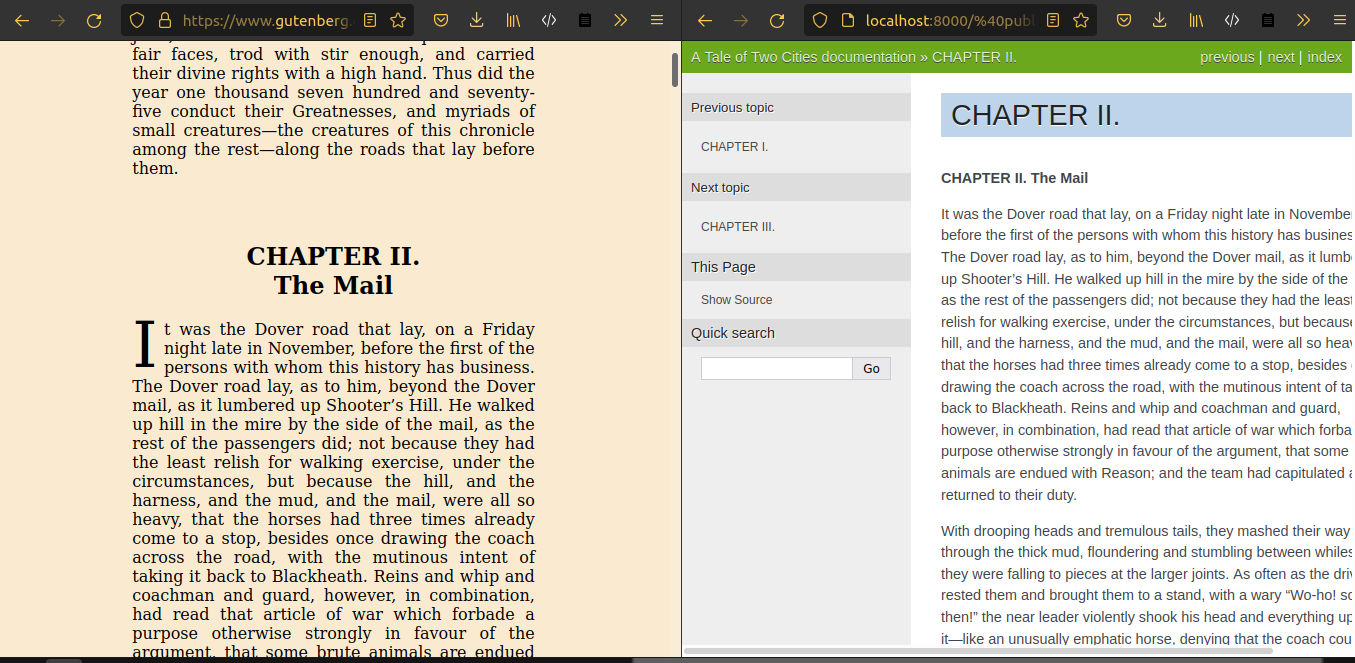
epub2sphinx can be used to convert public domain or CC-licensed epub files into static web pages that allows people to read them online. This will be useful for sites like Project Gutenberg or FreeTamilEbooks. Eventhough Project Gutenberg has an option to read online, it is very plain. Using Sphinx allows us to make use of any default or custom sphinx theme to make it look better.
Screenshots of comparison
Project Gutenberg online read vs Sphinx generated output

Contributing
Contributions are welcome. Fork the repo and Create a PR with your changes. If you are working on any of the existing issues, please add a comment on the issue to avoid duplicated effort.


1 maintainer

Metadata
1 maintainer
Release files for epub2sphinx 0.0.5
For a detailed explanation of source distributions (sdists) and built distributions (wheels), please see the package formats documentation.
Source distribution (sdist)
| File | Size | Uploaded | Provenance | |
|---|---|---|---|---|
| epub2sphinx-0.0.5.tar.gz | 12.4 kB | Without provenance | Details |
Built distribution (wheel)
| File | Interpreter | ABI | Platform | Reset |
|---|---|---|---|---|
| epub2sphinx-0.0.5-py3-none-any.whl | Python 3 | none | any | Details |
Total release size: 27.2 kB
Release files / epub2sphinx-0.0.5.tar.gz
| Download URL | epub2sphinx-0.0.5.tar.gz |
|---|---|
| Size | 12.4 kB |
| Tags | Source |
|
SHA-256 checksum How to use checksums |
322f33252d0bfa3ed4e0243ca789d085b5b82647713c7c3b83830d8c3f8be6c8
|
|
BLAKE2b-256 checksum How to use checksums |
538d4cc9700805257c42f9a3e511458275f793fa8932211cfb68a55be52644c0
|
| Upload date | |
|
Uploaded using Trusted Publishing? What is trusted publishing? |
No |
| Uploaded via |
twine/3.8.0 pkginfo/1.8.2 readme-renderer/34.0 requests/2.28.1 requests-toolbelt/0.9.1 urllib3/1.26.12 tqdm/4.63.0 importlib-metadata/4.11.2 keyring/23.5.0 rfc3986/2.0.0 colorama/0.4.6 CPython/3.10.9
|
Release files / epub2sphinx-0.0.5-py3-none-any.whl
| Download URL | epub2sphinx-0.0.5-py3-none-any.whl |
|---|---|
| Size | 14.8 kB |
| Tags | Python 3 |
|
SHA-256 checksum How to use checksums |
923250bf1ee2c90b06eb53422b33bd339f793e356d338af5f068f244948f1ec4
|
|
BLAKE2b-256 checksum How to use checksums |
076266b599ee06975b51625d74545f2c09de7f30f5b8952684020f63679dfb21
|
| Upload date | |
|
Uploaded using Trusted Publishing? What is trusted publishing? |
No |
| Uploaded via |
twine/3.8.0 pkginfo/1.8.2 readme-renderer/34.0 requests/2.28.1 requests-toolbelt/0.9.1 urllib3/1.26.12 tqdm/4.63.0 importlib-metadata/4.11.2 keyring/23.5.0 rfc3986/2.0.0 colorama/0.4.6 CPython/3.10.9
|
Security for epub2sphinx 0.0.5
Provenance
Provenance describes where a file came from. On PyPI, provenance is shared via attestations, which provide a verifiable record of the build or publishing details. View details, limitations and caveats.
No provenance found
None of the files in this release were uploaded with provenance metadata.
A note on package security
PyPI is a repository for distributing packages, not a service for auditing them. While third-party security researchers and our staff do their best to detect and remove malicious packages, PyPI cannot guarantee the quality, security or suitability of any given package.














