
ESA







ESA is a dynamic Artificial Intelligence Automation Platform engineered to orchestrate efficient AI instruction management and task execution across a multitude of providers. Our solution infuses adaptive memory handling with a broad spectrum of commands to enhance AI's understanding and responsiveness, leading to improved task completion. The platform's smart features, like Smart Instruct and Smart Chat, seamlessly integrate web search, planning strategies, and conversation continuity, transforming the interaction between users and AI. By leveraging a powerful plugin system that includes web browsing and command execution, ESA stands as a versatile bridge between AI models and users. With an expanding roster of AI providers, code evaluation capabilities, comprehensive chain management, and platform interoperability, ESA is consistently evolving to drive a multitude of applications, affirming its place at the forefront of AI technology.
Embracing the spirit of extremity in every facet of life, we introduce ESA. This advanced AI Automation Platform is our bold step towards the realization of Artificial General Intelligence (AGI). Seamlessly orchestrating instruction management and executing complex tasks across diverse AI providers, ESA combines adaptive memory, smart features, and a versatile plugin system to maximize AI potential. With our unwavering commitment to innovation, we're dedicated to pushing the boundaries of AI and bringing AGI closer to reality.
Table of Contents 📖
⚠️ Disclaimers
Monitor Your Usage
Please note that using some AI providers (such as OpenAI's GPT-4 API) can be expensive! Monitor your usage carefully to avoid incurring unexpected costs. We're NOT responsible for your usage under any circumstance.
Key Features 🗝️
- Context and Token Management: Adaptive handling of long-term and short-term memory for an optimized AI performance, allowing the software to process information more efficiently and accurately.
- Smart Instruct: An advanced feature enabling AI to comprehend, plan, and execute tasks effectively. The system leverages web search, planning strategies, and executes instructions while ensuring output accuracy.
- Interactive Chat & Smart Chat: User-friendly chat interface for dynamic conversational tasks. The Smart Chat feature integrates AI with web research to deliver accurate and contextually relevant responses.
- Task Execution & Smart Task Management: Efficient management and execution of complex tasks broken down into sub-tasks. The Smart Task feature employs AI-driven agents to dynamically handle tasks, optimizing efficiency and avoiding redundancy.
- Chain Management: Sophisticated handling of chains or a series of linked commands, enabling the automation of complex workflows and processes.
- Web Browsing & Command Execution: Advanced capabilities to browse the web and execute commands for a more interactive AI experience, opening a wide range of possibilities for AI assistance.
- Multi-Provider Compatibility: Seamless integration with leading AI providers such as OpenAI GPT series, Hugging Face Huggingchat, GPT4All, GPT4Free, Oobabooga Text Generation Web UI, Kobold, llama.cpp, FastChat, Google Bard, Bing, and more.
- Versatile Plugin System & Code Evaluation: Extensible command support for various AI models along with robust support for code evaluation, providing assistance in programming tasks.
- Docker Deployment: Simplified setup and maintenance through Docker deployment.
- Audio-to-Text & Text-to-Speech Options: Integration with Hugging Face for seamless audio-to-text transcription, and multiple TTS choices, featuring Brian TTS, Mac OS TTS, and ElevenLabs.
- Platform Interoperability & AI Agent Management: Streamlined creation, renaming, deletion, and updating of AI agent settings along with easy interaction with popular platforms like Twitter, GitHub, Google, DALL-E, and more.
- Custom Prompts & Command Control: Granular control over agent abilities through enabling or disabling specific commands, and easy creation, editing, and deletion of custom prompts to standardize user inputs.
- RESTful API: FastAPI-powered RESTful API for seamless integration with external applications and services.
- Expanding AI Support: Continually updated to include new AI providers and services, ensuring the software stays at the forefront of AI technology.\
Quick Start Guide
Prerequisites
- Git
- Docker
- Docker Compose
- Python 3.10
- NVIDIA Container Toolkit (if using local models on GPU)
If using Windows and trying to run locally, it is unsupported, but you will need Windows Subsystem for Linux and Docker Desktop at a minimum in addition to the above.
Download and Install
Open a terminal and run the following to download and install ESA:
git clone https://github.com/experian-sales-advisor/ESA
cd ESA
./ESA.sh
Environment Setup
You can choose to skip the environment setup and accept default values by entering Y on the first question Quick Setup without advanced configuration? (Y for yes, N for No).
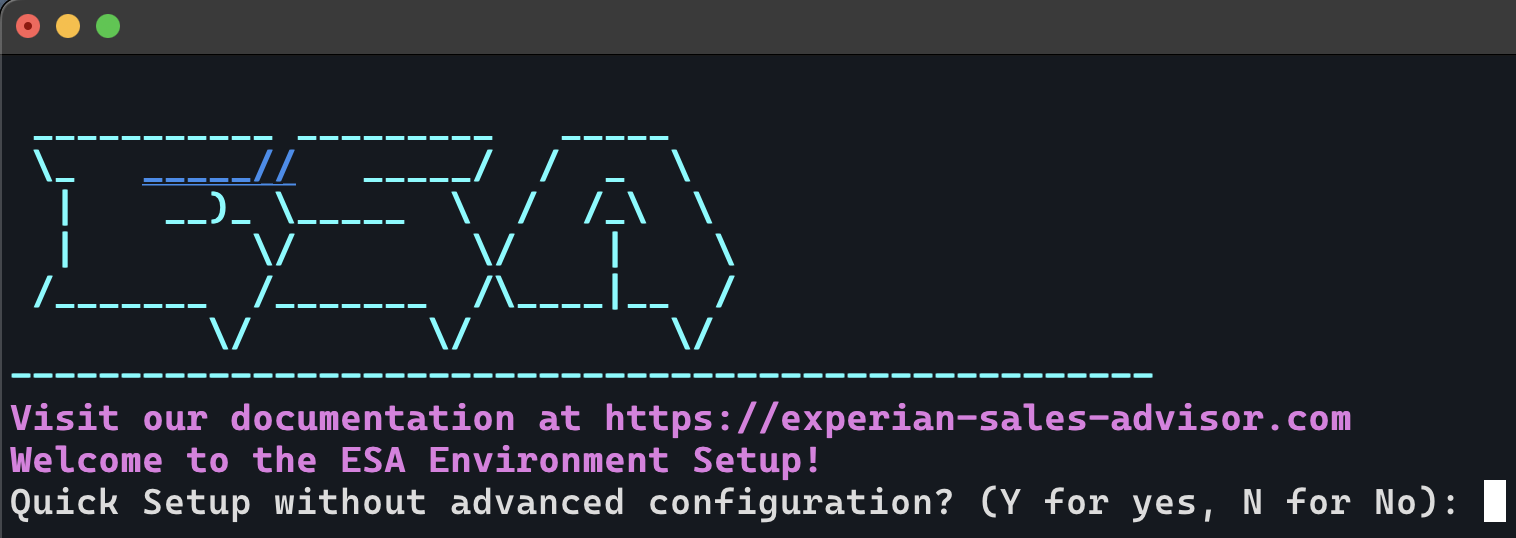
If you chose N, see the Environment Variable Setup documentation for guidance on setup.
Install Options
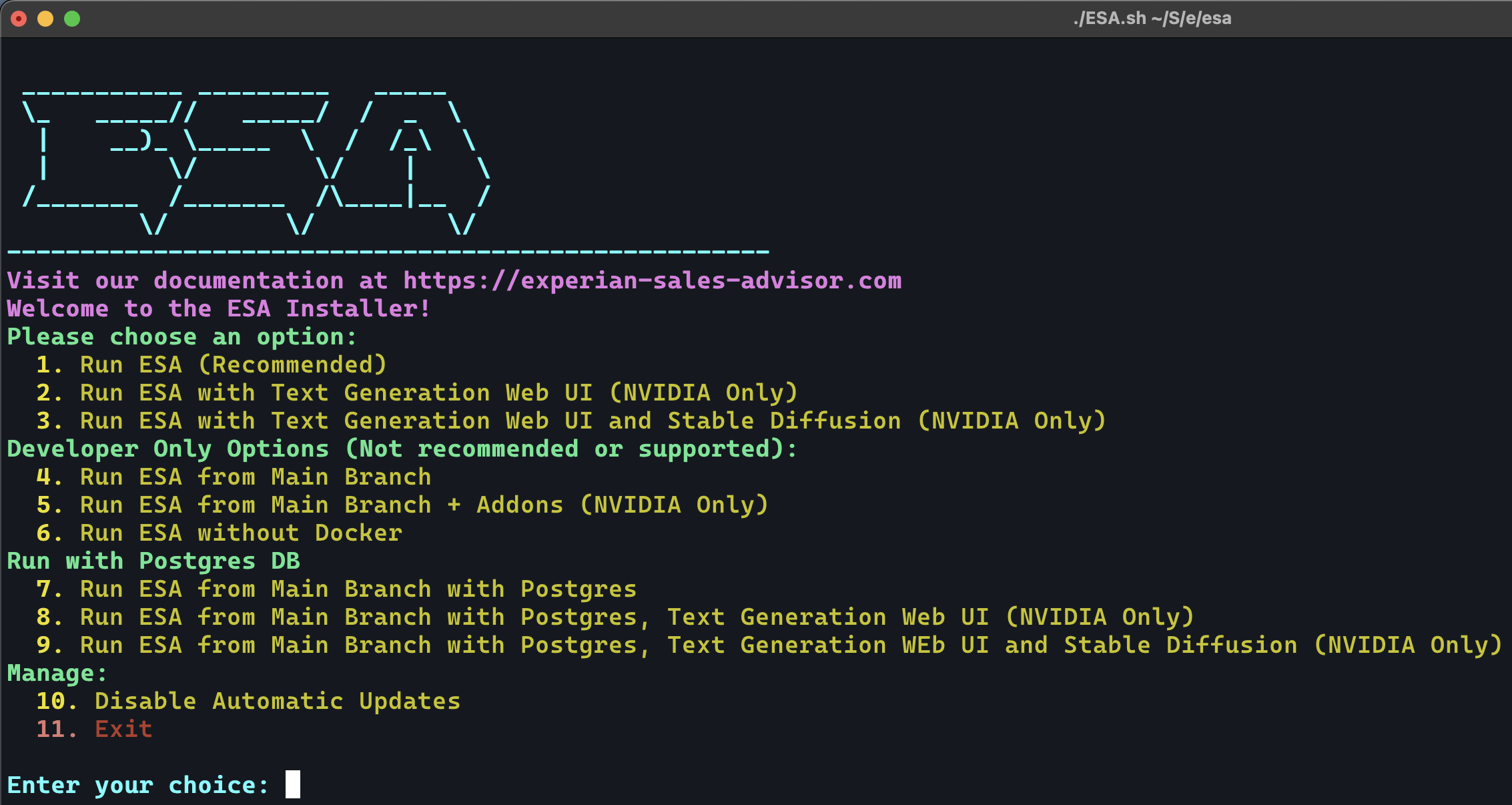
You will be prompted to choose an install option. Choose Option 1 to build docker images built and taged "latest" version. Choose 4 to build docker images built and tagged with the "main" branch in Github.
Running and Updating ESA
Any time you want to run or update ESA, run the following commands from your ESA directory:
./ESA.sh
- Access the ESA Next.js Admin Web Interface at http://localhost:24498
- Access the Agent Admin Streamlit Web Interface at http://localhost:8501
- Access the ESA API documentation at http://localhost:7437
If you're running with the option Run ESA and Text Generation Web UI with Docker (NVIDIA Only), you can access the Text Generation Web UI at http://localhost:7860/?__theme=dark to download and and configure your models. The AI_PROVIDER_URI will be http://text-generation-webui:5000 for your ESA agents.
Configuration
Each ESA Agent has its own settings for interfacing with AI providers, and other configuration options. These settings can be set and modified through the web interface.
Documentation
Need more information? Check out the documentation for more details to get a better understanding of the concepts and features of ESA.
Other Repositories
Check out the other ESA repositories at https://github.com/orgs/experian-sales-advisor/repositories - these include the ESA NextJS Web UI, ESA Streamlit Web UI, ESA Python SDK, ESA TypeScript SDK, and more!
1 maintainer

Metadata
1 maintainer
Release files for esa-ai 1.4.23
For a detailed explanation of source distributions (sdists) and built distributions (wheels), please see the package formats documentation.
Source distribution (sdist)
| File | Size | Uploaded | Provenance | Actions |
|---|---|---|---|---|
| esa-ai-1.4.23.tar.gz | 84.5 MB | Without provenance | Details for esa-ai-1.4.23.tar.gz |
Built distribution (wheel)
| File | Interpreter | ABI | Platform | Actions Reset |
|---|---|---|---|---|
| esa_ai-1.4.23-py3-none-any.whl | Python 3 | none | any | Details for esa_ai-1.4.23-py3-none-any.whl |
Total release size: 84.5 MB
Release files / esa-ai-1.4.23.tar.gz
| Download URL | esa-ai-1.4.23.tar.gz |
|---|---|
| Size | 84.5 MB |
| Tags | Source |
|
SHA-256 checksum How to use checksums |
31f141b45db3fa1a1197ea1619d1eba3c142dada0d8571cdc99c00e885c216d9
|
|
BLAKE2b-256 checksum How to use checksums |
4d29288b1b38ea317d1f00cd29b459e6f1faa8726c6078e6c7fb150f75b9f698
|
| Upload date | |
|
Uploaded using Trusted Publishing? What is trusted publishing? |
No |
| Uploaded via |
twine/4.0.2 CPython/3.9.18
|
Release files / esa_ai-1.4.23-py3-none-any.whl
| Download URL | esa_ai-1.4.23-py3-none-any.whl |
|---|---|
| Size | 30.2 kB |
| Tags | Python 3 |
|
SHA-256 checksum How to use checksums |
d0ab3d889fb274314b84f8c957003d40b8466546dc34b58c5e0b5155ee17cf98
|
|
BLAKE2b-256 checksum How to use checksums |
379a6524d36277d51004c10e68235030fdffa048f02f705b64f8ec2d62c08315
|
| Upload date | |
|
Uploaded using Trusted Publishing? What is trusted publishing? |
No |
| Uploaded via |
twine/4.0.2 CPython/3.9.18
|
Security for esa-ai 1.4.23
Provenance
Provenance describes where a file came from. On PyPI, provenance is shared via attestations, which provide a verifiable record of the build or publishing details. View details, limitations and caveats.
No provenance found
None of the files in this release were uploaded with provenance metadata.
A note on package security
PyPI is a repository for distributing packages, not a service for auditing them. While third-party security researchers and our staff do their best to detect and remove malicious packages, PyPI cannot guarantee the quality, security or suitability of any given package.
To learn more about protecting yourself from malicious actors, visit our package security documentation.














