
项目描述
根据特定格式的Excel模版,通过填充数据生成实际的Excel文件。 实际文件中的单元格样式,完全从模版文件中复制过来。 省去了代码定义单元格样式的过程,简化了开发和维护。
安装
pip install excel-template
同时需要安装
pip install openpyxl>=2.5.0
示例代码
  import os
  from excel_template import Writer

  template_path = os.path.join(
      ENV['root'], 'template', 'XXX_template.xlsx')
  output_file_path = os.path.join(
      ENV['root'], 'output', 'XXX.xlsx')
  # Sheet1为模版所在的Sheet名称
  excel_writer = Writer(template_path, 'Sheet1', output_file_path)

  data = XXXModule().get_XXX_data()
  if isinstance(data, dict):
      excel_writer.set_data(data)
  elif isinstance(data, list):
      excel_writer.set_data(data, multi_sheet=True)
  else:
      raise Exception(
          '如果生成单Sheet的Excel文件,data的格式必须为dict' +
          '如果生成多Sheet的Excel文件,data的格式必须为list' +
          '其中,list的每个数据成员,渲染一个Sheet')
模版的使用规则
-
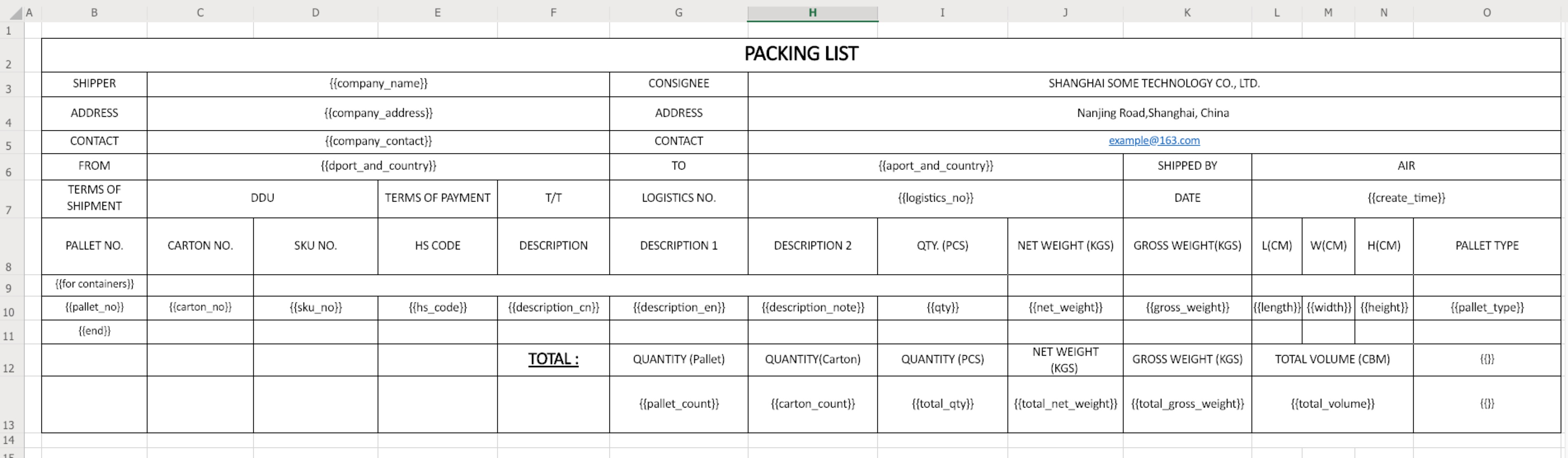
示例模版:(看不清图片,请右键,点击在新标签页中打开图片)
-
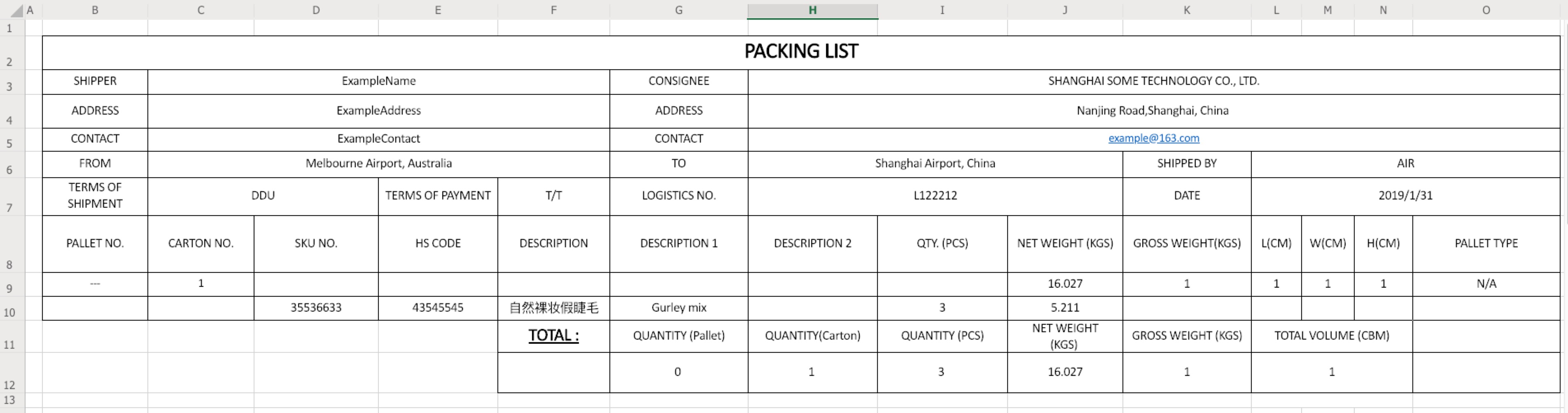
对应的填充数据如下:
    data = {
        'company_name': 'ExampleName',
        'company_address': 'ExampleAddress',
        'company_contact': 'ExampleContact',
        'dport_and_country': 'Melbourne Airport, Australia',
        'aport_and_country': 'Shanghai Airport, China',
        'logsitics_no': 'L122212',
        'create_time': '2019-01-31',
        'containers': [
            {
                'pallet_no': '---',
                'carton_no': '1',
                'sku_no': '',
                'hs_code': '',
                'description_cn': '',
                'description_en': '',
                'description_note': '',
                'qty': '',
                'net_weight': 16.027,
                'gross_weight': 1,
                'length': 1,
                'width': 1,
                'height': 1,
                'pallet_type': 'N/A'
            },
            {
                'pallet_no': '',
                'carton_no': '',
                'sku_no': '35536633',
                'hs_code': '43545545',
                'description_cn': '自然裸妆假睫毛',
                'description_en': 'Gurley mix',
                'description_note': '',
                'qty': 3,
                'net_weight': 5.211,
                'gross_weight': '',
                'length': '',
                'width': '',
                'height': '',
                'pallet_type': ''
            }
        ],
        'pallet_count': 0,
        'carton_count': 1,
        'total_qty': 3,
        'total_net_weight': 16.027,
        'total_gross_weight': 1,
        'total_volume': 1
    }
- 渲染的结果如下图所示:
- 注意事项:
- 全表支持横向合并单元格
- 只有表头数据(列表数据上方的非列表数据)支持纵向合并单元格,表尾数据(列表数据下方的非列表数据)不支持
- 如果想渲染空格的样式,例如合并单元格,也必须填充"{{}}'"
- 模版的复制,属于黑箱操作,因此样式(例如:边框等)需要认真设置。
待补充的方面
- 不支持表尾数据合并单元格,有需求可改进。
- 列表数据只支持一种生成规则,不支持不同列区域内存在不同的生成规则。
- 出现过生成Excel文件时间过长,导致接口超时的情况,目前还未对其进行研究过。 建议解决方法是,将其放到异步任务中执行。
1 maintainer

Metadata
1 maintainer
Release files for excel-template 0.1.5
For a detailed explanation of source distributions (sdists) and built distributions (wheels), please see the package formats documentation.
Source distribution (sdist)
| File | Size | Uploaded | Provenance | |
|---|---|---|---|---|
| excel-template-0.1.5.tar.gz | 6.1 kB | Without provenance | Details |
Built distribution (wheel)
| File | Interpreter | ABI | Platform | Reset |
|---|---|---|---|---|
| excel_template-0.1.5-py2.py3-none-any.whl | Python 3, Python 2 | none | any | Details |
Total release size: 13.3 kB
Release files / excel-template-0.1.5.tar.gz
| Download URL | excel-template-0.1.5.tar.gz |
|---|---|
| Size | 6.1 kB |
| Tags | Source |
|
SHA-256 checksum How to use checksums |
eee2102aca5723b37513e9b324346b995416a437fbdc92a9349e187355dc9194
|
|
BLAKE2b-256 checksum How to use checksums |
9d39577369db8e455e1c33f8661d4893a724f96455ff8c85ab8521420799b028
|
| Upload date | |
|
Uploaded using Trusted Publishing? What is trusted publishing? |
No |
| Uploaded via |
twine/1.13.0 pkginfo/1.5.0.1 requests/2.21.0 setuptools/40.7.1 requests-toolbelt/0.9.1 tqdm/4.30.0 CPython/2.7.13
|
Release files / excel_template-0.1.5-py2.py3-none-any.whl
| Download URL | excel_template-0.1.5-py2.py3-none-any.whl |
|---|---|
| Size | 7.2 kB |
| Tags | Python 2 Python 3 |
|
SHA-256 checksum How to use checksums |
3feb0e4ff65e274dd7814378751e18bdf4d2d625a33ffead45c92f55cd92f699
|
|
BLAKE2b-256 checksum How to use checksums |
4832e1884a4f69a8e925c01520beb187c0ee58107189f1556381ca3e54c4313b
|
| Upload date | |
|
Uploaded using Trusted Publishing? What is trusted publishing? |
No |
| Uploaded via |
twine/1.13.0 pkginfo/1.5.0.1 requests/2.21.0 setuptools/40.7.1 requests-toolbelt/0.9.1 tqdm/4.30.0 CPython/2.7.13
|
Security for excel-template 0.1.5
Provenance
Provenance describes where a file came from. On PyPI, provenance is shared via attestations, which provide a verifiable record of the build or publishing details. View details, limitations and caveats.
No provenance found
None of the files in this release were uploaded with provenance metadata.
A note on package security
PyPI is a repository for distributing packages, not a service for auditing them. While third-party security researchers and our staff do their best to detect and remove malicious packages, PyPI cannot guarantee the quality, security or suitability of any given package.
To learn more about protecting yourself from malicious actors, visit our package security documentation.














