
Experimentum





👨🔬🔬Experimentum is a domain-independent data-management framework for running and analyzing computational experiments.
About Experimentum
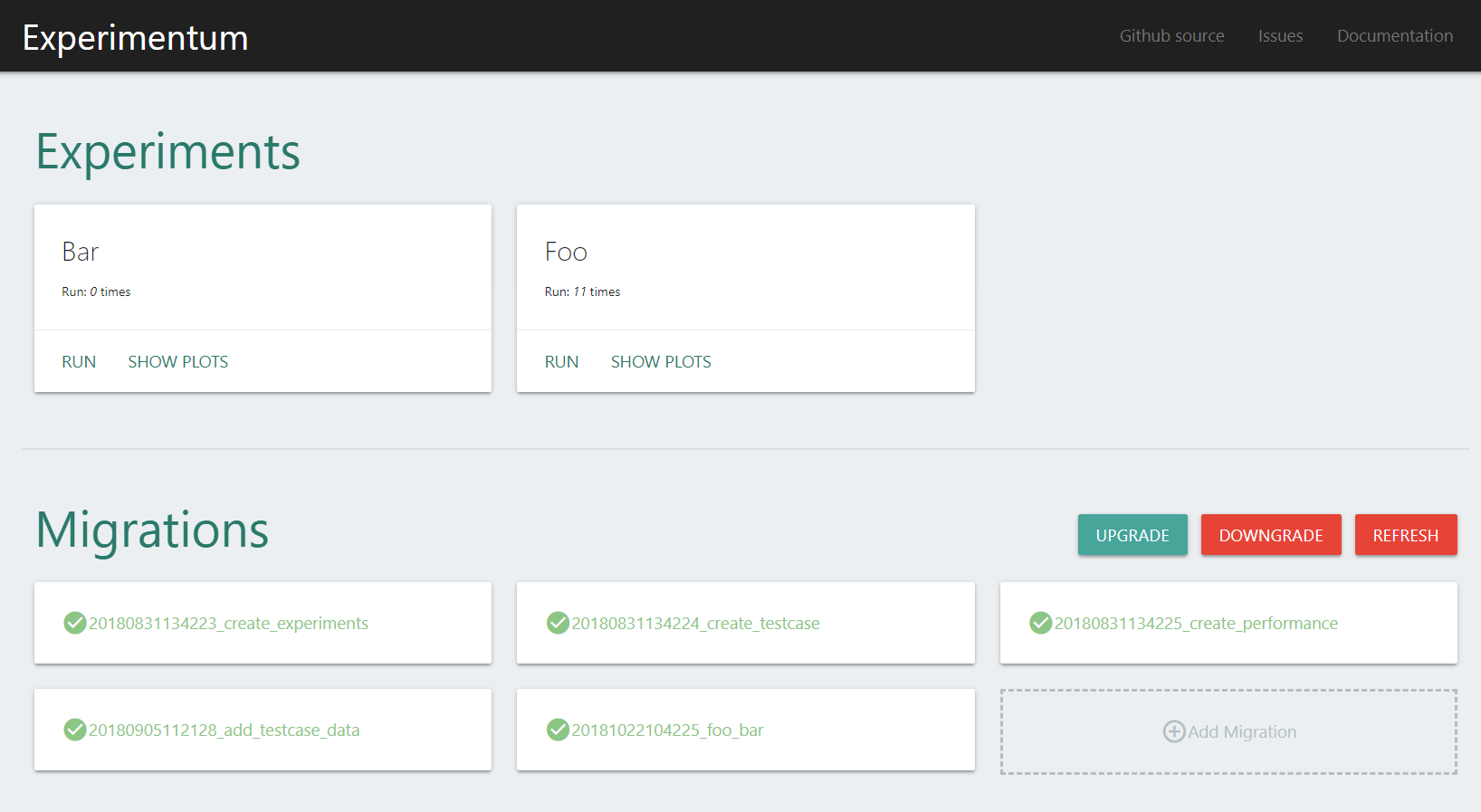
The main purposes of Experimentum are to support experimenters in conducting routine tasks in complex experiments more efficiently. Experimentum itself takes care of the database-specific parts of the data management: creating and modifying the database schema, storing the collected experiment results, and retrieving data from the database for further analysis.
Features
- Domain-independent
- Independent of used database (standard is a SQL database, but implementation can be swapped out to support NoSQL databases like MongoDB)
- Migrations and Schema-builder to easily create the database-schema (no need to know SQL!)
- Visualize results with matplotlib
- Manage Experiments via CLI or via Web-Interface
Installation 👨💻
The framework can be easily installed via pip with the following command:
$ pip install experimentum
The different
dbapipackages are not part of the package dependencies, so you must install them in order to connect to corresponding databases:
- PostgreSQL:
psycopg2- MySQL:
PyMySQLormysqlclient- Oracle:
cx_oracle- Microsoft SQL Server:
pyodbcorpymssql- SQLite: The
sqlite3module is bundled with Python by default
Getting Started
In order to use the experimentum framework, you’ll have to take care of some initial setup. You’ll need to auto-generate some code that creates the config files, migrations, repositories and other application-specific settings.
From the command line, cd into a directory where you would like to store your code, and then run the following command:
$ experimentum-quickstart
# if you you want to create the project in a subdirectory you can add the --root option
# experimentum-quickstart --root myproject
This willl create a myproject directory in your current directoy. The quickstart command will have created the following:
/
    config/
        app.json
        storage.json
    experiments/
        __init__.py
    logs/
    migrations/
        {TIMESTAMP}_create_experiments.py
        {TIMESTAMP}_create_testcase.py
        {TIMESTAMP}_create_performance.py
    repositories/
        __init__.py
        ExperimentRepository.py
        PerformanceRepository.py
        TestcaseRepository.py
    main.py
These files are:
- main.py: The main entry point of the framework. It lets you interact with the experimentum framework via the command line.
- config/: Contains all configuration files. You can place you own configuration files here. All *.json files will be loaded by the framework and available via the Config class under the config attribute of the App class.
- config/app.json and storage.json: Framework related settings. For more information see Configuration
- experiments/: Here you can place your experiments and their configrations.
- logs/: Contains the log files.
- migrations/: Your migration files are placed here.
- migrations/{TIMESTAMP}_create_experiments.py: Migration for creating the experiments table.
- migrations/{TIMESTAMP}_create_testcase.py: Migration for creating the testcase table.
- migrations/{TIMESTAMP}_create_performance.py: Migration for creating the performance table.
- repositories/ExperimentRepository.py: Repository for experiment data.
- repositories/TestcaseRepository.py: Repository for testcase data.
- repositories/PerformanceRepository.py: Repository for performance data.
Documentation 📃
An extensive documentation about the usage of the Experimentum framework and each individual component can be found under: https://pascalkleindienst.github.io/experimentum/index.html
Changelog 📝
The full changelog can be found in the CHANGELOG.md file.
Contributing
Thank you for considering contributing to the Experimentum framework! The contribution guide can be found in the CONTRIBUTING.md file.
Acknowledgments 👍
- @softgit - Beta Tester
License
Copyright 2019 Pascal Kleindienst
Licensed under the Apache License, Version 2.0 (the "License"); you may not use this file except in compliance with the License. You may obtain a copy of the License at
http://www.apache.org/licenses/LICENSE-2.0
Unless required by applicable law or agreed to in writing, software distributed under the License is distributed on an "AS IS" BASIS, WITHOUT WARRANTIES OR CONDITIONS OF ANY KIND, either express or implied. See the License for the specific language governing permissions and limitations under the License.
1 maintainer

Metadata
1 maintainer
Release files for experimentum 1.0.3
For a detailed explanation of source distributions (sdists) and built distributions (wheels), please see the package formats documentation.
Source distribution (sdist)
| File | Size | Uploaded | |
|---|---|---|---|
| experimentum-1.0.3.tar.gz | 64.6 kB | Details |
Built distribution (wheel)
| File | Interpreter | ABI | Platform | Reset |
|---|---|---|---|---|
| experimentum-1.0.3-py2.py3-none-any.whl | Python 3, Python 2 | none | any | Details |
Total release size: 151.8 kB
Release files / experimentum-1.0.3.tar.gz
| Download URL | experimentum-1.0.3.tar.gz |
|---|---|
| Size | 64.6 kB |
| Tags | Source |
|
SHA-256 checksum How to use checksums |
bb2796d2ecf62472bb0346ec3f8a4c96ed7142c433f3ba96c2c6c4268ea0be4f
|
|
BLAKE2b-256 checksum How to use checksums |
7641ed7d492e95711a654bf18332be7f149484b7e4a66b67008797b2a4b3a4e9
|
| Upload date | |
|
Uploaded using Trusted Publishing? What is trusted publishing? |
No |
| Uploaded via |
twine/1.13.0 pkginfo/1.5.0.1 requests/2.19.1 setuptools/40.3.0 requests-toolbelt/0.9.1 tqdm/4.31.1 CPython/3.6.3
|
Release files / experimentum-1.0.3-py2.py3-none-any.whl
| Download URL | experimentum-1.0.3-py2.py3-none-any.whl |
|---|---|
| Size | 87.3 kB |
| Tags | Python 2 Python 3 |
|
SHA-256 checksum How to use checksums |
ecd142d5d362f4a4c94f16d99c90e999b60b995be7d6b95e55e3bace8a8766f4
|
|
BLAKE2b-256 checksum How to use checksums |
e649f5e4c8228facffe1ebe163a250325b9f61daae4eb9675d969d455b79e5ea
|
| Upload date | |
|
Uploaded using Trusted Publishing? What is trusted publishing? |
No |
| Uploaded via |
twine/1.13.0 pkginfo/1.5.0.1 requests/2.19.1 setuptools/40.3.0 requests-toolbelt/0.9.1 tqdm/4.31.1 CPython/3.6.3
|














