
Create simple visualisations of mathematical operations on small datasets by rendering an expression graph, show your friends or serialise it for later.
Contents
Usage
Examples follow using the Python interactive shell
Starting out
Import some things from the module
from expr import Expr, NumExprConstruct an expression
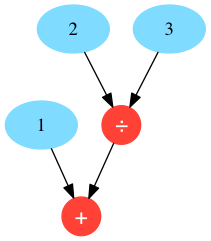
expr = Expr(
    operation_name='+',
    arguments=[
        NumExpr(number=1),
        Expr(
            operation_name='/',
            arguments=[
                NumExpr(number=2),
                NumExpr(number=3),
            ]
        )
    ]
)
Get an answer
>> expr.resolve()
1.6666666666666665
Draw a graph
>> graph = expr.graph()
>> graph.write_png('example.png')
True
example.png
Less verbosity
Import things using as to save your typing fingers by aliasing those characters away. In Python we don’t really need to care if functions specify keyword or positional signatures, so let’s not bother with those wordy keywords, hey.
>>> from expr import Expr as E, NumExpr as N
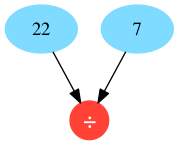
>>> expr = E('/', [N(22), N(7)])
>>> expr.resolve()
3.142857142857143
>>> expr.graph().write_png('pi.png')
True
pi.png
Involving pandas
We can create expressions that involve more than just numbers …
>>> import pandas
>>> from expr import (
...     Expr as E,
...     NumExpr as N,
...     DataFrameExpr as D,
... )
Create some stupid datasets
>>> def two_by_four():
...     data = [(n + 1, n + 1) for n in range(4)]
...     return pandas.DataFrame.from_records(data=data, columns=['a', 'b'])

>>> df_A = two_by_four()
>>> df_B = two_by_four()
>>> df_A
   a  b
0  1  1
1  2  2
2  3  3
3  4  4
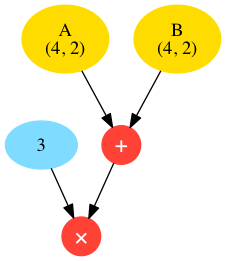
Create the expression object, the DataFrameExpr object (aliased here as D) takes an optional argument name which will be used as a label if present, otherwise an automatically generated label will applied.
>>> expr = E('*', [N(3), E('+', [D(df_A, 'A'), D(df_B, 'B')])])
>>> expr.graph().write_png('dataframe.png')
True
>>> expr.resolve()
    0   1
0   6   6
1  12  12
2  18  18
3  24  24
dataframe.png
Serialising
Let’s serialise the above example using JSON, any arguments passed to the serialise method are used when the serialiser function is applied.
>>> import json
>>> print(expr.serialise(json.dumps, indent=4))
{
    "__type__": "Expr",
    "operation_name": "*",
    "arguments": [
        {
            "__type__": "NumExpr",
            "number": 3.0
        },
        {
            "__type__": "Expr",
            "operation_name": "+",
            "arguments": [
                {
                    "__type__": "DataFrameExpr",
                    "name": "A",
                    "dataframe": {
                        "a": {
                            "0": 1,
                            "1": 2,
                            "2": 3,
                            "3": 4
                        },
                        "b": {
                            "0": 1,
                            "1": 2,
                            "2": 3,
                            "3": 4
                        }
                    }
                },
                {
                    "__type__": "DataFrameExpr",
                    "name": "B",
                    "dataframe": {
                        "a": {
                            "0": 1,
                            "1": 2,
                            "2": 3,
                            "3": 4
                        },
                        "b": {
                            "0": 1,
                            "1": 2,
                            "2": 3,
                            "3": 4
                        }
                    }
                }
            ]
        }
    ]
}
Getting funccy
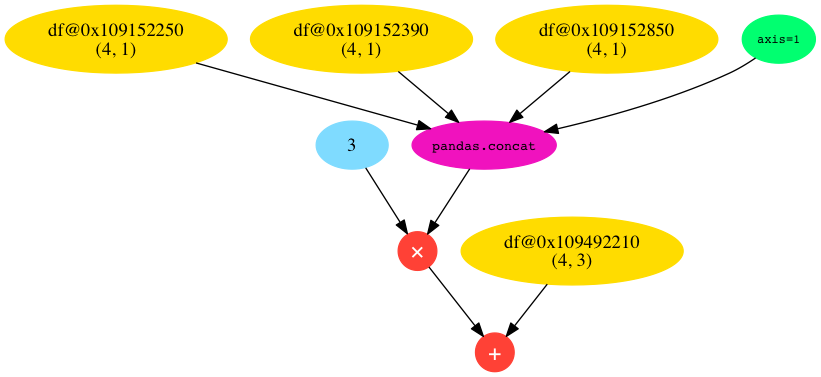
The final expression provided in this package is FuncExpr, which applies arbitrary functions to the arguments supplied (which should be objects implementing a resolve method). Keywords are also applied, probably for specifying options, which do not have to be expression objects. A contrived example of FuncExpr use follows.
Do some smart imports
import pandas
from expr import (
    Expr as E,
    NumExpr as N,
    DataFrameExpr as D,
    FuncExpr as F,
)
Define a factory function for creating DataFrame objects
def x_by_y(x, y, columns=False):
    data = [[a + b for b in range(x)] for a in range(y)]
    if columns is False:
        columns = [chr(97 + c) for c in range(x)]
    return pandas.DataFrame.from_records(data=data, columns=columns)
Crank out some df’s for later use
df_A = x_by_y(3, 4)
df_B = x_by_y(3, 4)
df_C = x_by_y(3, 4)
Now set up out expression and look at its graph
expr = E('+',
    [
        E('*',
            [
                N(3),
                F('pandas.concat',
                    [
                        D(x_by_y(1, 4, ['a'])),
                        D(x_by_y(1, 4, ['b'])),
                        D(x_by_y(1, 4, ['c'])),
                    ], axis=1
                )
            ]
        ),
        D(x_by_y(3, 4))
    ]
)
G = expr.graph()
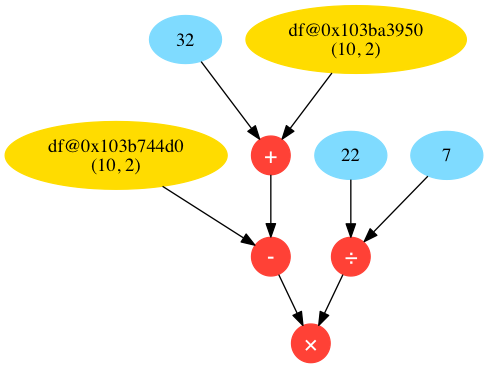
G.write_png('func.png')
func.png
Crazy ish
Why not very clumsily visualise a call stack for your audience’s pleasure?
Known Issues
If you like YAML, serialising pandas objects, may be problematic, but JSON should be fine.
Also
Colours courtesy of clrs.cc
1 maintainer

Metadata
1 maintainer
Release files for expr 0.0.1h
For a detailed explanation of source distributions (sdists) and built distributions (wheels), please see the package formats documentation.
Source distribution (sdist)
| File | Size | Uploaded | Provenance | |
|---|---|---|---|---|
| expr-0.0.1h.tar.gz | 6.5 kB | Without provenance | Details |
Release files / expr-0.0.1h.tar.gz
| Download URL | expr-0.0.1h.tar.gz |
|---|---|
| Size | 6.5 kB |
| Tags | Source |
|
SHA-256 checksum How to use checksums |
6b99490b24bf91e63b3fb12dba679b3092b467fcce5ba62efc6c4e839059a805
|
|
BLAKE2b-256 checksum How to use checksums |
2bcd89c913fd7faf9e277def5cc1d5926c9cadd9f9e0318dc021b9755c6800a9
|
| Upload date | |
|
Uploaded using Trusted Publishing? What is trusted publishing? |
No |
Security for expr 0.0.1h
Provenance
Provenance describes where a file came from. On PyPI, provenance is shared via attestations, which provide a verifiable record of the build or publishing details. View details, limitations and caveats.
No provenance found
None of the files in this release were uploaded with provenance metadata.
A note on package security
PyPI is a repository for distributing packages, not a service for auditing them. While third-party security researchers and our staff do their best to detect and remove malicious packages, PyPI cannot guarantee the quality, security or suitability of any given package.














