
Exprec
Exprec records your experiments so you can compare different runs and easily reproduce results.
- Track your experiments for experiment comparison and reproducability
- Minimum setup: only two lines of code required
- Framework agnostic - works with any machine learning/deep learning framework
- Experiments are saved locally - nothing is saved in the cloud
Installation
pip install exprec
Usage
Minimal example
from exprec import Experiment

with Experiment() as experiment:
    # YOUR CODE HERE
An experiment is recorded in the with statement. This includes recording the terminal output, the source code used and the packages that are installed at the time the experiment runs. You can also add parameters, scalars and images to the experiment (see below).
Dashboard
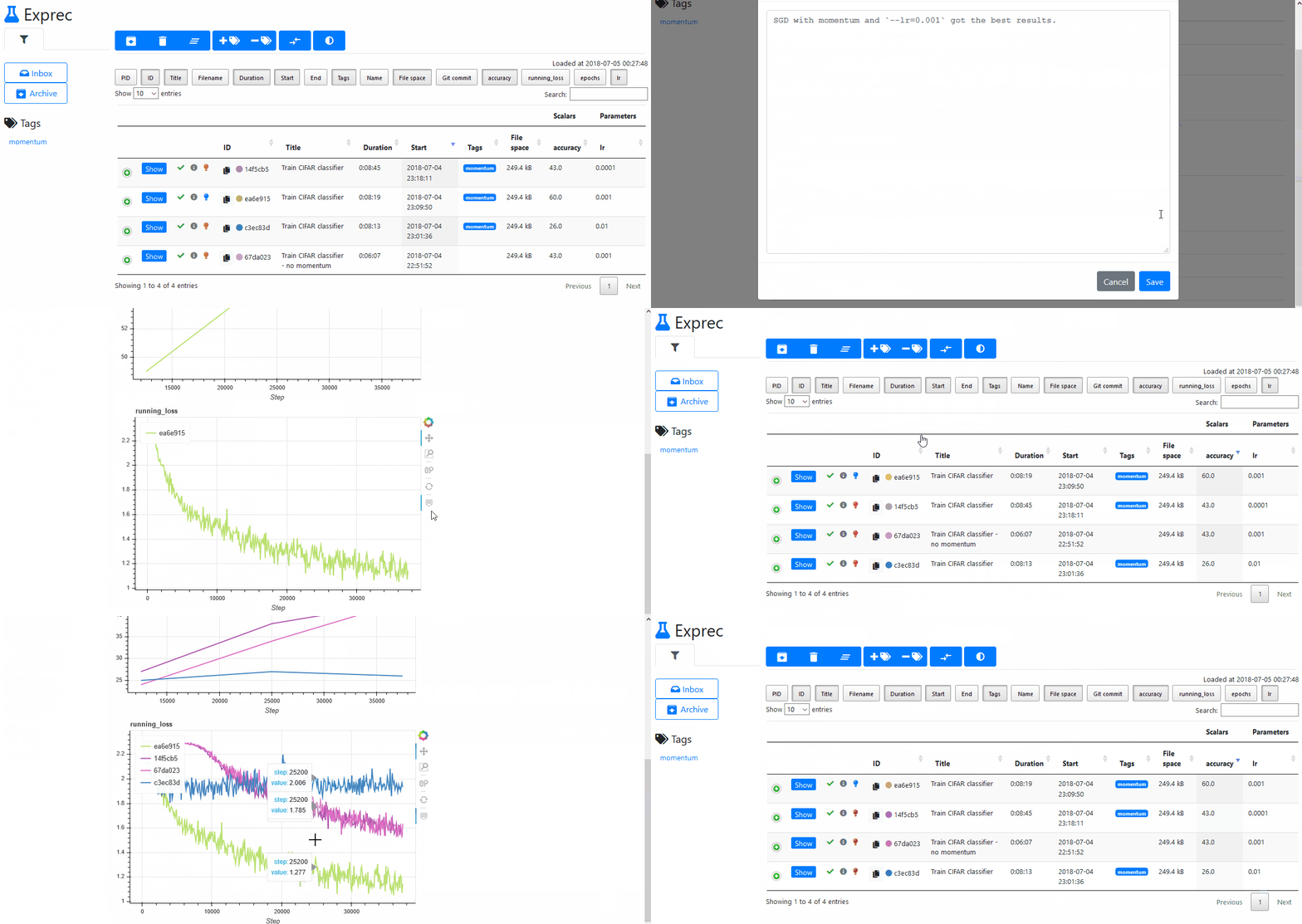
Run exprec in your terminal to start the dashboard. exprec has to be run from the same folder as you started your python script.
Now visit http://localhost:8080/ in your browser to see the dashboard. If the client and the exprec server run on different machines, set the flag --host=0.0.0.0 when starting exprec. This allows any client with access to the server to see the dashboard.
More code examples
from exprec import Experiment

with Experiment(title='My experiment', tags=['tag1', 'tag2']) as experiment:
    experiment.set_parameter('test_parameter', 5)

    for i in range(10):
        experiment.add_scalar('2x', 2*i, step=i)
        experiment.add_scalar('3x', 3*i, step=i)

    with experiment.open('filename.txt', mode='w') as fp:
        fp.write('test\n')
        # This creates a file in the experiment's folder (`.exprec/<experiment-id>/files/filename.txt`).

    raise ValueError('Invalid value')
    # The experiment will finish with status 'failed'. The exception is also logged.
Examples
Scripts under examples/ demonstrate how to use this package.
API
Experiment
Experiment(title='', tags=[], verbose=True, exceptions_to_ignore=['KeyboardInterrupt'], name='')
set_parameter
Experiment.set_parameter(name, value)
Sets the parameter to the given value.
Only one value can be recorded per parameter. You can overwrite a previously set parameter.
add_scalar
Experiment.add_scalar(name, value, step=None)
Records the scalar's value at a given step.
add_image
Experiment.add_image(name, image, step)
Adds an image at a given step.
Args:
    name (str): The name of the image
    image: The image to save. Should either be a Pillow image, or a numpy array which can be converted to a Pillow image.
    step (int)
open
Experiment.open(filename, mode='r', uuid=None)
Opens a file in the experiment's folder.
Args:
    filename (str): A filename or path to a filename
    mode (str): The mode in which the file is opened. Supports the same modes as Python's built-in `open()` function.
    uuid (str, None): A previous experiment's id. If given, it will look for the filename in the previous experiment's
        saved files. Only supports 'r' mode when a uuid is given.
Returns:
    A file object
Why "Exprec"?
Exprec is short for Experiment recorder.
License
MIT License
1 maintainer

Metadata
1 maintainer
Release files for exprec 0.1.1
For a detailed explanation of source distributions (sdists) and built distributions (wheels), please see the package formats documentation.
Source distribution (sdist)
| File | Size | Uploaded | |
|---|---|---|---|
| exprec-0.1.1.tar.gz | 25.4 kB | Details |
Built distribution (wheel)
| File | Interpreter | ABI | Platform | Reset |
|---|---|---|---|---|
| exprec-0.1.1-py3-none-any.whl | Python 3 | none | any | Details |
Total release size: 55.1 kB
Release files / exprec-0.1.1.tar.gz
| Download URL | exprec-0.1.1.tar.gz |
|---|---|
| Size | 25.4 kB |
| Tags | Source |
|
SHA-256 checksum How to use checksums |
21213df80c0cf9325665f47152890409ceebc3bc30a6ebe77dea801cdb644a39
|
|
BLAKE2b-256 checksum How to use checksums |
7c4e15ba401963c38973691a92b71f5d67e194c2ef2e6bb16e2efb87b57e16b2
|
| Upload date | |
|
Uploaded using Trusted Publishing? What is trusted publishing? |
No |
| Uploaded via |
twine/1.12.1 pkginfo/1.4.2 requests/2.20.1 setuptools/40.6.2 requests-toolbelt/0.8.0 tqdm/4.28.1 CPython/3.5.2
|
Release files / exprec-0.1.1-py3-none-any.whl
| Download URL | exprec-0.1.1-py3-none-any.whl |
|---|---|
| Size | 29.7 kB |
| Tags | Python 3 |
|
SHA-256 checksum How to use checksums |
99b55b6be6ab1701812fd85ab5872941f7b9e5e2139437072be1cde7d508fb51
|
|
BLAKE2b-256 checksum How to use checksums |
8fed11176bf74ff24eb90172408d019999a5f06c772a1fcddeda6484a59bc9f6
|
| Upload date | |
|
Uploaded using Trusted Publishing? What is trusted publishing? |
No |
| Uploaded via |
twine/1.12.1 pkginfo/1.4.2 requests/2.20.1 setuptools/40.6.2 requests-toolbelt/0.8.0 tqdm/4.28.1 CPython/3.5.2
|














