
Facebook Logger
A logging handler that sends you log entries on Facebook Messenger
import logging
from facebooklogger import FacebookLogger
logger = logging.getLogger("Home Server")
logger.setLevel(logging.INFO)
fb = FacebookLogger(level=logging.INFO)
logger.addHandler(fb)

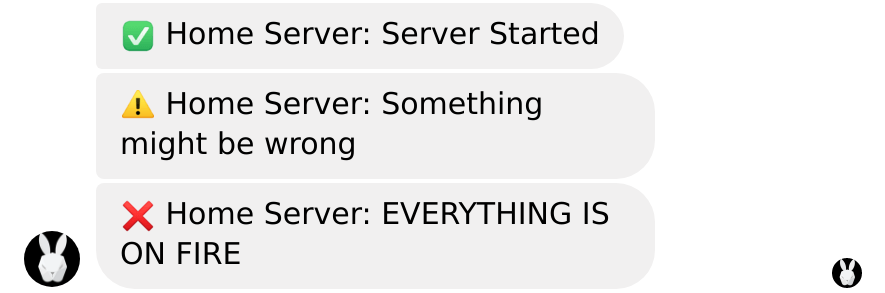
logger.info("Server Started")
logger.warning("Something might be wrong")
logger.error("EVERYTHING IS ON FIRE")
Getting Started
Install facebooklogger with
pip install facebooklogger
To use the Facebook logger, you will need to create a Facebook page and get two pieces of information. A Page Access Token to authenticate as the page, and the User ID you want logs sent to.
Configuration
The logger requires two configuration options set:
PAGE_ACCESS_TOKENFB_USER_ID
They can be provided as environment variables, or by creating a file called .env in
the working directory that looks like:
PAGE_ACCESS_TOKEN=ABCDEFGH12345abcefweeaABCDEFGH12345abcefweeaABCDEFGH12345abcefweeaABCDEFGH12345abcefweeaABCDEFGH12345abcefweeaABCDEFGH12345abcefweeaABCDEFGH12345abcefweeaABCDEFGH12345abcefwe
FB_USER_ID=1234567891234567
Replacing the token and user ID with your own obtained below
Page Access Token
Note that to use this logger you DO NOT need to have your app verified by Facebook, you can just stay in development mode.
Follow the getting started section of
https://developers.facebook.com/docs/messenger-platform/getting-started/quick-start
User ID
Facebook Page IDs are unique to the page, and as such if you change page you will need
to re-acquire the user id.
Note: You will have to already have the page access token
To get user id, run the following
PAGE_ACCESS_TOKEN=YOURTOKEN python3 -m facebooklogger
and follow the prompts
1 maintainer

Metadata
1 maintainer
Release files for facebooklogger 0.2.4
For a detailed explanation of source distributions (sdists) and built distributions (wheels), please see the package formats documentation.
Source distribution (sdist)
| File | Size | Uploaded | |
|---|---|---|---|
| facebooklogger-0.2.4.tar.gz | 4.1 kB | Details |
Built distribution (wheel)
| File | Interpreter | ABI | Platform | Reset |
|---|---|---|---|---|
| facebooklogger-0.2.4-py3-none-any.whl | Python 3 | none | any | Details |
Total release size: 9.7 kB
Release files / facebooklogger-0.2.4.tar.gz
| Download URL | facebooklogger-0.2.4.tar.gz |
|---|---|
| Size | 4.1 kB |
| Tags | Source |
|
SHA-256 checksum How to use checksums |
cb5475b65578ef461f49b331b65b4207ad8db37523d3aea6fb3e885cf6954f70
|
|
BLAKE2b-256 checksum How to use checksums |
f3306ae2dc08d2acec372090ce8f45a75e082d34eca7792a9a2024c4ff24b011
|
| Upload date | |
|
Uploaded using Trusted Publishing? What is trusted publishing? |
No |
| Uploaded via |
twine/3.1.1 pkginfo/1.5.0.1 requests/2.22.0 setuptools/40.8.0 requests-toolbelt/0.9.1 tqdm/4.40.2 CPython/3.8.0
|
Release files / facebooklogger-0.2.4-py3-none-any.whl
| Download URL | facebooklogger-0.2.4-py3-none-any.whl |
|---|---|
| Size | 5.7 kB |
| Tags | Python 3 |
|
SHA-256 checksum How to use checksums |
5ef25e5b986962e67a456470aa4659f10c0634c9222135eae37b837b6f1f7629
|
|
BLAKE2b-256 checksum How to use checksums |
3f76851548127eefed9ee05f0b3d1bcf016000db8e45f51394629101d2fe7cb8
|
| Upload date | |
|
Uploaded using Trusted Publishing? What is trusted publishing? |
No |
| Uploaded via |
twine/3.1.1 pkginfo/1.5.0.1 requests/2.22.0 setuptools/40.8.0 requests-toolbelt/0.9.1 tqdm/4.40.2 CPython/3.8.0
|














