
Open Policy Agent middleware for FastAPI
Table of contents
- Contributors
- What does fastapi-opa do
- Installation
- How to get started
- Open Policy Agent
- Authentication flow
- Custom payload enrichment
Contributors
Thanks to all the contributors below. Furthermore thanks for raising issues.









What does fastapi-opa do
The FastAPI extension fastapi-opa allows to add login flows and integrates
Open Policy Agent to your app.
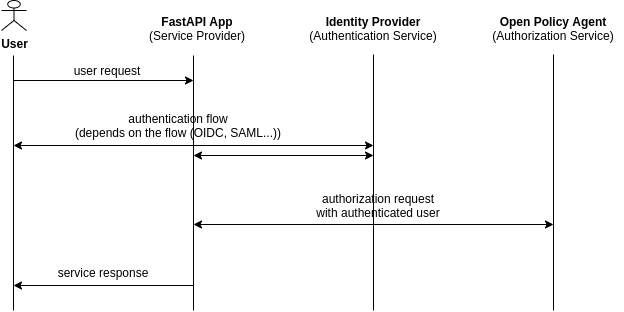
The middleware redirects the request to the identity provider. After the authentication it validates the token. Using the token, Open Policy Agent decides if the response has success or failure status.
Installation
poetry add [--extras "graphql"] [--extras "saml"] fastapi-opa
How to get started
:bulb: checkout the wiki for an environment setup with Keycloak and Open Policy Agent:
Getting Started with FastAPI app with Authentication and Authorization
The package combines authentication and authorization with FastAPI. You can
customize the OPAMiddleware depending on your authentication flow.
Check out these examples for the most common flows:
- OIDC:
fastapi_opa.example_oidc.py - SAML:
fastapi_opa.example_saml.py
Open Policy Agent
The middleware sends the validated and authenticated user token to Open
Policy Agent. It adds the extra attributes request_method and
request_path.
{
    "input": {
        "exp": 1617466243,
        "iat": 1617465943,
        "auth_time": 1617465663,
        "jti": "9aacb638-70c6-4f0a-b0c8-dbc67f92e3d1",
        "iss": "http://localhost:8080/auth/realms/example-realm",
        "aud": "example-client",
        "sub": "ccf78dc0-e1d6-4606-99d4-9009e74e3ab4",
        "typ": "ID",
        "azp": "david",
        "session_state": "41640fe7-39d2-44bc-818c-a3360b36fb87",
        "at_hash": "2IGw-B9f5910Sll1tnfQRg",
        "acr": "0",
        "email_verified": false,
        "hr": "true",
        "preferred_username": "david",
        "user": "david",
        "subordinates": [],
        "request_method": "GET",
        "request_path": ["finance", "salary", "david"]
    }
}
In Open Policy Agent you can create policies using user roles, routes, request methods etc.
An example policy (from the official Open Policy Agent docs) for this setup could look like this:
package httpapi.authz

# bob is alice's manager, and betty is charlie's.
subordinates = {"alice": [], "charlie": [], "bob": ["alice"], "betty": ["charlie"]}

# HTTP API request
import input

default allow = false

# Allow users to get their own salaries.
allow {
  some username
  input.request_method == "GET"
  input.request_path = ["finance", "salary", username]
  input.user == username
}

# Allow managers to get their subordinates' salaries.
allow {
  some username
  input.request_method == "GET"
  input.request_path = ["finance", "salary", username]
  subordinates[input.user][_] == username
}
Authentication flow
Use the provided interface to set up your desired authentication flow. Then
insert it into OPAMiddleware (fastapi_opa.auth.auth_interface.AuthInterface).
Consider submitting a pull request with new flows.
You can also use these ready-to-go implementations:
API key authentication
In the API key authentication a request header needs to match a given value.
# Configure API keys
api_key_config = APIKeyConfig(
    header_key="test",
    api_key="1234"
)
api_key_auth = APIKeyAuthentication(api_key_config)
In the example the header header["test"] = "1234" authenticates the request.
For Open Policy Agent, set user to APIKey and the variable client to the
client address.
OIDC authentication
The example in How to get started provides an example for the implementation of the OIDC Authentication.
SAML authentication
For the saml implementation create your certs using
openssl req -new -x509 -days 3652 -nodes -out sp.crt -keyout sp.key and
add the keys to the sp section of your settings.json. Checkout the test
settings to get an idea (tests/test_data/saml/*.json).
Provide the path to your own settings.json and advanced_settings.json
in the SAMLAuthConfig like in the example below (don't use the test data in
production).
from fastapi_opa import OPAConfig
from fastapi_opa.auth.auth_saml import SAMLAuthentication
from fastapi_opa.auth.auth_saml import SAMLConfig

opa_host = "http://localhost:8181"

saml_config = SAMLConfig(settings_directory="./tests/test_data/saml")
saml_auth = SAMLAuthentication(saml_config)

opa_config = OPAConfig(authentication=saml_auth, opa_host=opa_host,
                       accepted_methods=["id_token", "access_token"])
Upload the certificate to your identity provider. Using Keycloak as an
identity provider you need to configure encrypt assertion,
client signature required, force POST bindings on creating the client.
Also configure: Client Scopes -> role_list (saml) -> Mappers tab ->
role list -> Single Role Attribute
Custom payload enrichment
Use the interface fastapi_opa.opa.opa_config.Injectable to add
more information to the payload sent to Open Policy Agent.
Configure the injectables in the OPAConfig:
class FancyInjectable(Injectable):
    async def extract(self, request: Request) -> List:
        return ["some", "custom", "stuff"]

fancy_inj = FancyInjectable("fancy_key", skip_endpoints=["/health", "/api/[^/]*/test])

opa_config = OPAConfig(
    authentication=oidc_auth, opa_host=opa_host, injectables=[fancy_inj]
)
Use skip_endpoints to choose which endpoints the injectable shouldn't affect.
To define an endpoint, specify an exact string or a regular expression.
GraphQL enrichment
For GraphQL you can use the ready to go injectable:
from fastapi_opa.opa.enrichment.graphql_enrichment import GraphQLInjectable`

graphql = GraphQLInjectable("gql_injectable")
opa_config = OPAConfig(authentication=oidc_auth, opa_host=opa_host, injectables=[graphql])
1 maintainer

Metadata
1 maintainer
Release files for fastapi-opa 2.0.3
For a detailed explanation of source distributions (sdists) and built distributions (wheels), please see the package formats documentation.
Source distribution (sdist)
| File | Size | Uploaded | |
|---|---|---|---|
| fastapi_opa-2.0.3.tar.gz | 26.2 kB | Details |
Built distribution (wheel)
| File | Interpreter | ABI | Platform | Reset |
|---|---|---|---|---|
| fastapi_opa-2.0.3-py3-none-any.whl | Python 3 | none | any | Details |
Total release size: 53.4 kB
Release files / fastapi_opa-2.0.3.tar.gz
| Download URL | fastapi_opa-2.0.3.tar.gz |
|---|---|
| Size | 26.2 kB |
| Tags | Source |
|
SHA-256 checksum How to use checksums |
c88533ac229b5d102560b76fd3f1db9fefed7ea5966fdf451c8e8d61b266c574
|
|
BLAKE2b-256 checksum How to use checksums |
ec9fc0a037ba7b44c33b89ef491de11012dda50a95e985b92414055f38f4da5c
|
| Upload date | |
|
Uploaded using Trusted Publishing? What is trusted publishing? |
No |
| Uploaded via |
poetry/1.8.5 CPython/3.12.8 Darwin/24.1.0
|
Release files / fastapi_opa-2.0.3-py3-none-any.whl
| Download URL | fastapi_opa-2.0.3-py3-none-any.whl |
|---|---|
| Size | 27.2 kB |
| Tags | Python 3 |
|
SHA-256 checksum How to use checksums |
729fe20a1124c9e89e70e2177a3ea0f1fe369d1514d37b551e40db51e9245d27
|
|
BLAKE2b-256 checksum How to use checksums |
04fae701f493bc04de87bceadf76debf565abd20cf187ceb540dd3c48adfdaa1
|
| Upload date | |
|
Uploaded using Trusted Publishing? What is trusted publishing? |
No |
| Uploaded via |
poetry/1.8.5 CPython/3.12.8 Darwin/24.1.0
|














