
fastdot
A simple wrapper over
pydotto make it more consistent, unsurprising, and pythonic
Acknowledgement: fastdot is heavily influenced by work from David Page, who built a system for drawing graphs based on a highly flexible data structure he designed.
Install
We suggest installing with conda: conda install -c fastai fastdot. You can alternatively install with pip: pip install fastdot; however, if you use this approach, you'll also need to install graphviz (e.g. using apt, brew, etc).
Synopsis
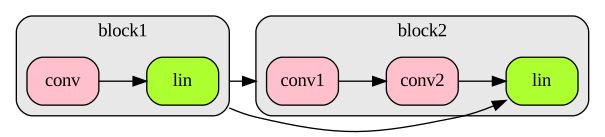
Start with some data representing objects and connections between them (e.g. they wouldn't normally be just strings like in this example, but would be neural net layers, or users and products, or car trips, etc):
layers1 = ['conv','conv','lin']
layers2 = ['conv','lin']
block1,block2 = ['block1','block2']
conns = ((block1, block2),
         (block1, layers2[-1]))
Then map them directly to a visual respresentation:
g = graph_items(seq_cluster(layers1, block1),
                seq_cluster(layers2, block2))
g.add_items(*object_connections(conns))
g
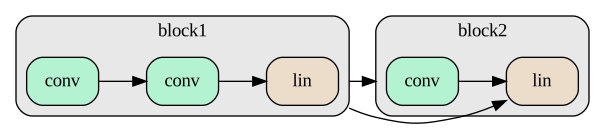
See the symbolic graphs and object graphs sections below for a more complete example.
fastdot overview
fastdot is a thin wrapper over the excellent pydot program (which is in turn a thin wrapper over the absolutely wonderful Graphviz software), designed to make it more consistent, unsurprising, and pythonic. (An example of removing surprise: pydot.Node('node') gives an obscure compilation exception, since node is a keyword in the underlying graphviz program, whereas fastdot.Node('node') works just fine, due to auto-quoting.) In fact, you never need to provide names in fastdot; you can create edges directly between objects.
Here's a quick example of some of the main functionality:
g = Dot()
c = Cluster('cl', fillcolor='pink')
a1,a2,b = c.add_items('a', 'a', 'b')
c.add_items(a1.connect(a2), a2.connect(b))
g.add_item(Node('Check tooltip', tooltip="I have a tooltip!"))
g.add_item(c)
g
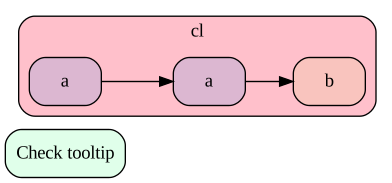
As you see, graphs know how to show themselves in Jupyter notebooks directly and can be exported to HTML (it uses SVG behind the scenes). Tooltips appear in both notebooks and exported HTML pages. Nodes with the same label, by default, are set to the same color. Also, as shown above, you can just use add_item or add_items, regardless of the type of item.
Symbolic graphs
fastdot is particularly designed to make it easier to create graphs symbolically - for instance, for Python dictionaries, PyTorch/TensorFlow models, and so forth. Here's a simple example with some mock neural network layers and sequential models. First, let's define our mock classes:
@dataclass(frozen=True)
class Layer: name:str; n_filters:int=1
class Linear(Layer): pass
class Conv2d(Layer): pass

@dataclass(frozen=True)
class Sequential: layers:list; name:str
Here's our sequential blocks for our "model":
block1 = Sequential([Conv2d('conv', 5), Linear('lin', 3)], 'block1')
block2 = Sequential([Conv2d('conv1', 8), Conv2d('conv2', 2), Linear('lin')], 'block2')
fastdot can create all node properties directly from objects; you just have to define functions describing how to map the object's attributes to graph properties. These mappings go in the node_defaults and cluster_defaults dictionaries (although by default labels are set using str(), so we don't need any special cluster defaults in this case):
node_defaults['fillcolor'] = lambda o: 'greenyellow' if isinstance(o,Linear) else 'pink'
cluster_defaults['label'] = node_defaults['label'] = attrgetter('name')
node_defaults['tooltip'] = str
With that in place, we can directly create nodes from our objects, for instance using the convenient seq_cluster function:
c1 = seq_cluster(block1.layers, block1)
c2 = seq_cluster(block2.layers, block2)
e1,e2 = c1.connect(c2),c1.connect(c2.last())
graph_items(c1,c2,e1,e2)
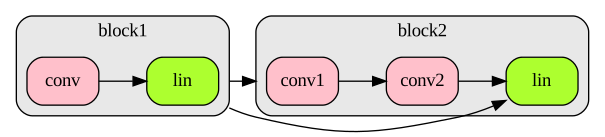
Note that in this example we didn't even need to create the Dot object separately - graph_items creates it directly from the graph items provided.
Using object graphs
In the above example, we defined our edges directly between fastdot objects. In practice, however, you'll most likely have your edges defined directly between python objects, for instance like this:
conns = (
    (block1, block2),
    (block1, block2.layers[-1]),
)
In this case, you'll want some way to connect your python objects to the fastdot graph items that represent them. A mapping is stored automatically by fastdot, and is made available through the object2graph function:
g = graph_items(seq_cluster(block1.layers, block1), seq_cluster(block2.layers, block2))
object2graph(block1.layers[-1])
<pydot.Node at 0x7f013180c310>
You can use this to graph your connections without needing access to the graph items:
g.add_items(*[object2graph(a).connect(object2graph(b))
              for a,b in conns])
g
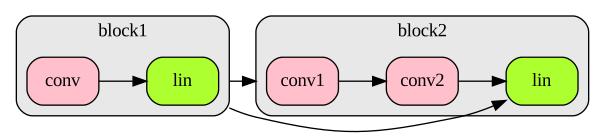
There's a helper function, object_connections, which creates these connections for you. So the above can be simplified to:
g = graph_items(seq_cluster(block1.layers, block1), seq_cluster(block2.layers, block2))
g.add_items(*object_connections(conns))
g
1 maintainer

Metadata
1 maintainer
Release files for fastdot 0.1.4
For a detailed explanation of source distributions (sdists) and built distributions (wheels), please see the package formats documentation.
Source distribution (sdist)
| File | Size | Uploaded | |
|---|---|---|---|
| fastdot-0.1.4.tar.gz | 12.3 kB | Details |
Built distribution (wheel)
| File | Interpreter | ABI | Platform | Reset |
|---|---|---|---|---|
| fastdot-0.1.4-py3-none-any.whl | Python 3 | none | any | Details |
Total release size: 23.0 kB
Release files / fastdot-0.1.4.tar.gz
| Download URL | fastdot-0.1.4.tar.gz |
|---|---|
| Size | 12.3 kB |
| Tags | Source |
|
SHA-256 checksum How to use checksums |
1f37a2126104056abc7f6028a604f20d48f8d831cb3fe13e14b1aaa03faa66c0
|
|
BLAKE2b-256 checksum How to use checksums |
620fbb3f979ec6e8e7681eec80edd3005e3bdc098afd28b437d596de745fb2cf
|
| Upload date | |
|
Uploaded using Trusted Publishing? What is trusted publishing? |
No |
| Uploaded via |
twine/3.2.0 pkginfo/1.5.0.1 requests/2.24.0 setuptools/49.6.0.post20200814 requests-toolbelt/0.9.1 tqdm/4.49.0 CPython/3.7.7
|
Release files / fastdot-0.1.4-py3-none-any.whl
| Download URL | fastdot-0.1.4-py3-none-any.whl |
|---|---|
| Size | 10.8 kB |
| Tags | Python 3 |
|
SHA-256 checksum How to use checksums |
b62c8d77ad8909642a503d9fe0ca64ae85c82f3a70e3e5c1662322b72f2feda4
|
|
BLAKE2b-256 checksum How to use checksums |
d70f457f6e23420879fe9c8b6d4395922de2ef345232ad56f177db21ac371679
|
| Upload date | |
|
Uploaded using Trusted Publishing? What is trusted publishing? |
No |
| Uploaded via |
twine/3.2.0 pkginfo/1.5.0.1 requests/2.24.0 setuptools/49.6.0.post20200814 requests-toolbelt/0.9.1 tqdm/4.49.0 CPython/3.7.7
|














