





Installation | GPU Drivers | Documentation | Examples | Contributing
Next-gen plotting library built using the pygfx rendering engine that utilizes Vulkan, DX12, or Metal via WGPU, so it is very fast! fastplotlib is an expressive plotting library that enables rapid prototyping for large scale exploratory scientific visualization.
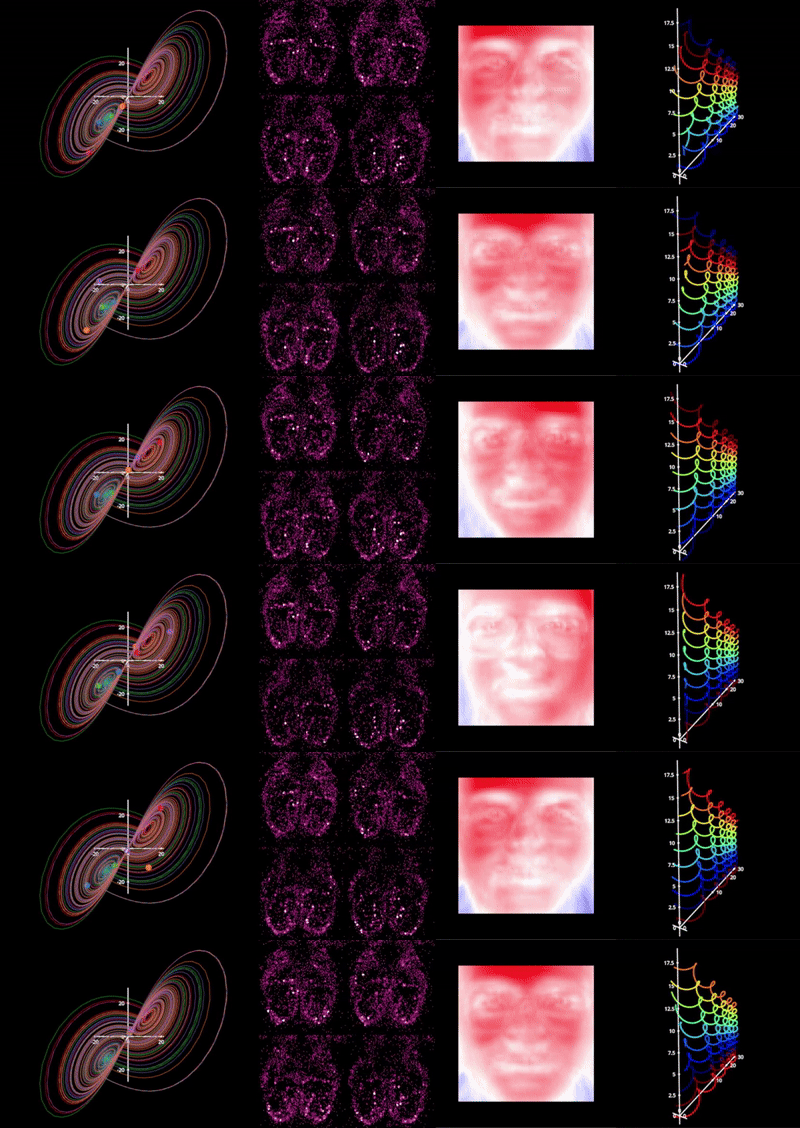
Note:
fastplotlibis currently in the late alpha stage, but you're welcome to use it or contribute! See our Roadmap. Also, see this for a discussion on API stability: https://github.com/fastplotlib/fastplotlib/issues/121
What are some things I can do with fastplotlib?
-
GPU-accelerated visualization
-
interactive visualization via an intuitive and expressive API
-
rapid prototyping and algorithm design
-
easy exploration and fast rendering of large-scale data
-
design, develop, evaluate, and ship machine learning models
-
create visualizations for real-time acquisition systems for scientific instruments (cameras, etc.)
Supported frameworks
fastplotlib can run on anything that pygfx can also run, this includes:
✔️ Jupyter lab, using jupyter_rfb
✔️ PyQt and PySide
✔️ glfw
✔️ wxPython
Write your code once and run it anywhere. Whether you are using Qt, glfw, jupyter lab, or doing offscreen rendering, fastplotlib works across all major platforms (Linux, Windows, Mac OS X) 😄 See the FAQ for more details on where and how you can use fastplotlib.
Documentation
http://www.fastplotlib.org/ver/dev
Questions, issues, ideas? You are welcome to post an issue or post on the discussion forum! 😃
Installation
To install use pip:
With imgui support (recommended)
Without jupyterlab support, install desired GUI framework such as glfw, PyQt6, or PySide6 separately.
pip install -U "fastplotlib[imgui]"
With jupyterlab support.
pip install -U "fastplotlib[notebook,imgui]"
Without imgui
Minimal, install desired GUI library such as PyQt6, PySide6, or glfw separately.
pip install fastplotlib
With jupyterlab support only.
pip install -U "fastplotlib[notebook]"
Fastplotlib is also available on conda-forge. For imgui support you will need to separately install imgui-bundle, and for jupyterlab you will need to install jupyter-rfb and simplejpeg which are all available on conda-forge.
Note:
fastplotlibandpygfxare fast evolving projects, the version available through pip might be outdated, you will need to follow the "For developers" instructions below if you want the latest features. You can find the release history here: https://github.com/fastplotlib/fastplotlib/releases
For developers
Make sure you have git-lfs installed.
git clone https://github.com/fastplotlib/fastplotlib.git
cd fastplotlib

# install all extras in place
pip install -e ".[notebook,docs,tests,imgui]"

# install latest pygfx
pip install git+https://github.com/pygfx/pygfx.git@main
See Contributing for more details on development
Examples
Examples gallery: http://fastplotlib.org/ver/dev/_gallery/index.html
User guide: http://fastplotlib.org/ver/dev/user_guide/guide.html
fastplotlib code is identical across notebook (jupyterlab), and desktop use with Qt/PySide or glfw.
Notebooks
The quickstart.ipynb tutorial notebook is a great way to get familiar with the API: https://github.com/fastplotlib/fastplotlib/tree/main/examples/notebooks/quickstart.ipynb
GPU drivers and requirements
Generally if your GPU is from 2017 or later it should be fine. Modern integrated graphics are usually fine for many use cases. The exact requirements will depend on how complex your visualization is and how many objects you need to render.
More detailed information on GPUs and drivers is here: http://fastplotlib.org/ver/dev/user_guide/gpu.html
For more detailed information, such as use on cloud computing infrastructure, see the WGPU docs: https://wgpu-py.readthedocs.io/en/stable/start.html#cloud-compute
Contributing ❤️
We welcome contributions! See the contributing guide: https://github.com/fastplotlib/fastplotlib/blob/main/CONTRIBUTING.md
You can also take a look at our Roadmap for 2026 and Issues for ideas on how to contribute!
Developers 🧠
A special thanks to all of the pygfx developers and the amazing work they have done.
Sponsors
Fastplotlib is free and open source. We would like to thank the following institutions for helping to support fastplotlib over the past few years.
- UNC Chapel Hill, Giovannucci Lab & Hantman Lab
- NYU & Flatiron Institute CCN, Williams lab & Chklovskii Lab
- Duke University, Pearson Lab
- Columbia University, Paninski lab
We are always open to new sponsors that can help further develop and improve the library.


Release files for fastplotlib 0.7.0
For a detailed explanation of source distributions (sdists) and built distributions (wheels), please see the package formats documentation.
Source distribution (sdist)
| File | Size | Uploaded | |
|---|---|---|---|
| fastplotlib-0.7.0.tar.gz | 305.9 kB | Details |
Built distribution (wheel)
| File | Interpreter | ABI | Platform | Reset |
|---|---|---|---|---|
| fastplotlib-0.7.0-py3-none-any.whl | Python 3 | none | any | Details |
Total release size: 665.5 kB
Release files / fastplotlib-0.7.0.tar.gz
| Download URL | fastplotlib-0.7.0.tar.gz |
|---|---|
| Size | 305.9 kB |
| Tags | Source |
|
SHA-256 checksum How to use checksums |
6c77270ddb7480454c36384a4c178d5c12f1eccb37414ca547723f48a8361ac0
|
|
BLAKE2b-256 checksum How to use checksums |
ac889ce8cc41cde1d57ac6051dddaa0ea986437752b88caec8a19a6ccc85a63d
|
| Upload date | |
|
Uploaded using Trusted Publishing? What is trusted publishing? |
No |
| Uploaded via |
twine/7.0.0 CPython/3.13.14
|
Release files / fastplotlib-0.7.0-py3-none-any.whl
| Download URL | fastplotlib-0.7.0-py3-none-any.whl |
|---|---|
| Size | 359.7 kB |
| Tags | Python 3 |
|
SHA-256 checksum How to use checksums |
a7af7c4ba06a296e5b517909f256a5a18e2ae58d191f5d8ea8ba28d686ea351d
|
|
BLAKE2b-256 checksum How to use checksums |
5368ffed6fe5bd0d8af90128dd48033636b42d120d8aa7254cb014676f87c655
|
| Upload date | |
|
Uploaded using Trusted Publishing? What is trusted publishing? |
No |
| Uploaded via |
twine/7.0.0 CPython/3.13.14
|














