
Fchart3
Fchart3 is a Python project for creating high-quality astronomical finder charts and maps. It uses data and catalogues based on Stellarium, KStars, HNSky and Gaia-derived deep star catalogues (hundreds of millions of stars, typically up to ~16–17 mag depending on the used catalog set).
In addition to single-object charts, the package also includes fchart3-atlas – a generator for multi-page sky atlases built on top of the same rendering engine.
It can generate:
- Offline charts with output to PDF, PNG, SVG or TikZ.
- Online interactive charts – the same rendering engine is used in the CzSkY project.
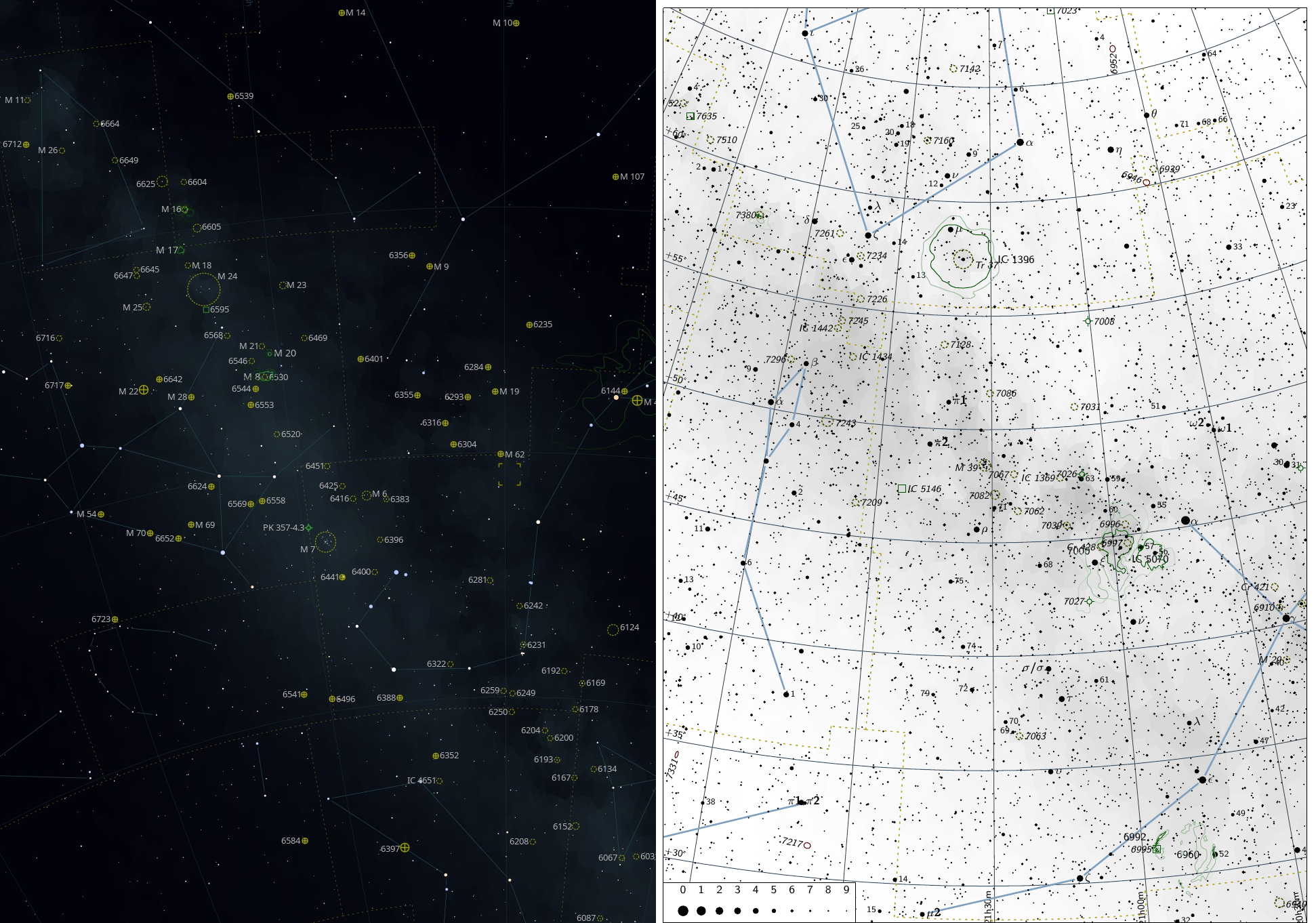
Online interactive version (CzSkY)
Interactive web charts using the fchart3 engine are available in the CzSkY project:
Features
- Deep-sky finder charts based on Gaia-derived star catalogues (hundreds of millions of stars).
- Deep-sky catalogue with hundreds of thousands of objects (from HNSky).
- Output formats: PDF, PNG, SVG, TikZ (format is determined by
--output-fileextension). - Multiple projections:
- stereographic (default)
- orthographic
- equidistant (fisheye-like)
- Equatorial and horizontal coordinate workflows:
- Equatorial maps (RA/Dec).
- Horizontal (Alt/Az) maps with observer location and time.
- CLI supports parsing both RA/Dec and Alt/Az positions.
- Solar system rendering (Sun, Moon, planets; and planetary moons):
- realistic radii and phases
- Saturn ring orientation
- optional moon magnitudes / label placement (as supported by the engine)
- Optional comet / minor planet resolving with trajectory plotting (requires time window).
- Optional polygon horizon from Stellarium landscape (
landscape.ini) for Alt/Az charts. - Flexible configuration: magnitude limits, labels, fonts, legends, colors, line widths, etc.
- Used as the map engine of the CzSkY online star atlas.
Install
Recommended: install from Git into a virtual environment:
git clone https://github.com/skybber/fchart3.git
cd fchart3

python3 -m venv venv
source venv/bin/activate

pip install -r requirements.txt
pip install ./
Linux build dependencies (common)
On some systems you may need development packages for Cairo and build tools before installing (example for Ubuntu):
sudo apt update
sudo apt install -y python3-dev pkg-config libcairo2-dev build-essential
Then:
pip install -U pip setuptools wheel
pip install pycairo
pip install .
Windows
git clone https://github.com/skybber/fchart3.git
cd fchart3

python -m venv venv
venv\Scripts\activate

pip install -U pip setuptools wheel
pip install .
Run
Show all CLI options:
fchart3 --help
Basic chart (default PDF) for Crab Nebula:
fchart3 M1
Output file / format
The output format is defined by --output-file extension:
something.pdfsomething.pngsomething.svgsomething.tikz
Example (PNG):
fchart3 --output-dir out --output-file m31.png M31
Example (TikZ):
fchart3 --output-dir out --output-file m39.tikz M39
Example: “complex” chart (PDF)
fchart3 -W 190 -H 270 -fov 40 -ls 9 -ld 9 \
  --show-nebula-outlines --show-enhanced-milky-way \
  --font-style-bayer bold --font-style-dso italic \
  --flamsteed-numbers-only --show-equatorial-grid \
  --hide-map-orientation-legend --hide-map-scale-legend \
  m39
Notes:
-ls/--limit-starcontrols star limiting magnitude.-ld/--limit-dsocontrols DSO limiting magnitude.-fov/--fieldsizeis the diameter of the field of view (degrees).
Sources (what you can pass on CLI)
A “source” can be:
- DSO names:
NGC891,IC1396,M31, … - Special:
ALLMESSIER(renders maps for all Messier objects) - Explicit coordinates:
Explicit equatorial position (RA,Dec)
fchart3 "9:35:00.8,-34:15:33,SomeCaption"
- RA is interpreted as hours (sexagesimal or decimal).
- Dec is interpreted as degrees (sexagesimal or decimal).
Explicit horizontal position (Az,Alt)
Prefix the first component with h: (or hor: / altaz:) and use degrees:
fchart3 --coord-system horizontal -L 14.42 -A 50.08 -t now \
  "h:180:00:00,45:00:00,AzAltCaption"
Decimal degrees are also accepted:
fchart3 --coord-system horizontal -L 14.42 -A 50.08 -t now \
  "h:180.5,45.25,AzAltCaption"
Horizontal coordinates (
h:) are allowed only when--coord-system horizontalis selected.
Observer location, time and coordinate systems
Coordinate system
- Default:
--coord-system equatorial - Horizontal:
--coord-system horizontal(Alt/Az)
Observer longitude/latitude
Required for horizontal charts and for time-dependent objects:
-L, --obs-longitude   Observer longitude in degrees (east positive)
-A, --obs-latitude    Observer latitude in degrees
Observation time
Use ISO-8601 UTC time or now:
-t now
-t 2026-01-02T21:15:00Z
-t 2026-01-02T21:15:00+01:00
All-sky (fisheye) mode
Fchart3 CLI supports a convenience all-sky mode for rendering a visible hemisphere (zenith-centered) fisheye chart.
It is designed for quick “what’s up now” sky maps and works best with the equidistant (azimuthal equidistant / fisheye-like) projection.
--all-sky
--all-sky is a shortcut that forces a suitable configuration:
--coord-system horizontal--projection equidistant- if
-fov/--fieldsizeis not set:-fov 180(full visible hemisphere) - if
-tis not set: usesnow(UTC)
It requires observer location (-L/-A).
Example:
fchart3 --all-sky --font-size 2 -ls 6 -ld 6 -L 14.42 -A 50.08
With explicit time:
fchart3 --all-sky --font-size 2 -ls 6 -ld 6 -L 14.42 -A 50.08 -t 2026-01-02T21:15:00Z
Notes
-
All-sky charts are typically used with:
--show-horizon(draw the horizon circle)- optional
--clip-to-horizon(hide objects below the horizon, if enabled in the engine)
-
For best results on portrait paper, consider using a square-ish page size or landscape orientation, because an all-sky chart is circular.
Stellarium landscape horizon (optional)
You can load a Stellarium landscape directory (must contain landscape.ini) and use its polygon horizon.
It can also provide location metadata (lon/lat) if present:
fchart3 --coord-system horizontal -t now \
  --stellarium-landscape "/path/to/stellarium/landscapes/MyLandscape" \
  "h:220,12,LookHere"
Extra marks (crosses)
Add a cross mark with -x:
Format:
"c1,c2[,label[,pos]]"pos=t|b|l|r(top/bottom/left/right)
Equatorial cross (RA/Dec):
fchart3 -x "20:35:25.4,+60:07:17.7,SN,t" NGC6946
Horizontal cross (Az/Alt; requires horizontal mode):
fchart3 --coord-system horizontal -L 14.42 -A 50.08 -t now \
  -x "h:180,45,Mark,r" "h:180,45,Center"
Solar system objects
Enable solar system rendering:
fchart3 --show-solar-system -t now -L 14.42 -A 50.08 Jupiter
For meaningful results, solar system objects require:
-ttime- observer lon/lat (or a Stellarium landscape that provides them)
Comets and minor planets (MPC) + trajectories
Fchart3 can resolve comets and minor planets using MPC files and plot their trajectories, when you provide a time window:
Required:
-tobservation time--trajectory-fromand--trajectory-to(UTC; date or datetime)
Example:
fchart3 -t 2026-01-02T21:00:00Z \
  --trajectory-from 2026-01-02 \
  --trajectory-to   2026-01-09 \
  "C/2023 A3"
MPC files are downloaded automatically if missing:
CometEls.txt(comets)MPCORB.9999.DAT(subset of numbered minor planets)
You can override paths and force refresh:
fchart3 --mpc-comets-file ./CometEls.txt --update-comets ...
fchart3 --mpc-minor-planets-file ./MPCORB.9999.DAT --update-minor-planets ...
Data files
This repository contains catalogues in data/catalogs (selection):
bsc5.dat– bright stars catalogueconstbnd.dat– constellation boundariesconstellationship_western.fab– constellation lines (Stellarium)milkyway.dat,milkyway_enhanced.dat– Milky Way outlines/shadingdeep_sky.hnd– deep-sky objects from HNSky (Han Kleijn)outlines_catgen.dat– nebula outlines (OpenNGC-based)PGC.dat,PGC_updates.dat– PGC galaxy catalogue (+ updates)namedstars.dat,starnames.dat,unamedstars.dat– star name catalogues (KStars)stars_0_0v*.cat– Gaia-based deep star catalogues (Stellarium)
Runtime-downloaded (not stored in repo by default):
CometEls.txt(MPC comet elements)MPCORB.9999.DAT(MPCORB subset)
fchart3-atlas (multi-page sky atlas generator)
fchart3-atlas is included in the fchart3 package and builds on top of the fchart3 CLI.
It generates a multi-page sky atlas by repeatedly rendering many overlapping chart tiles – similar in spirit to classic printed atlases
What it does
- Splits the sky into a grid of tiles (pages) based on:
--field-deg(tile field-of-view diameter in degrees)--overlap(tile overlap fraction to avoid gaps)
- For each tile, calls
fchart3with an explicit RA/Dec position source:"RA,Dec,Caption"
- Writes one output file per tile (PDF by default).
- Optionally merges all PDFs into a single
atlas.pdf(if a PDF merge tool is available).
Usage
Basic example (produce many pages into ./atlas_out):
fchart3-atlas \
  --out ./atlas_out \
  --config default \
  --field-deg 60 \
  --overlap 0.20 \
  --limit-star 8.0 \
  --limit-dso 9.0 \
  --projection stereographic \
  --show-enhanced-milky-way
Authors
- Vladimir Dvorak – fchart3
- Georg Zotti – fchart3
- Michiel Brentjens – original author of fchart
- Austin Riba – modern fchart for Python 2.7 + NumPy: https://github.com/Fingel/fchart
License
GNU GPL v2 (or later). See LICENSE.
1 maintainer

Metadata
1 maintainer
Release files for fchart3 0.12.2
For a detailed explanation of source distributions (sdists) and built distributions (wheels), please see the package formats documentation.
Source distribution (sdist)
| File | Size | Uploaded | |
|---|---|---|---|
| fchart3-0.12.2.tar.gz | 32.0 MB | Details |
Release files / fchart3-0.12.2.tar.gz
| Download URL | fchart3-0.12.2.tar.gz |
|---|---|
| Size | 32.0 MB |
| Tags | Source |
|
SHA-256 checksum How to use checksums |
3f1b922077dd27faf1cbf10b8c660cc0ad577a95db09278784a94da5bb40e563
|
|
BLAKE2b-256 checksum How to use checksums |
b0689e879240d8852b3c1bfed88a95ee266b1f3accfe5024c4bba7c9153bc80d
|
| Upload date | |
|
Uploaded using Trusted Publishing? What is trusted publishing? |
No |
| Uploaded via |
twine/6.2.0 CPython/3.13.11
|














