
Create fast feedback based on prewritten sentences combined with personalised messages.


Project description

Feat
Feedback Experiment Aansturing Tool
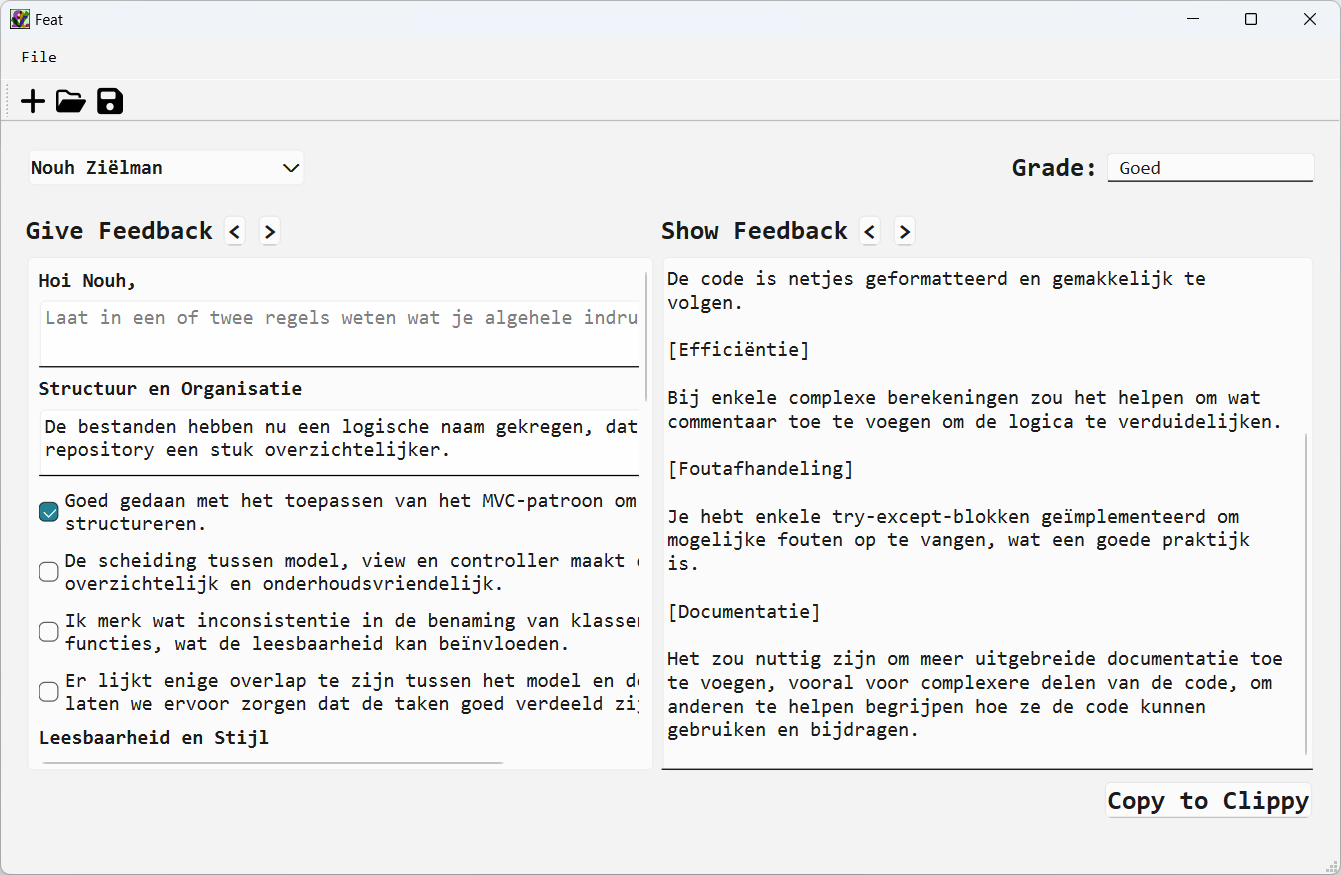
Create fast feedback messages based on your own prewritten feedback file and add personalised feedback per student. Feat requires you to import a list of student, which allows you to create feedback messages with personal salutation. It also gives you the opportunity to easily switch between the feedback text for all students in your group. You can save the .feat file and continue to provide feedback. With a single click the feedback messages is copied to your clipboard and ready to send to your students using the communication method of your choice.
Features
- Import prewritten feedback
- Import student names
- Switch between feedback messages of students
- Have personal salutations
- Add personalised feedback for each feedback section
- Add personalised feedback in a general section
- Add general complimentary close
- Save each student's grade in various formats (numeric, letters, or words)
- Save the feedback messages
- Copy the feedback messages to the clipboard
Screenshots
Select file > new, a new window appears.
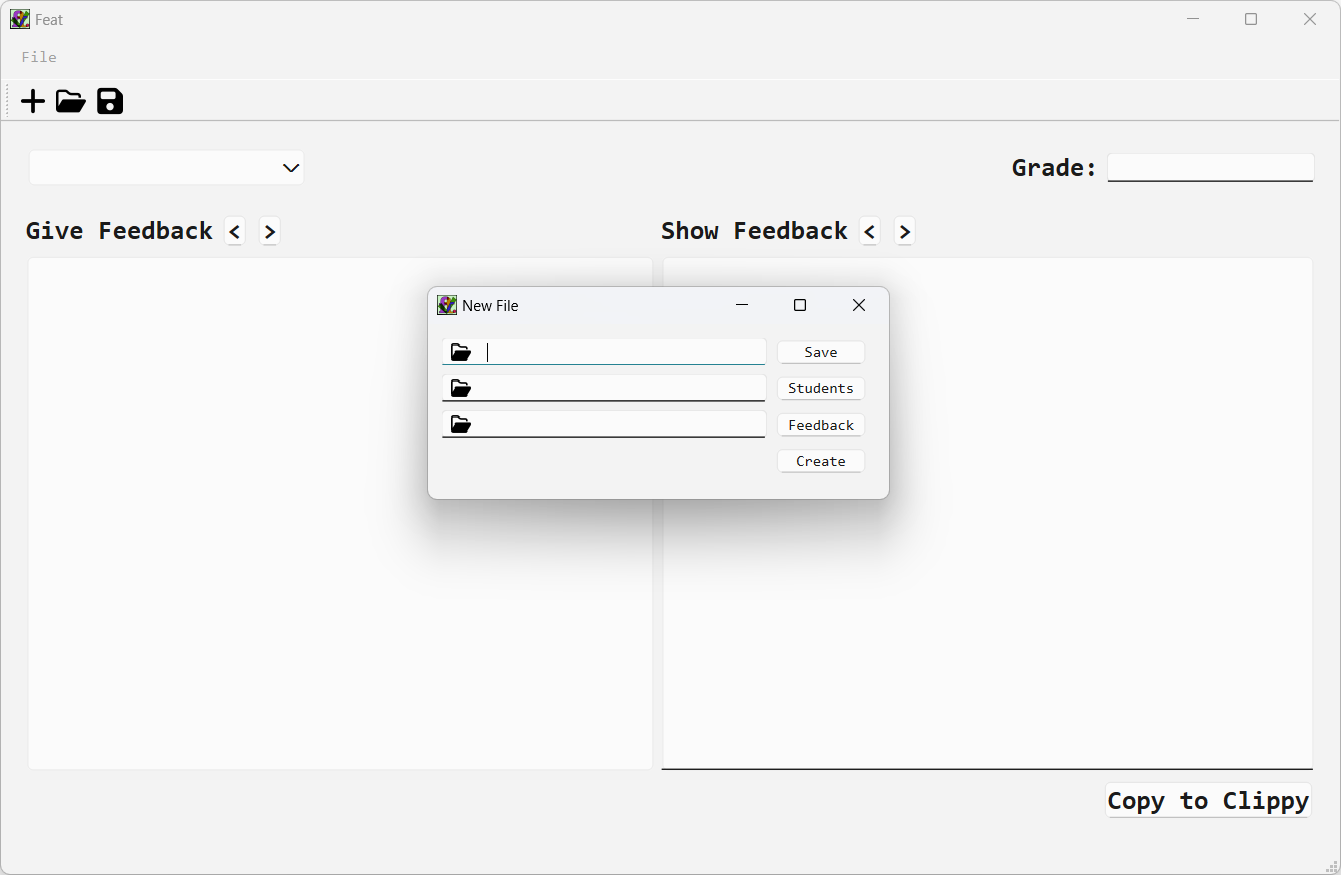
- Select the location to save the .feat file and give it a name.
- Select the file with student names.
- select the file with feedback.
Click create to create the .feat file and start composing feedback.
Select file > open to open a .feat file.
File Format Specifications
Student file
The file(.txt) with student names should be designed in the following way:
# Teaching assistant (information)
first_name lastname (unique_student_id)
first_name lastname (unique_student_id)
Text after '#' can be arbitrary since lines with '#' will be skipped. First names with spaces must be connected with "_". There is an example student file available.
Feedback form
The file(.toml) with feedback should be designed in the following way:
["Section 1"]
Unique_id = "Feedbackline 1"
Unique_id = "Feedbackline 2"
Unique_id = "Feedbackline 3"
Unique_id = "Feedbackline 4"

["Section 2"]
Unique_id = "Feedbackline 1"
Unique_id = "Feedbackline 2"
Unique_id = "Feedbackline 3"
Unique_id = "Feedbackline 4"
The unique IDs must be unique within the feedback form. There is an example feedback form available.
Install
In a virtual environment:
pip install feat-feedback-tool
Or with pipx:
pipx install feat-feedback-tool
Open Feat with ft.
ft.
Development instructions
Clone the repository
Create a new conda environment with python
conda create -n feat python
Activate the new conda enviornment
conda activate feat
Install Feat with poetry install
poetry install
Open Feat with ft.
ft.
Release history Release notifications | RSS feed


Download files
Download the file for your platform. If you're not sure which to choose, learn more about installing packages.
Source Distribution
Built Distribution
Filter files by name, interpreter, ABI, and platform.
If you're not sure about the file name format, learn more about wheel file names.
Copy a direct link to the current filters
File details
Details for the file feat_feedback_tool-1.2.0.tar.gz.
File metadata
- Download URL: feat_feedback_tool-1.2.0.tar.gz
- Upload date:
- Size: 125.2 kB
- Tags: Source
- Uploaded using Trusted Publishing? No
- Uploaded via: poetry/2.2.1 CPython/3.13.9 Darwin/25.1.0
File hashes
| Algorithm | Hash digest | |
|---|---|---|
| SHA256 |
01ba356818b2523be59e459375baf0ee61c3e059da0a6c9e8f483977f7cb89fd
|
|
| MD5 |
90eb4dab3fd0b66ee4712ab3f545e8d0
|
|
| BLAKE2b-256 |
0f7a21305688490ef0ebdd275dd69c7734fee59871fe944a3cb477d8d698d4fb
|
File details
Details for the file feat_feedback_tool-1.2.0-py3-none-any.whl.
File metadata
- Download URL: feat_feedback_tool-1.2.0-py3-none-any.whl
- Upload date:
- Size: 125.4 kB
- Tags: Python 3
- Uploaded using Trusted Publishing? No
- Uploaded via: poetry/2.2.1 CPython/3.13.9 Darwin/25.1.0
File hashes
| Algorithm | Hash digest | |
|---|---|---|
| SHA256 |
37aef54098dc1590484eaae746f173d9bffd8a1b3b3e251a6e44d623a0ee52dd
|
|
| MD5 |
1f444493cf7c19d9aff098302e3e75e2
|
|
| BLAKE2b-256 |
ca1206877f41b1f2854ba4c9d48ff8524aeac8a36abdd05dfb5999efcb6c370e
|






