
fetch-sitemap
Retrieves all URLs of a given sitemap.xml URL and fetches each page one by one. Useful for (load) testing the entire site for error responses.
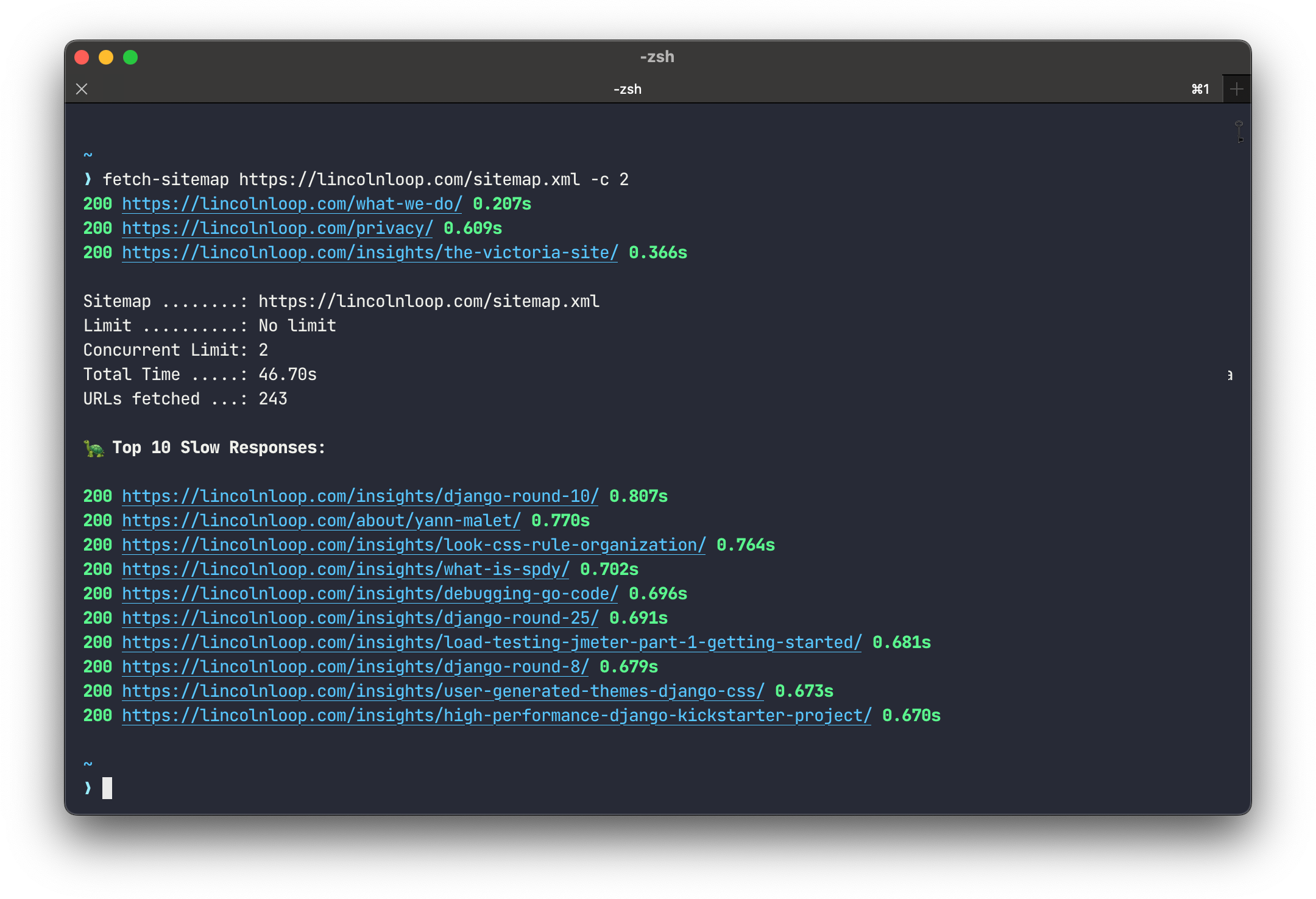
Installation
$ pip install fetch-sitemap
Usage
$ fetch-sitemap --help

 Usage: fetch-sitemap [OPTIONS] SITEMAP_URL

 Fetch a given sitemap and retrieve all URLs in it.

╭─ Options ──────────────────────────────────────────────────────────────────────────────────────────────────────────────────────────────────────────────────────╮
│ --basic-auth                -a  TEXT              Basic auth information. Format: 'username:password'                                                          │
│ --limit                     -l  INT [>=1]         Maximum number of URLs to fetch from the given sitemap.xml.                                                  │
│ --recursive/--no-recursive                        Recursively fetch all sitemap documents from the given sitemap.xml. [default: recursive]                     │
│ --concurrency-limit         -c  INT [>=1]         Max number of concurrent requests. [default: 5; >=1]                                                         │
│ --request-timeout           -t  INT [>=1]         Timeout for fetching a URL in seconds. [default: 30; >=1]                                                    │
│ --random                    -r                    Append a random string like ?12334232343 to each URL to bypass frontend cache.                               │
│ --random-length                 INT [1 to 100]    Length of the --random hash. [default: 15; 1 to 100]                                                         │
│ --report-path               -p  FILE              Store results in a CSV file. Example: ./report.csv                                                           │
│ --output-dir                -o  DIRECTORY         Store all fetched sitemap documents in this folder. Example: /tmp/my.domain.com/                             │
│ --slow-threshold                FLOAT [>=0.0]     Responses slower than this (in seconds) are considered 'slow'. [default: 5.0; >=0.0]                         │
│ --slow-num                      INTEGER OR "ALL"  How many 'slow' responses to show. [default: 10]                                                             │
│ --user-agent                    TEXT              User-Agent string set in the HTTP header. [default: Mozilla/5.0 (compatible; fetch-sitemap/23)]              │
│ --version                                         Show the version and exit.                                                                                   │
│ --help                                            Show this message and exit.                                                                                  │
╰────────────────────────────────────────────────────────────────────────────────────────────────────────────────────────────────────────────────────────────────╯
🤺 Local Development
poetry install
poetry run fetch-sitemap -h
poetry run ./tests.sh
1 maintainer

Release files for fetch-sitemap 25
For a detailed explanation of source distributions (sdists) and built distributions (wheels), please see the package formats documentation.
Source distribution (sdist)
| File | Size | Uploaded | |
|---|---|---|---|
| fetch_sitemap-25.tar.gz | 9.1 kB | Details |
Built distribution (wheel)
| File | Interpreter | ABI | Platform | Reset |
|---|---|---|---|---|
| fetch_sitemap-25-py3-none-any.whl | Python 3 | none | any | Details |
Total release size: 19.0 kB
Release files / fetch_sitemap-25.tar.gz
| Download URL | fetch_sitemap-25.tar.gz |
|---|---|
| Size | 9.1 kB |
| Tags | Source |
|
SHA-256 checksum How to use checksums |
8a213d2ffde21c10b038b2d1db1ee8e2112df6e18727279343e4c1ac74ba054a
|
|
BLAKE2b-256 checksum How to use checksums |
289d927a5a14ca8b92a7528dbf50ac9fae20f9d496a364a3c7c2dd58f6136fbd
|
| Upload date | |
|
Uploaded using Trusted Publishing? What is trusted publishing? |
No |
| Uploaded via |
poetry/1.8.2 CPython/3.12.3 Darwin/23.4.0
|
Release files / fetch_sitemap-25-py3-none-any.whl
| Download URL | fetch_sitemap-25-py3-none-any.whl |
|---|---|
| Size | 9.9 kB |
| Tags | Python 3 |
|
SHA-256 checksum How to use checksums |
0f77413e6b6284c9879fc1c7c3758a7579d183f929db2d934d74fdbe0fd3947b
|
|
BLAKE2b-256 checksum How to use checksums |
4e218cfa788d044d6b8836b9c184c4f3409a9484ae2e8249a44c89d7c72dee22
|
| Upload date | |
|
Uploaded using Trusted Publishing? What is trusted publishing? |
No |
| Uploaded via |
poetry/1.8.2 CPython/3.12.3 Darwin/23.4.0
|














