
1 file was added to this release more than 14 days after its initial publication. Inspect the release files before installing.
Fast CPython extensions to Python standard library with focus on performance.
This library provides CPython native extensions to mimic some of the well known built-in types. The implementation relies on enforced protocol - all the objects and abstract data types are implemented in C/C++ to provide highly effective manipulation.
Extended heapq - fext.ExtHeapQueue
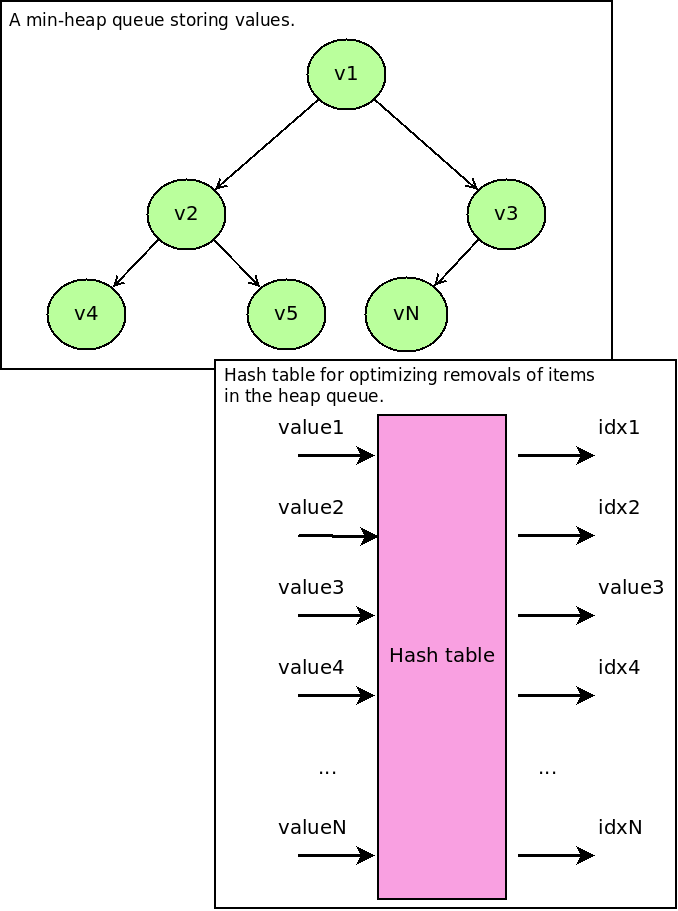
The extended heap queue acts as a min-heap queue from the standard Python library. It uses a hash table for storing information about indexes (where values sit in the min-heap queue) to optimize removals from the heap to O(log(N)).
Using fext in a C++ project
The design of this library allows you to use sources in your C++ project as well. The eheapq.hpp file defines the extended heap queue and edict.hpp the extended dictionary. Python files then act as a bindings to their respective Python interfaces. Mind the API design for the templated classes - it was meant to be used with pointers to objects (so avoid possible copy constructors).
Building the extensions
To build extensions, install the following packages (Fedora):
dnf install -y python3-devel g++ gccNow you can build extensions:
python3 setup.py buildIf you would like to produce binaries with debug information:
CFLAGS='-Wall -O0 -ggdb' python3 setup.py buildCheck sections below for more info on testing the C/C++ parts of extensions.
Reference count and memory leak checks
You can find Makefile in the Git repo. This repo defines targets to perform leak checks and reference count checks. Note they use different Python interpreters (with/without debug information) so make sure you do not mix virtual environments when running the tests.
make checkDeveloping the extension
First, prepare your environment:
dnf install -y make
make deps
To develop or adjust sources, simply change sources and verify your change is accepted by the test suite:
make checkThe check target will run the actual test suite (see also make test). Besides it, the test suite will be executed two more times to check test suite and its behaviour with respect to Python object reference counting (python3-debug dependency will be automatically installed with the provided make deps). This part of the test suite can be executed using make check-refcount. The last part of the test suite runs valgrind against the test suite - you can explicitly trigger this part by calling make check-leaks.
Mind make check-refcount and make check-leaks will take some time given the checks and processing that is done on the background. To verify your changes more iterativelly, make test should do the trick (don’t forget to do make check after that though).
To clean up your environment, perform:
make cleanBuilding and releasing
The release can be done from a containerized environment:
podman run --rm --workdir /io --entrypoint bash -it --volume `pwd`:/io:Z quay.io/pypa/manylinux2014_x86_64 -c "yum install -y make && make all"To check what’s happening, let’s run a containerized environment - this can be helpful when you are testing or developing the extension:
podman run --rm --workdir /io --entrypoint bash -it --volume `pwd`:/io:Z quay.io/pypa/manylinux2014_x86_64The following commands (run in the container stated above) will install all the necessary tools:
yum install -y make
make deps
Once tests pass, clean the environment:
make cleanNow we should be ready to produce bdist_wheel and sdist distribution for PyPI:
python3 setup.py bdist_wheel
python3 setup.py sdist
Finally, upload artifacts to PyPI:
auditwheel repair fext/*.whl
twine upload wheelhouse/*.whl
Alternativelly you can let make all happen.
Installation
The project is hosted on PyPI. You can install it via pip or Pipenv:
pipenv install fext
# pip3 install fext
If there is no release conforming your system, a build process is triggered during the installation - requires python3-devel and gcc/g++.
Usage
These data structures were designed for Thoth’s adviser - for data kept in resolver’s internal state as well as in the reinforcement learning part.


Release files for fext 0.2.0
For a detailed explanation of source distributions (sdists) and built distributions (wheels), please see the package formats documentation.
File added late
1 file was uploaded more than 14 days after the first file in this release.
While project maintainers occasionally add legitimate files to an existing release, late additions can also indicate a security compromise.
We recommend inspecting the release files before installing.
Source distribution (sdist)
| File | Size | Uploaded | |
|---|---|---|---|
| fext-0.2.0.tar.gz | 10.6 kB | Details |
Built distributions (wheels)
| File | Interpreter | ABI | Platform | Reset |
|---|---|---|---|---|
| fext-0.2.0-cp38-cp38-manylinux2014_x86_64.whl | CPython 3.8 | CPython 3.8 | Linux glibc 2.17+ x86-64 | Details |
| fext-0.2.0-cp36-cp36m-manylinux2014_x86_64.whl | CPython 3.6 | CPython 3.6 pymalloc | Linux glibc 2.17+ x86-64 | Details |
Total release size: 374.8 kB
Release files / fext-0.2.0.tar.gz
| Download URL | fext-0.2.0.tar.gz |
|---|---|
| Size | 10.6 kB |
| Tags | Source |
|
SHA-256 checksum How to use checksums |
6a689e3f4bf6425145e01ce31300150bb77ea82f0a5ee5f9c8c700c37204f2c4
|
|
BLAKE2b-256 checksum How to use checksums |
8f4f2491df9fbd4f47975b6e4c66befab3dd4447cb6fb1ee591a115ea80371bf
|
| Upload date | |
|
Uploaded using Trusted Publishing? What is trusted publishing? |
No |
| Uploaded via |
twine/3.1.1 pkginfo/1.5.0.1 requests/2.23.0 setuptools/46.1.3 requests-toolbelt/0.9.1 tqdm/4.44.1 CPython/3.6.8
|
Release files / fext-0.2.0-cp38-cp38-manylinux2014_x86_64.whl
File added late
This file was uploaded more than 14 days after the first file in this release.
While project maintainers occasionally add legitimate files to an existing release, late additions can also indicate a security compromise.
We recommend inspecting the release file before installing.
| Download URL | fext-0.2.0-cp38-cp38-manylinux2014_x86_64.whl |
|---|---|
| Size | 189.9 kB |
| Tags | CPython 3.8 Linux glibc 2.17+ x86-64 |
|
SHA-256 checksum How to use checksums |
efa386dcd40bf3dde7c10c86a3781ea4c63cd3b6bc392582ef3a66d0663a4b1e
|
|
BLAKE2b-256 checksum How to use checksums |
c24a2632ba715b88d84aa6f3b9d9c209088bf9b6f9c30dd8c5cd66ebd1a67c7d
|
| Upload date | |
|
Uploaded using Trusted Publishing? What is trusted publishing? |
No |
| Uploaded via |
twine/3.1.1 pkginfo/1.5.0.1 requests/2.22.0 setuptools/47.3.1 requests-toolbelt/0.9.1 tqdm/4.43.0 CPython/3.7.6
|
Release files / fext-0.2.0-cp36-cp36m-manylinux2014_x86_64.whl
| Download URL | fext-0.2.0-cp36-cp36m-manylinux2014_x86_64.whl |
|---|---|
| Size | 174.3 kB |
| Tags | CPython 3.6 CPython 3.6 pymalloc Linux glibc 2.17+ x86-64 |
|
SHA-256 checksum How to use checksums |
d7b1f083a14f95074808dcfdaa0aaba27c1b204115c13efdcc9fe67f124e39a6
|
|
BLAKE2b-256 checksum How to use checksums |
0f09196414b71fc7504e9b344478814ac09c5796b7cc65b96d2ff2a548cb66ca
|
| Upload date | |
|
Uploaded using Trusted Publishing? What is trusted publishing? |
No |
| Uploaded via |
twine/3.1.1 pkginfo/1.5.0.1 requests/2.23.0 setuptools/46.1.3 requests-toolbelt/0.9.1 tqdm/4.44.1 CPython/3.6.8
|














