
This release has been yanked by its maintainers, and will be ignored by installers, except when explicitly specified.
Reason given by maintainers: archived
Note: This project has been migrated to GitHub at https://github.com/mikespub/fgcp-client-api Please report any new issues there…
Client API library for the Fujitsu Global Cloud Platform (FGCP)
using XML-RPC API Version 2015-01-30
Using this library
If you already have access to the Fujitsu Global Cloud Platform (FGCP), have a look at the demo script:
**Usage:** fgcp_demo.py [pem_file] [region]
If not, register on one of the Service Portals from the list below. Afterwards, you can access your resources via command-line scripts, web interfaces etc. as you prefer.
# Connect with your client certificate to region 'uk'
from fgcp.resource import FGCPVDataCenter
vdc = FGCPVDataCenter('client.pem', 'uk')

# Do typical resource actions
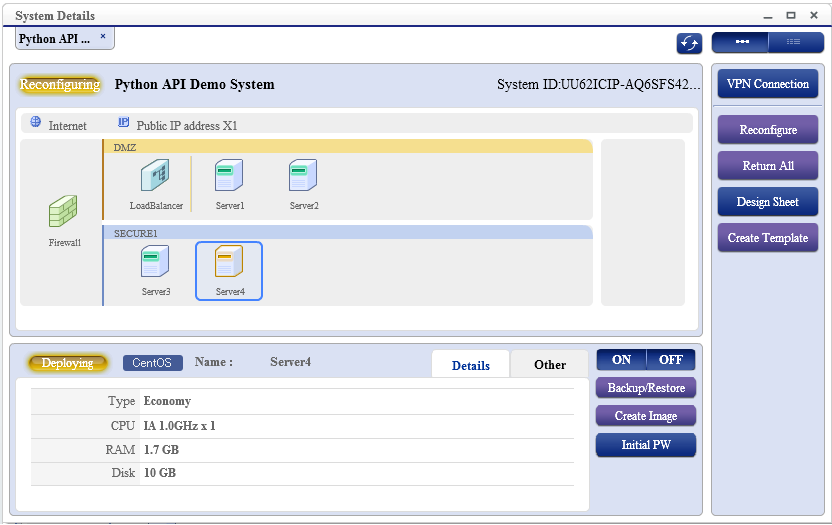
vsystem = vdc.get_vsystem('Python API Demo System')
vsystem.show_status()
for vserver in vsystem.vservers:
        result = vserver.backup(wait=True)
...
Note: this client API library provides higher-level Client Methods, intermediate Resource Actions and lower-level API Commands.
Fujitsu Global Cloud Platform (FGCP)
Service Portal:
for Australia and New Zealand: http://globalcloud.fujitsu.com.au/
for Central Europe (CEMEA&I): http://globalcloud.de.fujitsu.com/
for Japan: http://oviss.jp.fujitsu.com/
for Singapore, Malaysia, Indonesia, Thailand and Vietnam: http://globalcloud.sg.fujitsu.com/
for the UK and Ireland: http://globalcloud.uk.fujitsu.com/
for the Americas: http://globalcloud.us.fujitsu.com/
Requirements
This module uses tlslite.utils or gdata.tlslite.utils to create the key signature, see https://pypi.python.org/pypi/tlslite-ng or https://pypi.python.org/pypi/tlslite for download and installation
Note: to convert your .p12 or .pfx client certificate to unencrypted PEM format, you can use the following ‘openssl’ command:
openssl pkcs12 -in UserCert.p12 -out client.pem -nodes
1 maintainer

Metadata
1 maintainer
Release files for fgcp-client-api 1.5.0
For a detailed explanation of source distributions (sdists) and built distributions (wheels), please see the package formats documentation.
Source distribution (sdist)
| File | Size | Uploaded | Provenance | Actions |
|---|---|---|---|---|
| fgcp-client-api-1.5.0.tar.gz | 308.1 kB | Without provenance | Details for fgcp-client-api-1.5.0.tar.gz |
Built distribution (wheel)
| File | Interpreter | ABI | Platform | Actions Reset |
|---|---|---|---|---|
| fgcp_client_api-1.5.0-py2-none-any.whl | Python 2 | none | any | Details for fgcp_client_api-1.5.0-py2-none-any.whl |
Total release size: 373.7 kB
Release files / fgcp-client-api-1.5.0.tar.gz
| Download URL | fgcp-client-api-1.5.0.tar.gz |
|---|---|
| Size | 308.1 kB |
| Tags | Source |
|
SHA-256 checksum How to use checksums |
e82fef31fbb3387f556fddd56441187d10f46a4a77527154fc5e55380c2925e5
|
|
BLAKE2b-256 checksum How to use checksums |
adb3941ba5191141f0cd365264444c9dc726a2739133ab89471c01a6da04ecc2
|
| Upload date | |
|
Uploaded using Trusted Publishing? What is trusted publishing? |
No |
Release files / fgcp_client_api-1.5.0-py2-none-any.whl
| Download URL | fgcp_client_api-1.5.0-py2-none-any.whl |
|---|---|
| Size | 65.5 kB |
| Tags | Python 2 |
|
SHA-256 checksum How to use checksums |
fa88256273550dd7611968e34606b5a69bb0eb47626756931a3a6dd890aafdc0
|
|
BLAKE2b-256 checksum How to use checksums |
851e54620925f45be892c248f016416b5beac804004eafcdc42bd7843b68fac3
|
| Upload date | |
|
Uploaded using Trusted Publishing? What is trusted publishing? |
No |
Security for fgcp-client-api 1.5.0
Provenance
Provenance describes where a file came from. On PyPI, provenance is shared via attestations, which provide a verifiable record of the build or publishing details. View details, limitations and caveats.
No provenance found
None of the files in this release were uploaded with provenance metadata.
A note on package security
PyPI is a repository for distributing packages, not a service for auditing them. While third-party security researchers and our staff do their best to detect and remove malicious packages, PyPI cannot guarantee the quality, security or suitability of any given package.
To learn more about protecting yourself from malicious actors, visit our package security documentation.














