
Finance plotting

Project description
Finance Plot
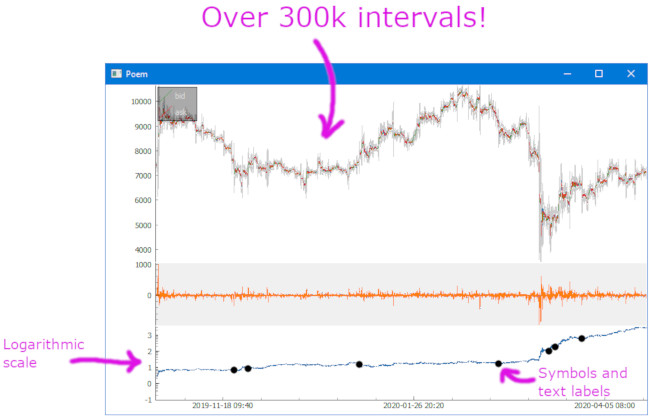
Finance Plotter, or finplot, is a performant library with a clean api to help you with your backtesting. It's optionated with good defaults, so you can start doing your work without having to setup plots, colors, scales, autoscaling, keybindings, handle panning+vertical zooming (which all non-finance libraries have problems with). And best of all: it can show hundreds of thousands of datapoints without batting an eye.



Features
- Great performance compared to mpl_finance, plotly and Bokeh
- Clean api
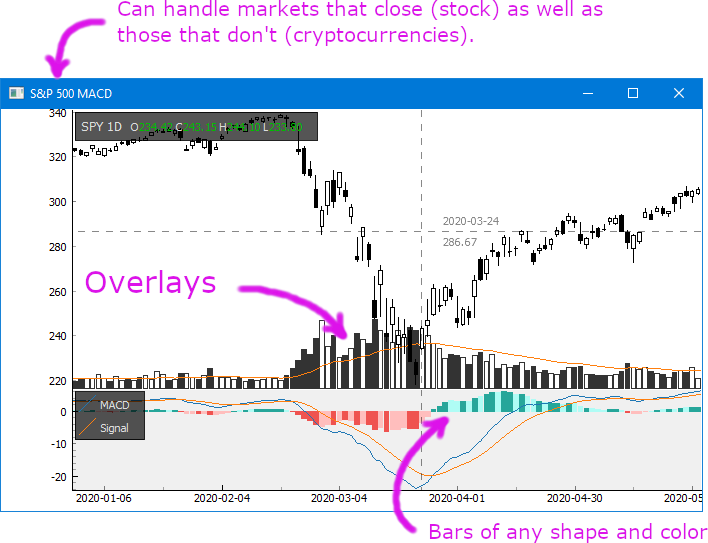
- Works with both stocks as well as cryptocurrencies on any time resolution
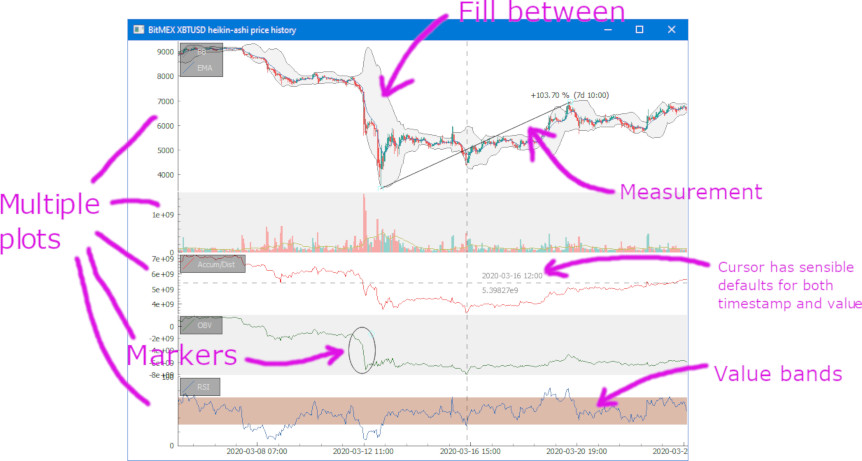
- Show as many charts as you want on the same time axis, zoom on all of them at once
- Auto-reload position where you were looking last run
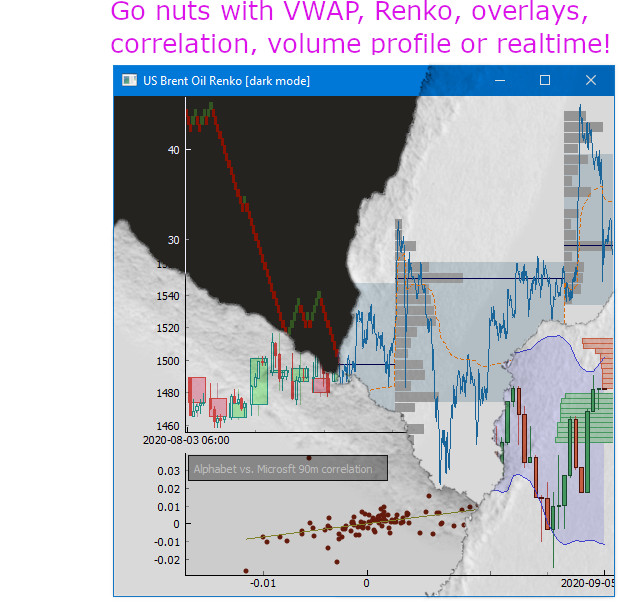
- Overlays, fill between, value bands, symbols, labels, legend, volume profile, heatmaps, etc.
- Can show real-time updates, including orderbook. Save screenshot.
- Comes with a dozen great examples.
What it is not
finplot is not a web app. It does not help you create an homebrew exchange. It does not work with Jupyter Labs.
It is only intended for you to do backtesting in. That is not to say that you can't create a ticker or a trade widget yourself. The library is based on the eminent pyqtgraph, which is fast and flexible, so feel free to hack away if that's what you want.
Easy installation
$ pip install finplot
Example
It's straight-forward to start using. This shows every daily candle of Apple since the 80'ies:
import finplot as fplt
import yfinance

df = yfinance.download('AAPL')
fplt.candlestick_ochl(df[['Open', 'Close', 'High', 'Low']])
fplt.show()
For more examples and a bunch of snippets, see the examples directory or the wiki. There you'll find how to plot MACD, Parabolic SAR, RSI, volume profile and much more.
Coffee
For future support and features, consider a small donation.
BTC: bc1qk8m8yh86l2pz4eypflchr0tkn5aeud6cmt426m
ETH: 0x684d7d4C52ed428AE9a36B2407ba909D896cDB67
Release history Release notifications | RSS feed


Download files
Download the file for your platform. If you're not sure which to choose, learn more about installing packages.
Source Distribution
Built Distribution
Filter files by name, interpreter, ABI, and platform.
If you're not sure about the file name format, learn more about wheel file names.
Copy a direct link to the current filters
File details
Details for the file finplot-1.9.7.tar.gz.
File metadata
- Download URL: finplot-1.9.7.tar.gz
- Upload date:
- Size: 708.1 kB
- Tags: Source
- Uploaded using Trusted Publishing? No
- Uploaded via: twine/5.1.1 CPython/3.11.1
File hashes
| Algorithm | Hash digest | |
|---|---|---|
| SHA256 |
4678ccba524ec5d037946c1bb97f83117c78e709f140ae34c43f984dd90101cc
|
|
| MD5 |
e49b97628f14a777b25f53adb18fcb4c
|
|
| BLAKE2b-256 |
211adc183bb126cd60cbf490062357ae859de9bf6a0d9fe8730facc164b2cb15
|
File details
Details for the file finplot-1.9.7-py3-none-any.whl.
File metadata
- Download URL: finplot-1.9.7-py3-none-any.whl
- Upload date:
- Size: 38.0 kB
- Tags: Python 3
- Uploaded using Trusted Publishing? No
- Uploaded via: twine/5.1.1 CPython/3.11.1
File hashes
| Algorithm | Hash digest | |
|---|---|---|
| SHA256 |
da26eff20d1a67c8a1c1d9083ffe47e0a446122e93a12e5dd8255068ba15f443
|
|
| MD5 |
cea6736bf47bc343c6d40947a9ab9fc4
|
|
| BLAKE2b-256 |
2e6dab08429a3de29bbc8daa7055b78e5b83ebf0b4f0845e7cd7bb816f65abfd
|






