
Firelight



Firelight is a visualization library for pytorch.
Its core object is a visualizer, which can be called passing some states (such as inputs, target,
prediction) returning a visualization of the data. What exactly that visualization shows, is specified in a yaml
configuration file.
Why you will like firelight initially:
- Neat image grids, lining up inputs, targets and predictions,
- Colorful images: Automatic scaling for RGB, matplotlib colormaps for grayscale data, randomly colored label images,
- Many available visualizers.
Why you will keep using firelight:
- Everything in one config file,
- Easily write your own visualizers,
- Generality in dimensions: All visualizers usable with data of arbitrary dimension.
Installation
From source (to get the most recent version)
On python 3.6+:
# Clone the repository
git clone https://github.com/inferno-pytorch/firelight
cd firelight/
# Install
python setup.py install
Using conda
Firelight is available on conda-forge for python > 3.6 and all operating systems:
conda install -c pytorch -c conda-forge firelight
Using pip
In an environment with scikit-learn installed:
pip install firelight
Example
- Run the example
firelight/examples/example_data.py
Config file example_config_0.yml:
RowVisualizer: # stack the outputs of child visualizers as rows of an image grid
  input_mapping:
    global: [B: ':3', D: '0:9:3'] # Show only 3 samples in each batch ('B'), and some slices along depth ('D').
    prediction: [C: '0']  # Show only the first channel of the prediction

  pad_value: [0.2, 0.6, 1.0] # RGB color of separating lines
  pad_width: {B: 6, H: 0, W: 0, rest: 3} # Padding for batch ('B'), height ('H'), width ('W') and other dimensions.

  visualizers:
    # First row: Ground truth
    - IdentityVisualizer:
        input: 'target' # show the target

    # Second row: Raw input
    - IdentityVisualizer:
        input: ['input', C: '0'] # Show the first channel ('C') of the input.
        cmap: viridis  # Name of a matplotlib colormap.

    # Third row: Prediction with segmentation boarders on top.
    - OverlayVisualizer:
        visualizers:
          - CrackedEdgeVisualizer: # Show borders of target segmentation
              input: 'target'
              width: 2
              opacity: 0.7 # Make output only partially opaque.
          - IdentityVisualizer: # prediction
              input: 'prediction'
              cmap: Spectral

    # Fourth row: Foreground probability, calculated by sigmoid on prediction
    - IdentityVisualizer:
        input_mapping: # the input to the visualizer can also be specified as a dict under the key 'input mapping'.
          tensor: ['prediction', pre: 'sigmoid'] # Apply sigmoid function from torch.nn.functional before visualize.
        value_range: [0, 1] # Scale such that 0 is white and 1 is black. If not specified, whole range is used.

    # Fifth row: Visualize where norm of prediction is smaller than 2
    - ThresholdVisualizer:
        input_mapping:
          tensor:
            NormVisualizer: # Use the output of NormVisualizer as the input to ThresholdVisualizer
              input: 'prediction'
              colorize: False
        threshold: 2
        mode: 'smaller'
Python code:
from firelight import get_visualizer
import matplotlib.pyplot as plt

# Load the visualizer, passing the path to the config file. This happens only once, at the start of training.
visualizer = get_visualizer('./configs/example_config_0.yml')

# Get an example state dictionary, containing the input, target, prediction
states = get_example_states()

# Call the visualizer
image_grid = visualizer(**states)

# Log your image however you want
plt.imsave('visualizations/example_visualization.jpg', image_grid.numpy())
Resulting visualization:
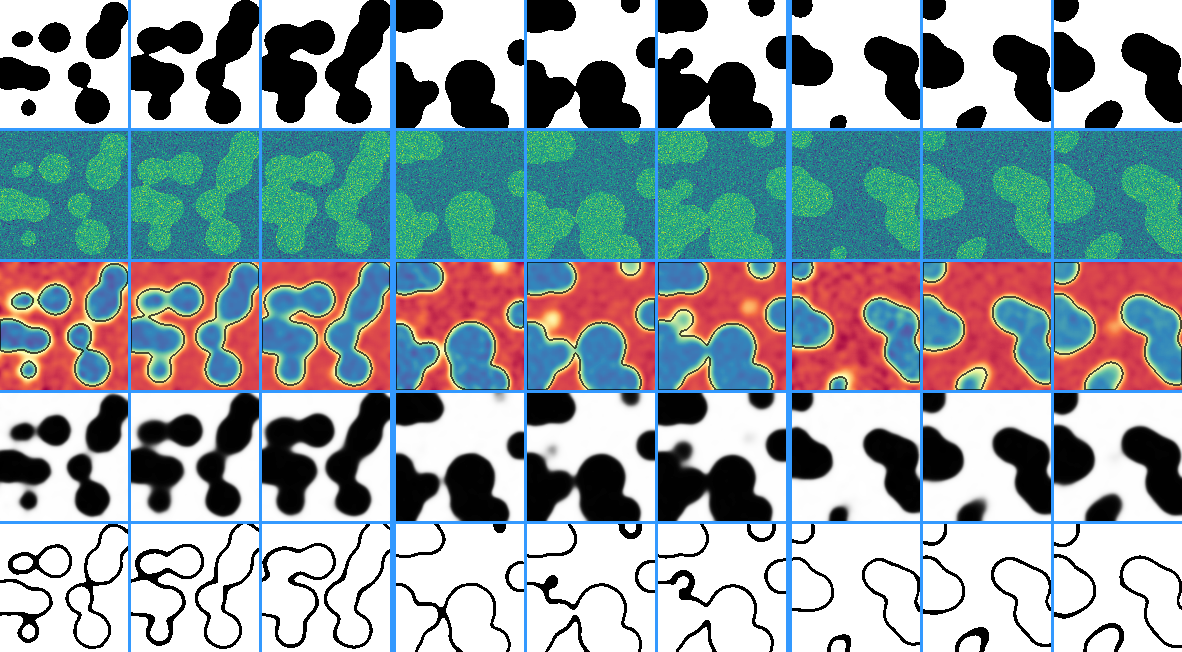
Many more visualizers are available. Have a look at visualizers.py and container_visualizers.py or, for a more condensed list, the imports in config_parsing.py.
With Inferno
Firelight can be easily combined with a TensorboardLogger from inferno.
Simply add an extra line at the start of your config specifying under which tag the visualizations should be logged, and
add a callback to your trainer with get_visualization_callback in firelight/inferno_callback.py
Config:
fancy_visualization: # This will be the tag in tensorboard
    RowVisualizer:
      ...
Python:
from inferno.trainers.basic import Trainer
from inferno.trainers.callbacks.logging.tensorboard import TensorboardLogger
from firelight.inferno_callback import get_visualization_callback

# Build trainer and logger
trainer = Trainer(...)
logger = TensorboardLogger(...)
trainer.build_logger(logger, log_directory='path/to/logdir')

# Register the visualization callback
trainer.register_callback(
        get_visualization_callback(
            config='path/to/visualization/config'
        )
    )
1 maintainer

Metadata
1 maintainer
Release files for firelight 0.2.1
For a detailed explanation of source distributions (sdists) and built distributions (wheels), please see the package formats documentation.
Source distribution (sdist)
| File | Size | Uploaded | Provenance | Actions |
|---|---|---|---|---|
| firelight-0.2.1.tar.gz | 33.8 kB | Without provenance | Details for firelight-0.2.1.tar.gz |
Built distribution (wheel)
| File | Interpreter | ABI | Platform | Actions Reset |
|---|---|---|---|---|
| firelight-0.2.1-py3-none-any.whl | Python 3 | none | any | Details for firelight-0.2.1-py3-none-any.whl |
Total release size: 75.4 kB
Release files / firelight-0.2.1.tar.gz
| Download URL | firelight-0.2.1.tar.gz |
|---|---|
| Size | 33.8 kB |
| Tags | Source |
|
SHA-256 checksum How to use checksums |
e2a97819946b82877e9b437364c935bd652a520f8ee207b18bee30a711bee5c6
|
|
BLAKE2b-256 checksum How to use checksums |
c244dfbe7c97c8e0f7d895986f472237044c28db06e38e41b5226e499937e78a
|
| Upload date | |
|
Uploaded using Trusted Publishing? What is trusted publishing? |
No |
| Uploaded via |
twine/2.0.0 pkginfo/1.5.0.1 requests/2.22.0 setuptools/41.6.0.post20191030 requests-toolbelt/0.9.1 tqdm/4.38.0 CPython/3.7.5
|
Release files / firelight-0.2.1-py3-none-any.whl
| Download URL | firelight-0.2.1-py3-none-any.whl |
|---|---|
| Size | 41.6 kB |
| Tags | Python 3 |
|
SHA-256 checksum How to use checksums |
6d8fd5c2f20623343ef06b8151ecd68bbeef72e279d3b8e135cdf2cee01ad12c
|
|
BLAKE2b-256 checksum How to use checksums |
39f087bd00f58061dc14dc964e09745c5796cbdf30f5c85a1d2b7951c7e88cfa
|
| Upload date | |
|
Uploaded using Trusted Publishing? What is trusted publishing? |
No |
| Uploaded via |
twine/2.0.0 pkginfo/1.5.0.1 requests/2.22.0 setuptools/41.6.0.post20191030 requests-toolbelt/0.9.1 tqdm/4.38.0 CPython/3.7.5
|
Security for firelight 0.2.1
Provenance
Provenance describes where a file came from. On PyPI, provenance is shared via attestations, which provide a verifiable record of the build or publishing details. View details, limitations and caveats.
No provenance found
None of the files in this release were uploaded with provenance metadata.
A note on package security
PyPI is a repository for distributing packages, not a service for auditing them. While third-party security researchers and our staff do their best to detect and remove malicious packages, PyPI cannot guarantee the quality, security or suitability of any given package.
To learn more about protecting yourself from malicious actors, visit our package security documentation.














