
fitellipsoid






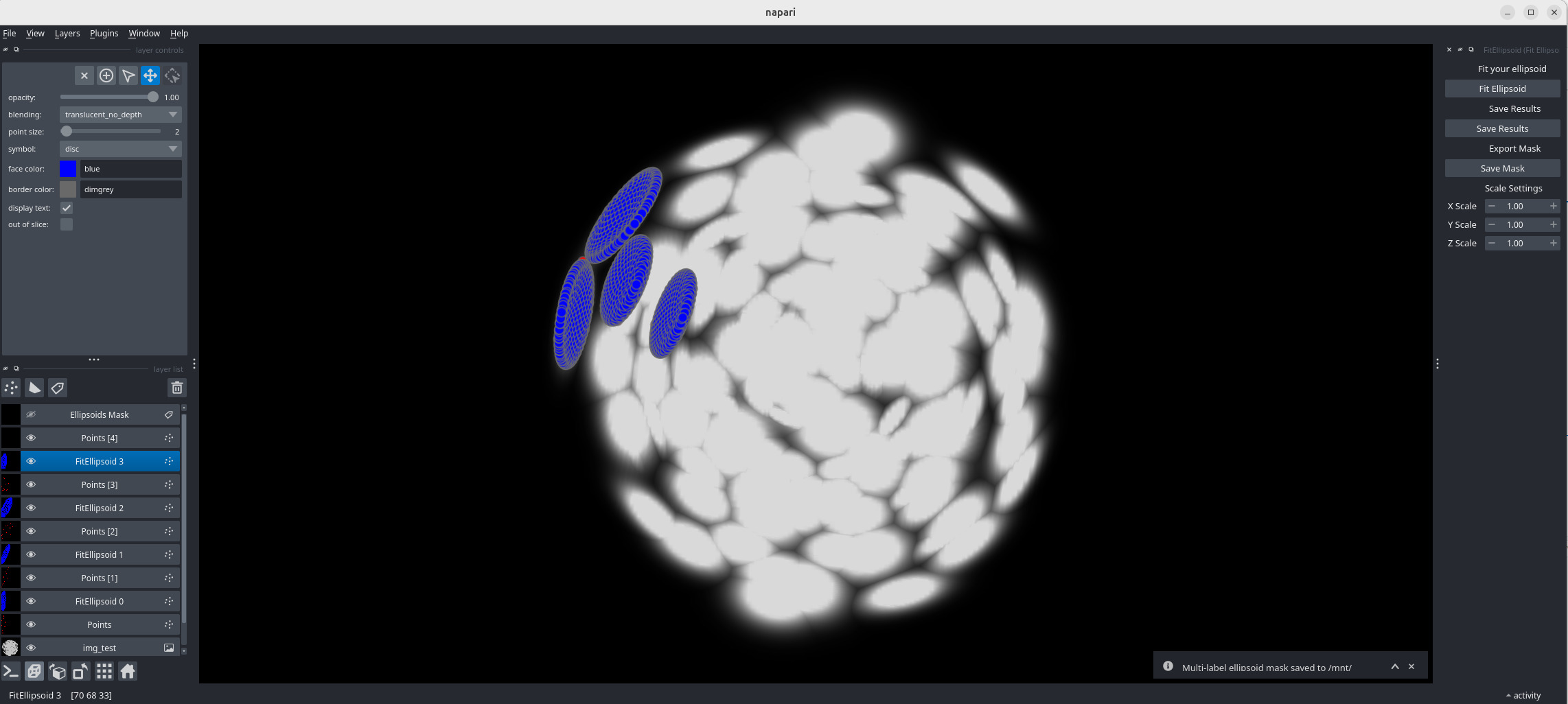
A plugin to find the best ellipsoid to fit a set of points clicked by the user. With just a few clicks (10 is the absolute minimum) around the cells/nuclei boundaries, the plugin fits an ellipsoid and returns its parameters. This can be used to analyze tissue geometry, mecanical stress, provide training databases for segmentation algorithms,...
Installation
You can install fitellipsoid via pip:
conda create -n fitellipsoid-env python=3.11
conda activate fitellispoid-env
pip install -U 'napari[all]'
pip install fitellipsoid
napari
🧪 Usage Instructions
-
Open your 3D image stack in Napari.
-
Launch the FitEllipsoid plugin from the plugin menu.
-
Select the point layer created by the plugin and begin clicking along the boundary of your object:
- 🖱️ Left-click to add a point
- 🖱️ Right-click to remove the last added point
-
Once you've added at least 10 points, click on the "Fit Ellipsoid" button.
-
A blue ellipsoid will be fitted and displayed.
- ✅ If the shape fits well, you're done with that object.
- ❌ If it doesn't, return to the corresponding point layer and add or adjust points.
-
Repeat the process for all objects you'd like to segment.
The plugin automatically adds a new point layer after each fit. -
When you're finished, save the results as a
.csvfile and optionally export a segmentation mask.
Contributors
- Pierre Weiss - Project lead, core plugin development
- Clément Cazorla - Added the segmentation mask generation
Contributing
Contributions are very welcome. Tests can be run with tox, please ensure the coverage at least stays the same before you submit a pull request.
License
Distributed under the terms of the GNU GPL v3.0 license, "fitellipsoid" is free and open source software
Issues
If you encounter any problems, please [file an issue] along with a detailed description.
1 maintainer

Metadata
1 maintainer
Release files for fitellipsoid 0.0.6
For a detailed explanation of source distributions (sdists) and built distributions (wheels), please see the package formats documentation.
Source distribution (sdist)
| File | Size | Uploaded | Provenance | Actions |
|---|---|---|---|---|
| fitellipsoid-0.0.6.tar.gz | 670.0 kB | Without provenance | Details for fitellipsoid-0.0.6.tar.gz |
Built distribution (wheel)
| File | Interpreter | ABI | Platform | Actions Reset |
|---|---|---|---|---|
| fitellipsoid-0.0.6-py3-none-any.whl | Python 3 | none | any | Details for fitellipsoid-0.0.6-py3-none-any.whl |
Total release size: 709.2 kB
Release files / fitellipsoid-0.0.6.tar.gz
| Download URL | fitellipsoid-0.0.6.tar.gz |
|---|---|
| Size | 670.0 kB |
| Tags | Source |
|
SHA-256 checksum How to use checksums |
e64b03f4c3fd40979417bef5083ffd26c620539fd4f5953dde880e99a1c54221
|
|
BLAKE2b-256 checksum How to use checksums |
7f9a8e14914c575f5f04d55dcb6c61308a5ee1bca113d957d51b84ba30597c54
|
| Upload date | |
|
Uploaded using Trusted Publishing? What is trusted publishing? |
No |
| Uploaded via |
twine/6.1.0 CPython/3.10.16
|
Release files / fitellipsoid-0.0.6-py3-none-any.whl
| Download URL | fitellipsoid-0.0.6-py3-none-any.whl |
|---|---|
| Size | 39.3 kB |
| Tags | Python 3 |
|
SHA-256 checksum How to use checksums |
f2a17266da8b5e65813b34f4872148203411fbe1908cd3241b02c8226f728c5d
|
|
BLAKE2b-256 checksum How to use checksums |
a2b5e306df6796fd1caa166ac205f3da3114568b43f288a74d5b944b742aa8ea
|
| Upload date | |
|
Uploaded using Trusted Publishing? What is trusted publishing? |
No |
| Uploaded via |
twine/6.1.0 CPython/3.10.16
|
Security for fitellipsoid 0.0.6
Provenance
Provenance describes where a file came from. On PyPI, provenance is shared via attestations, which provide a verifiable record of the build or publishing details. View details, limitations and caveats.
No provenance found
None of the files in this release were uploaded with provenance metadata.
A note on package security
PyPI is a repository for distributing packages, not a service for auditing them. While third-party security researchers and our staff do their best to detect and remove malicious packages, PyPI cannot guarantee the quality, security or suitability of any given package.
To learn more about protecting yourself from malicious actors, visit our package security documentation.














