
Flask extension for grouped log lines for Google Cloud Logging
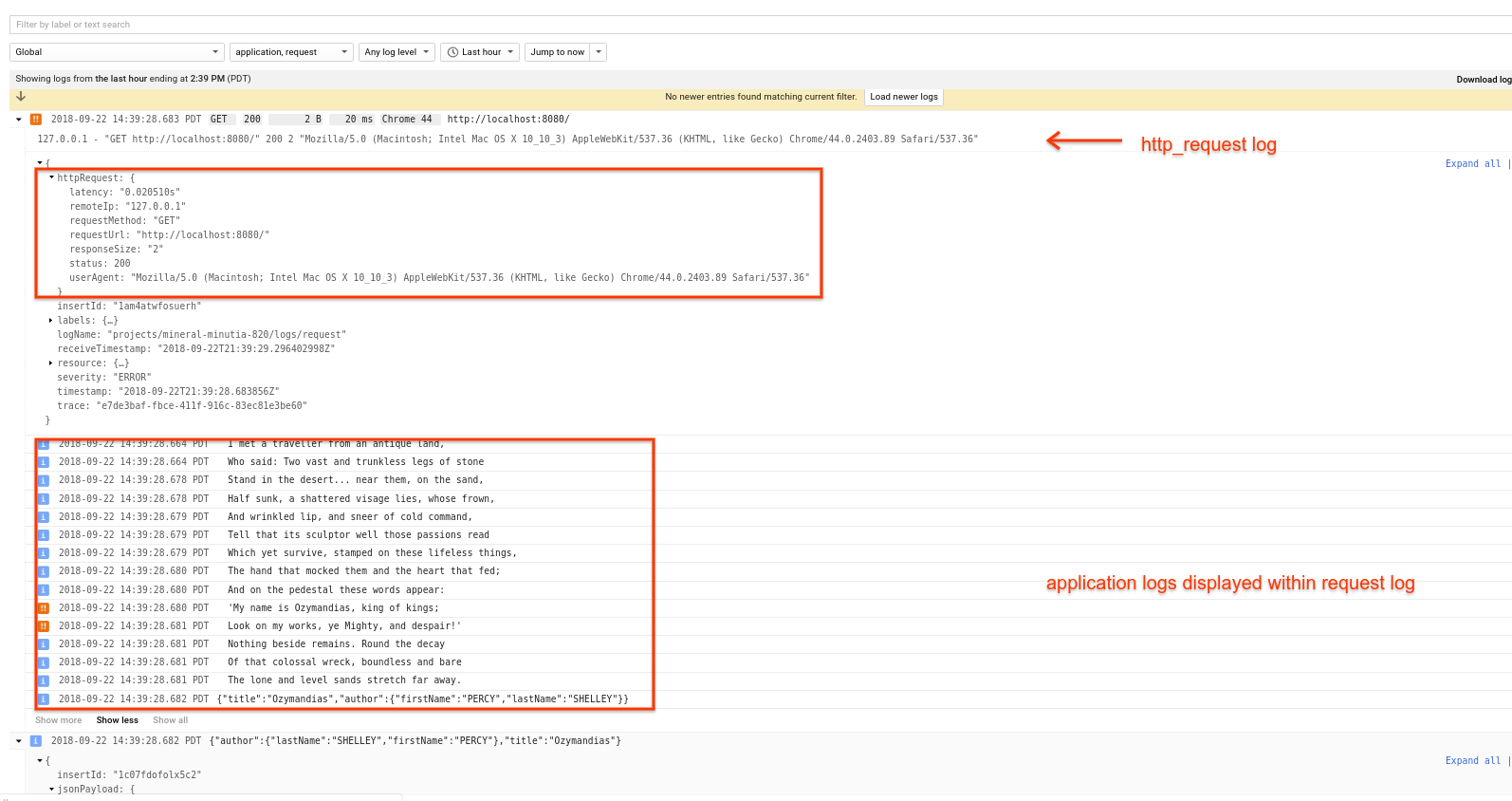
Flask extension that allows log lines emitted within a request handler to display/render together.
Normally, when using Google Cloud Logging libraries ( google-cloud-logging and CloudLoggingHander), each log entry that gets emitted is displayed separately within the Logging UI. However, its desireable to group all logs together that logically belong that way in an HTTP Request. For a given HTTP Request into FLask, this extension displays all the logs ‘together’ below the parent request.
as in
Configuration Parameters
GCPHandler
app: Flask handler
parentLogName: parentLogger name for the ‘request (default: request”)
childLogName: childLogger name for the ‘application logs (default: “application”)
traceHeaderName: header name to parse as the trace header. (on GCP, its X-Cloud-Trace-Context)
labels: labels dictionary to apply to all logs (default = None),
resource: Cloud Logging resource to log against (default=’global’)
from flask import Flask
import logging, json

from flask_gcp_log_groups import GCPHandler

app = Flask(__name__)

g = GCPHandler(app, parentLogName="request",
    childLogName="application",
    traceHeaderName='X-Cloud-Trace-Context',
    labels= {'foo': 'bar', 'baz': 'qux'},
    resource= {
              "type": "gce_instance",
              "labels": { "instance_id": "5160310737730769780",
                          "zone": "us-central1-a"
                        }
    })
g.setLevel(logging.INFO)
app.logger.addHandler(g)

@app.route('/')
def default():
  app.logger.setLevel(logging.INFO)
  app.logger.info("I met a traveller from an antique land,")
  return 'ok'

if __name__ == '__main__':
  app.run(host='0.0.0.0', port=8080, debug=False)
with trace only
curl -v  -H "User-Agent: Mozilla/5.0 (Macintosh; Intel Mac OS X 10_10_3) AppleWebKit/537.36 (KHTML, like Gecko) Chrome/44.0.2403.89 Safari/537.36" \
-H "X-Cloud-Trace-Context: `python -c "import uuid; print uuid.uuid4()"`" \
http://localhost:8080/
1 maintainer

Metadata
1 maintainer
Release files for flask-gcp-log-groups 0.2.2
For a detailed explanation of source distributions (sdists) and built distributions (wheels), please see the package formats documentation.
Source distribution (sdist)
| File | Size | Uploaded | Provenance | Actions |
|---|---|---|---|---|
| flask-gcp-log-groups-0.2.2.tar.gz | 5.9 kB | Without provenance | Details for flask-gcp-log-groups-0.2.2.tar.gz |
Release files / flask-gcp-log-groups-0.2.2.tar.gz
| Download URL | flask-gcp-log-groups-0.2.2.tar.gz |
|---|---|
| Size | 5.9 kB |
| Tags | Source |
|
SHA-256 checksum How to use checksums |
8f7037e0b01e8dec43c2fe367c6a3c239f41daf3685d7267bfd40c1b7fb69e24
|
|
BLAKE2b-256 checksum How to use checksums |
0f45b5370fb476e2786492754a2819f0feb48c87a3f2d4efda5eb4f193a2e99e
|
| Upload date | |
|
Uploaded using Trusted Publishing? What is trusted publishing? |
No |
| Uploaded via |
twine/3.2.0 pkginfo/1.6.1 requests/2.24.0 setuptools/50.3.0 requests-toolbelt/0.9.1 tqdm/4.54.1 CPython/3.8.6
|
Security for flask-gcp-log-groups 0.2.2
Provenance
Provenance describes where a file came from. On PyPI, provenance is shared via attestations, which provide a verifiable record of the build or publishing details. View details, limitations and caveats.
No provenance found
None of the files in this release were uploaded with provenance metadata.
A note on package security
PyPI is a repository for distributing packages, not a service for auditing them. While third-party security researchers and our staff do their best to detect and remove malicious packages, PyPI cannot guarantee the quality, security or suitability of any given package.
To learn more about protecting yourself from malicious actors, visit our package security documentation.














