
flowpy 💾 - A python package for working with optical flows
Optical flow is the displacement map of pixels between two frames. It is a low-level analysis used in many computer vision programs.
Working with optical flow may be cumbersome:
- It is quite hard to represent it in a comprehensible manner.
- Multiple formats exist for storing it.
Flowpy provides tools to work with optical flow more easily in python.
Installing
We recommend using pip:
pip install flowpy
Features
The main features of flowpy are:
- Reading and writing optical flows in two formats:
- Visualizing optical flows with matplotlib
- Backward and forward warp
Examples
A simple RGB plot
This is the simplest example of how to use flowpy, it:
- Reads a file using flowpy.flow_read.
- Transforms the flow as an rgb image with flowpy.flow_to_rgb and shows it with matplotlib
Code:
import flowpy
import matplotlib.pyplot as plt

flow = flowpy.flow_read("tests/data/kitti_occ_000010_10.flo")

fig, ax = plt.subplots()
ax.imshow(flowpy.flow_to_rgb(flow))
plt.show()
Result:
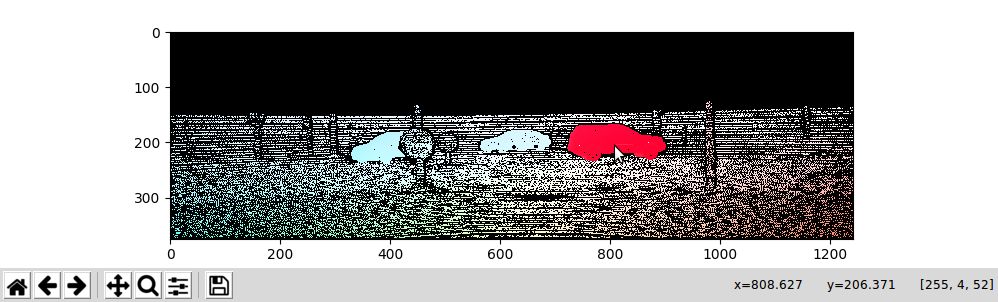
Sample image from the KITTI dataset
Plotting arrows, showing flow values and a calibration pattern
Flowpy comes with more than just RGB plots, the main features here are: - Arrows to quickly visualize the flow - The flow values below cursor showing in the tooltips - A calibration pattern side by side as a legend for your graph
Code:
flow = flowpy.flow_read("tests/data/Dimetrodon.flo")
height, width, _ = flow.shape

image_ratio = height / width
max_radius = flowpy.get_flow_max_radius(flow)

fig, (ax_1, ax_2) = plt.subplots(
    1, 2, gridspec_kw={"width_ratios": [1, image_ratio]}
)

ax_1.imshow(flowpy.flow_to_rgb(flow))
flowpy.attach_arrows(ax_1, flow)
flowpy.attach_coord(ax_1, flow)

flowpy.attach_calibration_pattern(ax_2, flow_max_radius=max_radius)

plt.show()
Result:
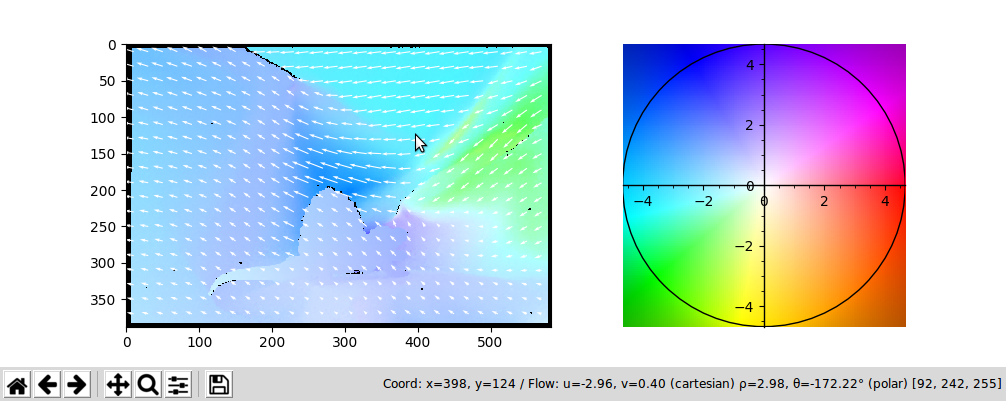
Sample image from the Middlebury dataset
Warping images (backward):
If you know the flow (first_image -> second_image), you can backward warp the second_image back to first_image.
flow = flowpy.flow_read("static/kitti_occ_000010_10.png")
first_image = np.asarray(Image.open("static/kitti_000010_10.png"))
second_image = np.asarray(Image.open("static/kitti_000010_11.png"))

flow[np.isnan(flow)] = 0
warped_first_image = flowpy.backward_warp(second_image, flow)

fig, axes = plt.subplots(3, 1)
for ax, image, title in zip(axes, (first_image, second_image, warped_first_image),
                            ("First Image", "Second Image", "Second image warped to first image")):
    ax.imshow(image)
    ax.set_title(title)
    ax.set_axis_off()

plt.show()
Result:
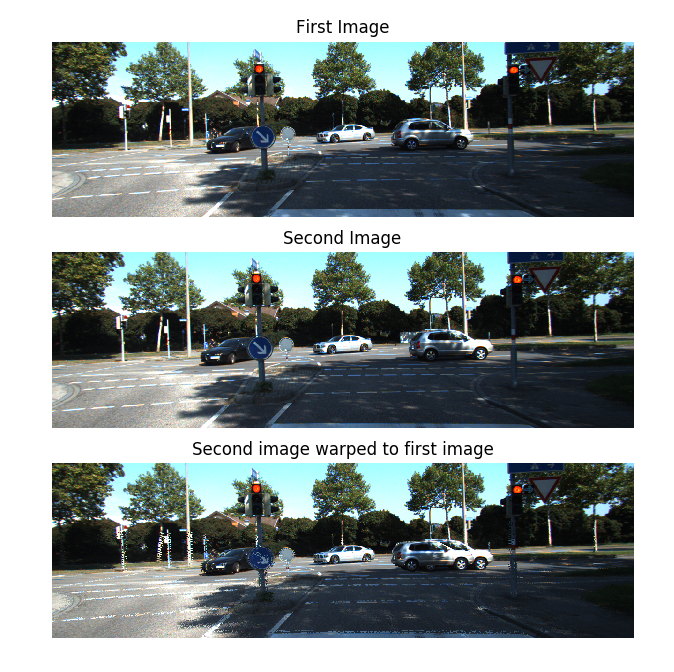
Note that the artifacts in the warp are normal, they are caused by unknown flows and occlusions.
Warping images (forward):
Forward warp is often less used as it is quite more complex. It relies on a k-nearest neighbor search instead of direct bi-linear interpolation.
forward_warp is about 10x slower than backward_warp but you still may find it useful.
flow = flowpy.flow_read("static/kitti_occ_000010_10.png")
first_image = np.asarray(Image.open("static/kitti_000010_10.png"))
second_image = np.asarray(Image.open("static/kitti_000010_11.png"))

flow[np.isnan(flow)] = 0
warped_second_image = flowpy.forward_warp(first_image, flow)

fig, ax = plt.subplots()

ax.imshow(warped_second_image)
ax.set_title( "First image warped to the second")
ax.set_axis_off()

plt.show()
Result:
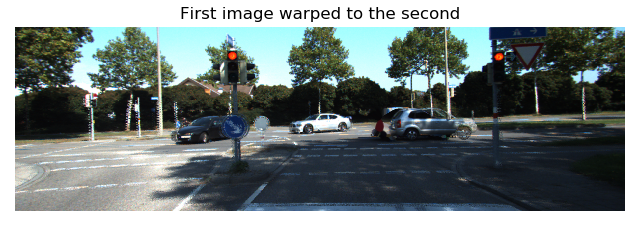
More
You can find the above examples in the examples folder. You can also look in tests.
If you encounter a bug or have an idea for a new feature, feel free to open an issue.
Most of the visualization and io handling has been translated from matlab and c code from the Middlebury flow code. Credits to thank Simon Baker, Daniel Scharste, J. P. Lewis, Stefan Roth, Michael J. Black and Richard Szeliski.
1 maintainer

Metadata
1 maintainer
Release files for flowpy 0.6.0
For a detailed explanation of source distributions (sdists) and built distributions (wheels), please see the package formats documentation.
Source distribution (sdist)
| File | Size | Uploaded | |
|---|---|---|---|
| flowpy-0.6.0.tar.gz | 13.3 kB | Details |
Built distribution (wheel)
| File | Interpreter | ABI | Platform | Reset |
|---|---|---|---|---|
| flowpy-0.6.0-py3-none-any.whl | Python 3 | none | any | Details |
Total release size: 27.4 kB
Release files / flowpy-0.6.0.tar.gz
| Download URL | flowpy-0.6.0.tar.gz |
|---|---|
| Size | 13.3 kB |
| Tags | Source |
|
SHA-256 checksum How to use checksums |
37ee90a8e68f3fe31b1dc1f72ea059eb0f5e34958d2e07cdbe8f014e62956b0e
|
|
BLAKE2b-256 checksum How to use checksums |
9d5c19c971c5b8e94f618e36f7d472aa62a6c79ccee551fc2d5306968662c546
|
| Upload date | |
|
Uploaded using Trusted Publishing? What is trusted publishing? |
No |
| Uploaded via |
twine/3.3.0 pkginfo/1.7.0 requests/2.25.1 setuptools/40.6.2 requests-toolbelt/0.9.1 tqdm/4.56.0 CPython/3.6.12
|
Release files / flowpy-0.6.0-py3-none-any.whl
| Download URL | flowpy-0.6.0-py3-none-any.whl |
|---|---|
| Size | 14.1 kB |
| Tags | Python 3 |
|
SHA-256 checksum How to use checksums |
9765c2214256192cc8d60ddb3af319d9d7928149c0095834dfcbeb54e8232549
|
|
BLAKE2b-256 checksum How to use checksums |
029d223844aca4bcaf264ca4de73c72014744cd9aafe48c4856de5af4fe14558
|
| Upload date | |
|
Uploaded using Trusted Publishing? What is trusted publishing? |
No |
| Uploaded via |
twine/3.3.0 pkginfo/1.7.0 requests/2.25.1 setuptools/40.6.2 requests-toolbelt/0.9.1 tqdm/4.56.0 CPython/3.6.12
|














