
Focus Stacking
Focus Stacking in Python
I wrote focusstack, a image simple focus stacking tool, for creating fun images with my microscope.
Per Wikipedia: Focus stacking is a digital image processing technique which combines multiple images taken at different focus distances to give a resulting image with a greater depth of field (DOF) than any of the individual source images.
See below for a longer explanation of the algorithm.
The ThoughtEmporium has a great explainer video on Youtube.
Installation
focusstack can be installed by running pip install focusstack. It requires Python 3.6.0+, OpenCV<3.4.2, and numpy.
You can use OpenCV 4.X+, but since the SIFT algorithm is proprietary, you must set use_sift in the source code to False.
Alternatively, you can install from source:
git clone https://github.com/momonala/focus-stack
cd focus-stack
pip install  -e .
Usage
focusstack -i input_dir -o output.png
Options:
$focusstack --help

usage: Tool to focus stack a list of images. [-h] -i INPUT -o OUTPUT
                                             [-d DEBUG] [-g GAUSSIAN]
                                             [-l LAPLACIAN]

optional arguments:
  -h, --help            show this help message and exit
  -i INPUT, --input INPUT
                        directory of images to focus stack
  -o OUTPUT, --output OUTPUT
                        Name of output image.
  -d DEBUG, --debug DEBUG
                        Debug mode.
  -g GAUSSIAN, --gaussian GAUSSIAN
                        Size of gaussian blur kernel.
  -l LAPLACIAN, --laplacian LAPLACIAN
                        Size of laplacian gradient kernel.
focusstack is a well-behaved Unix-style command-line tool:
-
it does nothing if no sources are passed to it;
-
it will read images from the stated input directory, and write the output image relative to the current working directory.
-
exits with code 0 unless an internal error occurred.
How it Works:
The focus stacking algorithm works by preferentially selecting the most in-focus regions from a set of images, and combining them into an output image.
The user must first create a set of images with different focus planes, all taken from a fixed vantage point. The software will read all the images in, and align them, since changing focus can add some warping, or perspective distortion, to the image. This tool uses the SIFT algorithm in OpenCV to find key-points in all the images, relative to the first in the set. A homography matrix is computed and used to warp the images and align those key points (and therefore the whole image, in theory).
Next we must find which parts of each image are most in-focus. This is done using the LaPlacian gradient. The LaPlacian gradient can be thought of as the second-order derivative of the image (where as the Sobel gradient would be the first order). It is measure of how intensely the pixels are changing. You can view the Khan Academy's video, or PyImageSearch's blog to get an intution for this concept.
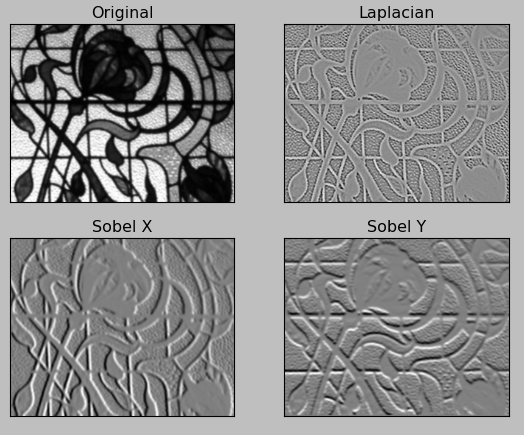
All the images are blurred, using a Gaussian blur filter, to make some of the estimations easier. And the LaPlacian gradient is calculated. The maxiuum of the absolute value of the gradient is taken, and this is used as the proxy for the focus region.
All the images are stacked, and for each x,y location in the image, the maximum value of the stack is sent to the output image. And there we have it, a focus stacked image!
License
MIT
This code and algorithm was inspired and adapted from the following sources:
1 maintainer

Metadata
1 maintainer
Release files for focus-stack 0.0.1
For a detailed explanation of source distributions (sdists) and built distributions (wheels), please see the package formats documentation.
Source distribution (sdist)
| File | Size | Uploaded | |
|---|---|---|---|
| focus-stack-0.0.1.tar.gz | 6.2 kB | Details |
Built distribution (wheel)
| File | Interpreter | ABI | Platform | Reset |
|---|---|---|---|---|
| focus_stack-0.0.1-py3-none-any.whl | Python 3 | none | any | Details |
Total release size: 14.5 kB
Release files / focus-stack-0.0.1.tar.gz
| Download URL | focus-stack-0.0.1.tar.gz |
|---|---|
| Size | 6.2 kB |
| Tags | Source |
|
SHA-256 checksum How to use checksums |
713c4d532189cd436998d5c40ed8b8f4872ed92fd4b797c4cfaf887d7f3f01bf
|
|
BLAKE2b-256 checksum How to use checksums |
40272097de13479c6fc082015574573c09db5b276b2f5bffc10a02eac18f181e
|
| Upload date | |
|
Uploaded using Trusted Publishing? What is trusted publishing? |
No |
| Uploaded via |
twine/3.1.1 pkginfo/1.5.0.1 requests/2.23.0 setuptools/46.1.1 requests-toolbelt/0.9.1 tqdm/4.43.0 CPython/3.7.6
|
Release files / focus_stack-0.0.1-py3-none-any.whl
| Download URL | focus_stack-0.0.1-py3-none-any.whl |
|---|---|
| Size | 8.3 kB |
| Tags | Python 3 |
|
SHA-256 checksum How to use checksums |
44d9e24484412f830e36fee778fab7b6ac02ea7cb3471e8f4b3e84302d09ac2e
|
|
BLAKE2b-256 checksum How to use checksums |
d5a1cd1a63f9274c1e3de5fc6fcca21fab529425ceba3334182419944246fc3b
|
| Upload date | |
|
Uploaded using Trusted Publishing? What is trusted publishing? |
No |
| Uploaded via |
twine/3.1.1 pkginfo/1.5.0.1 requests/2.23.0 setuptools/46.1.1 requests-toolbelt/0.9.1 tqdm/4.43.0 CPython/3.7.6
|













