
A minimalist Pomodoro timer that runs in your terminal
Verified details
These details have been verified by PyPIProject links
GitHub Statistics
Maintainers

Project description



A minimalist Pomodoro timer that runs in your terminal
Free software: MIT license
Documentation: https://scopeta.github.io/focusedme/
Installation and usage
- Install via pip
$ pip install focusedme
- Read instructions
$ focusedme -h
- Common usage (default pomodoro values)
$ focusedme
Platform Support
Windows: Uses built-in winsound module - no extra dependencies required!
macOS: Uses built-in afplay command - no extra dependencies required!
Linux/Other: Uses simpleaudio library, automatically installed with pip
Overview
Project Background and Description
The goal of this project is to implement a productivity timer based on Pomodoro technique using Python programming language
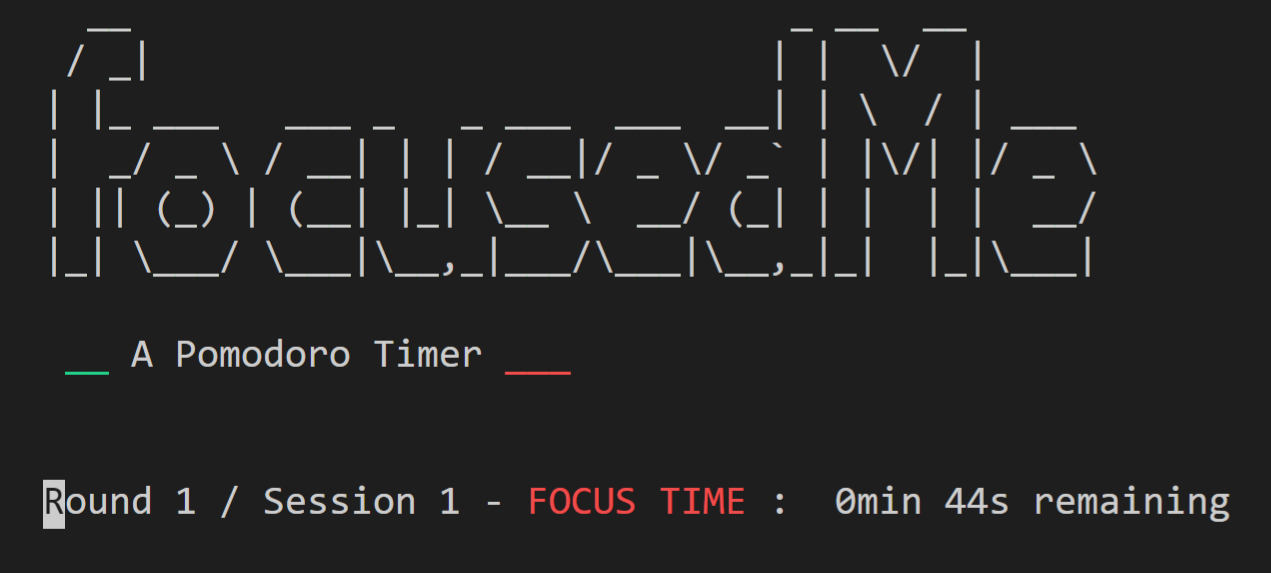
The focusedMe module implements the basic features of a Pomodoro timer that runs in a terminal and provide a minimalist text-based interface. The timer provides an easy way to break down work into focused sessions, traditionally 25 minutes in length, separated by short or long breaks. Each session is known as a Pomodoro.
The timer tracks the sessions and notify the user of completion, as well as allow them to control its progress.
Features
The timer currently includes the following features:
Allows users to initialize the timer with default parameters (25 mins for focused sessions and long breaks, and 5 mins for short breaks)
Tracks sessions according the Pomodoro technique and properly handling short and long breaks
Updates the user in real time through a text-based interface
Includes command line help and user options in the screen
Plays a sound to alert the user when a session is completed and a new one is about to start
Allows user to skip or pause a session or stop timer
Allows user to visualize information about progress
Project details
Verified details
These details have been verified by PyPIProject links
GitHub Statistics
Maintainers
Release history Release notifications | RSS feed


Download files
Download the file for your platform. If you're not sure which to choose, learn more about installing packages.
Source Distribution
Built Distribution
Filter files by name, interpreter, ABI, and platform.
If you're not sure about the file name format, learn more about wheel file names.
Copy a direct link to the current filters
File details
Details for the file focusedme-0.1.84.tar.gz.
File metadata
- Download URL: focusedme-0.1.84.tar.gz
- Upload date:
- Size: 306.5 kB
- Tags: Source
- Uploaded using Trusted Publishing? Yes
- Uploaded via: twine/6.1.0 CPython/3.12.9
File hashes
| Algorithm | Hash digest | |
|---|---|---|
| SHA256 |
9be18e0c5f5a4c08302b84df4b7bba94c86d0d005f502e5c13a5ba94ea045070
|
|
| MD5 |
f8ccab311da7a66be37a6605e5ddcfaf
|
|
| BLAKE2b-256 |
9c5bc1dc6666151b82f346fda6f3e64bb683013a7648e3218a2c5e3219eb2658
|
Provenance
The following attestation bundles were made for focusedme-0.1.84.tar.gz:
Publisher:
python-publish.yml on scopeta/focusedme
-
Statement:
-
Statement type:
https://in-toto.io/Statement/v1 -
Predicate type:
https://docs.pypi.org/attestations/publish/v1 -
Subject name:
focusedme-0.1.84.tar.gz -
Subject digest:
9be18e0c5f5a4c08302b84df4b7bba94c86d0d005f502e5c13a5ba94ea045070 - Sigstore transparency entry: 212684974
- Sigstore integration time:
-
Permalink:
scopeta/focusedme@bc7a781a858376cd109a5192127ce9c21a968299 -
Branch / Tag:
refs/tags/0.1.84 - Owner: https://github.com/scopeta
-
Access:
public
-
Token Issuer:
https://token.actions.githubusercontent.com -
Runner Environment:
github-hosted -
Publication workflow:
python-publish.yml@bc7a781a858376cd109a5192127ce9c21a968299 -
Trigger Event:
release
-
Statement type:
File details
Details for the file focusedme-0.1.84-py3-none-any.whl.
File metadata
- Download URL: focusedme-0.1.84-py3-none-any.whl
- Upload date:
- Size: 304.8 kB
- Tags: Python 3
- Uploaded using Trusted Publishing? Yes
- Uploaded via: twine/6.1.0 CPython/3.12.9
File hashes
| Algorithm | Hash digest | |
|---|---|---|
| SHA256 |
160cfc7b6f78b49b036cfb654ab6f5a0d81d448c56d13602112e691bc7ab5cb0
|
|
| MD5 |
08c65ba3584f844b4fe9327ca8b13888
|
|
| BLAKE2b-256 |
ee74fd4bc7606ce6dfd315d84a02feca0fdbe04555403e7d284125beaba9f1f5
|
Provenance
The following attestation bundles were made for focusedme-0.1.84-py3-none-any.whl:
Publisher:
python-publish.yml on scopeta/focusedme
-
Statement:
-
Statement type:
https://in-toto.io/Statement/v1 -
Predicate type:
https://docs.pypi.org/attestations/publish/v1 -
Subject name:
focusedme-0.1.84-py3-none-any.whl -
Subject digest:
160cfc7b6f78b49b036cfb654ab6f5a0d81d448c56d13602112e691bc7ab5cb0 - Sigstore transparency entry: 212684978
- Sigstore integration time:
-
Permalink:
scopeta/focusedme@bc7a781a858376cd109a5192127ce9c21a968299 -
Branch / Tag:
refs/tags/0.1.84 - Owner: https://github.com/scopeta
-
Access:
public
-
Token Issuer:
https://token.actions.githubusercontent.com -
Runner Environment:
github-hosted -
Publication workflow:
python-publish.yml@bc7a781a858376cd109a5192127ce9c21a968299 -
Trigger Event:
release
-
Statement type:






