
folderplay




folderplay is a small tool that helps you remember watched tv episodes ✨
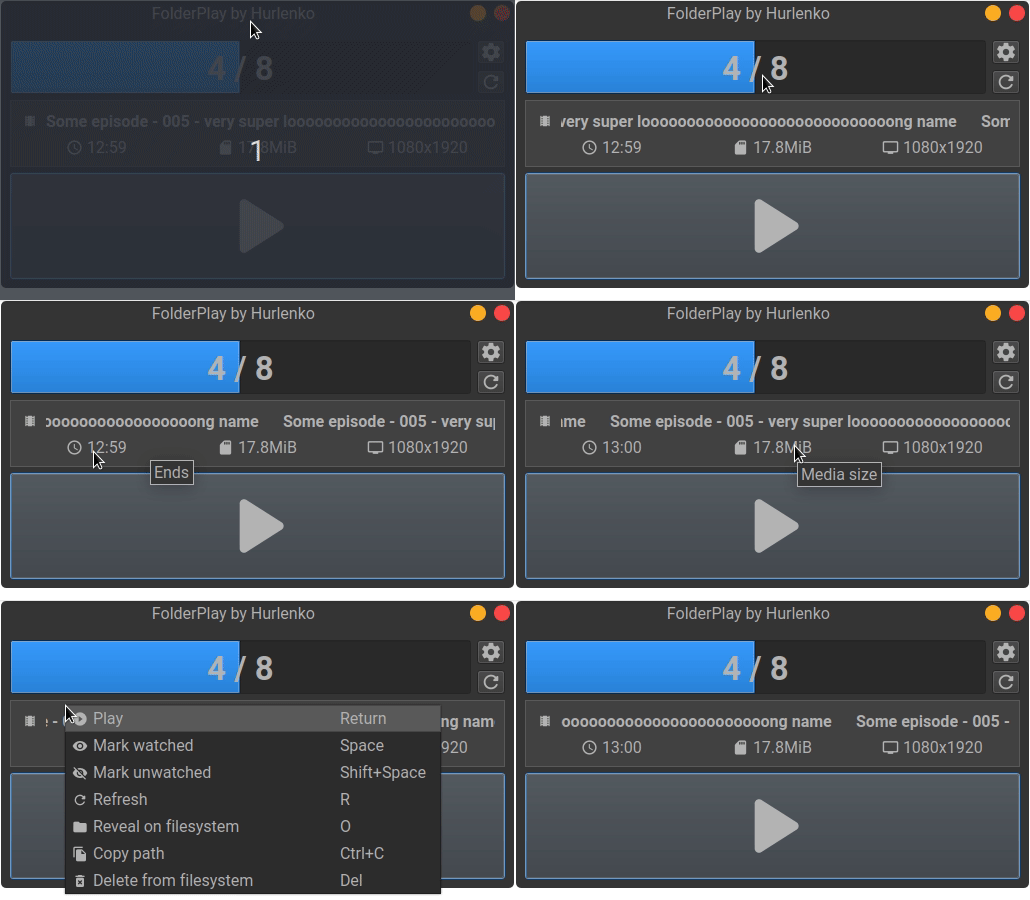
Its goal is to resume playback from the episode you left off with a single button press. It doesn't use any integrated players so you can still use your favourite one.
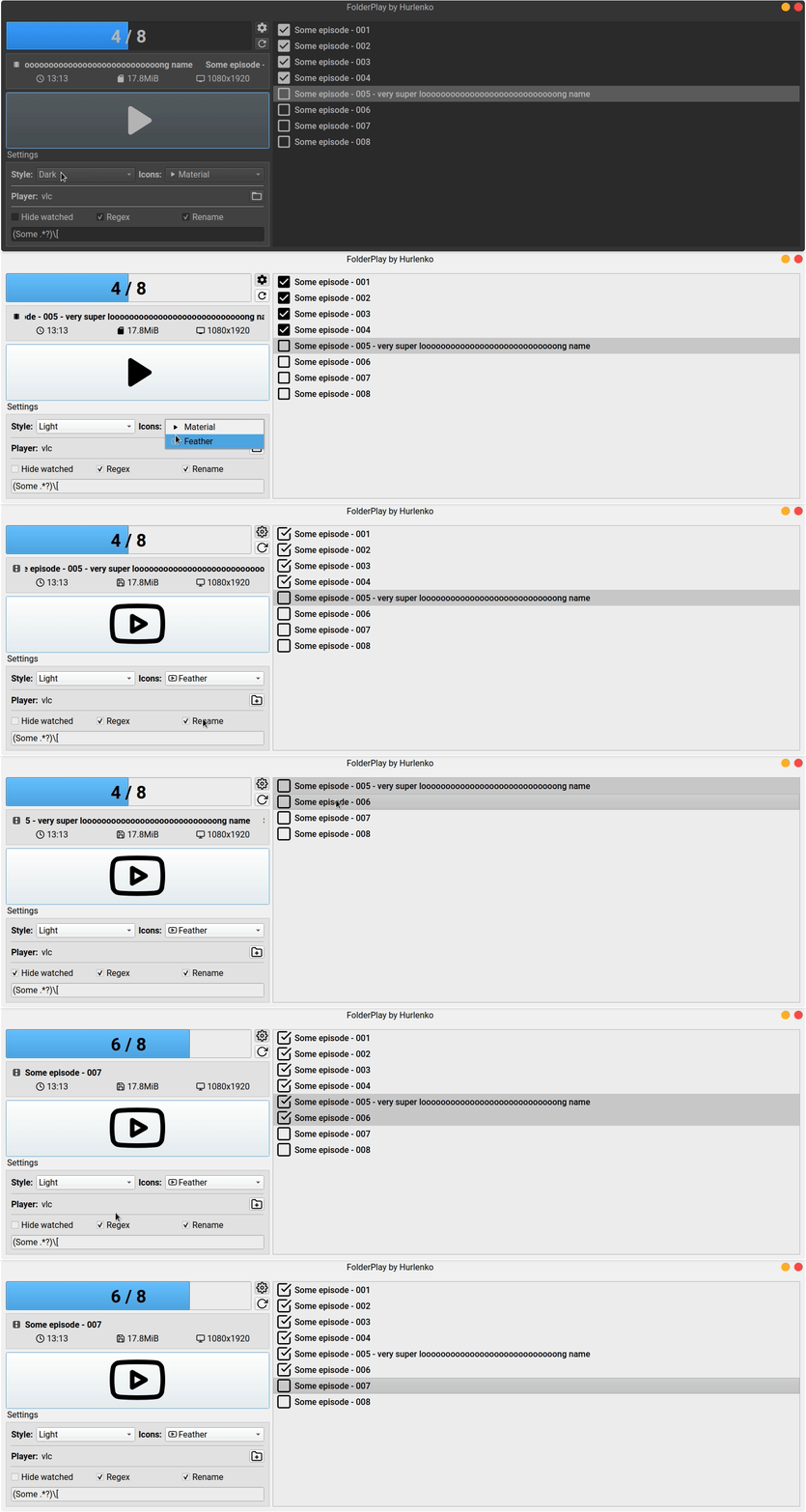
Advaced view
🚩 Table of Contents
🎨 Features
- Continue playback with a single button press
- Play with your favoure video player
- Filter and search your playlist
- Displays general media info
- Supports basic command line interface
- Minimalistic GUI
- Supports multiple color styles
- Supports multiple icon sets
- No installation required - the whole program is a single executable file
- Cross platform - supports all three major platforms (Windows, MacOS, Linux) thanks to
pythonandpyqt
⚙️ How it works
folderplay scans for known extensions in the current working directory and all subdirectories. It marks the files as watched or unwatched by checking for a specific prefix in the filename. It also searches for a list of predefined players for current operating systems. If the application can't find one, it will throw a warning and will ask you to select the player. When you hit the play button folderplay spawns a new process with the selected player, freezes the UI and waits for the process to exit. When the playes process exits folderplay will rename the media file by prepending a prefix to its filename to mark it as watched.
💾 Installation
Prebuilt binaries for macOS and Windows can be downloaded from the GitHub releases page.
⚠️ Note that the binaries were not thoroughly tested across different platforms and might not work correctly.
The recommended installation method is using pip:
pip install folderplay
If you're on Linux, you have to additionally install libmediainfo-dev. For Debian-based systems it's as simple as running
sudo apt-get install libmediainfo-dev
After installation, the fplay command will be available. Check the command line section for supported commands.
📙 Usage
Simply drop the executable into the directory where your media resides and run it. The application will scan all directories and subdirectories for known extensions.
By default the app runs in basic view mode. You can toggle to the more advanced view by pressing the gear button. From there you can select the video player to use (folderplay will try to search for existing video players and will warn you on start up if it didn't find one).
You can filter your media list using the search form. The list also has supports context menu with some handy commands.
🔨 Building
Clone master branch or checkout a specific tag
git clone https://github.com/hurlenko/folderplay.git
Create new virtual environment inside of the folderplay directory
python3 -m venv venv

source venv/bin/activate # Linux / MacOs

venv\Scripts\activate # Windows
Install dependencies
pip install -r requirements.txt
Now either run the application
python -m folderplay
Or create an executable (will be save inside of the dist directory)
python -m PyInstaller folderplay.spec
🖥️ Command line interface
Currently fplay supports these commands
Usage: fplay [OPTIONS] <directory>

Options:
  --version            Show the version and exit.
  -p, --player <path>  Host player binary
  -s, --style <name>   Color style: dark, light, fusion, native
  -i, --icons <name>   Icon set: material, feather
  --help               Show this message and exit.
:octocat: Credits
Work from these open source projects is used by this application
- qtmodern - PyQt/PySide Widgets Modern User Interface
- feathericons - Simply beautiful open source icons
- material icons - Material icons
1 maintainer

Metadata
1 maintainer
Release files for folderplay 0.4.3
For a detailed explanation of source distributions (sdists) and built distributions (wheels), please see the package formats documentation.
Source distribution (sdist)
| File | Size | Uploaded | Provenance | Actions |
|---|---|---|---|---|
| folderplay-0.4.3.tar.gz | 131.2 kB | Without provenance | Details for folderplay-0.4.3.tar.gz |
Built distribution (wheel)
| File | Interpreter | ABI | Platform | Actions Reset |
|---|---|---|---|---|
| folderplay-0.4.3-py3-none-any.whl | Python 3 | none | any | Details for folderplay-0.4.3-py3-none-any.whl |
Total release size: 277.5 kB
Release files / folderplay-0.4.3.tar.gz
| Download URL | folderplay-0.4.3.tar.gz |
|---|---|
| Size | 131.2 kB |
| Tags | Source |
|
SHA-256 checksum How to use checksums |
d8509e0e38056af54204d45febb3ad1b3c4fbb8ea38829578f52a60a33179a67
|
|
BLAKE2b-256 checksum How to use checksums |
12625f3379c06de6af11fffa9201e53bf842654560cff41dc400a14337bad6ce
|
| Upload date | |
|
Uploaded using Trusted Publishing? What is trusted publishing? |
No |
| Uploaded via |
twine/1.13.0 pkginfo/1.8.3 requests/2.28.1 setuptools/47.1.0 requests-toolbelt/0.10.1 tqdm/4.64.1 CPython/3.7.15
|
Release files / folderplay-0.4.3-py3-none-any.whl
| Download URL | folderplay-0.4.3-py3-none-any.whl |
|---|---|
| Size | 146.3 kB |
| Tags | Python 3 |
|
SHA-256 checksum How to use checksums |
96cb4551a67a96c354ea7f1a013f01357b52453ba7fe1604ac8827f0ab671727
|
|
BLAKE2b-256 checksum How to use checksums |
cd43d8f453afbbe76a66f299d6c73bb275218359040a2a9f0bc57f4af2d91572
|
| Upload date | |
|
Uploaded using Trusted Publishing? What is trusted publishing? |
No |
| Uploaded via |
twine/1.13.0 pkginfo/1.8.3 requests/2.28.1 setuptools/47.1.0 requests-toolbelt/0.10.1 tqdm/4.64.1 CPython/3.7.15
|
Security for folderplay 0.4.3
Provenance
Provenance describes where a file came from. On PyPI, provenance is shared via attestations, which provide a verifiable record of the build or publishing details. View details, limitations and caveats.
No provenance found
None of the files in this release were uploaded with provenance metadata.
A note on package security
PyPI is a repository for distributing packages, not a service for auditing them. While third-party security researchers and our staff do their best to detect and remove malicious packages, PyPI cannot guarantee the quality, security or suitability of any given package.
To learn more about protecting yourself from malicious actors, visit our package security documentation.














