
FS2Elastic
Python based CLI for Syncing File System based Data (CSV file etc.) to Elasticsearch.
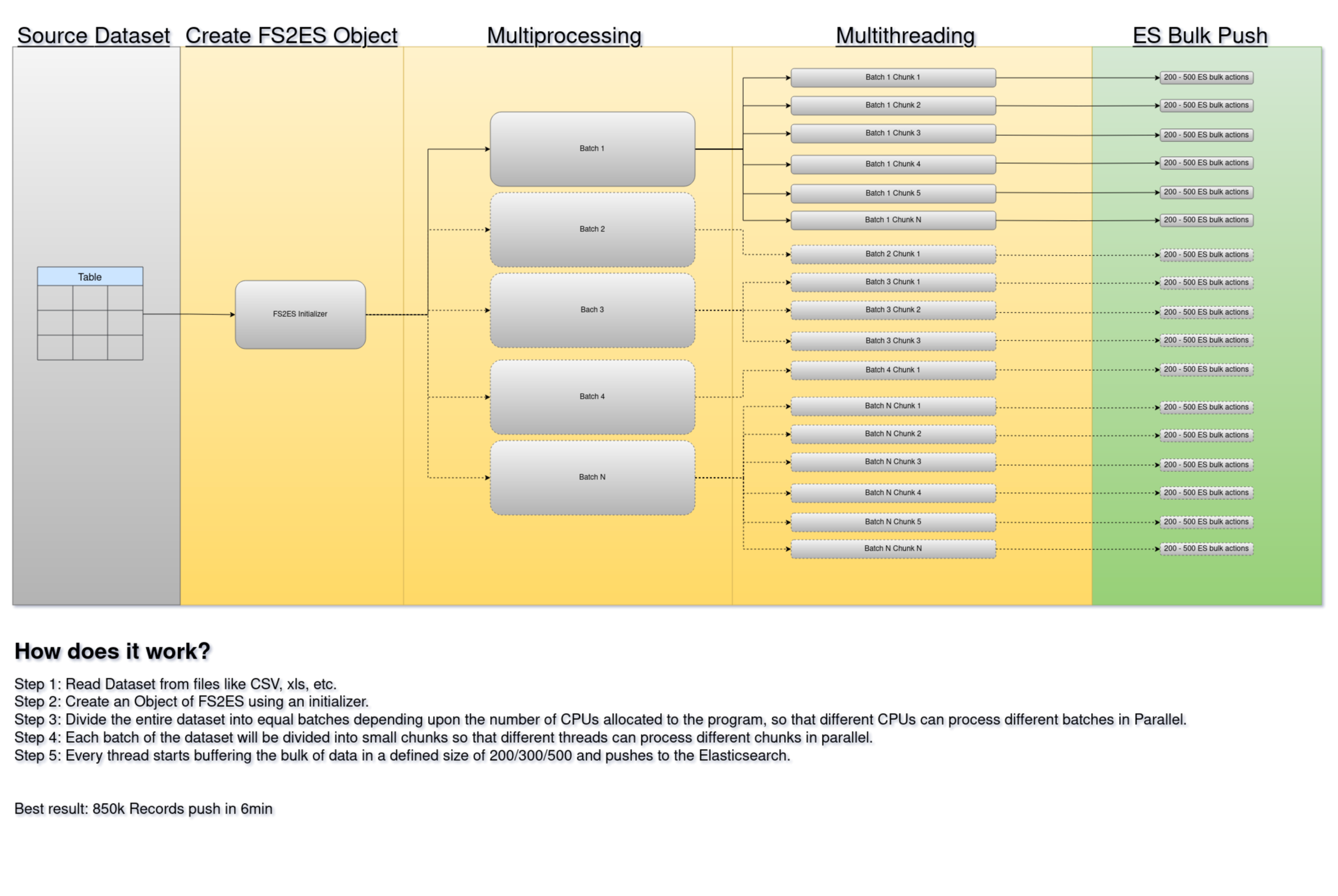
Features
- Real time csv file to Elasticsearch dataset syncing
- Configurable with custom config file
Installation
pip install fs2elastic
Configuration
configuration file present at ~/.fs2elastic/fs2elastic.conf.
- please create configuration file if not present.
- replace values with correct values
- remove configs that does not require
default configuration:
[AppConfig]
app_home = "/home/john/.fs2elastic"
app_config_file_path = "/home/john/.fs2elastic/fs2elastic.conf"

[DatasetConfig]
dataset_source_dir = "/home/john/csv_data_set"
dataset_supported_file_extensions = [ "csv", "xlsx", "xls", "json"]
dataset_max_workers = 1
dataset_threads_per_worker = 10
dataset_chunk_size = 200

[ESConfig]
es_hosts = [ "https://localhost:9200",]
es_username = "elastic"
es_password = ""
es_timeout = 300
es_index_prefix = "fs2es-"
es_ssl_ca = ""
es_verify_certs = false

[LogConfig]
log_file_path = "/home/john/.fs2elastic/fs2elastic.log"
log_max_size = 10485760
log_backup_count = 5
Usage
with Default config file
fs2elastic
with Custom config file
fs2elastic -c <config file path>
eg: fs2elastic -c ~/Documents/fs2elastic_custom_config.conf
Help
fs2elastic -h
Version
fs2elastic -v
Use as a system service
NOTE: Required sudo permission
# install Package
sudo pip install fs2elastic
# Create fs2elastic home directory somewhere. for eg /tmp/fs2elastic/
mkdir /tmp/fs2elastic/
# create config file at /tmp/fs2elastic/fs2elastic.conf inside fs2elastic home directory created above
[AppConfig]
app_home = "/home/john/.fs2elastic"
app_config_file_path = "/home/john/.fs2elastic/fs2elastic.conf"

[DatasetConfig]
dataset_source_dir = "/home/john/csv_data_set"
dataset_supported_file_extensions = [ "csv", "xlsx", "xls", "json"]
dataset_max_workers = 1
dataset_threads_per_worker = 10
dataset_chunk_size = 200

[ESConfig]
es_hosts = [ "https://localhost:9200",]
es_username = "elastic"
es_password = ""
es_timeout = 300
es_index_prefix = "fs2es-"
es_ssl_ca = ""
es_verify_certs = false

[LogConfig]
log_file_path = "/home/john/.fs2elastic/fs2elastic.log"
log_max_size = 10485760
log_backup_count = 5

# replace with correct values
# create service file at /etc/systemd/system/fs2elastic.service  with following content

[Unit]
Description=FS2Elastic Service
After=network.target

[Service]
User=root
Group=root
ExecStart=/usr/bin/fs2elastic -c /tmp/fs2elastic/fs2elastic.conf
Restart=always

[Install]
WantedBy=multi-user.target
# Reloading Change to Systemd Unit Files
sudo systemctl daemon-reload
# Start service
sudo systemctl start fs2elastic
# Enable service to start on boot
sudo systemctl enable fs2elastic
# check status
sudo systemctl status fs2elastic
# check logs
sudo tail -f /var/log/fs2elastic.log
# To stop service
sudo systemctl stop fs2elastic
# To remove service
sudo systemctl disable fs2elastic
sudo rm /etc/systemd/system/fs2elastic.service
Uninstall
pip uninstall fs2elastic
Who do I talk to?
- Repo owner or admin
- Other community or team contact
1 maintainer

Download files
Download the file for your platform. If you're not sure which to choose, learn more about installing packages.
Source Distribution
fs2elastic-0.1.2.tar.gz
(14.5 kB
view details)
Built Distribution
Filter files by name, interpreter, ABI, and platform.
If you're not sure about the file name format, learn more about wheel file names.
Copy a direct link to the current filters
File details
Details for the file fs2elastic-0.1.2.tar.gz.
File metadata
- Download URL: fs2elastic-0.1.2.tar.gz
- Upload date:
- Size: 14.5 kB
- Tags: Source
- Uploaded using Trusted Publishing? No
- Uploaded via:
twine/5.1.1 CPython/3.12.7
File hashes
| Algorithm | Hash digest | |
|---|---|---|
| SHA256 |
edfb815bc69728c0de4bd5702478804b49e253711a6f8e90df176c7eb77b8aa9
|
|
| MD5 |
dc6f89227296a4493d5c1bdb09f8a1fe
|
|
| BLAKE2b-256 |
42630795f57e27f45f704b5add755baaa7151d04bffa67dfbe0e173de44d21ca
|
File details
Details for the file fs2elastic-0.1.2-py3-none-any.whl.
File metadata
- Download URL: fs2elastic-0.1.2-py3-none-any.whl
- Upload date:
- Size: 15.3 kB
- Tags: Python 3
- Uploaded using Trusted Publishing? No
- Uploaded via:
twine/5.1.1 CPython/3.12.7
File hashes
| Algorithm | Hash digest | |
|---|---|---|
| SHA256 |
0967f66d95fd7cf57f6fd5fcae045cf0fb78c92ee80afc9e14cb234426182979
|
|
| MD5 |
dc76e66dca52c8a7acab581414077a5b
|
|
| BLAKE2b-256 |
51b3bc25399e7b1f124ef722d98ce69b351c7e4692f27397eb628ded4a339c63
|














