
Simple graphical code editor and runner for throwaway code

Project description
Functino
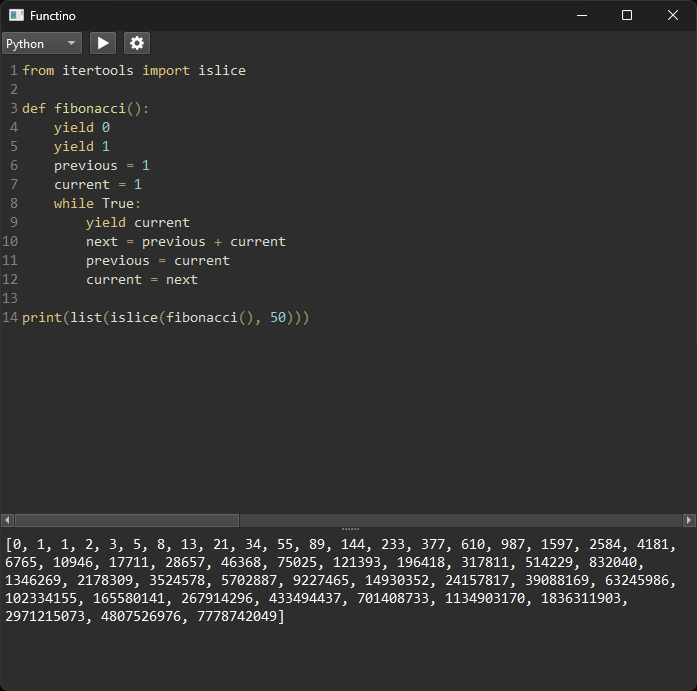
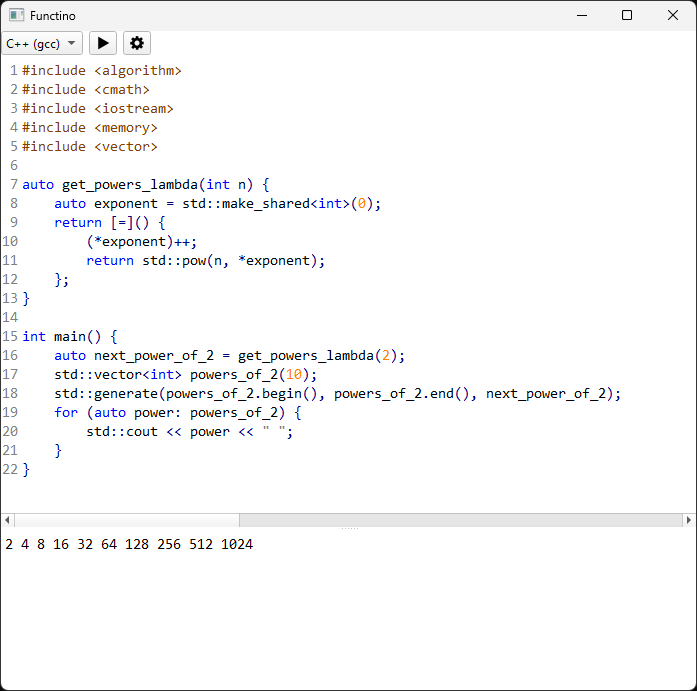
Functino is a simple graphical code editor and runner for throwaway code. Its functionality is somewhere in between a REPL and a fully-featured text editor. With Functino, you simply type code in the editor panel, press the run button, and the output of the code is shown in the output panel. Several languages are supported with no configuration needed to use them. If you've ever found yourself wanting to mess around with a block of code and thought "a REPL would be a bit unwieldy but my normal development environment would be overkill for this," then Functino might be for you!
Features
- Simple interface.
- Cross-platform.
- Built-in support for several languages:
- C and C++ (via gcc)
- NodeJS
- Python
- Ruby
- Rust
- No configuration needed to use existing compilers/interpreters installed on your system.
- Ability to configure support for languages and toolchains not already built in.
- Syntax highlighting.
- Light and dark theme that adjusts based on your system theme.
Installation
There are two options for installation; you can grab a pre-built binary from the github releases page (currently for Windows and Linux only), or you can install from PyPI (all platforms):
-
Make sure python is installed.
-
Install Functino:
pip install functino
Configuring Support for New Languages/Toolchains
If you would like to use a language or toolchain that Functino currently doesn't support, you can configure Functino to use it! The following is a TOML file that tells Functino how to execute Python code, with comments explaining each field:
# This is the display name for this profile. Display names must be unique across all
# profiles.
name = "Python"

# This is the language ID for this profile. Language IDs must match with a match-case
# key in src/functino/gui/language.py in order for the editor to provide syntax
# highlighting.
language_id = "python"

# This is the file extension that source files of this language use. Some compilers/
# interpreters rely on the file extention to be correct.
source_file_extension = "py"

# This option tells Functino whether or not this profile requires a separate compilation
# step. The value of this option will have an influence on the proper format of the
# command option below.
compile = false

# The section below tell Functino what command to run to handle the the source file. If
# compile is false, this will be an interpret command. If compile is true, this will be
# a compilation command, and the resulting program produced by the compilation will be
# run separately.
#
# All profile commands must have one option that is exactly equal to
# "{source_file_path}". Functino will replace this with the internally-used temporary
# file that contains the source code to run. File extensions or prefixes must not be
# added to this option.
#
# Profile commands for compiled languages must additionally have one option that is
# exactly equal to "{executable_path}". Functino will replace this with an
# internally-used temporary file that is meant to be used by the compiler to put the
# compiled program into. File extensions or prefixes must not be added to this option.
# See src/functino/resources/language_profiles/rust.toml for an example of how to use
# this option.
[command]

# The default command is the command that will be used if there's no specific command
# for the current operating system we're running in.
default = ["python", "{source_file_path}"]

# If you need to specify a different command for a particular operating system, then the
# key for the command must match up with one of the possible outputs of
# https://docs.python.org/3/library/platform.html#platform.system.
#
# The following is an example of specifying a windows-specific command:
Windows = ["python", "--windows-specific-flag", "{source_file_path}"]
You can place your custom language profiles in one of the following directories (based on your operating system), and Functino will automatically load them:
- Linux:
~/.config/functinodev/functino - Mac:
~/Library/Preferences/functinodev/functino - Windows:
C:/Users/<USER>/AppData/Local/functinodev/functino
Known Issues
- Currently there is no syntax highlighting support for Rust.
Development Setup
-
Make sure python is installed.
-
Get project source.
git clone https://github.com/davidscholberg/functino.git
cd functino
- Create and enter python virtual environment.
python -m venv .venv
source .venv/bin/activate
- Build and install the project package as an editable install with dev dependencies.
pip install --editable .[dev]
- Install the commit hooks to perform formatting and linting on commit (
pre-commitis installed locally as a dev dependency).
pre-commit install
Credits
Functino is written in Python and uses PyQt6 for all GUI functionality. Text editing and syntax highlighting functionality is provided by QScintilla, and the syntax highlighting color themes are provided by Notepad++ theme files.
Release history Release notifications | RSS feed


Download files
Download the file for your platform. If you're not sure which to choose, learn more about installing packages.
Source Distribution
Built Distribution
Filter files by name, interpreter, ABI, and platform.
If you're not sure about the file name format, learn more about wheel file names.
Copy a direct link to the current filters
File details
Details for the file functino-0.0.3.tar.gz.
File metadata
- Download URL: functino-0.0.3.tar.gz
- Upload date:
- Size: 55.9 kB
- Tags: Source
- Uploaded using Trusted Publishing? No
- Uploaded via: twine/4.0.2 CPython/3.11.4
File hashes
| Algorithm | Hash digest | |
|---|---|---|
| SHA256 |
ed18faf774b5e89d3c4e0b914a9bf52ce760c5c06228afcb80564e2d6a37528a
|
|
| MD5 |
9e3a45229800ba6df7b587ae882c4255
|
|
| BLAKE2b-256 |
42a41774ca866c25d8d10e9ce1db1facf68d558ae10f18988829c6cf1ef65dc3
|
File details
Details for the file functino-0.0.3-py3-none-any.whl.
File metadata
- Download URL: functino-0.0.3-py3-none-any.whl
- Upload date:
- Size: 61.7 kB
- Tags: Python 3
- Uploaded using Trusted Publishing? No
- Uploaded via: twine/4.0.2 CPython/3.11.4
File hashes
| Algorithm | Hash digest | |
|---|---|---|
| SHA256 |
40bdcd166b3f10f94f32b3351a06d85f52a1962557803c4fd95a5f58b7e42833
|
|
| MD5 |
0850237943041beb961a833d42cb45d6
|
|
| BLAKE2b-256 |
361c467dec631238963b1d7184a88f3917680a6d8789e4dacf2a26e2f535a010
|






