
Gammy – Generalized additive models in Python with a Bayesian twist
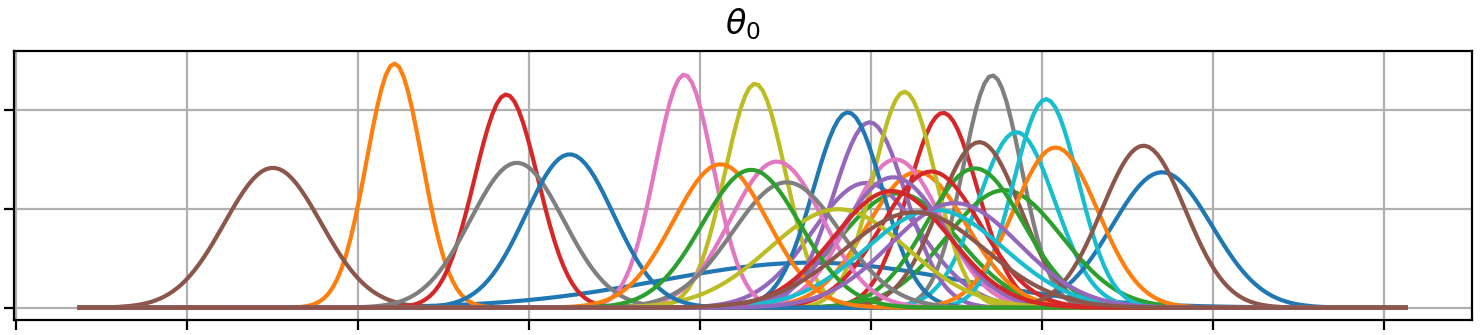
A Generalized additive model is a predictive mathematical model defined as a sum of terms that are calibrated (fitted) with observation data.
Generalized additive models form a surprisingly general framework for building models for both production software and scientific research. This Python package offers tools for building the model terms as decompositions of various basis functions. It is possible to model the terms e.g. as Gaussian processes (with reduced dimensionality) of various kernels, as piecewise linear functions, and as B-splines, among others. Of course, very simple terms like lines and constants are also supported (these are just very simple basis functions).
The uncertainty in the weight parameter distributions is modeled using Bayesian statistical analysis with the help of the superb package BayesPy. Alternatively, it is possible to fit models using just NumPy.
Table of Contents
Installation
The package is found in PyPi.
pip install gammy
Examples
In this overview, we demonstrate the package's most important features through common usage examples.
Polynomial regression on 'roids
A typical simple (but sometimes non-trivial) modeling task is to estimate an unknown function from noisy data. First we import the bare minimum dependencies to be used in the below examples:
>>> import numpy as np

>>> import gammy
>>> from gammy.models.bayespy import GAM

>>> gammy.__version__
'0.5.6'
Let's simulate a dataset:
>>> np.random.seed(42)

>>> n = 30
>>> input_data = 10 * np.random.rand(n)
>>> y = 5 * input_data + 2.0 * input_data ** 2 + 7 + 10 * np.random.randn(n)
The object x is just a convenience tool for defining input data maps
as if they were just Numpy arrays:
>>> from gammy.arraymapper import x
Define and fit the model:
>>> a = gammy.formulae.Scalar(prior=(0, 1e-6))
>>> b = gammy.formulae.Scalar(prior=(0, 1e-6))
>>> bias = gammy.formulae.Scalar(prior=(0, 1e-6))
>>> formula = a * x + b * x ** 2 + bias
>>> model = GAM(formula).fit(input_data, y)
The model attribute model.theta characterizes the Gaussian posterior
distribution of the model parameters vector.
>>> model.mean_theta
[array([3.20130444]), array([2.0420961]), array([11.93437195])]
Variance of additive zero-mean normally distributed noise is estimated automagically:
>>> round(model.inv_mean_tau, 8)
74.51660744
Predicting with model
>>> model.predict(input_data[:2])
array([ 52.57112684, 226.9460579 ])
Predictions with uncertainty, that is, posterior predictive mean and variance can be calculated as follows:
>>> model.predict_variance(input_data[:2])
(array([ 52.57112684, 226.9460579 ]), array([79.35827362, 95.16358131]))
Plotting results
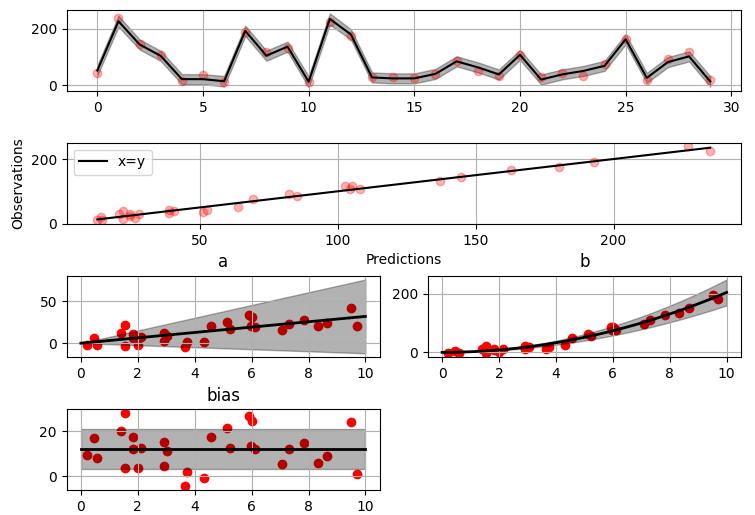
>>> fig = gammy.plot.validation_plot(
...     model,
...     input_data,
...     y,
...     grid_limits=[0, 10],
...     input_maps=[x, x, x],
...     titles=["a", "b", "bias"]
... )
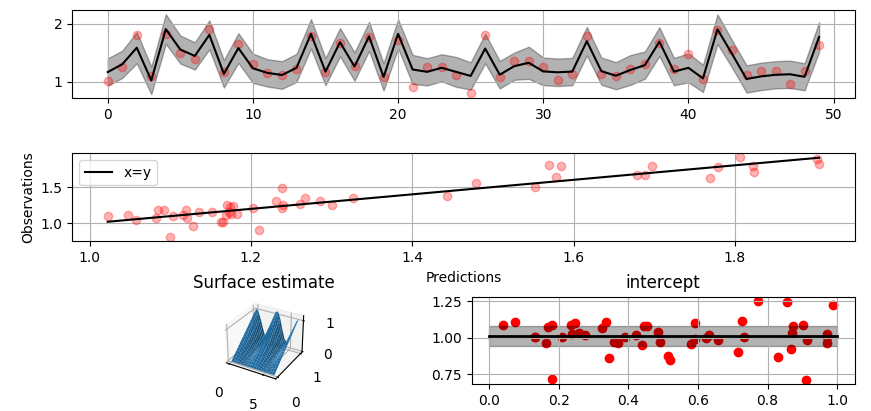
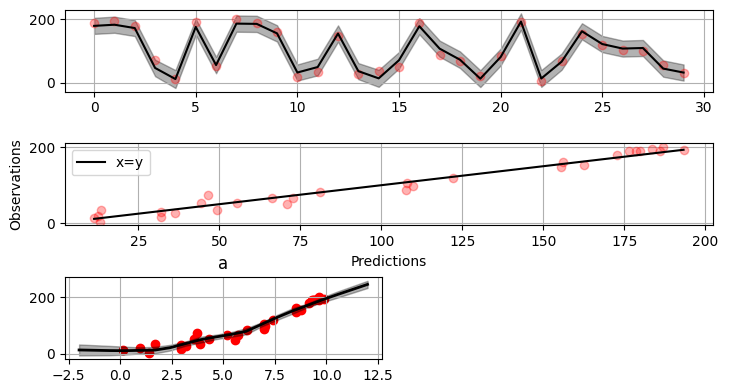
The grey band in the top figure is two times the prediction standard deviation and, in the partial residual plots, two times the respective marginal posterior standard deviation.
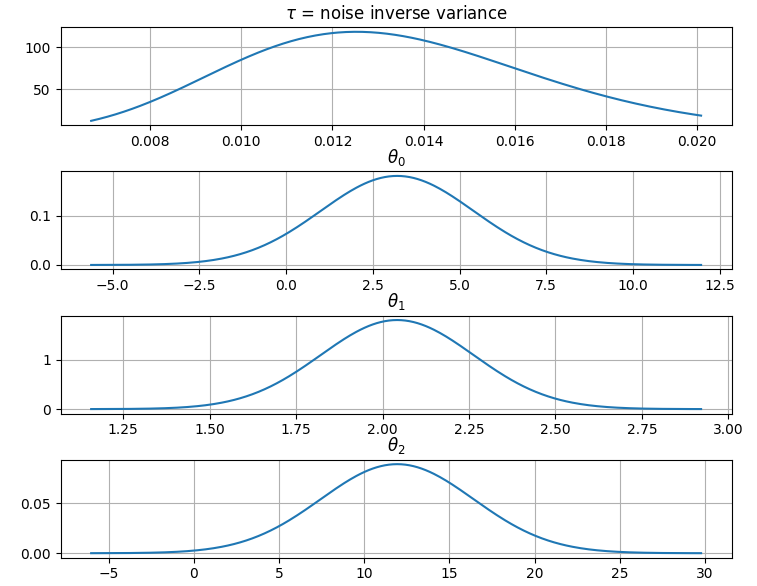
It is also possible to plot the estimated Γ-distribution of the noise precision (inverse variance) as well as the 1-D Normal distributions of each individual model parameter.
Plot (prior or posterior) probability density functions of all model parameters:
>>> fig = gammy.plot.gaussian1d_density_plot(model)
Saving model on hard disk
Saving:
>> model.save("/home/foobar/test.hdf5")
Loading:
>> model = GAM(formula).load("/home/foobar/test.hdf5")
Gaussian process regression
Create fake dataset:
>>> n = 50
>>> input_data = np.vstack((2 * np.pi * np.random.rand(n), np.random.rand(n))).T
>>> y = (
...     np.abs(np.cos(input_data[:, 0])) * input_data[:, 1] +
...     1 + 0.1 * np.random.randn(n)
... )
Define model:
>>> a = gammy.formulae.ExpSineSquared1d(
...     np.arange(0, 2 * np.pi, 0.1),
...     corrlen=1.0,
...     sigma=1.0,
...     period=2 * np.pi,
...     energy=0.99
... )
>>> bias = gammy.Scalar(prior=(0, 1e-6))
>>> formula = a(x[:, 0]) * x[:, 1] + bias
>>> model = gammy.models.bayespy.GAM(formula).fit(input_data, y)

>>> round(model.mean_theta[0][0], 8)
0.8343458
Plot predictions and partial residuals:
>>> fig = gammy.plot.validation_plot(
...     model,
...     input_data,
...     y,
...     grid_limits=[[0, 2 * np.pi], [0, 1]],
...     input_maps=[x[:, 0:2], x[:, 1]],
...     titles=["Surface estimate", "intercept"]
... )
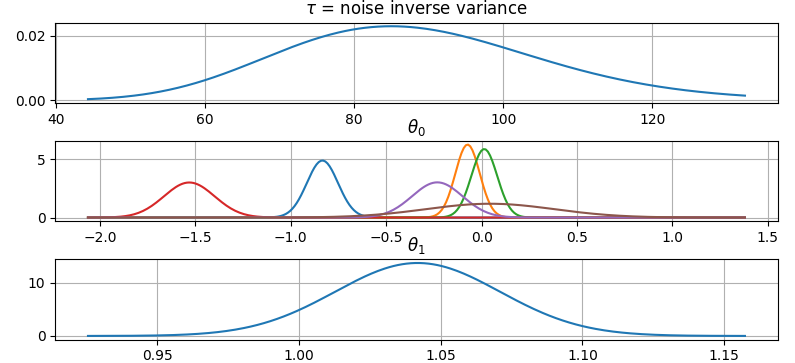
Plot parameter probability density functions
>>> fig = gammy.plot.gaussian1d_density_plot(model)
More covariance kernels
The package contains covariance functions for many well-known options such as the Exponential squared, Periodic exponential squared, Rational quadratic, and the Ornstein-Uhlenbeck kernels. Please see the documentation section More on Gaussian Process kernels for a gallery of kernels.
Defining custom kernels
Please read the documentation section: Customize Gaussian Process kernels
Spline regression
Constructing B-Spline based 1-D basis functions is also supported. Let's define dummy data:
>>> n = 30
>>> input_data = 10 * np.random.rand(n)
>>> y = 2.0 * input_data ** 2 + 7 + 10 * np.random.randn(n)
Define model:
>>> grid = np.arange(0, 11, 2.0)
>>> order = 2
>>> N = len(grid) + order - 2
>>> sigma = 10 ** 2
>>> formula = gammy.BSpline1d(
...     grid,
...     order=order,
...     prior=(np.zeros(N), np.identity(N) / sigma),
...     extrapolate=True
... )(x)
>>> model = gammy.models.bayespy.GAM(formula).fit(input_data, y)

>>> round(model.mean_theta[0][0], 8)
-49.00019115
Plot validation figure:
>>> fig = gammy.plot.validation_plot(
...     model,
...     input_data,
...     y,
...     grid_limits=[-2, 12],
...     input_maps=[x],
...     titles=["a"]
... )
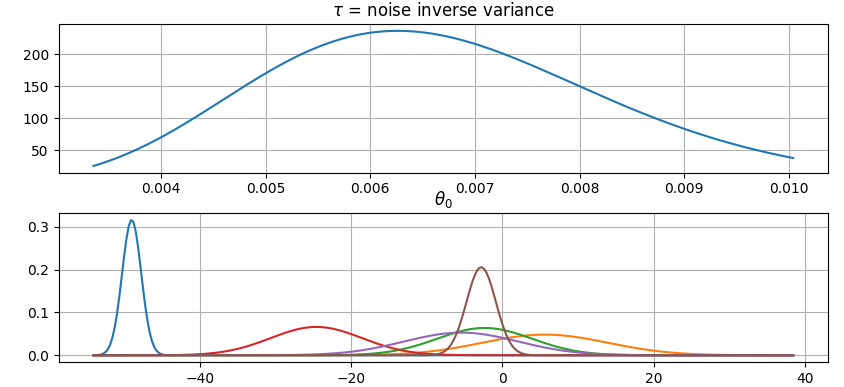
Plot parameter probability densities:
>>> fig = gammy.plot.gaussian1d_density_plot(model)
Non-linear manifold regression
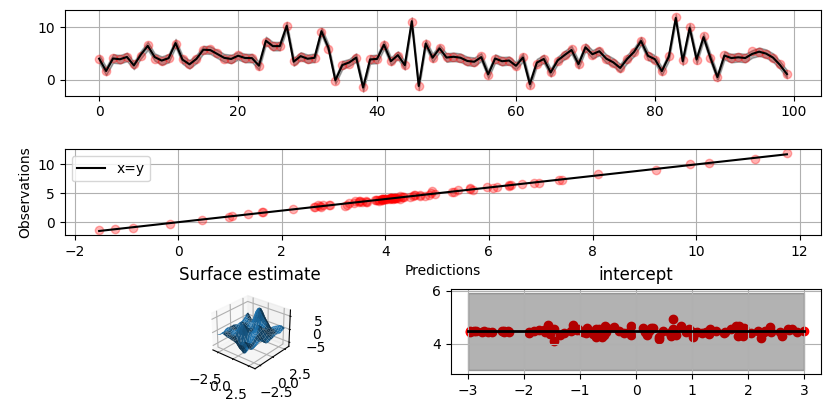
In this example we try estimating the bivariate "MATLAB function" using a Gaussian process model with Kronecker tensor structure (see e.g. PyMC3). The main point in the below example is that it is quite straightforward to build models that can learn arbitrary 2D-surfaces.
Let us first create some artificial data using the MATLAB function!
>>> n = 100
>>> input_data = np.vstack((
...     6 * np.random.rand(n) - 3, 6 * np.random.rand(n) - 3
... )).T
>>> y = (
...     gammy.utils.peaks(input_data[:, 0], input_data[:, 1]) +
...     4 + 0.3 * np.random.randn(n)
... )
There is support for forming two-dimensional basis functions given two one-dimensional formulas. The new combined basis is essentially the outer product of the given bases. The underlying weight prior distribution priors and covariances are constructed using the Kronecker product.
>>> a = gammy.ExpSquared1d(
...     np.arange(-3, 3, 0.1),
...     corrlen=0.5,
...     sigma=4.0,
...     energy=0.99
... )(x[:, 0])  # NOTE: Input map is defined here!
>>> b = gammy.ExpSquared1d(
...     np.arange(-3, 3, 0.1),
...     corrlen=0.5,
...     sigma=4.0,
...     energy=0.99
... )(x[:, 1]) # NOTE: Input map is defined here!
>>> A = gammy.formulae.Kron(a, b)
>>> bias = gammy.formulae.Scalar(prior=(0, 1e-6))
>>> formula = A + bias
>>> model = GAM(formula).fit(input_data, y)

>>> round(model.mean_theta[0][0], 8)
0.37426986
Note that same logic could be used to construct higher dimensional bases, that is, one could define a 3D-formula:
>> formula_3d = gammy.Kron(gammy.Kron(a, b), c)
Plot predictions and partial residuals:
>>> fig = gammy.plot.validation_plot(
...     model,
...     input_data,
...     y,
...     grid_limits=[[-3, 3], [-3, 3]],
...     input_maps=[x, x[:, 0]],
...     titles=["Surface estimate", "intercept"]
... )
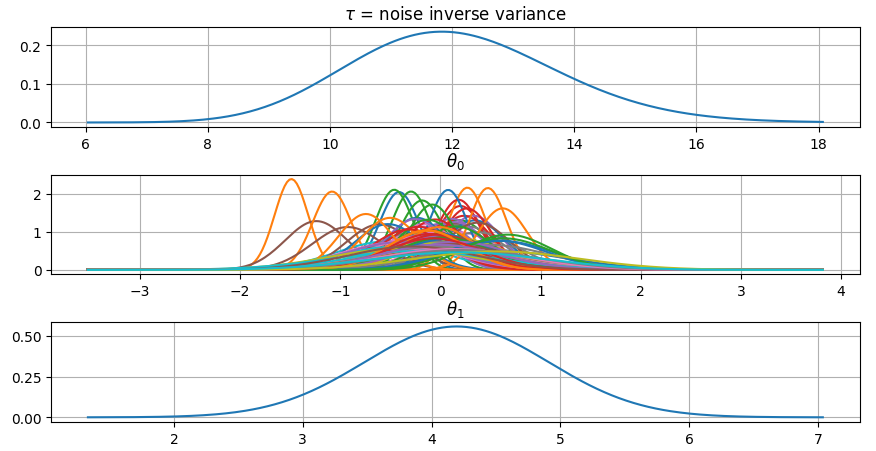
Plot parameter probability density functions:
>>> fig = gammy.plot.gaussian1d_density_plot(model)
Testing
The package's unit tests can be ran with PyTest (cd to repository root):
pytest -v
Running this documentation as a Doctest:
python -m doctest -v README.md
Package documentation
Documentation of the package with code examples: https://malmgrek.github.io/gammy.
1 maintainer

Metadata
1 maintainer
Release files for gammy 0.5.6
For a detailed explanation of source distributions (sdists) and built distributions (wheels), please see the package formats documentation.
Source distribution (sdist)
| File | Size | Uploaded | Provenance | Actions |
|---|---|---|---|---|
| gammy-0.5.6.tar.gz | 24.0 kB | Without provenance | Details for gammy-0.5.6.tar.gz |
Built distribution (wheel)
| File | Interpreter | ABI | Platform | Actions Reset |
|---|---|---|---|---|
| gammy-0.5.6-py3-none-any.whl | Python 3 | none | any | Details for gammy-0.5.6-py3-none-any.whl |
Total release size: 48.4 kB
Release files / gammy-0.5.6.tar.gz
| Download URL | gammy-0.5.6.tar.gz |
|---|---|
| Size | 24.0 kB |
| Tags | Source |
|
SHA-256 checksum How to use checksums |
bb80971dc7d7c4fb0deafb32c0db27514030d1e13de665f1fbf34805f3e59537
|
|
BLAKE2b-256 checksum How to use checksums |
072e1590e9267c3567efd8dc4bc7f74bbc6eb28ceae9d10f6be774101dcd84fc
|
| Upload date | |
|
Uploaded using Trusted Publishing? What is trusted publishing? |
No |
| Uploaded via |
twine/6.1.0 CPython/3.10.12
|
Release files / gammy-0.5.6-py3-none-any.whl
| Download URL | gammy-0.5.6-py3-none-any.whl |
|---|---|
| Size | 24.4 kB |
| Tags | Python 3 |
|
SHA-256 checksum How to use checksums |
b2f926ad90b09d01c87711a5977b39298ba92aa4dbfb9bce47f97f6bbb62be6e
|
|
BLAKE2b-256 checksum How to use checksums |
c34142f0adaa6b9503b2538a828422063b5e20a411b0c3d8c53c30cc2e6a1c9a
|
| Upload date | |
|
Uploaded using Trusted Publishing? What is trusted publishing? |
No |
| Uploaded via |
twine/6.1.0 CPython/3.10.12
|
Security for gammy 0.5.6
Provenance
Provenance describes where a file came from. On PyPI, provenance is shared via attestations, which provide a verifiable record of the build or publishing details. View details, limitations and caveats.
No provenance found
None of the files in this release were uploaded with provenance metadata.
A note on package security
PyPI is a repository for distributing packages, not a service for auditing them. While third-party security researchers and our staff do their best to detect and remove malicious packages, PyPI cannot guarantee the quality, security or suitability of any given package.
To learn more about protecting yourself from malicious actors, visit our package security documentation.














