








 Gemini-API
A reverse-engineered asynchronous python wrapper for Google Gemini web app (formerly Bard).
Features
- (WIP) Auto Cookie Management
- ImageFx Support - Supports retrieving images generated by ImageFx, Google's latest AI image generator.
- Extension Support - Supports generating contents with Gemini extensions on, like YouTube and Gmail.
- Classified Outputs - Auto categorizes texts, web images and AI generated images from the response.
- Official Flavor - Provides a simple and elegant interface inspired by Google Generative AI's official API.
- Asynchronous - Utilizes
asyncioto run generating tasks and return outputs efficiently.
Table of Contents
Installation
pip install gemini_webapi
Authentication
- Go to https://gemini.google.com and login with your Google account
- Press F12 for web inspector, go to
Networktab and refresh the page - Click any request and copy cookie values of
__Secure-1PSIDand__Secure-1PSIDTS
Usage
Initialization
Import required packages and initialize a client with your cookies obtained from the previous step.
import asyncio
from gemini_webapi import GeminiClient

# Replace "COOKIE VALUE HERE" with your actual cookie values
Secure_1PSID = "COOKIE VALUE HERE"
Secure_1PSIDTS = "COOKIE VALUE HERE"

async def main():
    client = GeminiClient(Secure_1PSID, Secure_1PSIDTS, proxy=None)
    await client.init(timeout=30, auto_close=False, close_delay=300)

asyncio.run(main())
Generate contents from text
Ask a one-turn quick question by calling GeminiClient.generate_content.
async def main():
    response = await client.generate_content("Hello World!")
    print(response.text)

asyncio.run(main())
Generate contents from image
Gemini supports image recognition and generate contents from image (currently only supports one image at a time). Optionally, you can pass image data in bytes or its path in str to GeminiClient.generate_content together with text prompt.
async def main():
    response = await client.generate_content("Describe the image", image="assets/banner.png")
    print(response.text)

asyncio.run(main())
Conversations across multiple turns
If you want to keep conversation continuous, please use GeminiClient.start_chat to create a ChatSession object and send messages through it. The conversation history will be automatically handled and get updated after each turn.
async def main():
    chat = client.start_chat()
    response1 = await chat.send_message("Briefly introduce Europe")
    response2 = await chat.send_message("What's the population there?")
    print(response1.text, response2.text, sep="\n\n----------------------------------\n\n")

asyncio.run(main())
Retrieve images in response
Images in the API's output are stored as a list of Image objects. You can access the image title, URL, and description by calling image.title, image.url and image.alt respectively.
async def main():
    response = await client.generate_content("Send me some pictures of cats")
    for image in response.images:
        print(image, "\n\n----------------------------------\n")

asyncio.run(main())
Generate images with ImageFx
In February 2022, Google introduced a new AI image generator called ImageFx and integrated it into Gemini. You can ask Gemini to generate images with ImageFx simply by natural language.
async def main():
    response = await client.generate_content("Generate some pictures of cats")
    for image in response.images:
        print(image, "\n\n----------------------------------\n")

asyncio.run(main())
Save images to local files
You can save images returned from Gemini to local files under /temp by calling Image.save(). Optionally, you can specify the file path and file name by passing path and filename arguments to the function and skip images with invalid file names by passing skip_invalid_filename=True. Works for both WebImage and GeneratedImage.
async def main():
    response = await client.generate_content("Generate some pictures of cats")
    for i, image in enumerate(response.images):
        await image.save(path="temp/", filename=f"cat_{i}.png", verbose=True)

asyncio.run(main())
Generate contents with Gemini extensions
After activating extensions for your account, you can access them in your prompts either by natural language or by starting your prompt with "@" followed by the extension keyword.
async def main():
    response1 = await client.generate_content("@Gmail What's the latest message in my mailbox?")
    print(response1, "\n\n----------------------------------\n")

    response2 = await client.generate_content("@Youtube What's the lastest activity of Taylor Swift?")
    print(response2, "\n\n----------------------------------\n")

asyncio.run(main())
Check and switch to other reply candidates
A response from Gemini usually contains multiple reply candidates with different generated contents. You can check all candidates and choose one to continue the conversation. By default, the first candidate will be chosen automatically.
async def main():
    # Start a conversation and list all reply candidates
    chat = client.start_chat()
    response = await chat.send_message("Recommend a science fiction book for me.")
    for candidate in response.candidates:
        print(candidate, "\n\n----------------------------------\n")

    if len(response.candidates) > 1:
        # Control the ongoing conversation flow by choosing candidate manually
        new_candidate = chat.choose_candidate(index=1)  # Choose the second candidate here
        followup_response = await chat.send_message("Tell me more about it.")  # Will generate contents based on the chosen candidate
        print(new_candidate, followup_response, sep="\n\n----------------------------------\n\n")
    else:
        print("Only one candidate available.")

asyncio.run(main())
References
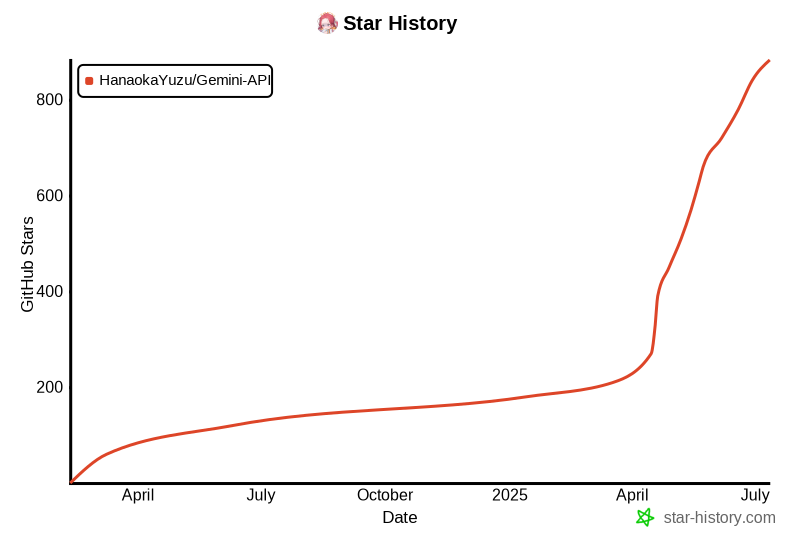
Stargazers
1 maintainer

Metadata
1 maintainer
Release files for gemini-webapi 0.6.0
For a detailed explanation of source distributions (sdists) and built distributions (wheels), please see the package formats documentation.
Source distribution (sdist)
| File | Size | Uploaded | Provenance | Actions |
|---|---|---|---|---|
| gemini-webapi-0.6.0.tar.gz | 183.9 kB | Without provenance | Details for gemini-webapi-0.6.0.tar.gz |
Built distribution (wheel)
| File | Interpreter | ABI | Platform | Actions Reset |
|---|---|---|---|---|
| gemini_webapi-0.6.0-py3-none-any.whl | Python 3 | none | any | Details for gemini_webapi-0.6.0-py3-none-any.whl |
Total release size: 210.4 kB
Release files / gemini-webapi-0.6.0.tar.gz
| Download URL | gemini-webapi-0.6.0.tar.gz |
|---|---|
| Size | 183.9 kB |
| Tags | Source |
|
SHA-256 checksum How to use checksums |
13c4fd153cd8360daa621dc629294c1ac07114beea3cfdc316655e63f8d193b6
|
|
BLAKE2b-256 checksum How to use checksums |
1b89db535b3307b10dcf73c212e91ba160f8b60e6b1d19a94efc186ad72811fd
|
| Upload date | |
|
Uploaded using Trusted Publishing? What is trusted publishing? |
Yes |
| Uploaded via |
twine/4.0.2 CPython/3.11.8
|
Release files / gemini_webapi-0.6.0-py3-none-any.whl
| Download URL | gemini_webapi-0.6.0-py3-none-any.whl |
|---|---|
| Size | 26.5 kB |
| Tags | Python 3 |
|
SHA-256 checksum How to use checksums |
8d87ea02750c6b4e1f8694e260f13c81440384b42c0c313bfc4a9f15bb50ce1b
|
|
BLAKE2b-256 checksum How to use checksums |
f0cd1965e659ed3778d066841281e95b077d1b4d5cfbfb9654f3e05d53513801
|
| Upload date | |
|
Uploaded using Trusted Publishing? What is trusted publishing? |
Yes |
| Uploaded via |
twine/4.0.2 CPython/3.11.8
|
Security for gemini-webapi 0.6.0
Provenance
Provenance describes where a file came from. On PyPI, provenance is shared via attestations, which provide a verifiable record of the build or publishing details. View details, limitations and caveats.
No provenance found
None of the files in this release were uploaded with provenance metadata.
A note on package security
PyPI is a repository for distributing packages, not a service for auditing them. While third-party security researchers and our staff do their best to detect and remove malicious packages, PyPI cannot guarantee the quality, security or suitability of any given package.
To learn more about protecting yourself from malicious actors, visit our package security documentation.














