
Great results without spending a lot of time
This package generates training data for yolov5 which will save you a lot of time and sanity. Getting the results that you can see in the video took me about 15 minutes of work and 6 hours of yolov5 training (50,000 images). So far, I have used the package only for "button like objects" and it has been working well. For more sophisticated objects, you probably need to create the training data manually.
pip install generate-training-data-ml
Example - Royale High from Roblox [I had to help out my daughter :) ]

Step 1
Take a lot of random screenshots (PNG) from the game WITHOUT any of the buttons you want to find. If you are lazy like me, use frames from YouTube videos: GitHub - hansalemaos/ytframedownloader
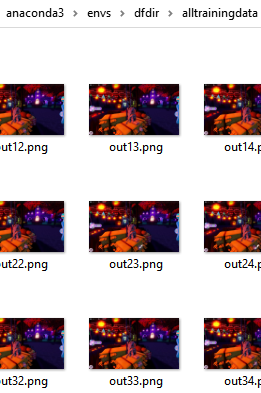
Step 2
Take some screenshot of the buttons you want to find and save them as shown on the screenshot (PNG).
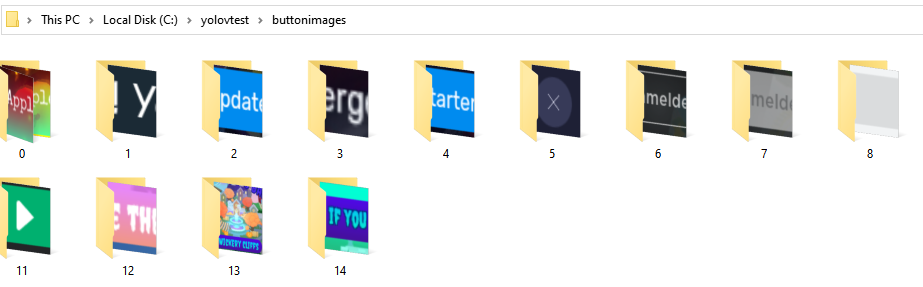
Step 3
Download https://github.com/ultralytics/yolov5 to /yolov5/ in your env, install all requirements
Step 4
Create a config file that looks like that
[GENERAL]
image_background_folder="C:\Users\Gamer\anaconda3\envs\dfdir\alltrainingdata"
image_button_folder = "C:\yolovtest\buttonimages"
save_path_generated_pics = "C:\trainingset\generated_pics"
save_path_generated_pics_separate = "C:\trainingset\generated_pics_sep"
maximum_buttons_on_pic=3
number_of_pictures_to_generate=10000
max_overlapping_avoid=50000
yaml_file="royal_halloween.yaml"

[TRAINING]
model_file ='yolov5s.yaml'
personal_yaml="royal_halloween.yaml"
hypfile = "hyp.scratch-low.yaml"
resolutionsize=640
batch=30
epochs=4
ptfile="C:\Users\Gamer\anaconda3\envs\dfdir\yolov5\yolov5s.pt"
workers=4
generated_pic_folder = "C:\trainingset\generated_pics_sep"
name_for_set = "royal_halloweennew"
save_period=10


[BUTTON0]
class_name="play_apple_game"
allowed_min_distance_from_zero_x=1
allowed_min_distance_from_zero_y=1
allowed_max_distance_from_zero_x=70
allowed_max_distance_from_zero_y=70
max_x=25
max_y=25
min_x=15
min_y=15
transparency_min=1
transparency_max=50
max_negativ_rotation=-10
max_positiv_rotation=10
add_pixelboarder=1
add_pixelboarder_percentage=10
unsharp_border=1
unsharp_border_percentage=10
random_crop=1
random_crop_percentage=30
random_crop_min=0
random_crop_max=2
random_blur=1
random_blur_percentage=20
random_blur_min=0.001
random_blur_max=0.05


[BUTTON1]
class_name="won_apples"
allowed_min_distance_from_zero_x=1
allowed_min_distance_from_zero_y=1
allowed_max_distance_from_zero_x=70
allowed_max_distance_from_zero_y=70
max_x=50
max_y=50
min_x=40
min_y=40
transparency_min=1
transparency_max=10
max_negativ_rotation=-10
max_positiv_rotation=10
add_pixelboarder=1
add_pixelboarder_percentage=10
unsharp_border=1
unsharp_border_percentage=10
random_crop=0
random_crop_percentage=30
random_crop_min=0
random_crop_max=1
random_blur=0
random_blur_percentage=10
random_blur_min=0.001
random_blur_max=0.05
...
Explanation for the config file
[GENERAL] image_background_folder - folder where your background images are located
[GENERAL] image_button_folder - folder where the buttons that you want to detect are located. Each button can have several different images. Each button's images must be in it's own folder. Folders must be consecutively numbered
[GENERAL] save_path_generated_pics - Temp folder for generated files
[GENERAL] save_path_generated_pics_separate - Finished generated training data
[GENERAL] maximum_buttons_on_pic - Max number of random buttons on a generated image
[GENERAL] number_of_pictures_to_generate - Total number of training images
[GENERAL] max_overlapping_avoid - Number of times to try to not overlap buttons (if maximum_buttons_on_pic > 1)
[GENERAL] yaml_file - choose a filename with ending '.yaml', e.g. 'mygeneratedfiles.yaml'
[TRAINING] model_file - One of https://github.com/ultralytics/yolov5#pretrained-checkpoints  , you might have to download them and put them into the yolov5 folder, maybe they get downloaded automatically
[TRAINING] personal_yaml - copy what you wrote in [GENERAL] yaml_file
[TRAINING] hypfile - I usually use "hyp.scratch-low.yaml" - check out the official documentation: https://github.com/ultralytics/yolov5
[TRAINING] resolutionsize - Use 640, I haven't tested it with other values
[TRAINING] batch - I use 30 with a RTX 2060 8 GB
[TRAINING] epochs - 100 is good to start with - check out the official documentation: https://github.com/ultralytics/yolov5
[TRAINING] ptfile - I start new models with yolov5s.pt and use later my own pretrained files - check out: https://github.com/ultralytics/yolov5#pretrained-checkpoints
[TRAINING] workers - number of CPUs to use
[TRAINING] generated_pic_folder - copy what you wrote in [GENERAL] save_path_generated_pics_separate
[TRAINING] name_for_set - choose name for the set
[BUTTON0] - each button must have its own section named BUTTON + next consecutively number
[BUTTON0] class_name - choose a unique class name
[BUTTON0] allowed_min_distance_from_zero_x - the minimum x distance in percent that the button can show up on the picture
[BUTTON0] allowed_min_distance_from_zero_y - the minimum y distance in percent that the button can show up on the picture
[BUTTON0] allowed_max_distance_from_zero_x - the maximum x distance in percent that the button can show up on the picture
[BUTTON0] allowed_max_distance_from_zero_y - the maximum y distance in percent that the button can show up on the picture
[BUTTON0] max_x - the max x size of the button in percent relative to the background picture, e.g. if you put 10 and your image has a width of 640, the max x size is 64
[BUTTON0] max_y - the max y size of the button in percent relative to the background picture
[BUTTON0] min_x - the min x size of the button in percent relative to the background picture, e.g. if you put 10 and your image has a width of 640, the min x size is 64
[BUTTON0] min_y - the min y size of the button in percent relative to the background picture
[BUTTON0] transparency_min  for random transparency, value will be substracted from alpha channel
[BUTTON0] transparency_max - for random transparency, value will be substracted from alpha channel
[BUTTON0] max_negativ_rotation - degrees to rotate button for random.randrange
[BUTTON0] max_positiv_rotation - degrees to rotate button for random.randrange
[BUTTON0] add_pixelboarder - 1 to enable, 0 to disable (for fuzzy border)
[BUTTON0] add_pixelboarder_percentage - percentage of images to add the fuzzy border to
[BUTTON0] unsharp_border - how many percent of the picture should become a fuzzy border (minimum)
[BUTTON0] unsharp_border_percentage - how many percent of the picture should become a fuzzy border (maximum)
[BUTTON0] random_crop - 1 to enable, 0 to disable, don't disable it for now, might cause problems
[BUTTON0] random_crop_percentage - percentage of all images the crop should be applied to
[BUTTON0] random_crop_min - how many pixels should be cropped (minimum)
[BUTTON0] random_crop_max - how many pixels should be cropped (maximum)
[BUTTON0] random_blur - 1 to enable, 0 to disable
[BUTTON0] random_blur_percentage - percentage of all images the blur should be applied to
[BUTTON0] random_blur_min - 0.001
[BUTTON0] random_blur_max - 0.005
Step 5
$ python generate_training_data_ml.py YOURCONFIGFILE

Results
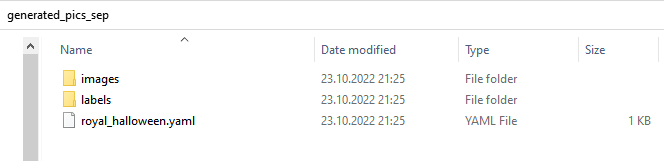
#If you don't want to use the command line, you can import the module
from generate_training_data_ml import generate_training_data
generate_training_data(YOURCONFIGFILE)
Now you can train the data with yolov5 (I uploaded another package to make your life easier) https://github.com/hansalemaos/train_generated_data_ml
1 maintainer

Release files for generate-training-data-ml 0.11
For a detailed explanation of source distributions (sdists) and built distributions (wheels), please see the package formats documentation.
Source distribution (sdist)
| File | Size | Uploaded | |
|---|---|---|---|
| generate_training_data_ml-0.11.tar.gz | 13.7 kB | Details |
Built distribution (wheel)
| File | Interpreter | ABI | Platform | Reset |
|---|---|---|---|---|
| generate_training_data_ml-0.11-py3-none-any.whl | Python 3 | none | any | Details |
Total release size:30.1 kB
Release files / generate_training_data_ml-0.11.tar.gz
| Download URL | generate_training_data_ml-0.11.tar.gz |
|---|---|
| Size | 13.7 kB |
| Tags | Source |
|
SHA-256 checksum How to use checksums |
60688a975ef5f71abd02c61253d5e9de3cdf451280eb73fc957366ed6a73adb8
|
|
BLAKE2b-256 checksum How to use checksums |
da32d1b7a53e37ba4402d3f7c0617e5d5a93dff4df13f3a7a3dfa652d0f1174d
|
| Upload date | |
|
Uploaded using Trusted Publishing? What is trusted publishing? |
No |
| Uploaded via |
twine/4.0.1 CPython/3.9.13
|
Release files / generate_training_data_ml-0.11-py3-none-any.whl
| Download URL | generate_training_data_ml-0.11-py3-none-any.whl |
|---|---|
| Size | 16.4 kB |
| Tags | Python 3 |
|
SHA-256 checksum How to use checksums |
fe98c74cdfdccf2bb6f98efc9cfaefad039567d9ceb193ebd2c350eec6b6834e
|
|
BLAKE2b-256 checksum How to use checksums |
f425a1182d0613ffb57049c4a03e12c38554ba93c570e8282df2b8dfe40e06aa
|
| Upload date | |
|
Uploaded using Trusted Publishing? What is trusted publishing? |
No |
| Uploaded via |
twine/4.0.1 CPython/3.9.13
|














