
geojsoncontour


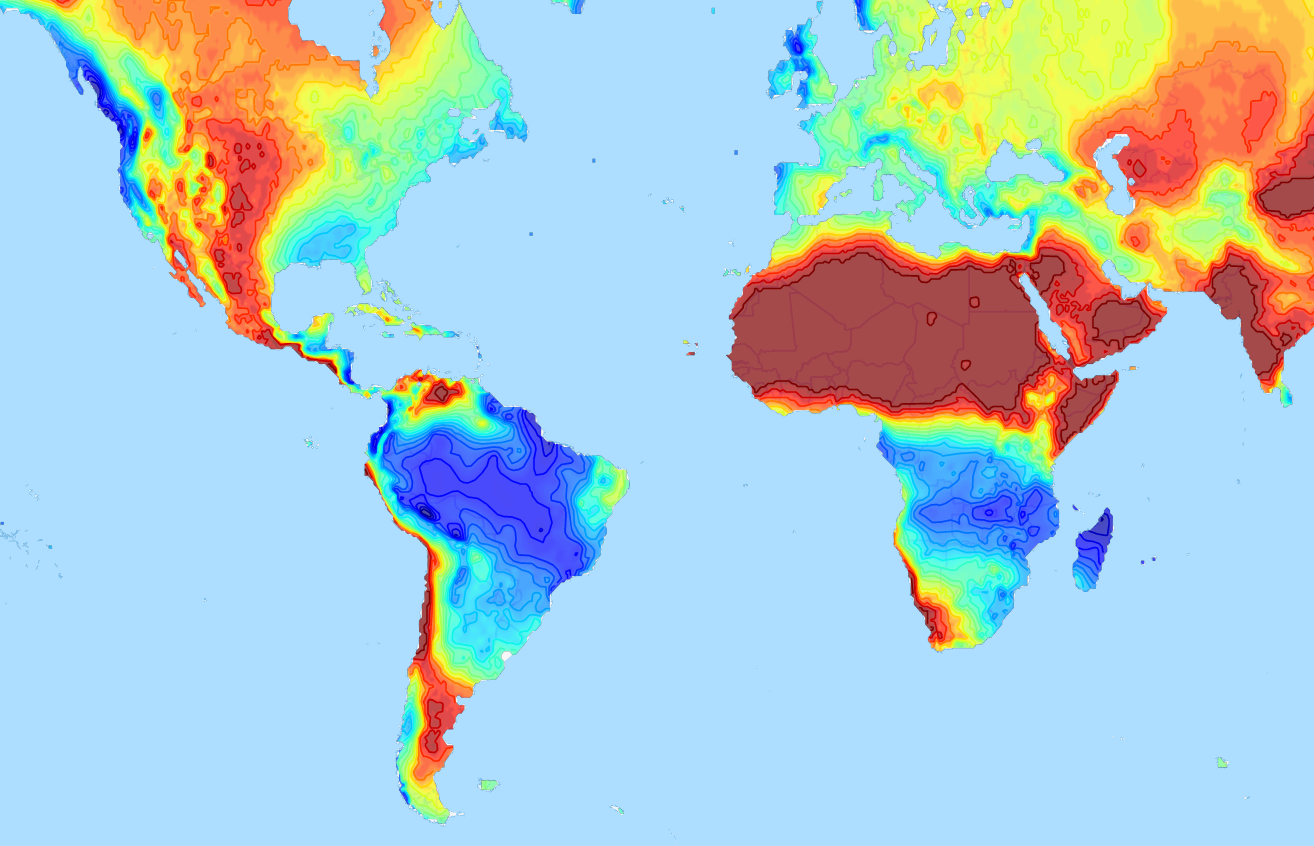
A Python 3 module to convert matplotlib contour plots to geojson. Supports both contour and contourf plots.

Designed to show geographical contour plots, created with matplotlib/pyplot, as vector layer on interactive slippy maps like OpenLayers and Leaflet.
Demo project that uses geojsoncontour: climatemaps.romgens.com
Installation
Install with pip,
pip install geojsoncontour
Usage
Use contour_to_geojson to create a geojson with contour lines from a matplotlib.contour plot (not filled).
Use contourf_to_geojson to create a geojson with filled contours from a matplotlib.contourf plot.
Contour plot to geojson
import numpy
import matplotlib.pyplot as plt
import geojsoncontour

# Create contour data lon_range, lat_range, Z
<your code here>

# Create a contour plot plot from grid (lat, lon) data
figure = plt.figure()
ax = figure.add_subplot(111)
contour = ax.contour(lon_range, lat_range, Z, cmap=plt.cm.jet)

# Convert matplotlib contour to geojson
geojson = geojsoncontour.contour_to_geojson(
    contour=contour,
    ndigits=3,
    unit='m'
)
For filled contour plots (matplotlib.contourf) use contourf_to_geojson.
See example_contour.py and example_contourf.py for simple but complete examples.
Show the geojson on a map
An easy way to show the generated geojson on a map is the online geojson renderer geojson.io or geojson.tools.
Style properties
Stroke color and width are set as geojson properties following https://github.com/mapbox/simplestyle-spec.
Create geojson tiles
Try geojson-vt or tippecanoe if performance is an issue and you need to tile your geojson contours.
Development
Tests
Run all tests,
python -m unittest discover
Release
Install setuptools, wheel and twine:
python -m pip install --upgrade setuptools wheel twine
Increase the version number in setup.py.
Create dist:
python setup.py sdist bdist_wheel
Upload:
twine upload dist/*
3 maintainers


Metadata
3 maintainers
Release files for geojsoncontour 0.5.1
For a detailed explanation of source distributions (sdists) and built distributions (wheels), please see the package formats documentation.
Source distribution (sdist)
| File | Size | Uploaded | Provenance | Actions |
|---|---|---|---|---|
| geojsoncontour-0.5.1.tar.gz | 9.9 kB | Without provenance | Details for geojsoncontour-0.5.1.tar.gz |
Built distribution (wheel)
| File | Interpreter | ABI | Platform | Actions Reset |
|---|---|---|---|---|
| geojsoncontour-0.5.1-py3-none-any.whl | Python 3 | none | any | Details for geojsoncontour-0.5.1-py3-none-any.whl |
Total release size: 18.5 kB
Release files / geojsoncontour-0.5.1.tar.gz
| Download URL | geojsoncontour-0.5.1.tar.gz |
|---|---|
| Size | 9.9 kB |
| Tags | Source |
|
SHA-256 checksum How to use checksums |
6a6684fe018e415c426912dba524a5833cb59972b768e980245c5605dd5872d6
|
|
BLAKE2b-256 checksum How to use checksums |
593877065f343a80e716914ac916bf1c07c31115719bc66a15f806ede8443471
|
| Upload date | |
|
Uploaded using Trusted Publishing? What is trusted publishing? |
No |
| Uploaded via |
twine/6.0.1 CPython/3.12.8
|
Release files / geojsoncontour-0.5.1-py3-none-any.whl
| Download URL | geojsoncontour-0.5.1-py3-none-any.whl |
|---|---|
| Size | 8.6 kB |
| Tags | Python 3 |
|
SHA-256 checksum How to use checksums |
6b0e38cc3099958d26547a315efd24683a4dbf03ce407d41da10485f3a973b33
|
|
BLAKE2b-256 checksum How to use checksums |
edae5fbf6ad7a576bdeea04d5fe8cd1258e4df779a388af00860f6f2e550c1c6
|
| Upload date | |
|
Uploaded using Trusted Publishing? What is trusted publishing? |
No |
| Uploaded via |
twine/6.0.1 CPython/3.12.8
|
Security for geojsoncontour 0.5.1
Provenance
Provenance describes where a file came from. On PyPI, provenance is shared via attestations, which provide a verifiable record of the build or publishing details. View details, limitations and caveats.
No provenance found
None of the files in this release were uploaded with provenance metadata.
A note on package security
PyPI is a repository for distributing packages, not a service for auditing them. While third-party security researchers and our staff do their best to detect and remove malicious packages, PyPI cannot guarantee the quality, security or suitability of any given package.
To learn more about protecting yourself from malicious actors, visit our package security documentation.














