
Welcome to geomate Documentation
Features:
Batch geocoding large amount of data.
Address or coordinates (reverse geocoding) supported.
Automatically handle input type, so you can mix address and coordinate in an array.
Automatically store data in Sqlite database.
Smart API keys quota management, you would never stuck at getting GeocoderQuotaExceeded error.
Built in logging system, or you can plug on yours.
Quick result lookup.
Quick Link:
Usage Example
Basically, you only need to do three things, and geomate will take care of everything else for you:
Prepare your API keys.
Give the path of your database file.
Create a list of address or coordinate you want to geocode.
import geomate
import pprint

# put your google map API key here, what you see here is all fake
api_keys = [
    "GoogleGeoCodingApiKey01", # user1
    "GoogleGeoCodingApiKey02", # user2
    ...
    "GoogleGeoCodingApiKey99", # user991ihu8",
]

# create a google geocode API client
googlegeocoder = geomate.GoogleGeocoder(api_keys=api_keys)
googlegeocoder.check_usable() # show you which keys are available

# bind to a geocoder and database
batch = geomate.BatchGeocoder(googlegeocoder, db_file="geocode.sqlite3")

# construct your todo address list anyway you want
list_of_address = [
    "675 15th St NW Washington, DC 20005",
    "2317 Morgan Ln Dunn Loring, VA 22027",
    "1201 Rockville Pike Rockville, MD 20852",
    (39.085801, -77.084513),
    (38.872719, -77.306417),
    (38.902027, -77.053536),
]

batch.process_this(list_of_address) # process everything

# see what's we have done
for address in list_of_address:
    pprint.pprint(batch.lookup(address))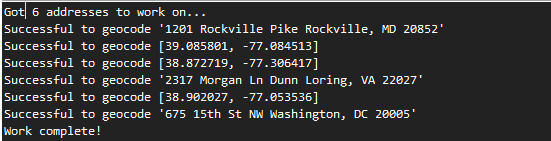
Advance Usage
Suppose you got 10000 address, but 5000 of them are invalid address, which is not able to geocoded. And invalid address happens to be at begin of the queue. You probably don’t want to waste API quota on that. geomate provide a keyword shuffle to randomlly perform the geocoding, so in average, you can get most of valid address geocoded in a short time:
batch.process_this(list_of_address, shuffle=True)Here’s something may helpful. Basically there are two steps in the processing:
Insert to-do addresses as primary key into a table, and skip address already in database.
Do geocoding.
So you can take advantage of this for more flexible batch geocoding process.
batch.add_addresses(list_of_address)
batch.process_all(shuffle=True)
Lookup the geocoded data
You can easily retrieve the geocoded data by:
for address in list_of_address:
    data = batch.lookup(address)
    pprint(data)
Of course you can also manually read it from sqlite database.
Install
geomate is released on PyPI, so all you need is:
$ pip install geomateTo upgrade to latest version:
$ pip install --upgrade geomatePrerequisit: geopy, to install:
$ pip install geopy1 maintainer

Metadata
1 maintainer
Release files for geomate 0.0.7
For a detailed explanation of source distributions (sdists) and built distributions (wheels), please see the package formats documentation.
Source distribution (sdist)
| File | Size | Uploaded | |
|---|---|---|---|
| geomate-0.0.7.zip | 17.0 kB | Details |
Release files / geomate-0.0.7.zip
| Download URL | geomate-0.0.7.zip |
|---|---|
| Size | 17.0 kB |
| Tags | Source |
|
SHA-256 checksum How to use checksums |
ee360bc5ad1d15f536a8f5c1ff7315c9c18224b46c52f0b4d6c5fde078e5778f
|
|
BLAKE2b-256 checksum How to use checksums |
d2b7402b9130971b752c76be871367e347455096210ee71fa1312e84475754ca
|
| Upload date | |
|
Uploaded using Trusted Publishing? What is trusted publishing? |
No |














