

GeoMesher: Meshing a GeoDataFrame using Gmsh









Features
GeoMesher is a fork of pandamesh. The original package included two mesh generators: Triangle and Gmsh. This fork only includes the Gmsh mesh generator since Triangle seems to be not maintained anymore. Also, GeoMesher adds the following new functionalities:
A new method for returning the generated mesh as a GeoDataFrame.
A new function called gdf_mesher that can generate a mesh from a GeoDataFrame with a single function call and with sane defaults for the mesh generator.
Remap a scalar field from the source GeoDataFrame to the generated mesh, using an area weighted interpolation method (based on Tobler).
Handle MultiPolygon geometries in the source GeoDataFrame.
Note that the remapping functionality of GeoMesher is a simple areal interpolation method. For more advanced interpolation methods, please use Tobler.
Installation
You can install GeoMesher using pip:
$ pip install geomesheror using conda (mamba):
$ conda install -c conda-forge geomesherQuick start
The following example shows how to generate a mesh from a GeoDataFrame using both the gdf_mesher function and the Mesher class.
We start by getting a GeoDataFrame of South America from the Natural Earth website. Then, we reproject it to a projected coordinate system (UTM zone 20S). Finally, we add a new column called cellsize that will be used to set the maximum size of the mesh elements.
We use the gdf_mesher function to generate the mesh with default parameters and use Mesher to generate the mesh with MESH_ADAPT algorithm. We also use the area_interpolate function to remap the POP_EST column from the source GeoDataFrame to the generated mesh.
import geopandas as gpd
import geomesher as gm

world = gpd.read_file(
    "https://naciscdn.org/naturalearth/110m/cultural/ne_110m_admin_0_countries.zip"
)

south_america = world[world["CONTINENT"] == "South America"]
south_america = south_america.explode(ignore_index=True).to_crs(32620)
south_america["cellsize"] = 500_000.0

mesh_auto = gm.gdf_mesher(south_america, intensive_variables=["POP_EST"])

mesher = gm.Mesher(south_america)
mesher.mesh_algorithm = "MESH_ADAPT"
mesh_adapt = mesher.generate()
mesh_adapt = gm.area_interpolate(south_america, mesh_adapt, intensive_variables=["POP_EST"])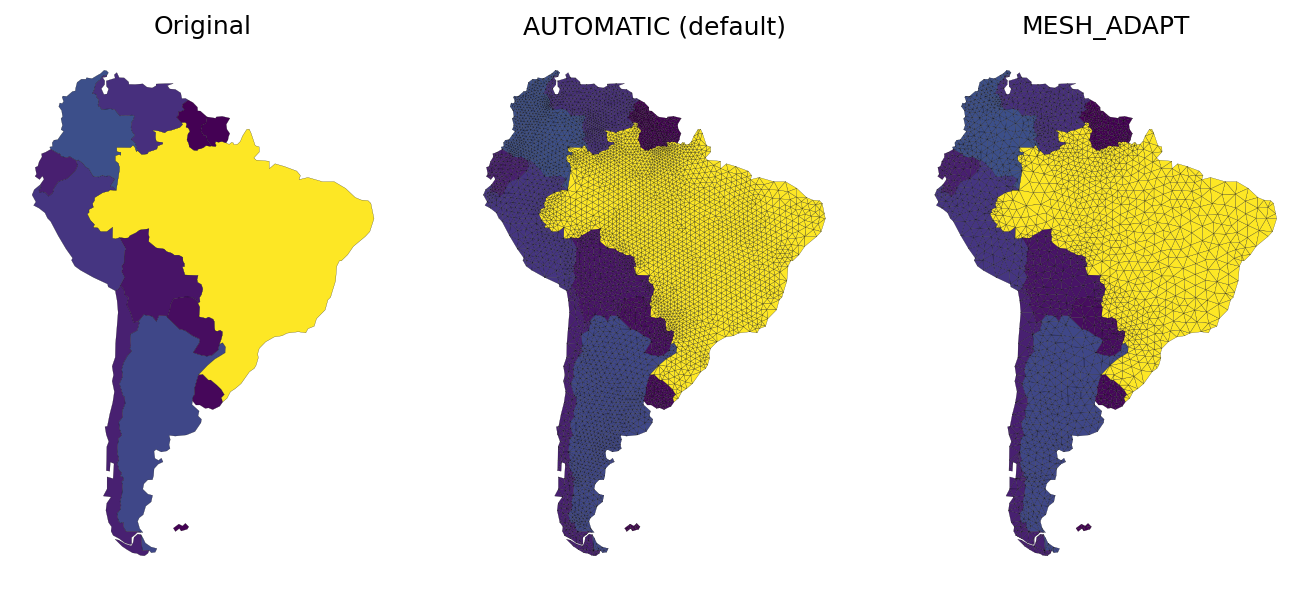
Contributing
Contributions are very welcomed. Please read CONTRIBUTING.rst file for instructions.
Credits
GeoMesher is a fork of pandamesh (MIT License) and uses one of the modules in Tobler (BSD-3-Clause License).
1 maintainer

Metadata
1 maintainer
Release files for geomesher 0.1.0
For a detailed explanation of source distributions (sdists) and built distributions (wheels), please see the package formats documentation.
Source distribution (sdist)
| File | Size | Uploaded | |
|---|---|---|---|
| geomesher-0.1.0.tar.gz | 1.7 MB | Details |
Built distribution (wheel)
| File | Interpreter | ABI | Platform | Reset |
|---|---|---|---|---|
| geomesher-0.1.0-py3-none-any.whl | Python 3 | none | any | Details |
Total release size: 1.7 MB
Release files / geomesher-0.1.0.tar.gz
| Download URL | geomesher-0.1.0.tar.gz |
|---|---|
| Size | 1.7 MB |
| Tags | Source |
|
SHA-256 checksum How to use checksums |
049218ad13f42f7d223a8526acd0b516f98fb6ad8b24df31d1e7f960a9a00e4c
|
|
BLAKE2b-256 checksum How to use checksums |
1146961f992e44af753658acd88ca0bc244de7804e386704e3d7aea7095b3ce6
|
| Upload date | |
|
Uploaded using Trusted Publishing? What is trusted publishing? |
Yes |
| Uploaded via |
twine/4.0.2 CPython/3.11.5
|
Release files / geomesher-0.1.0-py3-none-any.whl
| Download URL | geomesher-0.1.0-py3-none-any.whl |
|---|---|
| Size | 21.5 kB |
| Tags | Python 3 |
|
SHA-256 checksum How to use checksums |
c32143b6117dd71de6e4d8fe2ba6e0a47fe387fb96b00bb8dacd6231edb91634
|
|
BLAKE2b-256 checksum How to use checksums |
64b9d51c5e2cd76fe43ba6066feec05a5b6977a3346dc0f7b157b3c53609bf6a
|
| Upload date | |
|
Uploaded using Trusted Publishing? What is trusted publishing? |
Yes |
| Uploaded via |
twine/4.0.2 CPython/3.11.5
|













