
GeoPhotos is a package to pull, analyze, and plot coordinates from various sources.

What is GeoPhotos?
GeoPhotos is a Python library designed to make it easy to pull coordinates from various sources, analyze them in order to obtain useful information, and plot them on a map.
Main features
An overview of some of the major features of GeoPhotos are as follows:
- Extract metadata (timestamp, coordinates, etc.) from one or more files, and write to a csv file if desired
- Pull coordinates from Google Takeout location history
- Plot coordinate data on a fully customizable heatmap, including markers, tooltips, layer control, and more
- Analyze coordinate data to determine unique countries, most common countries, and more
- Highlight certain countries on the heatmap easily and painlessly
- Save the map to an html file for reference or for use with web development frameworks such as flask
- Open the html file directly from the code for debugging
How to get it
Dependencies
Required dependencies
Currently, the following packages are required:
Some packages that are currently required may be made optional in the future, such as the gdal/osgeo package.
Optional Dependencies
The geopandas package has been made optional due to how difficult it is to install properly. It is required to perform geographical data analysis.
Installation
Assuming you've already got the dependencies covered, you can use pip to install this package:
pip install geophotos
However, you will most likely run into problems doing it this way. Unfortunately, I have tried and failed to overcome these obstacles myself. My recommendation is to install geopandas using Anaconda/conda (you might have to install gdal as well), and then pip install it into your current environment:
conda install geopandas
conda install gdal
pip install geophotos
This should handle all of the dependencies for you, although you still might run into some issues (I sure did!).
Updating
To update geophotos to the latest version, simply use the command:
pip install --upgrade geophotos
Example usage
Heatmap from photo locations
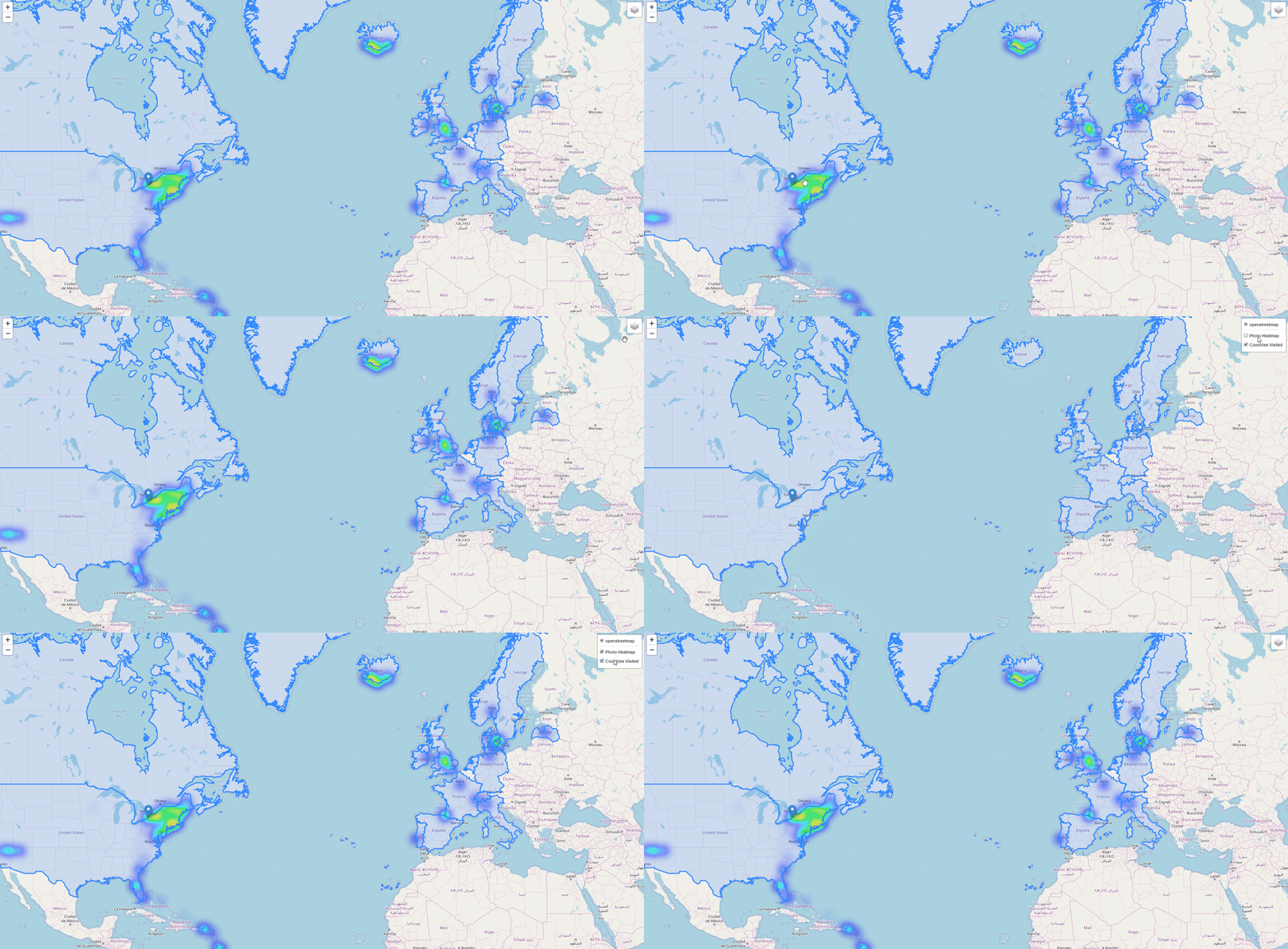
One of the main reasons I made this package was to pull GPS information from the pictures in my iCloud library, then plot them on a map. Skipping the pulling of the coordinates for simplicity's sake, the following code does the following:
- Read latitudes and longitudes from a csv file
- Generate a heatmap using this coordinate data
- Add a marker that marks my hometown
- Analyze the data and determine which countries I've visited
- Highlight only the countries I've been to on a separate layer
- Save the map as an html file and open it in a web browser
The html file is completely interactive, and I hope to eventually use it on my personal website.
import geophotos as gp

# Read coordinate data from csv
data = gp.coordinates_from_csv(r'coordinates.csv', 2, 3)
# Initialize the Map object
nys_center = [42.965000, -76.016667]
heatmap = gp.Map(location=nys_center, zoom_start=7)
# Feed the Heatmap object the coordinates
heatmap.coordinates = data
# Create the heatmap
heatmap.create_heatmap(max_zoom=10, min_opacity=0.05, radius=13, blur=25,
                       name='Photo Heatmap')
# Add a marker to the heatmap
hamburg_ny = [42.715746, -78.829416]
heatmap.add_marker(location=hamburg_ny,
                   tooltip='<strong>Hamburg, NY</strong><br>Hometown')
# Analyze the data to determine which countries are unique
analyzer = gp.Analyzer(data)
unique_countries = analyzer.unique_countries(),
# Use the data to determine which countries to highlight
border_layer = gp.CountryLayer(unique_countries, name='Countries Visited')
border_layer.add_to(heatmap)
# Add layer control functionality to the map
heatmap.add_layer_control()
# Save the heatmap and open it in a browser
heatmap.save_html('sample.html', open_html=True)
Heatmap from Google Takeout location history
Another thing I wanted to do when starting this project was be able to analyze my Google Takeout location data. While not an overly complicated thing to do without GeoPhotos, it does make this process very simple.
For example, the following code extracts coordinate information from the Google Takeout location history JSON file and plots them on a heatmap. It's really interesting to see where you've been the most.
import geophotos as gp

# Read coordinate data from the location history file
data = gp.coordinates_from_google_takeout_json(r'locationhistory.json')
# Initialize the Map object
nys_center = [42.965000, -76.016667]
heatmap = gp.Map(location=nys_center, zoom_start=7)
# Feed the Heatmap object the coordinates
heatmap.coordinates = data
# Create the heatmap
heatmap.create_heatmap(max_zoom=14, min_opacity=0.05, radius=13, blur=25)
# Save the heatmap and open it in a browser
heatmap.save_html(r'locationhistory.html', open_html=True)

Authors
1 maintainer

Metadata
1 maintainer
Release files for geophotos 0.50.1
For a detailed explanation of source distributions (sdists) and built distributions (wheels), please see the package formats documentation.
Source distribution (sdist)
| File | Size | Uploaded | Provenance | Actions |
|---|---|---|---|---|
| geophotos-0.50.1.tar.gz | 7.0 MB | Without provenance | Details for geophotos-0.50.1.tar.gz |
Release files / geophotos-0.50.1.tar.gz
| Download URL | geophotos-0.50.1.tar.gz |
|---|---|
| Size | 7.0 MB |
| Tags | Source |
|
SHA-256 checksum How to use checksums |
a4137b2a6c6f6f5fe0b093efc9b82e2709425bc8071f9718b27c2ced54cbabec
|
|
BLAKE2b-256 checksum How to use checksums |
50dd30fcb497cc7006322472bf4e8be76af1348b71cece4663a9a7f42a50a837
|
| Upload date | |
|
Uploaded using Trusted Publishing? What is trusted publishing? |
No |
| Uploaded via |
twine/1.14.0 pkginfo/1.5.0.1 requests/2.22.0 setuptools/42.0.2.post20191203 requests-toolbelt/0.9.1 tqdm/4.40.2 CPython/3.7.3
|
Security for geophotos 0.50.1
Provenance
Provenance describes where a file came from. On PyPI, provenance is shared via attestations, which provide a verifiable record of the build or publishing details. View details, limitations and caveats.
No provenance found
None of the files in this release were uploaded with provenance metadata.
A note on package security
PyPI is a repository for distributing packages, not a service for auditing them. While third-party security researchers and our staff do their best to detect and remove malicious packages, PyPI cannot guarantee the quality, security or suitability of any given package.
To learn more about protecting yourself from malicious actors, visit our package security documentation.














