
Geotag photos with exiftool based on your Moves app history

Project description
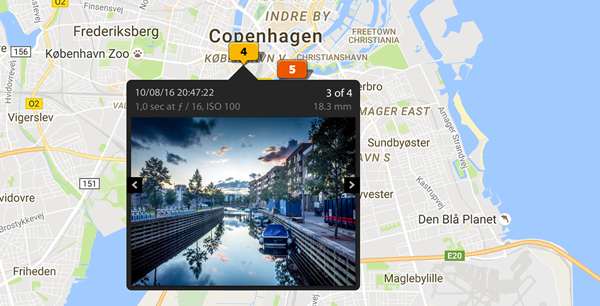
Geotag your photos from GPS-less cameras with your phone’s location history data.
Is it for me?
Do you take photos with a camera without a GPS tracking feature?
Do you have https://moves-app.com/ installed on your phone?
Do you want to have your photos geotagged?
…if your answer is 3x yes, then this tool is for you.
How does it work?
You already walk around with your location-aware phone and Moves records your location.
You snap photos with your GPS-less camera.
GeoTagger uses the creation timestamps from photos to find your location at the time of taking them in your Moves log.
GeoTagger is able to retrospectively add GEO tags to even old photos, as long as your location for the period is logged with Moves.
How is it implemented?
When you ask GeoTagger to tag your photos, this process takes places:
Unique creation dates are extracted from the photo files.
Your Moves history for those days is fetched from the Moves API.
A GPX file is generated from the data.
exiftool -geotag is used behind to scene to apply that location log to your photos.
Status
Beta quality.
Installation
Install exiftool, for example, with: $ brew install exiftool
Install geotagger from PyPi with: $ pip install geotagger
Usage
See $ geotagger --help and $ geotagger sub-command --help.
Moves authentication
Create a new app under your Moves account: https://dev.moves-app.com/apps/new
Specify http://127.0.0.1:7777/redirect as Redirect URI.
Create ~/.geotagger.json with credentials for your app: {"MOVES_ID": "<CLIENT_ID>", "MOVES_SECRET": "<CLIENT_SECRET>"}
Run geotagger auth and follow the instruction to authenticate the app.
Geotagging
Geotag all images in a folder:
$ geotagger tag ./photosYou can also just generate a GPX log for the dates without applying it:
$ geotagger gpx ./photos > log.gpxThe tag sub-command also optionally accepts a path to a GPX log file:
$ geotagger tag ./photos log.gpxTODO
Improve UX: simplify installation and setup
Make the external metadata updates play well with photos already imported to Lightroom
Add Geosync support http://www.sno.phy.queensu.ca/~phil/exiftool/geotag.html#geosync
Consider Electron-based GUI app
Consider additional GPS log sources than Moves
Changelog
0.0.3 (2017-09-09)
Fixed missing configuration: MOVES__ID #1
Contact
Jakub Roztocil
Contribute
Licence
MIT. See LICENCE.
Release history Release notifications | RSS feed


Download files
Download the file for your platform. If you're not sure which to choose, learn more about installing packages.
Source Distribution
File details
Details for the file geotagger-0.0.3.tar.gz.
File metadata
- Download URL: geotagger-0.0.3.tar.gz
- Upload date:
- Size: 11.4 kB
- Tags: Source
- Uploaded using Trusted Publishing? No
File hashes
| Algorithm | Hash digest | |
|---|---|---|
| SHA256 |
f3f6d37b7a9dd6b4e6bb104344e86e8cc45a7e863be33d2a72a9ebcc32816eca
|
|
| MD5 |
64e6772d7a572d306d648520a79fa9b3
|
|
| BLAKE2b-256 |
4c7be3167978b5af9c5be4fff10c5e33edf447da7fb898b23416fa03a9f0d8b4
|






